# @baiibayu/srouter 中文文档
规范地址:https://npmcn.com/package/%40baiibayu/srouter/
版本:0\.1\.70
npm 元数据更新时间:2026-11-06T13:53:50.597Z
中文译文更新时间:2026-11-07T22:24:09.384Z
软件包许可:MIT
本文由上游 README 翻译,可能存在偏差,请结合原文核对 API、命令与配置。版权与许可归原作者所有。
原始 npm 页面:https://www.npmjs.com/package/%40baiibayu/srouter
原文对照:https://npmcn.com/package/%40baiibayu/srouter/?lang=original
项目主页:https://github.com/baiibayu/srouter/tree/main/cli#readme
源码仓库:https://github.com/baiibayu/srouter
## 关键信息(来自 npm 元数据)
- 包体积(解压后):17.2 MB,1283 个文件
- 模块格式:ES Module
- TypeScript 类型:未声明
- Node.js 要求:\>=20\.18\.0 \<25\.0\.0
- 运行依赖:14 个
- 首次发布:2026-10-12T13:20:19.598Z
- 最新版本发布:2026-11-06T13:53:50.242Z
- 近 30 天下载量:2276(2026-10-08 至 2026-11-06,npm 官方下载统计)
- 已发布版本数:12(近 12 个月 12 个)
## 中文简介
SRouter — 免费开源 LLM 路由器:运行网关,设置编码代理,管理提供者密钥
## 安装
```sh
npm install @baiibayu/srouter
```
也可以使用:`pnpm add @baiibayu/srouter`、`yarn add @baiibayu/srouter`、`bun add @baiibayu/srouter`
## README
# \## 苏鲁特
### 最终自由 AI 网关和智能 LLM 路由器
**永远不要打 利率限制。 以即时压缩+自动倒计时的方式保存令牌到~60免费AI提供者和~1200+模型.**
**将所有AI编码工具(Claude Code, Cursor, Windsurf, Cline, Codex, Copilot, Aider, OpenCode.)连接在一个统一的OpenAI相容端点后.**
[](https://www.npmjs.com/package/@baiibayu/srouter) [](https://github.com/baiibayu/srouter/blob/main/LICENSE) [](https://nodejs.org/) [](https://github.com/baiibayu/srouter/blob/main/docs/en/install/01-install.md#docker-compose) [](https://github.com/baiibayu/srouter/pkgs/container/srouter) [](https://github.com/baiibayu/srouter/releases/latest) [](https://github.com/baiibayu/srouter/blob/main/CONTRIBUTING.md) [](https://npmcn.com/package/%40baiibayu/srouter/#readme--support-the-developer)
[**QQ 快速启动**](https://npmcn.com/package/%40baiibayu/srouter/#readme--quick-start) 二. 支助 [**\* 编码代理**](https://npmcn.com/package/%40baiibayu/srouter/#readme--compatible-coding-agents--clis) 二. 支助 [**键 CLI**](https://npmcn.com/package/%40baiibayu/srouter/#readme--provider-keys-management) 二. 支助 [**提供商**](https://npmcn.com/package/%40baiibayu/srouter/#readme--supported-providers) 二. 支助 [**API 终点**](https://npmcn.com/package/%40baiibayu/srouter/#readme--unified-api-endpoints) 二. 支助 [**QQ MCP 设置**](https://npmcn.com/package/%40baiibayu/srouter/#readme-%EF%B8%8F-mcp-server-setup) 二. 支助 [**为什么是斯鲁特?**](https://npmcn.com/package/%40baiibayu/srouter/#readme--why-srouter) 二. 支助 [**\* 如何运作**](https://npmcn.com/package/%40baiibayu/srouter/#readme--how-it-works) 二. 支助 [**++ 辅助**](https://npmcn.com/package/%40baiibayu/srouter/#readme--support-the-developer)
[](https://github.com/baiibayu/srouter/blob/main/docs/en/install/01-install.md#docker-compose) [](https://github.com/baiibayu/srouter/releases/latest/download/SRouter-Setup-win.exe) [](https://github.com/baiibayu/srouter/releases/latest/download/SRouter-mac-arm64.dmg) [](https://github.com/baiibayu/srouter/releases/latest/download/SRouter-mac-x64.dmg) [](https://github.com/baiibayu/srouter/releases/latest/download/SRouter.AppImage)
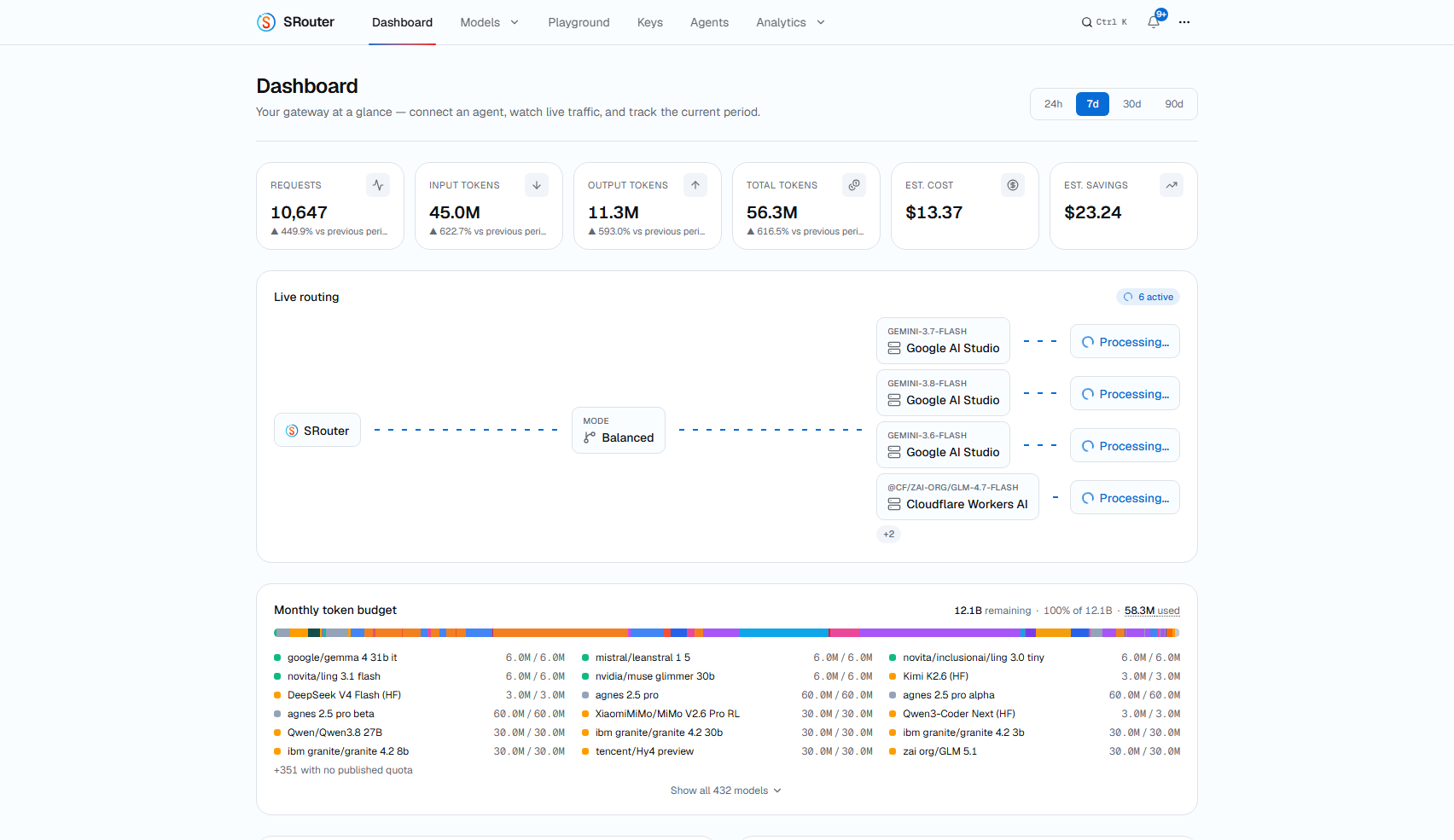
_您的路由器自动同步其模式目录每天两次从一个签名的种子中发送:新模式,配额更新,以及提供者的怪异修正自动到达而不需要手动更新._
* * *
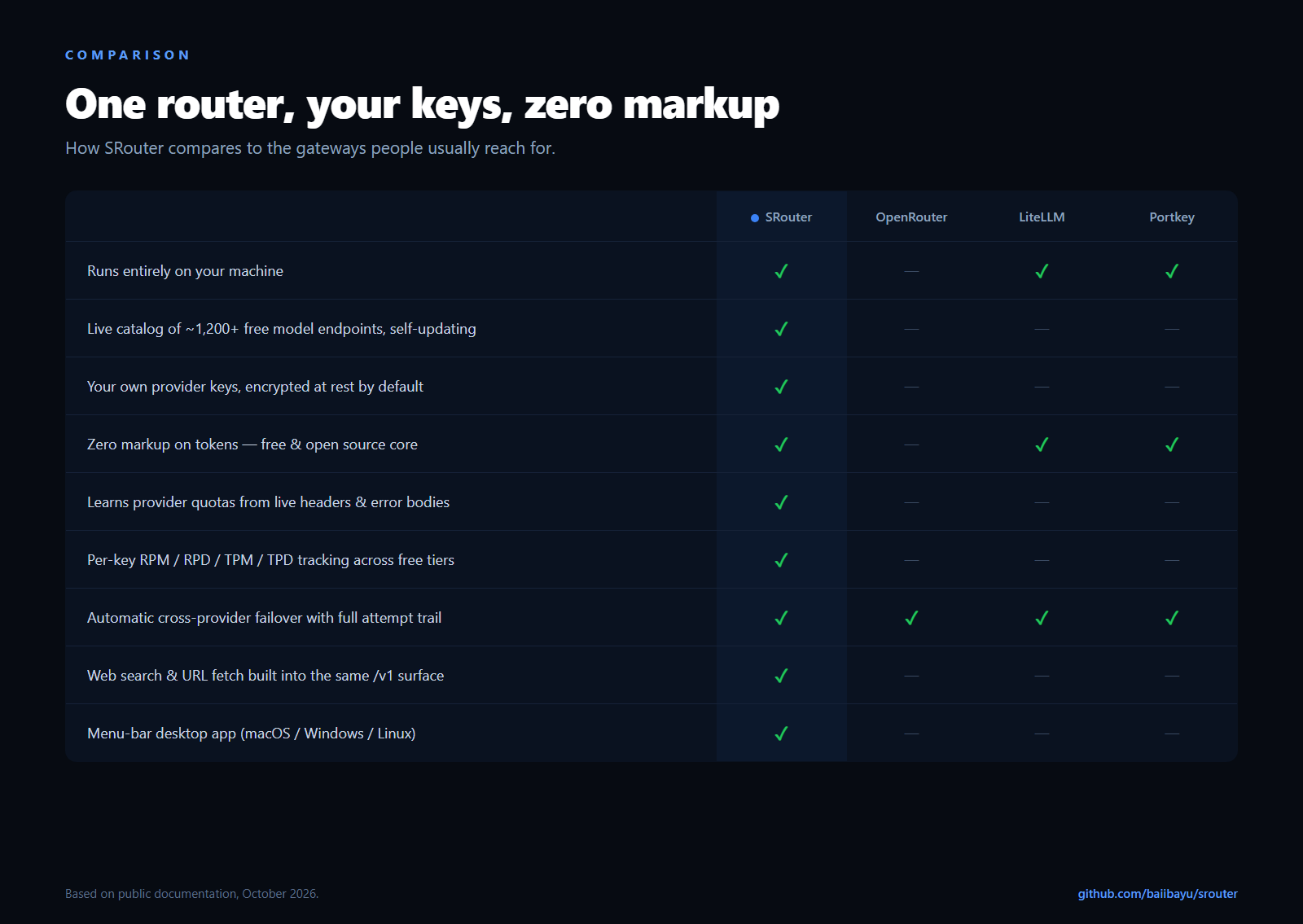
## 为什么是斯鲁特?
与人工智能代理(Claude Code, Cursor, Windsurf, Cline)的编码具有转型性,但开发者不断会跑入墙壁:
| 头痛 | \* SRouter解决方案 |
| :-- | :-- |
| **定额废物和过期:** 每月支付的API津贴未使用或月底到期. | **最大化每个键 :** 智能先排出活性配额,再由其他提供者轮流. |
| **速率限制 (429):** 一个巨大的快速或重复的工具呼叫会停止工作流程的中编码. | **Smart 3-Tier 自动反射:** 即时,无缝故障(订阅-预算-100%免费无键),停机时间为零. |
| **Token 正在打开工具输出 :** 长 `git diff`, (中文(简体) ), `grep`,测试日志,和 JSON 输出会消耗大量的上下文窗口. | **提示压缩并按键保护程序( T) :** 内置高压和结构感知滤波器 压缩噪音工具结果, **通常保存 20-40% 个令牌**。 。 。 . |
| **SDK & API 分裂 :** 将50+不相容的SDK,认证格式,和端点URL相混合. | **一个通用 `/v1` 网关 :** 单一的 OpenAI 兼容基址( )`http://localhost:20268/v1`),它也以本地方式处理 Anthropic 信件(`/v1/messages`),代码x(`/v1/responses`双子座(`/v1beta`和奥拉玛模仿. |
| **无法预测的自由等级 :** 提供商每周会添加,更改,或贬值免费型号. | **自更新目录 :** Pinned Ed25519 签名目录自动更新 ~1200+ 型号每天两次进入您本地的 SQLite DB. |
| **隐私和安全风险:** 将 API 密钥发送给云代理供应商会曝光您的证书 . | **100%本地加密( E) :** 密钥为本地存储 **AES-256-GCM (法语)** 加密;从您的机器直接到上游提供者的交通代理. |
* * *
## \* 如何运作
```
┌─────────────────────────────────────────────────────────────────────────────┐
│ Your Coding Agents & IDEs │
│ (Claude Code, Cursor, Windsurf, Cline, Roo Code, Codex, Aider) │
└──────────────────────────────────────┬──────────────────────────────────────┘
│ http://localhost:20268/v1
▼
┌─────────────────────────────────────────────────────────────────────────────┐
│ SRouter Smart AI Gateway │
│ • Complexity Gate (System One: routes simple prompts fast, complex deep) │
│ • Prompt Compressor & Token Saver (compacts tool results, trims context) │
│ • Protocol Translation (OpenAI ↔ Anthropic Messages ↔ Gemini ↔ Ollama) │
│ • Per-Key Rate Tracking (RPM / RPD / TPM / TPD tracking with auto-reset) │
│ • Local AES-256-GCM Key Vault & SQLite Persistence │
└──────────────────────────────────────┬──────────────────────────────────────┘
│
┌──────────────────────────────┼──────────────────────────────┐
▼ ▼ ▼
┌──────────────────────────┐ ┌──────────────────────────┐ ┌──────────────────────────┐
│ Tier 1: Sub / Fast Key │ │ Tier 2: Generous Quota │ │ Tier 3: 100% Free / Anon │
│ • Google Gemini 2.5 │ │ • Mistral / Codestral │ │ • Kilo Gateway (No Key) │
│ • Groq (Llama 3.3 70B) │──►│ • Zhipu GLM-4 / CogView │──►│ • OpenCode Free (No Key)│
│ • Pollinations (Free) │ │ • Cloudflare Workers AI │ │ • OVH Endpoints (No Key)│
│ • OpenRouter / DeepSeek │ │ • Cohere / NVIDIA NIM │ │ • LLM7 / AI Horde │
└──────────────────────────┘ └──────────────────────────┘ └──────────────────────────┘
```
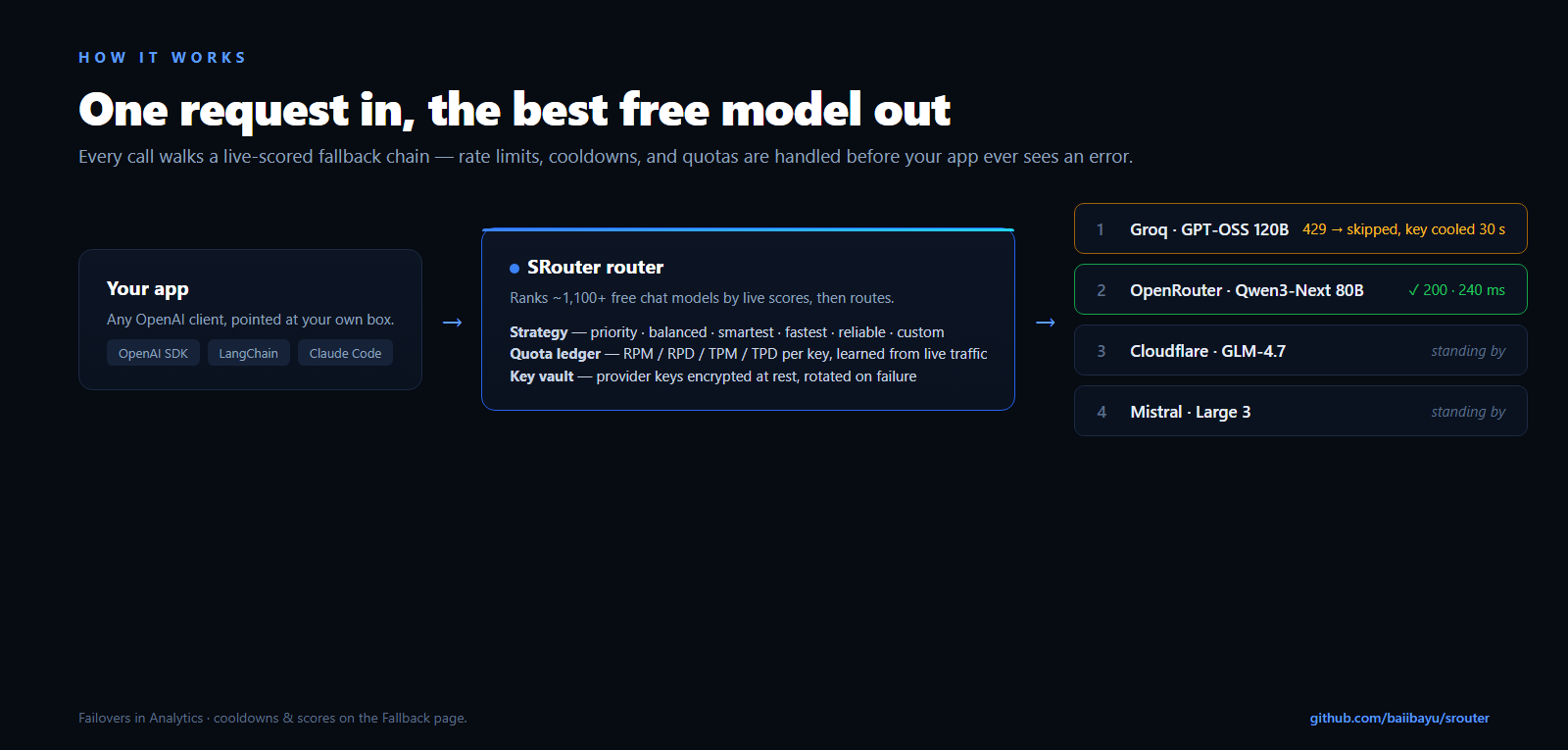
当请求到来时,SRouter会评价模型健康,目前的RPM/RPD限制,以及即时的复杂性. 如果上游提供者返回 `429 Too Many Requests` 或者说 `5xx Server Error`,键入临时冷却器和 SRouter **立即重试你倒数链中第二好模式**。 。 。 .
* * *
## QQ 快速启动
### 1\. 通过国家预防机制/国家项目X运行门户
运行 SRouter 任何地方的节点 20+ 安装时不克隆寄存器 :
```bash
# Install globally
npm install -g @baiibayu/srouter
# Launch the gateway & open the Web Dashboard (default port 20268)
srouter
# Or run headless with custom port
srouter serve --port 3000 --no-browser
# Or run directly without installing using npx
npx @baiibayu/srouter
```
Web Dashboard 自动打开 `http://localhost:20268`中安全存储数据 `~/.srouter`。 。 。 .
### 2\. 升级
升级是无缝的——您的 SQLite 数据库和配置幸存更新 :
```bash
# Check if a newer version exists
srouter update --check
# Upgrade to latest
srouter update
# or
npm install -g @baiibayu/srouter@latest
```
### 3\. Docker和GHCR替代品
```bash
# Run instantly from GitHub Container Registry
docker run -d --name srouter -p 20268:20268 -v srouter-data:/app/server/data ghcr.io/baiibayu/srouter:latest
```
* * *
## \* 兼容编码代理件和CLI
SRouter包括自动配置发电机(`setup-*`),检查您的活模式目录,取用已有设置的时间标记备份,并写出您工具预期的确切配置:

克劳德代码 | 
光标 | 
代码 CLI | 
线 | 
继续 | 
助手 |

打开代码 | 
双子座CLI | 
Roo 代码 | 
Kilo 代码 | 
齐德 | 
喷气管 |

鹅 | 
Quen 代码 | 
碾碎 | 
工厂机器人 | 
打开Claw | 
深搜索策略 |

哦,我的爱 | 
赫尔墨斯 | 
Pi | 
原子代码 | 
原因 | 
打开阴影 |
### 设置命令参考
配置任何带有一个命令的代理 :
```bash
# Point Claude Code to SRouter
srouter setup-claude --url http://localhost:20268 --api-key
# Or run via npx without global install
npx @baiibayu/srouter setup-cursor --url http://localhost:20268 --api-key
```
| 工具 | 设置命令 | 目标基础 URL | 议定书 |
| :-- | :-- | :-- | :-- |
| **克劳德代码** | `srouter setup-claude` | `http://localhost:20268` | 原生人类 `/v1/messages` |
| **光标** | `srouter setup-cursor` | `http://localhost:20268/v1` | OpenAI 聊天补全 |
| **代码 CLI** | `srouter setup-codex` | `http://localhost:20268/v1` | 土著 `/v1/responses` |
| **线** | `srouter setup-cline` | `http://localhost:20268/v1` | OpenAI / 雅典格式 |
| **继续** | `srouter setup-continue` | `http://localhost:20268/v1` | 聊天 + 鬼文字补全 |
| **助手** | `srouter setup-aider` | `http://localhost:20268/v1` | OpenAI 聊天补全 |
| **打开代码** | `srouter setup-opencode` | `http://localhost:20268/v1` | OpenAI 聊天补全 |
| **鹅** | `srouter setup-goose` | `http://localhost:20268/v1` | OpenAI 聊天补全 |
| **Quen 代码** | `srouter setup-qwen` | `http://localhost:20268/v1` | OpenAI 或双子座格式 |
| **Roo 代码** | `srouter setup-roo` | `http://localhost:20268/v1` | OpenAI 聊天补全 |
| **Kilo 代码** | `srouter setup-kilo` | `http://localhost:20268/v1` | OpenAI 聊天补全 |
| **碾碎** | `srouter setup-crush` | `http://localhost:20268/v1` | OpenAI 聊天补全 |
| **深搜索策略** | `srouter setup-dsh` | `http://localhost:20268/v1` | OpenAI 聊天补全 |
| **MiMo 代码** | `srouter setup-mimo` | `http://localhost:20268/v1` | OpenAI 聊天补全 |
| **哦,我的爱** | `srouter setup-omp` | `http://localhost:20268/v1` | OpenAI 聊天补全 |
| **打开Claw** | `srouter setup-openclaw` | `http://localhost:20268/v1` | OpenAI 聊天补全 |
| **赫尔墨斯探员** | `srouter setup-hermes` | `http://localhost:20268/v1` | OpenAI 聊天补全 |
| **Pi** | `srouter setup-pi` | `http://localhost:20268/v1` | OpenAI 聊天补全 |
| **原因** | `srouter setup-reasonix` | `http://localhost:20268/v1` | OpenAI 聊天补全 |
| **工厂机器人** | `srouter setup-droid` | `http://localhost:20268/v1` | OpenAI 聊天补全 |
| **打开阴影** | `srouter setup-openclaude` | `http://localhost:20268/v1` | OpenAI 聊天补全 |
| **原子代码** | `srouter setup-atomcode` | `http://localhost:20268/v1` | OpenAI 聊天补全 |
| **Zed / 喷气管** | `srouter setup-zed` 编号 : `setup-jetbrains` | `http://localhost:20268` | Ollam模拟(`/api/*`(中文(简体) ) |
| **一般开放AI** | `srouter setup-generic` | `http://localhost:20268/v1` | 标准 OpenAI API |
### 零持久性发射器
不为您的磁盘写敏感密钥的发射代理:
```bash
# Injects credentials directly into Claude Code's child process environment
srouter launch
# Injects credentials directly into Codex CLI
srouter launch-codex
```
### 诊断和健康检查`srouter doctor`(中文(简体) )
判断您的编码工具是否实际到达网关( 解析环境变量、 配置优先级和可达性) :
```bash
srouter doctor
# or check a specific tool:
srouter doctor claude
srouter doctor codex
```
### CLI 生成器旗
| 旗帜 | 说明 |
| :-- | :-- |
| `--url URL` | 网关基础 URL( 默认 ): `http://localhost:20268` 或者说 `SROUTER_URL`(中文(简体) ) |
| `--api-key KEY` | 统一 API 密钥( 或 `SROUTER_API_KEY`(中文(简体) ) |
| `--profile NAME` | 命名生成的配置文件/ 提供者条目( 默认 ): `default`(中文(简体) ) |
| `--model ID` | 选中一个特定的模型而不是目录默认 |
| `--dry-run` | 打印 diff 的精确配置到 stdout 并写入无 |
* * *
## 提供钥匙管理
从终端管理上游提供者密钥而不打开浏览器 。 这些命令使用您的仪表盘会话代号进行认证( Name`SROUTER_DASHBOARD_TOKEN` 或者说 `--token`:
```bash
export SROUTER_URL=http://localhost:20268
export SROUTER_DASHBOARD_TOKEN=''
# Interactive prompt (hidden input)
srouter keys add groq
# Non-interactive addition
srouter keys add groq --key 'gsk_...'
# List all stored keys (shows ID, platform, active models, health status)
srouter keys list
# Test provider key health through the gateway
srouter keys test groq
srouter keys test groq --id 3
# Remove a provider key safely
srouter keys remove groq --id 3
```
* * *
## \* 支助提供者
SRouter合计数 **~60个供应商** 财务报告和审定财务报表 **~1,200+ 终点** 一个统一后 `/v1` 终点.

谷歌双子座 | 
格罗克 | 
迷雾 | 
打开路透社 | 
阿里巴巴·克温 | 
诺斯研究 |

硅花 | 
模型范围 | 
云雾花 | 
代码 | 
齐普 GLM | 
NVIDIA 尼姆语 |

白都强活佛 | 
字节方舟 | 
iFlytek Spark (英语) | 
AMD 雷达 | 
拥抱脸 | 
基罗 |

法学硕士7 | 
奥拉玛 | 
孤儿 | 
弹道 | 
打开代码 | 
大赦国际 |
### 提供者级别
1. **100% 自由/ 无密钥 :** Kilo Gateways (无密钥), OpenCode Free (无密钥), OVH AI Endpoints, LLM7, AI Horde.
2. **QQ 有密钥的 Generous Free Tier :** Google AI Studio (Gemini 2.5 Flash / Pro),Groq (Llama 3.3 70B@30 RPM),Mistral AI (Codestral), Cloudflare 工人AI (Cloudflare systems/日),Cohere,Zhipu GLM-4,NVIDIA NIM.
3. **\* 区域和高配额:** 模型Scope (Aliyun, 2,000 req/日), Baidu Qianfan, Volcengine Ark, Nara Router, 海狮.
4. **本地自定义/ 自定义 :** 直接通过 Keys 页面连接 Ollama, LM Studio, vLLM, 或 lama.cpp.
* * *
## QQ 统一 API 端点
SRouter将不同的API线程翻译为标准表面:
| 终点 | 方法 | 议定书/目标 | 说明 |
| :-- | :-- | :-- | :-- |
| `/v1/chat/completions` | `POST` | OpenAI 聊天 | 通用 LLM 聊天完成器, 具有多级自动倒计时功能 |
| `/v1/responses` | `POST` | OpenAI 响应 | 本地 Codex CLI 响应终点 |
| `/v1/messages` | `POST` | Anthropic 信件 | Claude Code 和 Anthropic SDKs 的原生线条格式 |
| `/v1beta/models/*:generateContent` | `POST` | 谷歌双子座 | 原生双子座线 API 双子座 CLI 和 SDKs |
| `/v1/search` | `POST` | 统一搜索 | 跨越DuckDuckGo,SaerXNG,Brave等网络综合搜索. |
| `/v1/fetch` | `POST` | Web 获取中继 | URL 的纯读取器- mode HTML/ Markdown 提取 |
| `/v1/decision` | `POST` | 决策系统一 | 快速恒温快速复杂度和模型选择器 |
| `/mcp` | `GET` 编号 : `POST` | 示范背景协议 | 用于 Claude 桌面、光标和代理的可流式 HTTP 传输 |
| `/v1/models` | `GET` | OpenAI 模型 | 模拟目录 `execution_status` 可用的过滤器( u) |
| `/v1/embeddings` | `POST` | OpenAI 嵌入 | 向量嵌入生成 |
| `/v1/images/generations` | `POST` | OpenAI 图像 | 多提供图像生成( Pollinations, Flux, SD) |
| `/v1/audio/speech` | `POST` | OpenAI 音频 TTS | 文本对语音音频合成 |
| `/v1/audio/transcriptions` | `POST` | OpenAI 音频 STT | 语音对文字录音记录 |
| `/api/tags` | `GET` | 奥利亚马模拟 | 返回 Zed / JetBrains 的本地和活跃模式目录 |
| `/api/chat` | `POST` | 奥利亚马模拟 | Ollama 客户端的 NDJSON 流式聊天完成 |
| `/v1/docs` | `GET` | OpenAPI 文档 | 交互式 Swagger/ Redoc API 文档查看器 |
> \[TIP\] **决策系统一`/v1/decision`:** 在发送昂贵的查询之前使用这个端点来确定一个快报是需要轻量级快报模型还是重推理模型.
>
> **网络工具( E)`/v1/search` 打开 `/v1/fetch`:** 内置的网页刮取和搜索工具允许您的编码代理直接通过网关研究最新的文件、软件包和故障排除指南.
* * *
## QQ MCP 服务器设置
SRouter包括本地人 **示范背景协议(MCP)** 服务器结束 **可流取的 HTTP** 时间 `http://localhost:20268/mcp`。 。 。 .
### Claude 桌面配置
将 Sruter 添加到您的 `claude_desktop_config.json`数字 :
```json
{
"mcpServers": {
"srouter": {
"url": "http://localhost:20268/mcp",
"headers": {
"Authorization": "Bearer srouter-your-unified-key"
}
}
}
}
```
### 光标/ 线条配置
在编辑器的 MCP 设置中, 添加一个新的服务器 :
- **名称 :** `srouter`
- **类型 :** `sse` 或者说 `streamable-http`
- **URL :** `http://localhost:20268/mcp`
- **标题 :** `{"Authorization": "Bearer srouter-your-unified-key"}`
可用的多边CP工具包括: `list_models`, (中文(简体) ), `get_model_status`, (中文(简体) ), `check_provider_health`,以及 `web_search`。 。 。 .
* * *
## 安全、安保和地方隐私
- **非破坏性发电机:** 生成器命令合并到现有的配置文件, 而不是覆盖它们, 并使用时间戳 `.bak` 先备份. `--dry-run` 提前显示准确的 diff .
- **零接触发射器:** `srouter launch` 财务报告和审定财务报表 `srouter launch-codex` 只将证书输入到子进程内存中——没有键被写入磁盘.
- **当地AES-256-GCM 默认 :** 上游 API 密钥在 SQLite 中使用 AES-256-GCM 本地加密(`~/.srouter/srouter.db`) (中文(简体) ). 没有遥测,没有云接力,没有证书泄漏.
- **无法打开压缩 :** Token 保存器和 regex 压缩过滤器会安全打开: 如果过滤器无法解析输入, 原始提示会完整地转发 .
* * *
## QQ 解决问题和问题
### 20268号港口已在使用
指定以 `--port`数字 :
```bash
srouter serve --port 3000
```
### 速率限制( 429次请求过多)
SRouter自动冷却了已耗尽的密钥,并且无缝地重复了您倒置链中的下一个提供者. 如果该模式级的所有密钥已用尽, 请通过 Web Dashboard 启用100%的无密钥提供者( 如 Kilo Gateway 或 OpenCode Free) .
### 我的数据存放在哪里?
- 全球CLI: `~/.srouter/srouter.db`
- Docker: 已命名的音量 `srouter-data` (单位:千美元)`/app/server/data`(中文(简体) )
- 视窗桌面 : `%APPDATA%\SRouter\srouter.db`
- macOS 桌面 : `~/Library/Application Support/SRouter/srouter.db`
* * *
## QQ 支持开发者
如果 SRouter 保存您符号, 提升您的编码工作流程, 或保存您的钱, 考虑支持开发 。 每一杯咖啡都保持了这个项目的独立性和积极维护!
[](https://trakteer.id/baiibayu/tip) [](https://ko-fi.com/baiibayu) [](https://www.paypal.me/baiibayu)
* * *
## QQ 许可证和免责声明
- **许可证 :** 打开源 [MIT 许可证](https://github.com/baiibayu/srouter/blob/main/LICENSE)。 。 。 .
- **免责声明:** SRouter是为个人发展,实验,和编码剂增强而设计的. 免费等级由各上游提供者的服务规定.
- **仓库 :** [https://github.com/baiibayu/srouter (英语)](https://github.com/baiibayu/srouter)
- **作者 :** [巴伊巴尤语](https://github.com/baiibayu)
充满激情 **[@baiibayu (英语)](https://github.com/baiibayu)** 社区贡献者( c).
## 常见问题
### @baiibayu/srouter 是什么?
SRouter — 免费开源 LLM 路由器:运行网关,设置编码代理,管理提供者密钥
### 如何安装 @baiibayu/srouter?
在项目目录运行 npm install @baiibayu/srouter,或使用 pnpm add / yarn add / bun add。它还提供命令行工具 srouter,可以用 npx srouter 直接运行。
### @baiibayu/srouter 支持 TypeScript 吗?
该包的 package\.json 没有声明类型入口。需要类型提示时,可以在 npm 上查找社区维护的 @types/baiibayu\_\_srouter 是否存在。
### @baiibayu/srouter 支持 ESM 还是 CommonJS?
以 ES Module 形式发布,推荐使用 import 引入。在 CommonJS 项目中,Node\.js 20\.19\+ / 22\.12\+ 可以直接 require\(\) 不含顶层 await 的 ES Module,更早的版本需要改用动态 import\(\)。
### @baiibayu/srouter 需要什么版本的 Node\.js?
package\.json 的 engines 字段要求 Node\.js \>=20\.18\.0 \<25\.0\.0。版本不符时 npm 默认只给出警告,开启 engine-strict 后会拒绝安装。
### @baiibayu/srouter 可以商用吗?
@baiibayu/srouter 使用 MIT 许可。宽松许可:允许商业使用、修改和再分发,通常只需在分发时保留原版权与许可声明。以上为概括,不构成法律意见,请以许可原文为准。
### @baiibayu/srouter 的下载量有多少?
根据 npm 官方下载统计,@baiibayu/srouter 在 2026/10/08 – 2026/11/06 这 30 天内被下载 2,276 次,日均约 76 次。下载量会把 CI 构建、镜像同步和作为其他包依赖的安装一并计入,适合横向比较热度,不能直接等同于使用人数。
### @baiibayu/srouter 还在维护吗?
最新版本 0\.1\.70 发布于 2026/11/06(1 天前);至今共发布 12 个版本,其中过去 12 个月发布了 12 个;首次发布于 2026/10/12。发布频率只是参考信号:功能稳定的工具可能很少需要更新,建议结合源码仓库的 issue 和提交记录判断。