# @bytescale/upload-widget-react 中文文档
规范地址:https://npmcn.com/package/%40bytescale/upload-widget-react/
版本:4\.21\.0
npm 元数据更新时间:2026-04-15T12:16:05.103Z
中文译文更新时间:2026-11-08T22:07:18.286Z
软件包许可:MIT
本文由上游 README 翻译,可能存在偏差,请结合原文核对 API、命令与配置。版权与许可归原作者所有。
原始 npm 页面:https://www.npmjs.com/package/%40bytescale/upload-widget-react
原文对照:https://npmcn.com/package/%40bytescale/upload-widget-react/?lang=original
项目主页:https://www.bytescale.com/docs/upload-widget/react
源码仓库:https://github.com/bytescale/bytescale-upload-widget-react
## 关键信息(来自 npm 元数据)
- 包体积(解压后):43.7 kB,17 个文件
- 模块格式:CommonJS
- TypeScript 类型:包内自带
- 运行依赖:2 个
- peer 依赖:react \>=16\.3\.0
- 首次发布:2023-09-14T14:29:21.583Z
- 最新版本发布:2026-04-15T12:16:04.931Z
- 近 30 天下载量:80980(2026-10-09 至 2026-11-07,npm 官方下载统计)
- 已发布版本数:28(近 12 个月 2 个)
## 中文简介
反应文件上传 UI 部件 — 轻量级 & 支持: 拖放、 多重上传、 图像裁剪、 定制 & 更多 & & QQ 来与 Cloud 存储 & QQ
## 安装
```sh
npm install @bytescale/upload-widget-react
```
也可以使用:`pnpm add @bytescale/upload-widget-react`、`yarn add @bytescale/upload-widget-react`、`bun add @bytescale/upload-widget-react`
## README
# [](https://www.bytescale.com/docs/upload-widget/react)
**美丽的文件上传部件**
(工作出箱,包含存储)
[](https://www.npmjs.com/package/@bytescale/upload-widget-react)[ ](https://github.com/bytescale/bytescale-upload-widget-react/actions/workflows/ci.yml)[ ](https://github.com/bytescale/bytescale-upload-widget-react/)[](https://www.npmjs.com/package/@bytescale/upload-widget-react)
[](https://www.npmjs.com/package/@bytescale/upload-widget-react)[ ](https://github.com/bytescale/bytescale-upload-widget-react/actions/workflows/ci.yml)[](https://twitter.com/intent/tweet?text=This%20was%20a%20great%20find...%0A%0Ahttps%3A%2F%2Fgithub.com%2Fbytescale%2Fbytescale-upload-widget-react)
# 开始.. [试试代码Pen](https://codepen.io/bytescale/pen/popWJpX?editors=0010)
[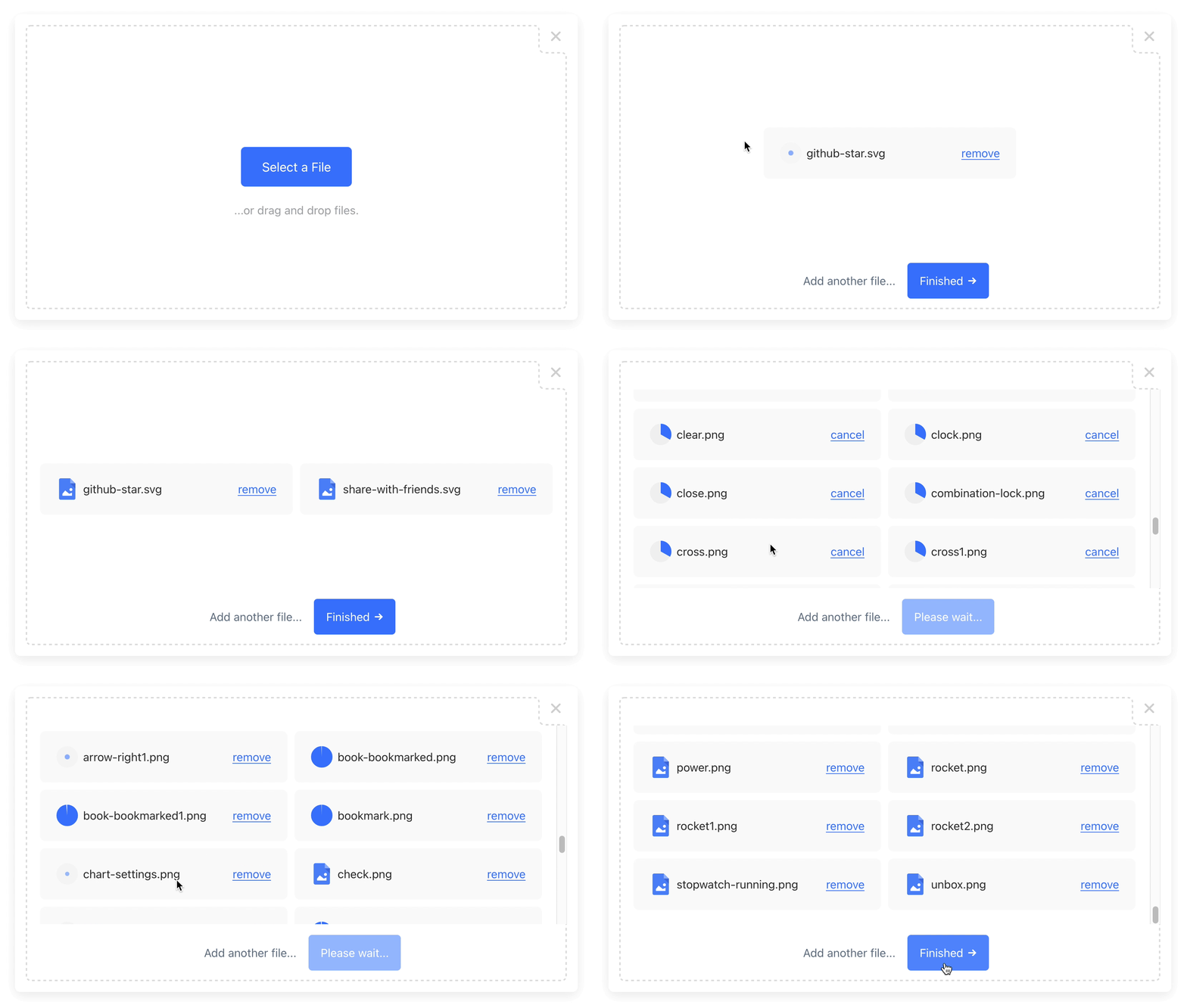](https://www.bytescale.com/docs/upload-widget)
100% 无服务器文件上传部件
电源 [字节比例](https://www.bytescale.com/)
* * *
**支持 :** 图像裁剪、视频预览、文档预览、拖放等...
[**完整文档**](https://www.bytescale.com/docs/upload-widget/react) 二. 支助 [无头 SDK](https://www.bytescale.com/docs/sdks/javascript) 二. 支助 [媒体处理 APIs](https://www.bytescale.com/docs/media-processing-apis) 二. 支助 [存储](https://www.bytescale.com/docs/storage/sources) 二. 支助 [光盘N](https://www.bytescale.com/docs/cdn)
* * *
## 安装
通过国家预防机制安装:
```shell
npm install @bytescale/upload-widget-react
```
或者通过YARN:
```shell
yarn add @bytescale/upload-widget-react
```
或者通过一个 `
```
## 使用量
### 上传按钮.. [试试代码Pen](https://codepen.io/bytescale/pen/popWJpX?editors=0010)
这个 `UploadButton` 组件使用a [渲染道具](https://reactjs.org/docs/render-props.html) 提供 `onClick` 调回按钮元素 .
点击时, 文件上传模式将出现 :
```javascript
import { UploadButton } from "@bytescale/upload-widget-react";
// Full Configuration:
// https://www.bytescale.com/docs/upload-widget#configuration
const options = {
apiKey: "free", // Get API keys from: www.bytescale.com
maxFileCount: 10
};
const MyApp = () => (
alert(files.map(x => x.fileUrl).join("\n"))}>
{({onClick}) =>
}
);
```
所需的道具 :
- `options`
- `children`
可选道具 :
- `onComplete`
- `onUpdate`
### 上传Dropzone - [试试代码Pen](https://codepen.io/bytescale/pen/LYrMzaB?editors=0010)
这个 `UploadDropzone` 组件使文件上传的内置拖放区 :
```javascript
import { UploadDropzone } from "@bytescale/upload-widget-react";
// Full Configuration:
// https://www.bytescale.com/docs/upload-widget#configuration
const options = {
apiKey: "free", // Get API keys from: www.bytescale.com
maxFileCount: 10
};
const MyApp = () => (
{
console.log(uploadedFiles.map(x => x.fileUrl).join("\n"))
}}
width="600px"
height="375px" />
);
```
> **降区的特殊行为 :**
>
> `onComplete` 只有在 `showFinishButton = true` (当用户点击"Finnish").
>
> `onUpdate` 必须在 `showFinishButton = false`。 。 。 .
>
> 默认值 : `showFinishButton = false`
所需的道具 :
- `options`
可选道具 :
- `onComplete`
- `onUpdate`
- `width`
- `height`
## 结果
召回者收到一个 `Array`数字 :
```javascript
{
fileUrl: "https://upcdn.io/FW25...", // URL to use when serving this file.
filePath: "/uploads/example.jpg", // File path (we recommend saving this to your database).
accountId: "FW251aX", // Bytescale account the file was uploaded to.
editedFile: undefined, // Edited file (for image crops). Same structure as below.
originalFile: {
fileUrl: "https://upcdn.io/FW25...", // Uploaded file URL.
filePath: "/uploads/example.jpg", // Uploaded file path (relative to your raw file directory).
accountId: "FW251aX", // Bytescale account the file was uploaded to.
originalFileName: "example.jpg", // Original file name from the user's machine.
file: { ... }, // Original DOM file object from the element.
size: 12345, // File size in bytes.
lastModified: 1663410542397, // Epoch timestamp of when the file was uploaded or updated.
mime: "image/jpeg", // File MIME type.
metadata: {
... // User-provided JSON object.
},
tags: [
"tag1", // User-provided & auto-generated tags.
"tag2",
...
]
}
}
```
## QQ 配置
所有配置都是可选的(除了 `apiKey` 字段,这是需要的).
```javascript
const options = {
apiKey: "free", // Get API keys from: www.bytescale.com
locale: myCustomLocale, // EN_US by default. (See "Localization" section below.)
maxFileCount: 5, // Unlimited by default (or 1 if multi: false).
maxFileSizeBytes: 1024 ** 2, // Unlimited by default.
mimeTypes: ["image/*"], // Unrestricted by default. Supports * wildcard suffix.
multi: false, // False by default.
onInit: ({ // Exposes lifecycle methods for the component.
close, // Closes the widget when called.
reset, // Resets the widget when called.
updateConfig // Updates the widget's config by passing a new config
}) => {}, // object to the method's first parameter.
onUpdate: (event) => { // Called each time the Upload Widget's list of files change.
// event.pendingFiles // Array of files that are preprocessing, uploading, or awaiting user input.
// event.pendingFiles[0].progress // Factor (0 to 1).
// event.pendingFiles[0].status // "Preprocessing" | "Uploading" | "AwaitingUserInput"
// event.failedFiles // Array of files that failed to upload (due to network or validation reasons).
// event.uploadedFiles // Array of files that have been uploaded and not removed.
},
onPreUpload: async file => ({
errorMessage: "Uh oh!", // Displays this validation error to the user (if set).
transformedFile: file // Uploads 'transformedFile' instead of 'file' (if set).
}),
showFinishButton: true, // Show/hide the "finish" button in the widget.
showRemoveButton: true, // Show/hide the "remove" button next to each file.
styles: {
breakpoints: {
fullScreenWidth: 750, // Full-screen mode activates when the screen is at or below this width.
fullScreenHeight: 420 // Full-screen mode activates when the screen is at or below this height.
},
colors: {
primary: "#377dff", // Primary buttons & links
active: "#528fff", // Primary buttons & links (hover). Inferred if undefined.
error: "#d23f4d", // Error messages
shade100: "#333", // Standard text
shade200: "#7a7a7a", // Secondary button text
shade300: "#999", // Secondary button text (hover)
shade400: "#a5a6a8", // Welcome text
shade500: "#d3d3d3", // Modal close button
shade600: "#dddddd", // Border
shade700: "#f0f0f0", // Progress indicator background
shade800: "#f8f8f8", // File item background
shade900: "#fff" // Various (draggable crop buttons, etc.)
},
fontFamilies: {
base: "arial, sans-serif" // Base font family (comma-delimited).
},
fontSizes: {
base: 16 // Base font size (px).
}
},
path: { // Optional: a string (full file path) or object like so:
fileName: "Example.jpg", // Supports path variables (e.g. {ORIGINAL_FILE_EXT}).
folderPath: "/uploads" // Please refer to docs for all path variables.
},
metadata: {
hello: "world" // Arbitrary JSON metadata (saved against the file).
},
tags: ["profile_picture"], // Requires a Bytescale account.
editor: {
images: {
allowResizeOnMove: true, // True by default. If false, prevents cropper from resizing when moved.
preview: true, // True by default if cropping is enabled. Previews PDFs and videos too.
crop: true, // True by default.
cropFilePath: image => { // Choose the file path used for JSON image crop files.
const {filePath} = image // In: https://www.bytescale.com/docs/types/UploadedFile
return `${filePath}.crop` // Out: https://www.bytescale.com/docs/types/FilePathDefinition
},
cropRatio: 4 / 3, // Width / Height. Undefined enables freeform (default).
cropShape: "rect" // "rect" (default) or "circ".
}
},
}
```
### \* 本地化
默认是 [EN 美国](https://github.com/bytescale/bytescale-upload-widget/blob/main/lib/src/modules/locales/EN_US.ts)数字 :
```javascript
const myCustomLocale = {
addAnotherFileBtn: "Add another file...",
addAnotherImageBtn: "Add another image...",
cancelBtn: "cancel",
cancelBtnClicked: "cancelled",
cancelPreviewBtn: "Cancel",
continueBtn: "Continue",
cropBtn: "Crop",
customValidationFailed: "Failed to validate file.",
doneBtn: "Done",
fileSizeLimitPrefix: "File size limit:",
finishBtn: "Finished",
finishBtnIcon: true,
imageCropNumberPrefix: "Image",
maxFilesReachedPrefix: "Maximum number of files:",
maxImagesReachedPrefix: "Maximum number of images:",
orDragDropFile: "...or drag and drop a file.",
orDragDropFileMulti: "...or drag and drop files.",
orDragDropImage: "...or drag and drop an image.",
orDragDropImageMulti: "...or drag and drop images.",
processingFile: "Processing file...",
removeBtn: "remove",
removeBtnClicked: "removed",
submitBtnError: "Error!",
submitBtnLoading: "Please wait...",
unsupportedFileType: "File type not supported.",
uploadFileBtn: "Upload a File",
uploadFileMultiBtn: "Upload Files",
uploadImageBtn: "Upload an Image",
uploadImageMultiBtn: "Upload Images",
xOfY: "of"
}
```
# API 支持
## XQ 文件管理 APIs
字节尺提供了广泛的 [文件管理 API](https://www.bytescale.com/docs/apis)数字 :
- **[文件列表](https://www.bytescale.com/docs/folder-api/ListFolder)**
- **[文件删除](https://www.bytescale.com/docs/file-api/DeleteFile)**
- **[文件复制](https://www.bytescale.com/docs/file-api/CopyFile)**
- [还有...](https://www.bytescale.com/docs/apis)
## \* 媒体处理API(图像/视频/音频)
字节比例还提供实时 [媒体处理 APIs](https://www.bytescale.com/docs/media-processing-apis)数字 :
- **[图像处理 API](https://www.bytescale.com/docs/image-processing-api)** (单位:千美元)[调整大小](https://www.bytescale.com/docs/image-processing-api#image-resizing-api), (中文(简体) ), [作物](https://www.bytescale.com/docs/image-processing-api#image-cropping-api), (中文(简体) ), [转换](https://www.bytescale.com/docs/image-processing-api#f), (中文(简体) ), [压缩](https://www.bytescale.com/docs/image-processing-api#image-compression-api) 打开 [水印](https://www.bytescale.com/docs/image-processing-api#Text-layering-api)(中文(简体) )
- **[视频处理 API](https://www.bytescale.com/docs/video-processing-api)** (单位:千美元)[转码](https://www.bytescale.com/docs/video-processing-api#video-transcoding-api), (中文(简体) ), [优化](https://www.bytescale.com/docs/video-processing-api#video-compression-api), (中文(简体) ), [调整大小](https://www.bytescale.com/docs/video-processing-api#video-resizing-api) 打开 [提取元数据](https://www.bytescale.com/docs/video-processing-api#video-metadata-api)(中文(简体) )
- **[音频处理 API](https://www.bytescale.com/docs/audio-processing-api)** (单位:千美元)[转码](https://www.bytescale.com/docs/audio-processing-api#audio-transcoding-api), (中文(简体) ), [优化](https://www.bytescale.com/docs/audio-processing-api#audio-compression-api), (中文(简体) ), [修饰](https://www.bytescale.com/docs/audio-processing-api#audio-trimming-api) 打开 [提取元数据](https://www.bytescale.com/docs/audio-processing-api#audio-metadata-api)(中文(简体) )
### 图像处理 API( 原始图像)
举个例子 [一张芝加哥的照片](https://upcdn.io/W142hJk/raw/example/city-landscape.jpg)数字 :

```
https://upcdn.io/W142hJk/raw/example/city-landscape.jpg
```
### 图像处理 API (已转换的图像)
使用 [图像处理 API](https://www.bytescale.com/docs/image-processing-api),可以生产 [此图像](https://upcdn.io/W142hJk/image/example/city-landscape.jpg?w=900&h=600&fit=crop&f=webp&q=80&blur=4&text=WATERMARK&layer-opacity=80&blend=overlay&layer-rotate=315&font-size=100&padding=10&font-weight=900&color=ffffff&repeat=true&text=Chicago&gravity=bottom&padding-x=50&padding-bottom=20&font=/example/fonts/Lobster.ttf&color=ffe400)数字 :

```
https://upcdn.io/W142hJk/image/example/city-landscape.jpg
?w=900
&h=600
&fit=crop
&f=webp
&q=80
&blur=4
&text=WATERMARK
&layer-opacity=80
&blend=overlay
&layer-rotate=315
&font-size=100
&padding=10
&font-weight=900
&color=ffffff
&repeat=true
&text=Chicago
&gravity=bottom
&padding-x=50
&padding-bottom=20
&font=/example/fonts/Lobster.ttf
&color=ffe400
```
## 认证
字节尺度支持两种认证类型:
### API 密钥
字节级上传部件使用 `apiKey` 要认证的参数 [字节比例](https://www.bytescale.com/)。 。 。 .
使用 API 密钥 认证,请求者可以访问 API 密钥可用的资源 :
- 密钥 API (`secret_***`)可以执行所有API操作(参见: [字节大小 JavaScript SDK](https://www.bytescale.com/docs/sdks/javascript)) (中文(简体) ).
- 公共 API 密钥( R)`public_***`)只能执行文件上传和文件下载. 文件覆盖,文件删除,所有其他破坏性操作都无法使用公共 API 密钥进行.
你总是要用 **公共 API 密钥** (例如:. `public_***`在你的客户端代码.
每个API密钥的读取/写取权限可以限制在文件/文件夹的子集.
### 日本西北地区
JWT是可选的.
使用 JWT , 用户可以通过 URL 直接下载私有文件, 因为认证是通过会话 cookie 默认进行的 _或者说_ 通过一个 `authorization` 如果启用了服务员,则页眉(见 `serviceWorkerScript` 目标 `AuthManager.beginAuthSession` 页:1 这允许浏览器在 `![]() `, (中文(简体) ), `