# @choc-ui/chakra-autocomplete 中文文档

规范地址：https://npmcn.com/package/%40choc-ui/chakra-autocomplete/

版本：6\.2\.2
npm 元数据更新时间：2026-02-07T19:58:49.628Z
中文译文更新时间：2026-11-09T14:06:13.518Z
软件包许可：MIT

本文由上游 README 翻译，可能存在偏差，请结合原文核对 API、命令与配置。版权与许可归原作者所有。

原始 npm 页面：https://www.npmjs.com/package/%40choc-ui/chakra-autocomplete
原文对照：https://npmcn.com/package/%40choc-ui/chakra-autocomplete/?lang=original
项目主页：https://github.com/anubra266/choc-autocomplete#readme
源码仓库：https://github.com/anubra266/choc-autocomplete

## 关键信息（来自 npm 元数据）

- 包体积（解压后）：121 kB，49 个文件
- 模块格式：ESM + CJS
- TypeScript 类型：包内自带
- Node.js 要求：\>=10
- 运行依赖：3 个
- peer 依赖：@chakra-ui/react ^3\.2\.2，@emotion/react ^11\.13\.5，react \>=18\.2\.0
- 首次发布：2021-05-16T23:15:31.274Z
- 最新版本发布：2026-02-07T19:58:49.449Z
- 近 30 天下载量：201726（2026-10-10 至 2026-11-08，npm 官方下载统计）
- 已发布版本数：145（近 12 个月 2 个）

## 中文简介


## 安装

```sh
npm install @choc-ui/chakra-autocomplete
```

也可以使用：`pnpm add @choc-ui/chakra-autocomplete`、`yarn add @choc-ui/chakra-autocomplete`、`bun add @choc-ui/chakra-autocomplete`

## README

#   
🏇  
@choc-ui/chakra-自动完成  
  

  [![npm package](https://img.shields.io/npm/v/@choc-ui/chakra-autocomplete.svg?style=for-the-badge)](https://www.npmjs.com/package/@choc-ui/chakra-autocomplete?style=for-the-badge)[![npm  downloads](https://img.shields.io/npm/dw/@choc-ui/chakra-autocomplete.svg?style=for-the-badge) ](https://www.npmjs.com/package/@choc-ui/chakra-autocomplete?style=for-the-badge)![NPM](https://img.shields.io/npm/l/@choc-ui/chakra-autocomplete?style=for-the-badge)

![GitHub Repo stars](https://img.shields.io/github/stars/anubra266/choc-autocomplete?logo=github&style=for-the-badge)

[![All Contributors](https://img.shields.io/badge/all_contributors-15-orange.svg?style=flat-square)](https://npmcn.com/package/%40choc-ui/chakra-autocomplete/#readme-contributors-)

  
自动完成组件 [查克拉乌伊](https://chakra-ui.com/) 图书馆.

## Chakra V3 和 V2 支持

自动完成版本 6+ 支持 [Chakra UI V3 软件](https://www.chakra-ui.com/)。如果您正在使用 [查克拉UI V2](https://v2.chakra-ui.com/),请继续使用当前的 choc-autocomplete v5.X [这里的文档](https://github.com/anubra266/choc-autocomplete/tree/v5)。我们将继续努力支持Chakra V2,但一旦V3得到更广泛的采用,最终将被删除.

从Chakra UI V2 迁移到V3的帮助,请查看他们的 [移徙指南](https://chakra-ui.com/docs/get-started/migration)

Autocomplete 组件的公开API没有随此迁移而改变.

## 与Chakra V3的已知问题

与Chakra V3只有已知的1个显示问题. 使用时 `multiple` 道具,再也不能复制同样的造型了 `Box` 包装为 `Input` 正在使用。 我们仍然在研究解决这个问题的方法,但查克拉和下个主题小组尚未就此发表指导意见.

## 安装

```bash
npm i --save @choc-ui/chakra-autocomplete
#or
yarn add @choc-ui/chakra-autocomplete
```

## 预览

### 用鼠标

![](https://npmcn.com/package/%40choc-ui/chakra-autocomplete/assets/mouse.gif)

### 键盘

![](https://npmcn.com/package/%40choc-ui/chakra-autocomplete/assets/keyboard.gif)

## 使用量

### 基本用途

```js
import { Flex, Field } from "@chakra-ui/react";
import {
  AutoComplete,
  AutoCompleteInput,
  AutoCompleteItem,
  AutoCompleteList,
} from "@choc-ui/chakra-autocomplete";

function App() {
  const countries = [
    "nigeria",
    "japan",
    "india",
    "united states",
    "south korea",
  ];

  return (
    <Flex pt="48" justify="center" align="center" w="full">
      <Field.Root w="60">
        <Field.Label>Olympics Soccer Winner</Field.Label>
        <AutoComplete openOnFocus>
          <AutoCompleteInput variant="subtle" />
          <AutoCompleteList>
            {countries.map((country, cid) => (
              <AutoCompleteItem
                key={`option-${cid}`}
                value={country}
                textTransform="capitalize"
              >
                {country}
              </AutoCompleteItem>
            ))}
          </AutoCompleteList>
        </AutoComplete>
        <Field.HelperText>Who do you support.</Field.HelperText>
      </Field.Root>
    </Flex>
  );
}

export default App;
```

![CleanShot 2021-07-28 at 23 47 57@2x](https://user-images.githubusercontent.com/30869823/127406028-1b20b6c7-d2f4-4a27-a0f4-2a07598e7dfa.png)

### 创建组

您可以创建组 `AutoCompleteGroup` 组件,并加上标题 `AutoCompleteGroupTitle` 组件.

```js
import React from "react";
import {
  AutoComplete,
  AutoCompleteGroup,
  AutoCompleteGroupTitle,
  AutoCompleteInput,
  AutoCompleteItem,
  AutoCompleteList,
} from "@choc-ui/chakra-autocomplete";
import { Stack, Text } from "@chakra-ui/react";

export default function App() {
  const continents = {
    africa: ["nigeria", "south africa"],
    asia: ["japan", "south korea"],
    europe: ["united kingdom", "russia"],
  };
  return (
    <Stack direction="column">
      <Text>Group </Text>
      <AutoComplete openOnFocus>
        <AutoCompleteInput placeholder="Search..." variant="subtle" />
        <AutoCompleteList>
          {Object.entries(continents).map(([continent, countries], co_id) => (
            <AutoCompleteGroup key={co_id} showDivider>
              <AutoCompleteGroupTitle textTransform="capitalize">
                {continent}
              </AutoCompleteGroupTitle>
              {countries.map((country, c_id) => (
                <AutoCompleteItem
                  key={c_id}
                  value={country}
                  textTransform="capitalize"
                >
                  {country}
                </AutoCompleteItem>
              ))}
            </AutoCompleteGroup>
          ))}
        </AutoCompleteList>
      </AutoComplete>
    </Stack>
  );
}
```

![CleanShot 2021-07-29 at 01 18 47@2x](https://user-images.githubusercontent.com/30869823/127412483-89639ae2-34a7-4f59-9da0-287cd83cd035.png)

## 进入内部状态

进入内部状态 `AutoComplete`,使用儿童功能(通常称为渲染道具). 你会进入国家内部 `isOpen`,与 `onOpen` 财务报告和审定财务报表 `onClose` 方法。 。 .

```js
import {
  Flex,
  Field, 
  Icon
} from "@chakra-ui/react";
import * as React from "react";
import {
  AutoComplete,
  AutoCompleteInput,
  AutoCompleteItem,
  AutoCompleteList,
} from "@choc-ui/chakra-autocomplete";
import { FiChevronRight, FiChevronDown } from "react-icons/fi";
import { InputGroup } from "./components/ui/input-group";

function App() {
  const countries = [
    "nigeria",
    "japan",
    "india",
    "united states",
    "south korea",
  ];

  return (
    <Flex pt="48" justify="center" align="center" w="full">
      <Field.Root w="60">
        <Field.Label>Olympics Soccer Winner</Field.Label>
        <AutoComplete openOnFocus>
          {({ isOpen }) => (
            <>
              <InputGroup 
                endElement={<Icon>{isOpen ? <FiChevronRight /> : <FiChevronDown />}</Icon>}
              >
                <AutoCompleteInput variant="subtle" placeholder="Search..." />
              </InputGroup>
              <AutoCompleteList>
                {countries.map((country, cid) => (
                  <AutoCompleteItem
                    key={`option-${cid}`}
                    value={country}
                    textTransform="capitalize"
                  >
                    {country}
                  </AutoCompleteItem>
                ))}
              </AutoCompleteList>
            </>
          )}
        </AutoComplete>
        <Field.HelperText>Who do you support.</Field.HelperText>
      </Field.Root>
    </Flex>
  );
}

export default App;
```

![CleanShot 2021-07-29 at 01 29 46@2x](https://user-images.githubusercontent.com/30869823/127413256-053d280f-46b7-4b12-bc49-c482963b857f.png)

## 自定义渲染

随所欲能作是念已. 这个 `AutoComplete` 常规项目 `Chakra` 箱来.

```js
import React from "react";
import {
  AutoComplete,
  AutoCompleteGroup,
  AutoCompleteInput,
  AutoCompleteItem,
  AutoCompleteList,
} from "@choc-ui/chakra-autocomplete";
import { Stack, Text } from "@chakra-ui/react";
import { Avatar } from "./components/ui/avatar";

export default function App() {
  const europeans = [
    { name: "Dan Abramov", image: "https://bit.ly/dan-abramov" },
    { name: "Kent Dodds", image: "https://bit.ly/kent-c-dodds" },
    { name: "Ryan Florence", image: "https://bit.ly/ryan-florence" },
  ];
  const nigerians = [
    { name: "Segun Adebayo", image: "https://bit.ly/sage-adebayo" },
    { name: "Prosper Otemuyiwa", image: "https://bit.ly/prosper-baba" },
  ];
  return (
    <Stack direction="column">
      <Text>Custom Render </Text>
      <AutoComplete rollNavigation>
        <AutoCompleteInput variant="subtle" placeholder="Search..." />
        <AutoCompleteList>
          <AutoCompleteGroup title="Nigerians" showDivider>
            {nigerians.map((person, oid) => (
              <AutoCompleteItem
                key={`nigeria-${oid}`}
                value={person.name}
                textTransform="capitalize"
                align="center"
              >
                <Avatar size="sm" name={person.name} src={person.image} />
                <Text ml="4">{person.name}</Text>
              </AutoCompleteItem>
            ))}
          </AutoCompleteGroup>
          <AutoCompleteGroup title="Europeans" showDivider>
            {europeans.map((person, oid) => (
              <AutoCompleteItem
                key={`europe-${oid}`}
                value={person.name}
                textTransform="capitalize"
                align="center"
              >
                <Avatar size="sm" name={person.name} src={person.image} />
                <Text ml="4">{person.name}</Text>
              </AutoCompleteItem>
            ))}
          </AutoCompleteGroup>
        </AutoCompleteList>
      </AutoComplete>
    </Stack>
  );
}

```

![CleanShot 2021-07-29 at 01 35 03@2x](https://user-images.githubusercontent.com/30869823/127413575-9cea8ee8-3fd3-4720-8d87-7e1f996144be.png)

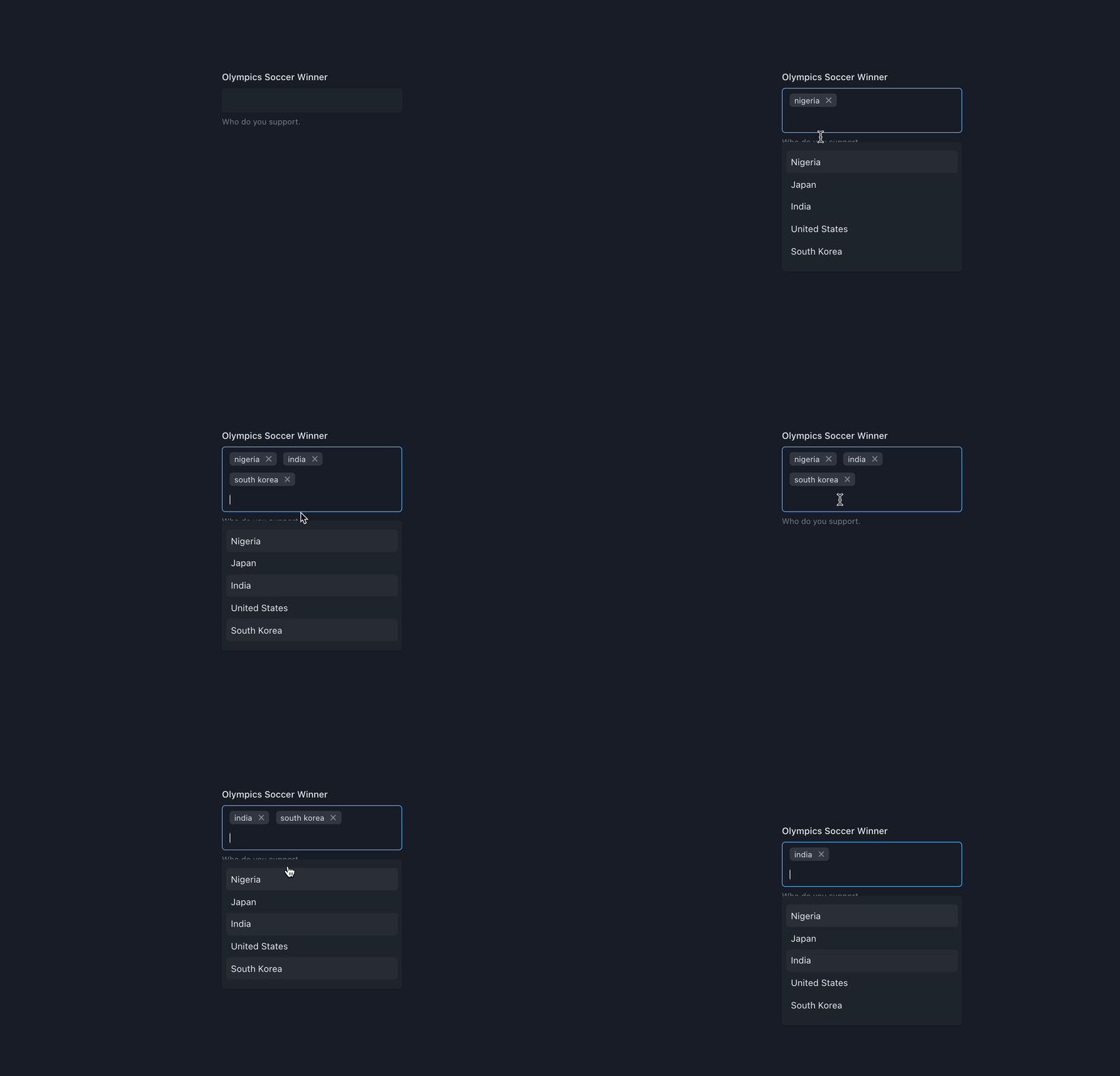
## 带有标签的多选择

添加数据 `multiple` 向 `AutoComplete` 构成部分 `AutoCompleteInput` 现在会暴露孩子的功能. 这个 `onChange` prop 现在返回选中的数组 `values`

现在,你可以绘制标签 `AutoCompleteTag` 组件或您选择的任何其他组件。 这个 `label` 编辑 `onRemove` 方法现已被曝光.

**重要** - 与Chakra UI V3, 已经无法复制同样的外形 `Box` 包装为 `Input` 正在使用。 我们仍然在研究解决这个问题的方法,但查克拉和下个主题小组尚未就此发表指导意见.

```js
import React from "react";
import {
  AutoComplete,
  AutoCompleteInput,
  AutoCompleteItem,
  AutoCompleteList,
  AutoCompleteTag,
} from "@choc-ui/chakra-autocomplete";
import { Stack, Text } from "@chakra-ui/react";

export default function App() {
  const countries = [
    "nigeria",
    "japan",
    "india",
    "united states",
    "south korea",
  ];
  return (
    <Stack direction="column">
      <Text>Multi select with tags</Text>
      <AutoComplete openOnFocus multiple onChange={(vals) => console.log(vals)}>
        <AutoCompleteInput placeholder="Search..." variant="subtle">
          {({ tags }) =>
            tags.map((tag, tid) => (
              <AutoCompleteTag
                key={tid}
                label={tag.label}
                onRemove={tag.onRemove}
              />
            ))
          }
        </AutoCompleteInput>
        <AutoCompleteList>
          {countries.map((country, cid) => (
            <AutoCompleteItem
              key={`option-${cid}`}
              value={country}
              textTransform="capitalize"
              _selected={{ bg: "whiteAlpha.50" }}
              _focus={{ bg: "whiteAlpha.100" }}
            >
              {country}
            </AutoCompleteItem>
          ))}
        </AutoCompleteList>
      </AutoComplete>
    </Stack>
  );
}
```

![Kapture 2021-07-29 at 02 05 53](https://user-images.githubusercontent.com/30869823/127415996-09a5df7c-a356-4a22-ad9c-60d09963cfc6.gif)

## 可创建项目

我知道标题几乎没有表达这一点, 但是,是的,命名很困难。 您可能希望您的用户能够在提供选项中没有选项时添加额外项目 。 例如,在您的 Polywork 配置中添加新标签 .

首先增加一个 `creatable` 给 `AutoComplete` 组件. 然后添加一个 `AutoCompleteCreatable` 到列表底部的组件。 关于这一构成部分的更多信息,请参阅参考文献.

```js
import React from "react";
import {
  AutoComplete,
  AutoCompleteCreatable,
  AutoCompleteInput,
  AutoCompleteItem,
  AutoCompleteList,
  AutoCompleteTag,
} from "@choc-ui/chakra-autocomplete";
import { Stack, Text } from "@chakra-ui/react";

export default function App() {
  const options = ["apple", "appoint", "zap", "cap", "japan"];
  return (
    <Stack direction="column">
      <Text>Creatable </Text>
      <AutoComplete multiple rollNavigation creatable>
        <AutoCompleteInput
          variant="subtle"
          placeholder="Search basic..."
          autoFocus
        >
          {({ tags }) =>
            tags.map((tag, tid) => (
              <AutoCompleteTag
                key={tid}
                label={tag.value}
                onRemove={tag.onRemove}
                disabled={tag.label === "japan"}
              />
            ))
          }
        </AutoCompleteInput>
        <AutoCompleteList>
          {options.map((option, oid) => (
            <AutoCompleteItem
              key={`option-${oid}`}
              value={option}
              textTransform="capitalize"
            >
              {option}
            </AutoCompleteItem>
          ))}
          <AutoCompleteCreatable />
        </AutoCompleteList>
      </AutoComplete>
    </Stack>
  );
}

```

![CleanShot 2021-07-29 at 02 29 20@2x](https://user-images.githubusercontent.com/30869823/127417453-e78b9b48-26e8-4ff0-a264-1d6bb4717ab0.png)

## 装入状态

需要从API中提取数据,但不希望您的用户看到空白屏幕吗? 您可以通过 : `isLoading` 向 `AutoComplete`。通过这样做,将启用另外两个道具

1.  `loadingIcon` 打开 `AutoCompleteInput` 将在输入的右侧显示某种装入图标。 默认a `Spinner` 将显示,但您可以在任何要显示的自定义元素中通过
    
2.  `loadingState` 打开 `AutoCompleteList` 可以在 `isLoading` 实值 `true`。所有内容将放在列表的中心。 默认a `Spinner` 将显示,但您可以在任何要渲染的自定义元素中通过.
    

最佳做法是结合 `setTimeout` 财务报告和审定财务报表 `useEffect` 以产生去弹出效应。 这将防止不必要的 API 调用, 如果您的用户类型相对快 .

可以找到工作代码演示 [这里](https://codesandbox.io/s/choc-ui-chakra-autocomplete-loading-tfc8jz)

## 与窗体库合并

比较容易与诸如: `React Hook Form`, (中文(简体) ), `Formik`还有其他 工作实例可见于 `demos` 此 repo 文件夹。 见 [捐款](https://npmcn.com/package/%40choc-ui/chakra-autocomplete/#readme-contribute) 如何复制和设置用于测试.

你最喜欢的表格库没有工作榜样吗? 提交 PR 以获得添加, 并帮助其它使用此库的人迅速起起跑 .

## 自动完整方法

指派一名裁判 `AutoComplete` 使用:

```js
ref.current?.resetItems();
ref.current?.removeItem(itemValue);
```

### 密码箱链接 [给](https://githubbox.com/anubra266/choc-autocomplete/tree/main/demo)

## API 参考

**编号**: 请随意请求任何额外的 `Prop` 内 [问题](https://github.com/anubra266/choc-autocomplete/issues/new/)。 。 。 .

### **自动完成**

包装和提供者 `AutoCompleteInput` 财务报告和审定财务报表 `AutoCompleteList`

**自动完成** 编曲 [**方框**](https://chakra-ui.com/docs/components/box) 这样你就可以通过所有Box道具来改变它的风格.

**编号 :** 交给它的道具都不需要.

| Prop | 类型 | 说明 | 默认 |
| --- | --- | --- | --- |
| 关闭 Blur | 布尔 | 输入模糊时关闭建议 | 真实 |
| 关闭选择 | 布尔 | 选择建议时关闭建议 | 当多为假, 当多为真时为假 |
| 可冻性 | 布尔 | 允许添加建议书中没有的任意值 | 虚假 |
| 默认打开 | 布尔 | 建议列表默认打开 | 虚假 |
| 第一个项目 | 布尔 | 应先将第一项目完全集中在查询更改、打开和过滤当前重点项目之外 | 真实 |
| 默认值 | 阵列 | 用于预定义标记,或自动完成组件的值 。 只要传递数组 | ——— |
| 禁用过滤器 | 布尔 | 设置为正则时禁用过滤 | 虚假 |
| 强调 | 布尔 QQ 系统样式对象 | 在建议中突出显示匹配字符, 您可以通过样式 - 假 | 虚假 |
| 默认状态Props | 弹性程序 | 在使用默认空状态时, 支持通过“ Flex” 组件 。 在提供自己的习惯\`空地国家'时不适用 | ——— |
| 空状态 | 
```ts
boolean | MaybeRenderProp<{ value: Item["value"] }>
```

 | 当没有建议匹配查询时, 将消息转换为 | 真实 |
| 过滤器 | 

```ts
(query: string, optionValue: Item["value"], optionLabel: Item["label"]) =>
  boolean;
```

 | 自定义过滤功能 | ——— |
| 焦点输入选择 | 布尔 | 选择建议后的重点输入 | 真实 |
| 免费索洛 | 布尔 | 允许输入任意值 | 虚假 |
| 仅读 | 布尔 | 使组件只读 | 虚假 |
| 正在丢失 | 布尔 | 在输入和列表元素上显示加载动画 | 虚假 |
| 已安装 | 布尔 | 确定弹出式内容是否应以 [门户](https://chakra-ui.com/docs/components/portal)。设置为虚假,以在 DOM 结构中渲染内容.  
  
在对话框内渲染时有用 | 真实 |
| 列表 AllValues 焦点 | 布尔 | 当用户集中输入时显示所有建议,而输入不是空的. | 虚假 |
| 匹配窗口 | 布尔 | 查克拉乌伊 [Popover. Placeting.same Width (英语). (英语)](https://chakra-ui.com/docs/components/popover#same-width) 属性将弹出式内容的宽度与容器的宽度相匹配 | 真实 |
| 最大选择 | 编号 | 在多种模式中限制标签选择的可能数量 | ——— |
| 最大建议 | 编号 | 列表中建议的数量限制 | ——— |
| 多个 | 布尔 | 允许标签多选择 | 虚假 |
| 变化 | 

```ts
(value: string | Item["value"][], item: Item| Item[]) => void
```

 | 当自动完成值发生变化时运行的函数 | ——— |
| 选择选项 | 

```ts
(params: {
    item: Item;
    selectMethod: "mouse" | "keyboard" | null;
    isNewInput: boolean;
  }) => boolean | void
```

 | 选择建议时调用的方法 | ——— |
| 选择焦点 | 

```ts
(params: {
    item: Item;
    focusMethod: "mouse" | "keyboard" | null;
    isNewInput: boolean;
  }) => boolean | void
```

 | 在建议有重点时调用的方法 | ——— |
| 准备 | 

```ts
(props:{tags:ItemTag[]}) => void
```

 | 显示组件中使用的变量的方法 | ——— |
| 已删除 | 

```ts
(removedTag: Item["value"],item: Item, tags: Item["value"][]) => void
```

 | 删除标签时调用的方法 | ——— |
| 打开焦点 | 布尔 | 输入焦点时打开建议 | 虚假 |
| 安置情况 | 用逻辑定位 | 将显示自动完整列表。 接受来自 [过量](https://chakra-ui.com/docs/components/popover#placement) 组件 | 下边 |
| 恢复 OnBlurIfEmpty 数据 | 布尔 | 如果错误, 清除输入字段的值也会清除选中的选项 | 真实 |
| 滚动导航 | 布尔 | 允许键盘导航在达到一端时切换到相交端 | 虚假 |
| 选择焦点 | 布尔 | 选择焦点时输入的文字 | 虚假 |
| 应提交建议 | 

```ts
(value: string) => boolean
```

 | 函数来决定建议是否应当提供,例如仅在查询值中至少有两个字符时显示建议 | ——— |
| 提交密钥; | 

```ts
string[]
```

 | 清单 [键盘事件: 键值](https://developer.mozilla.org/en-US/docs/Web/API/UI_Events/Keyboard_event_key_values),除“ Enter” 键外,该键触发当前选中项目的点击事件. | ——— |
| 建议何时 | 布尔 | 输入值为空时显示建议 | 虚假 |
| 价值 | 任意 | 控制状态中组件的值 | \-- -- . . |

### **自动补全标签**

多个模式的标记

**自动补全标签** 编曲 [**标记**](https://chakra-ui.com/docs/components/tag) 这样你就可以通过所有的Tag道具来改变它的风格.

| Prop  
 | 类型 | 说明 | 需求 | 默认 |
| --- | --- | --- | --- | --- |
| 已禁用 | 
```
string
```

 | 如果您需要锁定某些标记,从而无法在界面中去掉,可以设置已禁用的标记. | 没有  
 | ——— |
| 标签 | 

```
string
```

 | 标签上显示的标签 | 对  
 | ——— |
| 移动 | 

```ts
() => void
```

 | 从所选值中删除标签的方法 | 对  
 | ——— |

### **自动完成输入**

输入 `AutoComplete` 数值.

**自动完成输入** 编曲 [**投入**](https://chakra-ui.com/docs/components/input) 这样你就可以通过所有的输入道具来改变它的风格.

| Prop  
 | 类型 | 说明 | 需求 | 默认 |
| --- | --- | --- | --- | --- |
| 儿童 | 
```ts
type children = MaybeRenderProp<{
  tags: Item & { onRemove: () => void }[];
}>;
```

 | 

回调返回 `ReactNode` 并带有标签 `multiple` 模式 譬如说.

```js
<AutoCompleteInput variant="subtle">
  {({ tags }) =>
    tags.map((tag, tid) => (
      <AutoCompleteTag key={tid} label={tag.label} onRemove={tag.onRemove} />
    ))
  }
</AutoCompleteInput>
```

 | 没有  
 | ——— |
| 参考 | 

```js
RefObject<HTMLInputElement>
```

 | 为输入元素提供参考,以便在其他上下文中引用该值 | 没有  
 | ——— |
| 隐藏位置符 | 布尔 | 当孩子不是空阵列时隐藏占位符 。 原定用途

```js
<AutoComplete multiple creatable />
```

 | 没有  
 | 虚假 |
| 装入Icon | 

```
React.ReactNode | JSX
```

 | 挂起时显示的元素是真实的 | 没有 | [旋转器](https://chakra-ui.com/docs/components/spinner) 从查克拉UI |

### **自动补全列表**

包装器 `AutoCompleteGroup` 财务报告和审定财务报表 `AutoCompleteItem`

**自动补全列表** 编曲 [**方框**](https://chakra-ui.com/docs/components/box) 这样你就可以通过所有Box道具来改变它的风格.

| Prop  
 | 类型 | 说明 | 需求 | 默认 |
| --- | --- | --- | --- | --- |
| 装入状态 | 反应 反应节点 QQ JSX | 在列表中显示的内容是真实的。 内容将居中 | 没有 | [旋转器](https://chakra-ui.com/docs/components/spinner) 从 Chakra-UI 带 md 大小 |

### **自动完成组**

用于收藏 `AutoCompleteItem`编号

**自动完成组** 编曲 [**方框**](https://chakra-ui.com/docs/components/box) 这样你就可以通过所有Box道具来改变它的风格.

| Prop  
 | 类型 | 说明 | 需求 | 默认 |
| --- | --- | --- | --- | --- |
| 显示 Divider | 布尔 | 如果为真, 则显示分隔符 | 没有 | 虚假 |
| 分页颜色 | 字符串 | 分隔符的颜色, 如果存在的话 | 没有 | 继承 |

### **自动完成项目**

这是你的建议

**自动完成项目** 编曲 [**弹性**](https://chakra-ui.com/docs/components/flex) 这样你就可以通过所有的Flex道具来改变它的风格.

| Prop  
 | 类型 | 说明 | 需求 | 默认 |
| --- | --- | --- | --- | --- |
| 获取值 | (数值: 任何) 任何 | 当值为对象时用于确定持有值的密钥的方法 | 没有  
 | 
```js
val => val;
```

 |
| 标签 | 字符串 | 选项的标签 | 没有  
 | ——— |
| 价值 | 字符串或对象 | 选项的价值 | 对  
 | ——— |
| 已固定 | 

```
boolean
```

 | 无论过滤或最大建议如何, 使某一项随时可见 | 没有 | ——— |
| 已修补( v) | 系统样式对象 | 固定项目样式 | 没有 | 

```js
{
  fontWeight: 'extrabold',
}
```

 |
| 价值 | 字符串 | 选项的价值 | 对  
 | ——— |
| 已禁用 | 

```
boolean
```

 | 禁用项目, 因此无法选中 | 没有 | ——— |
| 残疾( d) | 系统样式对象 | 禁用项目的样式 | 没有 | 

```js
{
  fontWeight: 'extrabold',
}
```

 |
| 选中( s) | 系统样式对象 | 选定项目的样式 | 没有 | 

```js
{
  fontWeight: 'extrabold',
}
```

 |
| 焦点( c) | 系统样式对象 | 焦点项目的样式 | 没有 | 

```js
{
  fontWeight: 'extrabold',
}
```

 |

### **自动完成创建**

用于 `AutoComplete` 组件的 `creatable` proc,允许用户输入任意值,在提供的选项中不可用.

**自动完成创建** 编曲 [**弹性**](https://chakra-ui.com/docs/components/flex) 这样你就可以通过所有的Flex道具来改变它的风格.

它也接受一个功能作为它的 `children` 带有电流的道具 `inputValue`。 。 。 .

| Prop  
 | 类型 | 说明 | 需求 | 默认 |
| --- | --- | --- | --- | --- |
| 儿童 | 
```ts
type children = MaybeRenderProp<{ value: any }>;
```

 | 

`ReactNode` 或回调返回 `ReactNode` 譬如说.

```js
<AutoCompleteCreatable>
  {({ value }) => <span>Add {value} to List</span>}
</AutoCompleteCreatable>
```

 | 没有  
 | ——— |
| 总是播放 | 

```ts
boolean;
```

 | 

讽痷, `AutoCompleteCreatable` 即使当 `AutoCompleteInput` 为空

 | 没有  
 | ——— |

## 贡献

-   克隆此寄存器

```sh
git clone https://github.com/anubra266/choc-autocomplete.git
```

-   安装所有依赖( 有线条)

```sh
yarn
```

-   安装软件包示例依赖性( 有线条)

```sh
cd example
yarn
```

启动软件包服务器和示例服务器

```sh
# root directory
yarn start

# example directory with (cd example)
yarn dev
```

## 赞助者

感谢这些伟大的人[emoji 密钥](https://allcontributors.org/docs/en/emoji-key):

[![](https://cdn.jsdelivr.net/gh/anubra266/static@main/sponsors.svg)](https://patreon.com/anubra266?utm_medium=clipboard_copy&utm_source=copyLink&utm_campaign=creatorshare_creator&utm_content=join_link)

## 贡献者

感谢这些伟大的人[emoji 密钥](https://allcontributors.org/docs/en/emoji-key):

<table><tbody><tr><td align="center"><a href="https://anubra266.tk/" rel="nofollow noopener noreferrer"><img alt="" src="https://avatars.githubusercontent.com/u/30869823?v=4?s=100" width="100px;" loading="lazy" decoding="async" referrerpolicy="no-referrer"><br><sub><b>马孔·卡拉罗</b></sub></a><br><a href="https://github.com/anubra266/choc-autocomplete/commits?author=anubra266" title="Code" rel="nofollow noopener noreferrer">💻</a></td><td align="center"><a href="http://margalit.com.au/" rel="nofollow noopener noreferrer"><img alt="" src="https://avatars.githubusercontent.com/u/2268424?v=4?s=100" width="100px;" loading="lazy" decoding="async" referrerpolicy="no-referrer"><br><sub><b>萨姆·马尔加利特</b></sub></a><br><a href="https://github.com/anubra266/choc-autocomplete/commits?author=margalit" title="Documentation" rel="nofollow noopener noreferrer">📖</a></td><td align="center"><a href="https://github.com/gepd" rel="nofollow noopener noreferrer"><img alt="" src="https://avatars.githubusercontent.com/u/7091609?v=4?s=100" width="100px;" loading="lazy" decoding="async" referrerpolicy="no-referrer"><br><sub><b>宝石</b></sub></a><br><a href="https://github.com/anubra266/choc-autocomplete/commits?author=gepd" title="Code" rel="nofollow noopener noreferrer">💻</a> <a href="https://github.com/anubra266/choc-autocomplete/issues?q=author%3Agepd" title="Bug reports" rel="nofollow noopener noreferrer">🐛</a></td><td align="center"><a href="https://www.linkedin.com/in/spencerkaiser" rel="nofollow noopener noreferrer"><img alt="" src="https://avatars.githubusercontent.com/u/6445731?v=4?s=100" width="100px;" loading="lazy" decoding="async" referrerpolicy="no-referrer"><br><sub><b>斯宾塞·凯泽</b></sub></a><br><a href="https://github.com/anubra266/choc-autocomplete/commits?author=SpencerKaiser" title="Documentation" rel="nofollow noopener noreferrer">📖</a></td><td align="center"><a href="https://github.com/jcdogo" rel="nofollow noopener noreferrer"><img alt="" src="https://avatars.githubusercontent.com/u/70533701?v=4?s=100" width="100px;" loading="lazy" decoding="async" referrerpolicy="no-referrer"><br><sub><b>贾克多戈</b></sub></a><br><a href="https://github.com/anubra266/choc-autocomplete/commits?author=jcdogo" title="Code" rel="nofollow noopener noreferrer">💻</a></td><td align="center"><a href="https://github.com/daliudzius" rel="nofollow noopener noreferrer"><img alt="" src="https://avatars.githubusercontent.com/u/46355846?v=4?s=100" width="100px;" loading="lazy" decoding="async" referrerpolicy="no-referrer"><br><sub><b>达利乌齐乌斯</b></sub></a><br><a href="https://github.com/anubra266/choc-autocomplete/commits?author=daliudzius" title="Code" rel="nofollow noopener noreferrer">💻</a></td><td align="center"><a href="https://fabien0102.com/" rel="nofollow noopener noreferrer"><img alt="" src="https://avatars.githubusercontent.com/u/1761469?v=4?s=100" width="100px;" loading="lazy" decoding="async" referrerpolicy="no-referrer"><br><sub><b>法比恩·贝尔纳德</b></sub></a><br><a href="https://github.com/anubra266/choc-autocomplete/commits?author=fabien0102" title="Code" rel="nofollow noopener noreferrer">💻</a></td></tr><tr><td align="center"><a href="https://riccardolorenzi.com/" rel="nofollow noopener noreferrer"><img alt="" src="https://avatars.githubusercontent.com/u/5848941?v=4" width="100px;" loading="lazy" decoding="async" referrerpolicy="no-referrer"><br><sub><b>里克卡多·洛伦齐</b></sub></a><br><a href="https://github.com/anubra266/choc-autocomplete/commits?author=Richi2293" title="Bug fixes" rel="nofollow noopener noreferrer">🐛</a></td><td align="center"><a href="https://github.com/MathisFederico" rel="nofollow noopener noreferrer"><img alt="" src="https://avatars.githubusercontent.com/u/60117466?v=4" width="100px;" loading="lazy" decoding="async" referrerpolicy="no-referrer"><br><sub><b>马西斯·费德里克</b></sub></a><br><a href="https://github.com/anubra266/choc-autocomplete/commits?author=MathisFederico" title="Bug" rel="nofollow noopener noreferrer">🐛</a></td><td align="center"><a href="https://github.com/Kysluss" rel="nofollow noopener noreferrer"><img alt="" src="https://avatars.githubusercontent.com/u/29052043?v=4" width="100px;" loading="lazy" decoding="async" referrerpolicy="no-referrer"><br><sub><b>凯尔·斯卢瑟</b></sub></a><br><a href="https://github.com/anubra266/choc-autocomplete/commits?author=Kysluss" title="Code" rel="nofollow noopener noreferrer">💻🐛</a></td><td align="center"><a href="https://github.com/sakerhetspolisen" rel="nofollow noopener noreferrer"><img alt="" src="https://avatars.githubusercontent.com/u/68159964?v=4" width="100px;" loading="lazy" decoding="async" referrerpolicy="no-referrer"><br><sub><b>卡尔·塞尔格伦</b></sub></a><br><a href="https://github.com/anubra266/choc-autocomplete/commits?author=sakerhetspolisen" title="Code" rel="nofollow noopener noreferrer">🐛🔧</a></td><td align="center"><a href="https://github.com/JedBh" rel="nofollow noopener noreferrer"><img alt="" src="https://avatars.githubusercontent.com/u/44101778?v=4" width="100px;" loading="lazy" decoding="async" referrerpolicy="no-referrer"><br><sub><b>杰迪迪亚·本霍德</b></sub></a><br><a href="https://github.com/anubra266/choc-autocomplete/commits?author=jedBh" title="Code" rel="nofollow noopener noreferrer">🐛</a></td><td align="center"><a href="https://github.com/Janekk" rel="nofollow noopener noreferrer"><img alt="" src="https://avatars.githubusercontent.com/u/6827881?v=4" width="100px;" loading="lazy" decoding="async" referrerpolicy="no-referrer"><br><sub><b>亚努什·卡卡拉克</b></sub></a><br><a href="https://github.com/anubra266/choc-autocomplete/commits?author=janekk" title="Code" rel="nofollow noopener noreferrer">🐛</a></td><td align="center"><a href="https://github.com/ThomasHickman" rel="nofollow noopener noreferrer"><img alt="" src="https://avatars.githubusercontent.com/u/6304200?v=4" width="100px;" loading="lazy" decoding="async" referrerpolicy="no-referrer"><br><sub><b>托马斯·希克曼</b></sub></a><br><a href="https://github.com/anubra266/choc-autocomplete/commits?author=thomashickman" title="Bug" rel="nofollow noopener noreferrer">🐛</a></td></tr><tr><td align="center"><a href="https://github.com/chrisregner" rel="nofollow noopener noreferrer"><img alt="" src="https://avatars.githubusercontent.com/u/26005158?v=4" width="100px;" loading="lazy" decoding="async" referrerpolicy="no-referrer"><br><sub><b>克里斯托弗·雷格纳</b></sub></a><br><a href="https://github.com/anubra266/choc-autocomplete/commits?author=chrisregner" title="Code" rel="nofollow noopener noreferrer">📖🐛</a></td><td align="center"><a href="https://github.com/EinarSnorrason" rel="nofollow noopener noreferrer"><img alt="" src="https://avatars.githubusercontent.com/u/31321506?v=4" width="100px;" loading="lazy" decoding="async" referrerpolicy="no-referrer"><br><sub><b>艾纳·斯诺拉森</b></sub></a><br><a href="https://github.com/anubra266/choc-autocomplete/commits?author=EinarSnorrason" title="Code" rel="nofollow noopener noreferrer">💻🐛🔧</a></td><td align="center"><a href="https://github.com/gbermudez1992" rel="nofollow noopener noreferrer"><img alt="" src="https://avatars.githubusercontent.com/u/84212735?v=4" width="100px;" loading="lazy" decoding="async" referrerpolicy="no-referrer"><br><sub><b>格贝穆德兹1992年</b></sub></a><br><a href="https://github.com/anubra266/choc-autocomplete/commits?author=gbermudez1992" title="Code" rel="nofollow noopener noreferrer">💻🐛🔧</a></td><td align="center"><a href="https://github.com/ido213" rel="nofollow noopener noreferrer"><img alt="" src="https://avatars.githubusercontent.com/u/163876909?v=4" width="100px;" loading="lazy" decoding="async" referrerpolicy="no-referrer"><br><sub><b>ido213号</b></sub></a><br><a href="https://github.com/anubra266/choc-autocomplete/commits?author=ido213" title="Code" rel="nofollow noopener noreferrer">💻🐛🔧</a></td><td align="center"><a href="https://github.com/aeons" rel="nofollow noopener noreferrer"><img alt="" src="https://avatars.githubusercontent.com/u/1432894?v=4" width="100px;" loading="lazy" decoding="async" referrerpolicy="no-referrer"><br><sub><b>比约恩·马德森</b></sub></a><br><a href="https://github.com/anubra266/choc-autocomplete/commits?author=aeons" title="Code" rel="nofollow noopener noreferrer">🐛</a></td><td align="center"><a href="https://github.com/SupremeTechnopriest" rel="nofollow noopener noreferrer"><img alt="" src="https://avatars.githubusercontent.com/u/2261598?v=4" width="100px;" loading="lazy" decoding="async" referrerpolicy="no-referrer"><br><sub><b>兰迪·勒博</b></sub></a><br><a href="https://github.com/anubra266/choc-autocomplete/commits?author=SupremeTechnopriest" title="Code" rel="nofollow noopener noreferrer">🐛</a></td><td align="center"><a href="https://github.com/jayveebustarde" rel="nofollow noopener noreferrer"><img alt="" src="https://avatars.githubusercontent.com/u/26862076?v=4" width="100px;" loading="lazy" decoding="async" referrerpolicy="no-referrer"><br><sub><b>杰维·布斯塔德</b></sub></a><br><a href="https://github.com/anubra266/choc-autocomplete/commits?author=jayveebustarde" title="Code" rel="nofollow noopener noreferrer">🐛🔧</a></td></tr><tr><td align="center"><a href="https://github.com/zanctor" rel="nofollow noopener noreferrer"><img alt="" src="https://avatars.githubusercontent.com/u/11874442?v=4" width="100px;" loading="lazy" decoding="async" referrerpolicy="no-referrer"><br><sub><b>伊霍尔·津琴科</b></sub></a><br><a href="https://github.com/anubra266/choc-autocomplete/commits?author=zanctor" title="Code" rel="nofollow noopener noreferrer">🐛🔧</a></td><td align="center"><a href="https://github.com/bwalendz" rel="nofollow noopener noreferrer"><img alt="" src="https://avatars.githubusercontent.com/u/6239158?v=4" width="100px;" loading="lazy" decoding="async" referrerpolicy="no-referrer"><br><sub><b>布赖恩·瓦伦德津斯基</b></sub></a><br><a href="https://github.com/anubra266/choc-autocomplete/commits?author=bwalendz" title="Code" rel="nofollow noopener noreferrer">🐛🔧</a></td><td align="center"><a href="https://github.com/NoFr1ends" rel="nofollow noopener noreferrer"><img alt="" src="https://avatars.githubusercontent.com/u/6075580?v=4" width="100px;" loading="lazy" decoding="async" referrerpolicy="no-referrer"><br><sub><b>林克丝</b></sub></a><br><a href="https://github.com/anubra266/choc-autocomplete/commits?author=NoFr1ends" title="Code" rel="nofollow noopener noreferrer">🐛</a></td></tr></tbody></table>

本项目遵循 [全部贡献者](https://github.com/all-contributors/all-contributors) 规格。 任何捐款都欢迎!

## 常见问题

### 如何安装 @choc-ui/chakra-autocomplete？

在项目目录运行 npm install @choc-ui/chakra-autocomplete，或使用 pnpm add / yarn add / bun add。它还需要宿主项目提供 peer 依赖：@chakra-ui/react（^3\.2\.2）、@emotion/react（^11\.13\.5）、react（\>=18\.2\.0）。npm 7 及以上与 pnpm 8 及以上默认会自动安装必需的 peer 依赖，Yarn 需要手动安装。

### @choc-ui/chakra-autocomplete 支持 TypeScript 吗？

支持。包内自带 TypeScript 类型声明（package\.json 声明了 types 入口），安装后即可获得类型提示，无需再安装 @types 包。

### @choc-ui/chakra-autocomplete 支持 ESM 还是 CommonJS？

同时提供 ES Module 与 CommonJS 入口，import 和 require\(\) 都可以使用，打包工具会自动选择合适的版本。

### @choc-ui/chakra-autocomplete 需要什么版本的 Node\.js？

package\.json 的 engines 字段要求 Node\.js \>=10。版本不符时 npm 默认只给出警告，开启 engine-strict 后会拒绝安装。

### @choc-ui/chakra-autocomplete 可以商用吗？

@choc-ui/chakra-autocomplete 使用 MIT 许可。宽松许可：允许商业使用、修改和再分发，通常只需在分发时保留原版权与许可声明。以上为概括，不构成法律意见，请以许可原文为准。

### @choc-ui/chakra-autocomplete 的下载量有多少？

根据 npm 官方下载统计，@choc-ui/chakra-autocomplete 在 2026/10/10 – 2026/11/08 这 30 天内被下载 201,726 次，日均约 6,724 次。下载量会把 CI 构建、镜像同步和作为其他包依赖的安装一并计入，适合横向比较热度，不能直接等同于使用人数。

### @choc-ui/chakra-autocomplete 还在维护吗？

最新版本 6\.2\.2 发布于 2026/02/08（9 个月前）；至今共发布 145 个版本，其中过去 12 个月发布了 2 个；首次发布于 2021/05/17。发布频率只是参考信号：功能稳定的工具可能很少需要更新，建议结合源码仓库的 issue 和提交记录判断。