# @edgetools/codemirror-lang-mermaid 中文文档
规范地址:https://npmcn.com/package/%40edgetools/codemirror-lang-mermaid/
版本:0\.6\.0
npm 元数据更新时间:2026-09-13T12:38:50.824Z
中文译文更新时间:2026-11-13T06:52:25.352Z
软件包许可:MIT
本文由上游 README 翻译,可能存在偏差,请结合原文核对 API、命令与配置。版权与许可归原作者所有。
原始 npm 页面:https://www.npmjs.com/package/%40edgetools/codemirror-lang-mermaid
原文对照:https://npmcn.com/package/%40edgetools/codemirror-lang-mermaid/?lang=original
项目主页:https://github.com/Edge-Tools/codemirror-lang-mermaid#readme
源码仓库:https://github.com/Edge-Tools/codemirror-lang-mermaid
## 关键信息(来自 npm 元数据)
- 包体积(解压后):579 kB,7 个文件
- 模块格式:ESM + CJS
- TypeScript 类型:包内自带
- 运行依赖:4 个
- 首次发布:2026-09-13T12:38:50.283Z
- 最新版本发布:2026-09-13T12:38:50.579Z
- 近 30 天下载量:2185(2026-10-13 至 2026-11-11,npm 官方下载统计)
- 已发布版本数:1(近 12 个月 1 个)
## 中文简介
CodeMirror 的美人鱼语言支持
## 安装
```sh
npm install @edgetools/codemirror-lang-mermaid
```
也可以使用:`pnpm add @edgetools/codemirror-lang-mermaid`、`yarn add @edgetools/codemirror-lang-mermaid`、`bun add @edgetools/codemirror-lang-mermaid`
## README
# @ edgetools/ codemirror- lang- 美人鱼
此软件包为 CodeMirror 代码编辑器执行美人鱼语言支持. 获得美人鱼图的语法亮度!
## 开始
安装软件包 :
```
npm install @edgetools/codemirror-lang-mermaid
```
示例用法:
```js
import { basicSetup, EditorView } from 'codemirror';
import { mermaid, mindmapTags } from '@edgetools/codemirror-lang-mermaid';
import { HighlightStyle, syntaxHighlighting } from '@codemirror/language';
const myHighlightStyle = HighlightStyle.define([
{ tag: mindmapTags.diagramName, color: '#9650c8' },
{ tag: mindmapTags.lineText1, color: '#ce9178' },
{ tag: mindmapTags.lineText2, color: 'green' },
{ tag: mindmapTags.lineText3, color: 'red' },
{ tag: mindmapTags.lineText4, color: 'magenta' },
{ tag: mindmapTags.lineText5, color: '#569cd6' },
]);
new EditorView({
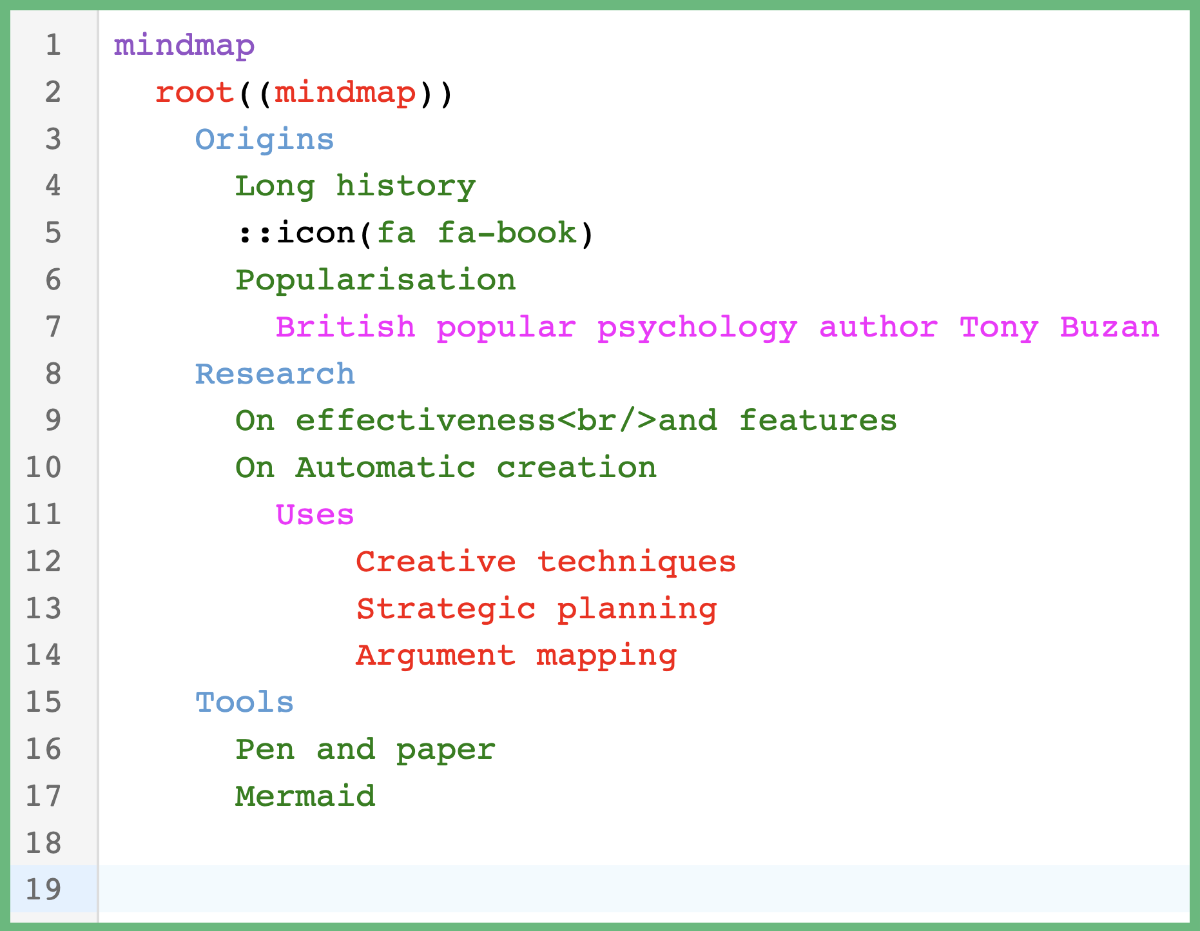
doc: `mindmap
root((mindmap))
Origins
Long history
::icon(fa fa-book)
Popularisation
British popular psychology author Tony Buzan
Research
On effectiveness
and features
On Automatic creation
Uses
Creative techniques
Strategic planning
Argument mapping
Tools
Pen and paper
Mermaid
`,
extensions: [basicSetup, mermaid(), syntaxHighlighting(myHighlightStyle)],
parent: document.body,
});
```
如果您在浏览器中运行此代码, 您应该获得语法突出显示 !
## 支持的图表
[美人鱼](https://mermaid.js.org/intro/) 包含许多不同类型的图表。 每个图都有自己的 [勒泽](https://lezer.codemirror.net/) 语法文件. 支持以下图表:
- [思维图](https://mermaid.js.org/syntax/mindmap.html)
- [派图](https://mermaid.js.org/syntax/pie.html)
- [流程图](https://mermaid.js.org/syntax/flowchart.html)
- [序列图](https://mermaid.js.org/syntax/sequenceDiagram.html)
- [用户行程](https://mermaid.js.org/syntax/userJourney.html)
- [要求图表](https://mermaid.js.org/syntax/requirementDiagram.html)
- [粗略图表](https://mermaid.js.org/syntax/gantt.html)
- [时间表](https://mermaid.js.org/syntax/timeline.html)
- [象限图表](https://mermaid.js.org/syntax/quadrantChart.html)
- [类图](https://mermaid.js.org/syntax/classDiagram.html)
- [状态图](https://mermaid.js.org/syntax/stateDiagram.html)
- [实体关系图](https://mermaid.js.org/syntax/entityRelationshipDiagram.html)
- [图形](https://mermaid.js.org/syntax/gitgraph.html)
- [C4 图](https://mermaid.js.org/syntax/c4.html)
- [安全图](https://mermaid.js.org/syntax/sankey.html)
- [XY 图表](https://mermaid.js.org/syntax/xyChart.html)
- [块图](https://mermaid.js.org/syntax/block.html)
- [包图](https://mermaid.js.org/syntax/packet.html)
- [宽板](https://mermaid.js.org/syntax/kanban.html)
- [结构图](https://mermaid.js.org/syntax/architecture.html)
每个图类型也作为单项导出——作为 `LanguageSupport` 扩展(例如). `mindmap()`, (中文(简体) ), `flowchart()`, (中文(简体) ), `classDiagram()`页:1 `LRLanguage` (例如:. `mindmapLanguage`页:1 `LanguageDescription` (例如:. `mindmapLanguageDescription`),并有一套自定义突出标记(例如. `mindmapTags`) (中文(简体) ). 包罗万象 `mermaid()` 扩展自动从第一行检测出图表类型并应用相匹配的语法.
## 支持的标记
CodeMiror 支持长列表 [标记](https://lezer.codemirror.net/docs/ref/#highlight.tags) 用于处理以多种语言突出的语法。 一些常见标记包括: `name`, (中文(简体) ), `variableName`, (中文(简体) ), `lineComment`, (中文(简体) ), `string`,以及 `number`。 。 。 .
CodeMirror 也支持创建能力 [自定义标签](https://lezer.codemirror.net/docs/ref/#highlight.Tag)。自定义标记对于从代码Mirror提供的语法中可能没有适合的标记的发型符号是有用的.
您可以根据我定义的自定义标签或相应的父标签(如果它有一个)来选择语法加亮的样式 。 请看 [标签文件](https://github.com/Edge-Tools/codemirror-lang-mermaid/blob/main/src/tags/index.ts) 用于列出我定义的所有自定义标签及其相应的父标签.
### 使用自定义标记的语法加亮
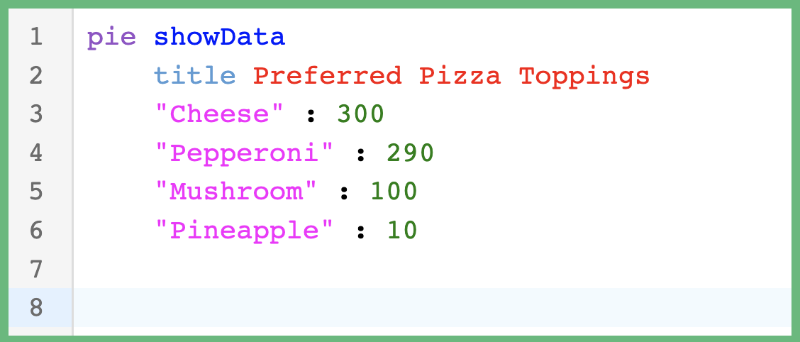
下面是使用自定义标记在饼图美人鱼图中突出指代的例子.
```js
import { basicSetup, EditorView } from 'codemirror';
import { mermaid, pieTags } from '@edgetools/codemirror-lang-mermaid';
import { HighlightStyle, syntaxHighlighting } from '@codemirror/language';
const myHighlightStyle = HighlightStyle.define([
{ tag: pieTags.diagramName, color: '#9650c8' },
{ tag: pieTags.lineComment, color: '#ce9178' },
{ tag: pieTags.number, color: 'green' },
{ tag: pieTags.showData, color: 'blue' },
{ tag: pieTags.string, color: 'magenta' },
{ tag: pieTags.title, color: '#569cd6' },
{ tag: pieTags.titleText, color: 'red' },
]);
new EditorView({
doc: `pie showData
title Preferred Pizza Toppings
"Cheese" : 300
"Pepperoni" : 290
"Mushroom" : 100
"Pineapple" : 10`,
extensions: [basicSetup, mermaid(), syntaxHighlighting(myHighlightStyle)],
parent: document.body,
});
```
在浏览器中运行此代码应导致以下语法加亮.
### 用父标记加亮语法
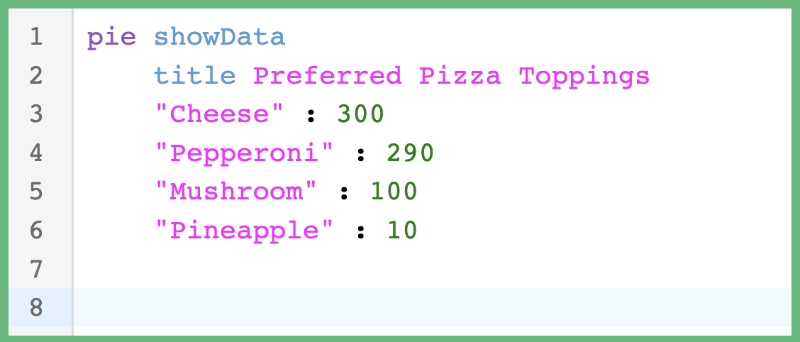
下面是使用母标记(由CodeMirror定义)在饼图"美人鱼"图中突出指代而不用自定义标记(由我定义)的例子.
```js
import { basicSetup, EditorView } from 'codemirror';
import { mermaid } from '@edgetools/codemirror-lang-mermaid';
import { HighlightStyle, syntaxHighlighting } from '@codemirror/language';
import { tags as t } from '@lezer/highlight';
const myHighlightStyle = HighlightStyle.define([
{ tag: t.typeName, color: '#9650c8' }, // parent tag of pieTags.diagramName
{ tag: t.lineComment, color: '#ce9178' }, // parent tag of pieTags.lineComment
{ tag: t.number, color: 'green' }, // parent tag of pieTags.number
{ tag: t.keyword, color: '#569cd6' }, // parent tag of pieTags.showData and pieTags.title
{ tag: t.string, color: 'magenta' }, // parent tag of pieTags.string and pieTags.titleText
]);
new EditorView({
doc: `pie showData
title Preferred Pizza Toppings
"Cheese" : 300
"Pepperoni" : 290
"Mushroom" : 100
"Pineapple" : 10`,
extensions: [basicSetup, mermaid(), syntaxHighlighting(myHighlightStyle)],
parent: document.body,
});
```
在浏览器中运行此代码应导致以下语法加亮.
### 何时使用自定义标记对父标记
这取决于你的偏好! 不过,我个人更喜欢习惯标签。 如前所述,每张美人鱼图都需要自己的勒泽语法文件,这实质上意味着每张图都使用自己的"语言". 美人鱼图中使用的语言与典型的编程语言大相径庭,因此在"CodeMirror"的列表中会出现没有相应匹配的符号 [标记](https://lezer.codemirror.net/docs/ref/#highlight.tags)。 。 。 .
区域中的自定义标签 `@edgetools/codemirror-lang-mermaid` 软件包提供了对什么符号得到语法加亮的多一点控制. 注意上面的馅饼图例, `t.string` 双亲都是 `pieTags.string` 财务报告和审定财务报表 `pieTags.titleText`。我创建了两个自定义标签来塑造 `TitleText` 符号与 `String` 标志 然而,如果您的应用程序已经拥有了色彩主题,而您不希望自定义标签的间接费用,那么继续使用母标签.
请注意,并非所有自定义标记都有父标记(即大部分的心智图标记),这意味着你仍然需要使用自定义标记来做这些标记. 心灵图有特殊的语法强调,变化取决于每行有多少个缩进.
## 扩展
这个 `@edgetools/codemirror-lang-mermaid` 软件包为以下扩展提供支持:
- [折叠缩进](https://github.com/Edge-Tools/codemirror-lang-mermaid/blob/main/src/extensions/index.ts)
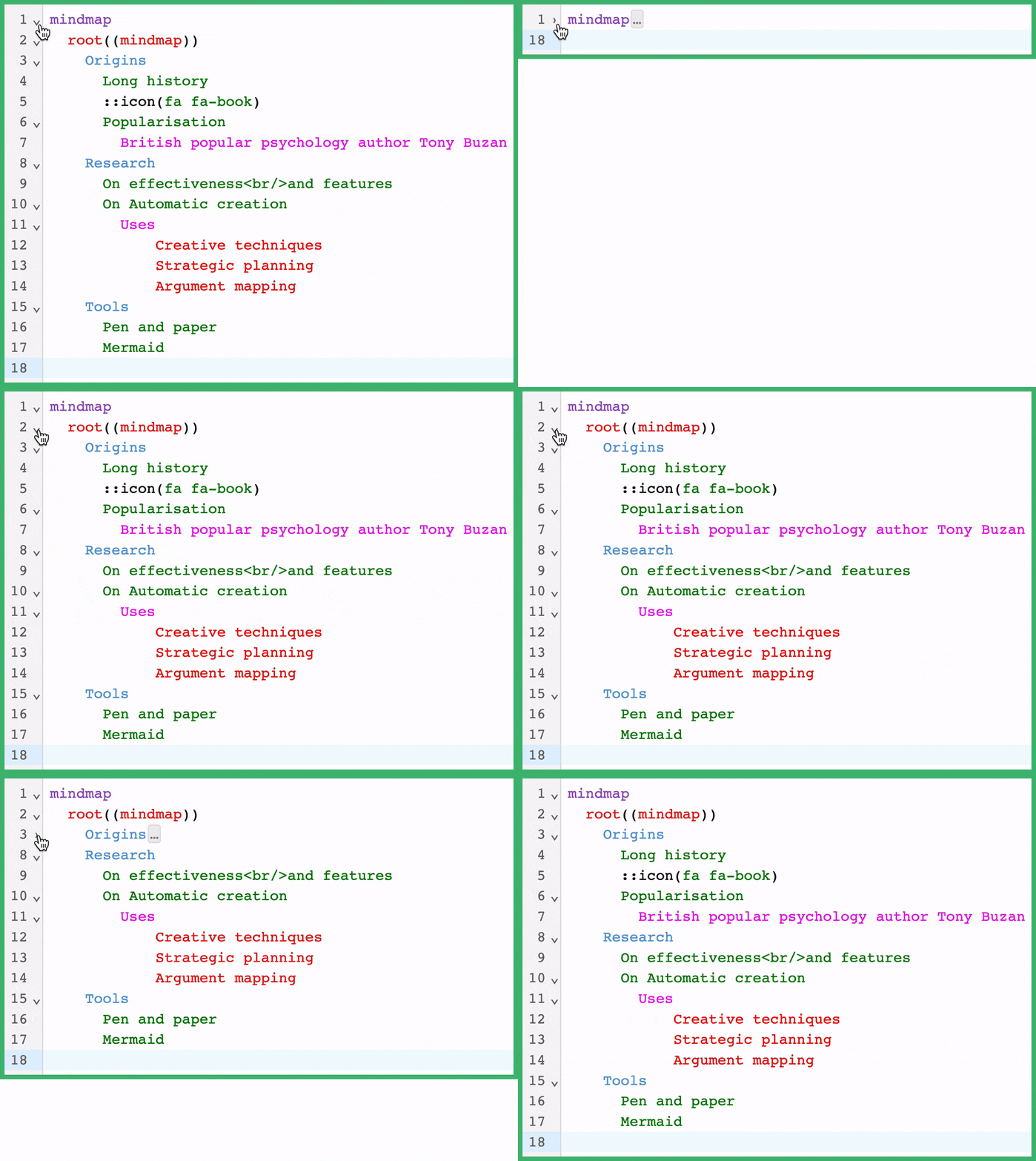
通过使 `foldByIndent` 扩展名,CodeMirror编辑器将在所有美人鱼图上添加代码折叠支持. [代码折叠](https://en.wikipedia.org/wiki/Code_folding) 是文本编辑器和IDE中允许您隐藏文档部分的常见功能。 这有助于使文档更容易阅读或管理.
示例用法:
```js
import { basicSetup, EditorView } from 'codemirror';
import { mermaid, mindmapTags } from '@edgetools/codemirror-lang-mermaid';
import { HighlightStyle, syntaxHighlighting } from '@codemirror/language';
const myHighlightStyle = HighlightStyle.define([
{ tag: mindmapTags.diagramName, color: '#9650c8' },
{ tag: mindmapTags.lineText1, color: '#ce9178' },
{ tag: mindmapTags.lineText2, color: 'green' },
{ tag: mindmapTags.lineText3, color: 'red' },
{ tag: mindmapTags.lineText4, color: 'magenta' },
{ tag: mindmapTags.lineText5, color: '#569cd6' },
]);
new EditorView({
doc: `mindmap
root((mindmap))
Origins
Long history
::icon(fa fa-book)
Popularisation
British popular psychology author Tony Buzan
Research
On effectiveness
and features
On Automatic creation
Uses
Creative techniques
Strategic planning
Argument mapping
Tools
Pen and paper
Mermaid
`,
extensions: [basicSetup, mermaid(), syntaxHighlighting(myHighlightStyle), foldByIndent()],
parent: document.body,
});
```
通过添加 `foldByIndent` 中,将启用缩进的代码折叠。 记住这个例子正在使用 `basicSetup` 扩展名,由 CodeMirror 提供,它在所有提供代码折叠支持的行上会添加箭头. 这个 `foldByIndent` 扩展会根据当前行的缩进数和以下行的缩进数来折叠代码.
## 常见问题
### @edgetools/codemirror-lang-mermaid 是什么?
CodeMirror 的美人鱼语言支持
### 如何安装 @edgetools/codemirror-lang-mermaid?
在项目目录运行 npm install @edgetools/codemirror-lang-mermaid,或使用 pnpm add / yarn add / bun add。
### @edgetools/codemirror-lang-mermaid 支持 TypeScript 吗?
支持。包内自带 TypeScript 类型声明(package\.json 声明了 types 入口),安装后即可获得类型提示,无需再安装 @types 包。
### @edgetools/codemirror-lang-mermaid 支持 ESM 还是 CommonJS?
同时提供 ES Module 与 CommonJS 入口,import 和 require\(\) 都可以使用,打包工具会自动选择合适的版本。
### @edgetools/codemirror-lang-mermaid 可以商用吗?
@edgetools/codemirror-lang-mermaid 使用 MIT 许可。宽松许可:允许商业使用、修改和再分发,通常只需在分发时保留原版权与许可声明。以上为概括,不构成法律意见,请以许可原文为准。
### @edgetools/codemirror-lang-mermaid 的下载量有多少?
根据 npm 官方下载统计,@edgetools/codemirror-lang-mermaid 在 2026/10/13 – 2026/11/11 这 30 天内被下载 2,185 次,日均约 73 次。下载量会把 CI 构建、镜像同步和作为其他包依赖的安装一并计入,适合横向比较热度,不能直接等同于使用人数。
### @edgetools/codemirror-lang-mermaid 还在维护吗?
最新版本 0\.6\.0 发布于 2026/09/13(2 个月前);至今共发布 1 个版本,其中过去 12 个月发布了 1 个;首次发布于 2026/09/13。发布频率只是参考信号:功能稳定的工具可能很少需要更新,建议结合源码仓库的 issue 和提交记录判断。