# @elfsight/embed-sdk 中文文档
规范地址:https://npmcn.com/package/%40elfsight/embed-sdk/
版本:0\.3\.4
npm 元数据更新时间:2025-09-24T15:21:17.614Z
中文译文更新时间:2026-11-14T03:37:53.209Z
软件包许可:ISC
本文由上游 README 翻译,可能存在偏差,请结合原文核对 API、命令与配置。版权与许可归原作者所有。
原始 npm 页面:https://www.npmjs.com/package/%40elfsight/embed-sdk
原文对照:https://npmcn.com/package/%40elfsight/embed-sdk/?lang=original
项目主页:https://elfsight.com/developers/
源码仓库:https://github.com/elfsight/embed-sdk
## 关键信息(来自 npm 元数据)
- 包体积(解压后):925 kB,44 个文件
- 模块格式:ESM + CJS
- TypeScript 类型:未声明
- 运行依赖:5 个
- 首次发布:2019-11-19T07:33:54.040Z
- 最新版本发布:2025-09-24T15:21:17.264Z
- 近 30 天下载量:2382(2026-10-14 至 2026-11-12,npm 官方下载统计)
- 已发布版本数:21(近 12 个月 0 个)
## 中文简介
Elfsight 嵌入 SDK 是将 Elfsight 部件目录直接整合到您的平台上的工具
## 安装
```sh
npm install @elfsight/embed-sdk
```
也可以使用:`pnpm add @elfsight/embed-sdk`、`yarn add @elfsight/embed-sdk`、`bun add @elfsight/embed-sdk`
## README
# 精灵入住SDK
  
Elfsight 嵌入 SDK 是集成的工具 [外观 50+ 部件](http://elfsight.com/widgets) 直接在您的平台上的目录(网站主题,网站/页面构建器等). Elfsight提供的社会馈赠、评论、现场聊天、形式、画廊和电子商务部件将大大扩展您的平台的功能。 嵌入目录会让你赚更多 [精明附属程序](https://elfsight.com/affiliate-program/)。 。 。 .
## 目录
[开始](https://npmcn.com/package/%40elfsight/embed-sdk/#readme-getting-started)
- [1\. 添加 SDK](https://npmcn.com/package/%40elfsight/embed-sdk/#readme-1-add-sdk)
- [2\. 嵌入部件](https://npmcn.com/package/%40elfsight/embed-sdk/#readme-2-embed-the-widgets)
- [3\. 处理用户配置的部件](https://npmcn.com/package/%40elfsight/embed-sdk/#readme-3-process-the-users-configured-widget)
- [4\. 允许用户管理其部件](https://npmcn.com/package/%40elfsight/embed-sdk/#readme-4-allows-the-users-to-manage-their-widgets)
- [5\. 连接Elfsight附属方案](https://npmcn.com/package/%40elfsight/embed-sdk/#readme-5-link-elfsight-affiliate-program)
- [6\. 增加移案段落](https://npmcn.com/package/%40elfsight/embed-sdk/#readme-6-add-referral-param)
[UI 组件](https://npmcn.com/package/%40elfsight/embed-sdk/#readme-ui-components)
- [应用目录](https://npmcn.com/package/%40elfsight/embed-sdk/#readme-apps-catalog)
- [应用卡](https://npmcn.com/package/%40elfsight/embed-sdk/#readme-app-card)
- [部件管理面板](https://npmcn.com/package/%40elfsight/embed-sdk/#readme-widget-management-panel)
- [按钮](https://npmcn.com/package/%40elfsight/embed-sdk/#readme-buttons)
[API 方法](https://npmcn.com/package/%40elfsight/embed-sdk/#readme-api-methods)
- [获取应用程序列表](https://npmcn.com/package/%40elfsight/embed-sdk/#readme-get-the-apps-list)
- [获取特定的应用程序](https://npmcn.com/package/%40elfsight/embed-sdk/#readme-get-the-specific-app)
- [设置关联推荐ID](https://npmcn.com/package/%40elfsight/embed-sdk/#readme-set-affiliate-referral-id)
- [打开创建部件窗口](https://npmcn.com/package/%40elfsight/embed-sdk/#readme-open-create-widget-window)
- [打开编辑部件窗口](https://npmcn.com/package/%40elfsight/embed-sdk/#readme-open-edit-widget-window)
- [调用删除部件](https://npmcn.com/package/%40elfsight/embed-sdk/#readme-call-remove-widget)
- [显示部件](https://npmcn.com/package/%40elfsight/embed-sdk/#readme-display-a-widget)
## 开始
### 1\. 添加 SDK
首先,在你的环境里加入"精灵"(Elfsight Embed SDK). 请确保您已将其添加到用户将配置其部件的区域以及必须显示的区域.
您可以以两种方式添加嵌入式 SDK :
- 通过我们的CDN:
```html
```
- 作为 npm 软件包 :
```bash
npm install --save @elfsight/embed-sdk
```
下一步, 您需要导入嵌入软件包 。 如果你使用CDN,你不必导入软件包.
```js
import { ElfsightEmbedSDK } from '@elfsight/embed-sdk';
```
### 2\. 嵌入部件
根据您的使用大小写, 您可以通过 SDK 中提供的各种组件和 API 嵌入部件 。 让我们考虑一个嵌入 [应用目录](https://npmcn.com/package/%40elfsight/embed-sdk/#readme-apps-catalog) 组件.
使用下面的代码将组件嵌入到您的平台的正确位置:
```js
const container = document.querySelector('#elfsight-catalog-container');
const callback = function(response) {
// saving logic (3. Process the user’s configured widget)
};
const options = {
};
ElfsightEmbedSDK.displayCatalog(container, callback, options);
```
1. 设定 `container` 来制作目录.
2. 通过 `callback` 函数,将随用户配置部件的数据调用.
3. 配置组件 `options`,如有必要.
### 3\. 处理用户配置的部件
在用户的部件配置完成后,它将调用第2点所描述的调用函数,数据如下:
```js
{
id: 'xxxxxxxx-xxxx-xxxx-xxxx-xxxxxxxxxxxx',
url: 'https://apps.elfsight.com/widget/xxxxxxxx-xxxx-xxxx-xxxx-xxxxxxxxxxxx',
code: '',
element: div.elfsight-app-xxxxxxxx-xxxx-xxxx-xxxx-xxxxxxxxxxxx, // instanceof HTMLElement
app: 'application-alias'
}
```
#### 3.1. 在环境中保存部件数据
您需要保存您的数据库中的部件数据, 才能做到以下操作 :
- 显示部件
- 允许用户与部件交互
- 嵌入组件来管理部件
#### 3.2. 显示部件
要显示用户配置的部件, 您需要将部件数据元素添加到要显示部件的地方 .
从上一步扩展示例 :
```html
```
请确保您已经将 SDK 添加到该部件的页面中 .
### 4\. 允许用户管理其部件
为了允许您的用户编辑或移除其部件, Elfsight Embed SDK 提供了 [编辑](https://npmcn.com/package/%40elfsight/embed-sdk/#readme-edit-button) 财务报告和审定财务报表 [删除](https://npmcn.com/package/%40elfsight/embed-sdk/#readme-remove-button) 按钮或 [部件管理面板](https://npmcn.com/package/%40elfsight/embed-sdk/#readme-widget-management-panel),允许所有可能的部件操作。 要显示部件管理面板, 请在部件元素旁边添加代码 :
示例
```html
```
### 5\. 连接Elfsight附属方案
每一次通过您合并的付费订阅,可获得30%的无期限收入。 学习更多关于 [附属程序](https://elfsight.com/affiliate-program/)。 。 。 .
1. 注册到程序 [https://elfsight.com/affiliate-program/ 页面存档备份,存于互联网档案馆](https://elfsight.com/affiliate-program/)。 。 。 .
2. 登录到您 [附属账户](https://elfsight.affise.com/v2/sign/in) 并且提供身份证明.
3. 使用方法 `setAffiseParams` 用于带有附属参数的 SDK.
```js
ElfsightEmbedSDK.setAffiseParams(pid, offerId);
```
如果你有任何困难,不要犹豫联系我们 [附属机构@elfsight.com](mailto:affiliates@elfsight.com)。 。 。 .
### 6\. 添加移案参数
要连接一个 [转诊程序](https://dash.elfsight.com/refer-a-friend) 链接使用 `setReferral` 方法 :
它会增加一个 `?ref=` sDK中所有链接的参数.
```js
ElfsightEmbedSDK.setReferral('xxxxxxxx-xxxx-xxxx-xxxx-xxxxxxxxxxxx');
```
## UI 组件
### 应用目录
此组件显示 Elfsight 部件的完整列表 。 还按类别提供了过滤和搜索功能。 配置此组件有两种方式之一:让您的用户点击其卡片打开一个应用程序的编辑器,或者引导它们到我们的网站.
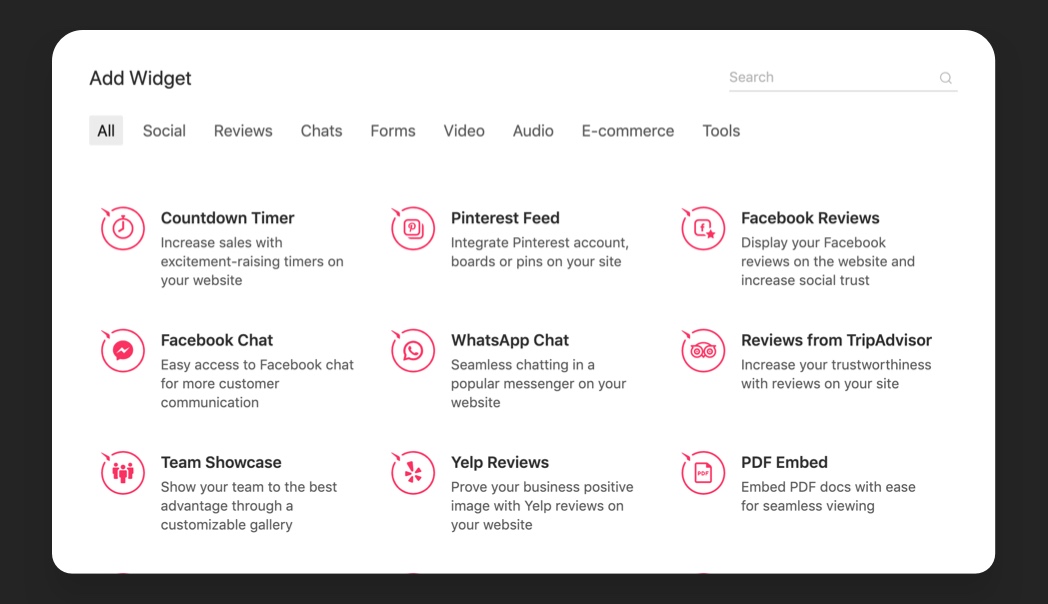 [](https://jsfiddle.net/elfsight/3vzabkw7/)
`ElfsightEmbedSDK.displayCatalog(container, callback, options)`
```js
const container = document.querySelector('#elfsight-catalog-container');
const callback = function(widget) {
// saving logic
};
const options = {
};
ElfsightEmbedSDK.displayCatalog(container, callback, options);
```
二、可选办法
| 选项 | 类型 | 默认 | 说明 |
| --- | --- | --- | --- |
| `title` | 字符串 | `'Choose Widget'` | 输入目录标题文本 |
| `searchEnabled` | 布尔 | `true` | 在目录中显示/隐藏搜索字段 |
| `searchPlaceholder` | 字符串 | `''` | 输入搜索字段的占位符文字 |
| `height` | 字符串 | `'auto'` | 设置像素中的目录高度 `'auto'` 以全高显示目录 |
| `category` | 字符串 | `''` | 对于只需要显示一个部件类别时,请在此设置该类别的别名 |
| `promoMode` | 布尔/ 字符串 | `false` | 指定目录的行为 |
| `promoReferral` | 字符串 | `''` | 在此添加您的推荐代号( 如果您没有用方法完成 ) [设置关联推荐ID](https://npmcn.com/package/%40elfsight/embed-sdk/#readme-set-affiliate-referral-id) |
可用值 `category` 可获取选项 [这里](https://apps.elfsight.com/api/v1/public/categories)。 。 。 .
可用值 `promoMode` 选项 :
- `false` - 默认在新窗口中打开 app. elfsight.com 服务让用户创建并选择部件 。 选中的部件返回为指定的调回参数, 然后再嵌入到所需的位置 .
- `'link'` 激活此模式, 在您的网站上显示应用程序目录, 并推荐您的访问者到 elfsight.com 网站, 以 Elfsight 附属程序获得更多的收入 .
- `'demo'` 激活此模式以显示应用程序目录, 并在您的网站上打开部件编辑器, 并引导您的访问者使用 app. elfsight.com 仪表板, 以 Elfsight 附属程序赚取更多的收入 .
### 应用卡
嵌入了卡片组件以显示一个特定的Elfsight应用. 用户可以配置的编辑器会在点击时打开.
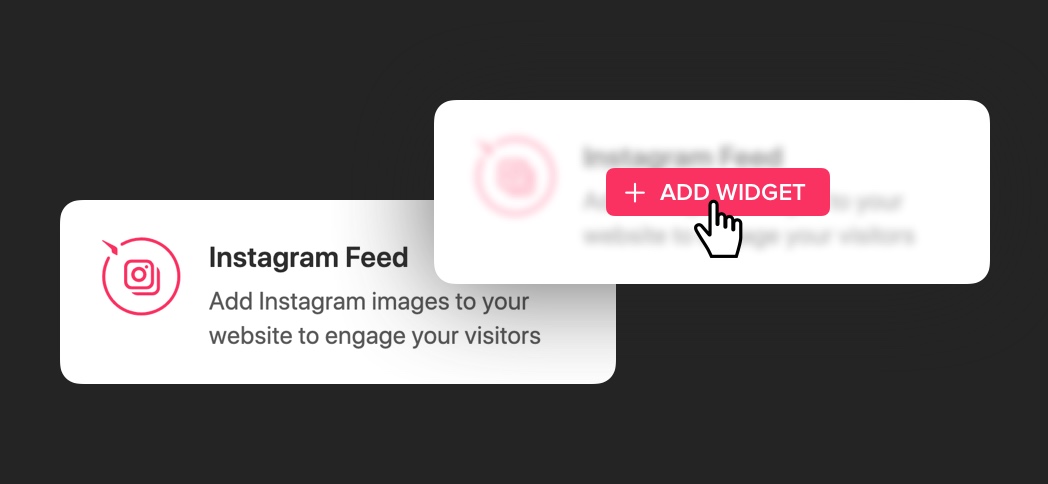 [](https://jsfiddle.net/elfsight/yrdm45e0/)
`ElfsightEmbedSDK.displayCard(container, callback, options)`
```js
const container = document.querySelector('#elfsight-app-card-container');
const callback = function(response) {
// saving logic
};
const options = {
appAlias: '' // required
};
ElfsightEmbedSDK.displayCard(container, callback, options);
```
二、可选办法
| 选项 | 类型 | 默认 | 说明 |
| --- | --- | --- | --- |
| `appAlias` | 字符串 | `''` | **需求**。设置要显示为卡片的应用程序别名 |
| `buttonText` | 字符串 | `'ADD'` | 设置悬停按钮文本 |
| `buttonIcon` | 字符串 | `'add'` | 设置徘徊按钮图标 |
| `promoMode` | 布尔/ 字符串 | `false` | 指定牌的行为 |
| `promoReferral` | 字符串 | `''` | 在此添加您的推荐代号( 如果您没有用方法完成 ) [设置关联推荐ID](https://npmcn.com/package/%40elfsight/embed-sdk/#readme-set-affiliate-referral-id) |
可用值 `appAlias` 可获取选项 [这里](https://apps.elfsight.com/api/v1/public/applications)
可用值 `promoMode` 选项 :
- `false` - 默认在新窗口中打开 app. elfsight.com 服务让用户创建并选择部件 。 选中的部件返回为指定的调回参数, 然后再嵌入到所需的位置 .
- `'link'` 激活此模式, 在您的网站上显示应用程序目录, 并推荐您的访问者到 elfsight.com 网站, 以 Elfsight 附属程序获得更多的收入 .
- `'demo'` 激活此模式以显示应用程序目录, 并在您的网站上打开部件编辑器, 并引导您的访问者使用 app. elfsight.com 仪表板, 以 Elfsight 附属程序赚取更多的收入 .
可用值 `buttonIcon` 选项 :
- `'glyph'`
- `'plus'`
- `'edit'`
- `'search'`
- `'close'`
- `'trash'`
### 部件管理面板
将此面板与用户的部件一起添加到您的管理区域 。 这将使用户能够管理部件(编辑、删除等).
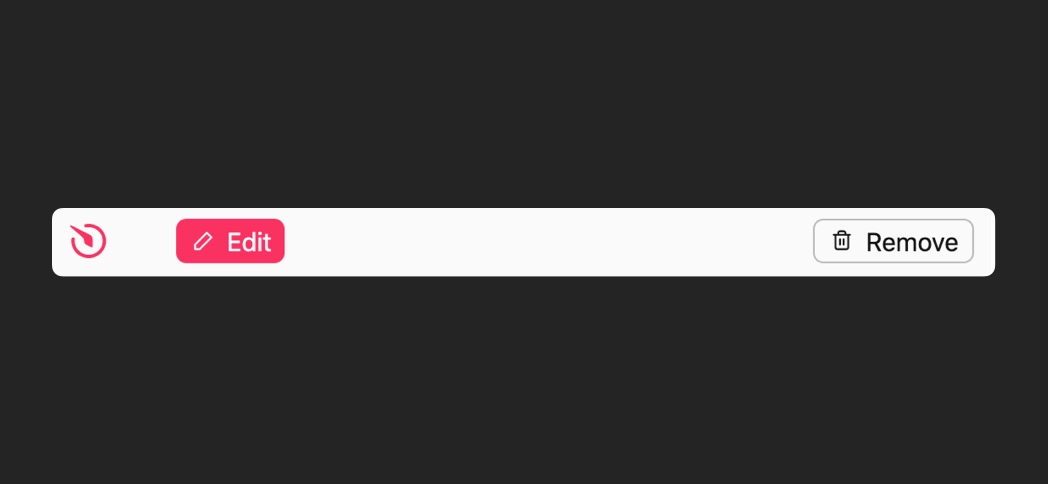 [](https://jsfiddle.net/elfsight/t63a9vcq/)
`ElfsightEmbedSDK.displayPanel(container, callbacks, options)`
```js
const container = document.querySelector('#elfsight-widget-panel-container');
const callbacks = {
onEdit: function(response) {
// on edit logic
},
onRemove: function(response) {
// on remove logic
}
};
const options = {
widgetId: '' // required
};
ElfsightEmbedSDK.displayPanel(container, callbacks, options);
```
二、可选办法
| 选项 | 类型 | 默认 | 说明 |
| --- | --- | --- | --- |
| `widgetId` | 字符串 | `null` | **需求**设置要在此面板中管理的用户部件 ID |
| `size` | 字符串 | `'big'` | 选择可用的大小之一 |
| `color` | 字符串 | `'#fafafa'` | 设置面板背景颜色 |
可用值 `size` 选项 :
- `'big'`
- `'medium'`
- `'small'`
### 按钮
此组件包括3个按钮:
- **创建** - 打开应用程序目录让用户选择一个应用程序,
- **编辑** - 打开部件编辑器窗口,
- **删除** - 从网站上删除部件.
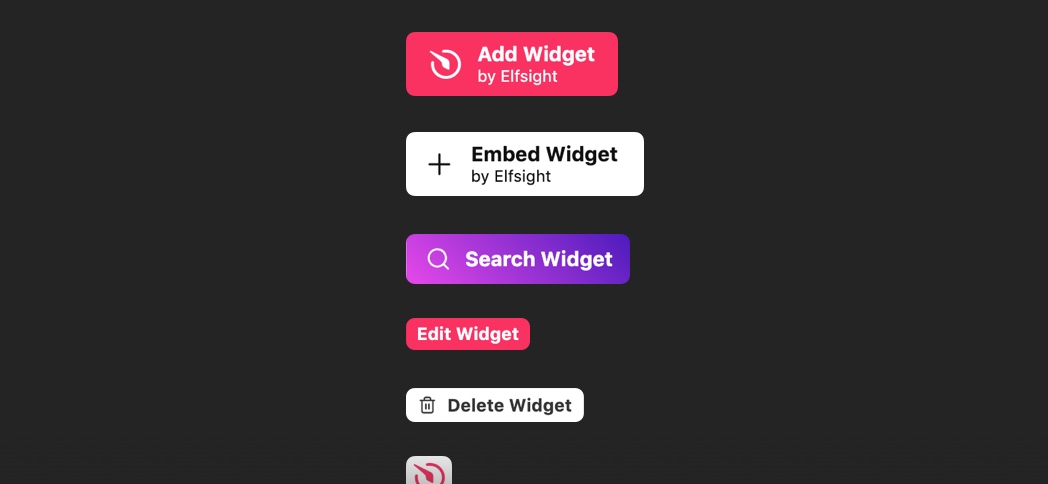 [](https://jsfiddle.net/elfsight/oj168u3f/)
`ElfsightEmbedSDK.displayButton(container, callback, options)`
```js
const container = document.querySelector('#elfsight-button-container');
const callback = function(response) {
// button callback logic
};
const options = {
};
ElfsightEmbedSDK.displayButton(container, callback, options);
```
二、可选办法
| 选项 | 类型 | 默认 | 说明 |
| --- | --- | --- | --- |
| `type` | 字符串 | `'create'` | **需求**按钮动作 |
| `widgetId` | 字符串 | `null` | **需求** 用于按钮类型“ 编辑” 和“ 移动 ” |
| `size` | 字符串 | `'big'` | 选择可用的大小之一 |
| `backgroundColor` | 字符串 | `'#f93262'` | 设置按钮背景颜色 |
| `backgroundColor` | 字符串 | `'#f93262'` | 设置按钮文本颜色 |
| `backgroundColor` | 字符串/波尔 | `false` | 设置按钮边框颜色( E)`false` 透明度) |
| `text` | 字符串 | `'Add Widget'` | 设置按钮文本 |
| `icon` | 字符串 | `'glyph'` | 选择可用的图标之一 |
可用值 `type` 选项 :
- `'create'`
- `'edit'`
- `'remove'`
可用值 `size` 选项 :
- `'big'`
- `'medium'`
- `'small'`
可用值 `icon` 选项 :
- `'glyph'`
- `'plus'`
- `'edit'`
- `'search'`
- `'close'`
- `'trash'`
#### 创建按钮
带有类型的预定义按钮 `'create'`
`ElfsightEmbedSDK.displayCreateButton(container, callback, options)`
```js
const container = document.querySelector('#elfsight-button-container');
const callback = function(response) {
// button callback logic
};
const options = {
appAlias: '' // set app alias to create a specific app. leave it blank to open app selection popup
};
ElfsightEmbedSDK.displayCreateButton(container, callback, options);
```
#### 编辑按钮
带有类型的预定义按钮 `'edit'`
`ElfsightEmbedSDK.displayEditButton(container, callback, options)`
```js
const container = document.querySelector('#elfsight-button-container');
const callback = function(response) {
// button callback logic
};
const options = {
widgetId: '' // required
};
ElfsightEmbedSDK.displayEditButton(container, callback, options);
```
#### 删除按钮
带有类型的预定义按钮 `'remove'`
`ElfsightEmbedSDK.displayRemoveButton(container, callback, options)`
```js
const container = document.querySelector('#elfsight-button-container');
const callback = function(response) {
// button callback logic
};
const options = {
widgetId: '' // required
};
ElfsightEmbedSDK.displayRemoveButton(container, callback, options);
```
## API 方法
使用 API 端点来创建您自己的组件或接口来与 Elfsight 部件交互 .
### 获取应用程序列表
使用此端点获取以下数据的可用应用程序列表:
- `name`
- `alias`
- `caption`
- `public_id`
- `icon`
- `category_id`
- `tags`
- `promo_url`
`ElfsightEmbedSDK.getApplications()`
```js
const callback = function(response) {
// logic on
};
ElfsightEmbedSDK.getApplications().then(callback);
```
### 获取特定的应用程序
使用此端点获取特定应用程序的数据
`ElfsightEmbedSDK.getApplication(appAlias)`
```js
const appAlias = 'instashow'; // required. alias for specified application
const callback = function(response) {
// logic on
};
ElfsightEmbedSDK.getApplication(appAlias).then(callback);
```
### 设置关联推荐ID
加入您的关联转介ID 以收取关联费 为SDK订阅。 学习更多关于 [Effsight 附属程序](https://elfsight.com/affiliate-program/)
`ElfsightEmbedSDK.setReferral('xxxxxxxx-xxxx-xxxx-xxxx-xxxxxxxxxxxx')`
```js
const referralID = 'xxxxxxxx-xxxx-xxxx-xxxx-xxxxxxxxxxxx';
ElfsightEmbedSDK.setReferral(referralID);
```
### 打开创建部件窗口
使用此端点打开窗口, 您的用户可以配置并创建其部件 .
`ElfsightEmbedSDK.createWidget(appAlias).then(callback)`
```js
const appAlias = 'instashow'; // optional. alias for specified application, displays the popup if not specified
const callback = function(response) {
// logic on
};
ElfsightEmbedSDK.createWidget(appAlias).then(callback);
```
### 打开编辑部件窗口
使用此端点打开窗口, 您的用户可以配置先前创建的部件 .
`ElfsightEmbedSDK.editWidget(widgetId).then(callback)`
```js
const widgetId = 'xxxxxxxx-xxxx-xxxx-xxxx-xxxxxxxxxxxx'; // required. set the managed widget
const callback = function(response) {
// logic on
};
ElfsightEmbedSDK.editWidget(widgetId).then(callback);
```
### 调用删除部件
调用此方法要求用户确认部件删除 。 如果用户确认, 部件去除逻辑, 您在 `callback` 执行.
`ElfsightEmbedSDK.removeWidget(widgetId).then(callback)`
```js
const widgetId = 'xxxxxxxx-xxxx-xxxx-xxxx-xxxxxxxxxxxx'; // required. set the managed widget
const callback = function(response) {
// logic on
};
ElfsightEmbedSDK.removeWidget(widgetId).then(callback);
```
### 显示部件
将指定的部件嵌入容器 .
`ElfsightEmbedSDK.displayWidget(container, widgetId)`
```js
const container = document.querySelector('#elfsight-widget-container');
const widgetID = 'xxxxxxxx-xxxx-xxxx-xxxx-xxxxxxxxxxxx';
ElfsightEmbedSDK.displayWidget(container, widgetID);
```
## 常见问题
### @elfsight/embed-sdk 是什么?
Elfsight 嵌入 SDK 是将 Elfsight 部件目录直接整合到您的平台上的工具
### 如何安装 @elfsight/embed-sdk?
在项目目录运行 npm install @elfsight/embed-sdk,或使用 pnpm add / yarn add / bun add。
### @elfsight/embed-sdk 支持 TypeScript 吗?
该包的 package\.json 没有声明类型入口。需要类型提示时,可以在 npm 上查找社区维护的 @types/elfsight\_\_embed-sdk 是否存在。
### @elfsight/embed-sdk 支持 ESM 还是 CommonJS?
同时提供 ES Module 与 CommonJS 入口,import 和 require\(\) 都可以使用,打包工具会自动选择合适的版本。
### @elfsight/embed-sdk 可以商用吗?
@elfsight/embed-sdk 使用 ISC 许可。宽松许可:允许商业使用、修改和再分发,通常只需在分发时保留原版权与许可声明。以上为概括,不构成法律意见,请以许可原文为准。
### @elfsight/embed-sdk 的下载量有多少?
根据 npm 官方下载统计,@elfsight/embed-sdk 在 2026/10/14 – 2026/11/12 这 30 天内被下载 2,382 次,日均约 79 次。下载量会把 CI 构建、镜像同步和作为其他包依赖的安装一并计入,适合横向比较热度,不能直接等同于使用人数。
### @elfsight/embed-sdk 还在维护吗?
最新版本 0\.3\.4 发布于 2025/09/24(1\.1 年前);至今共发布 21 个版本,其中过去 12 个月发布了 0 个;首次发布于 2019/11/19。发布频率只是参考信号:功能稳定的工具可能很少需要更新,建议结合源码仓库的 issue 和提交记录判断。