# @fleox-agent-crm/agentcrm 中文文档

规范地址：https://npmcn.com/package/%40fleox-agent-crm/agentcrm/

版本：0\.12\.2
npm 元数据更新时间：2026-11-06T21:15:50.117Z
中文译文更新时间：2026-11-14T22:25:54.369Z
软件包许可：SEE LICENSE IN LICENSE

本文由上游 README 翻译，可能存在偏差，请结合原文核对 API、命令与配置。版权与许可归原作者所有。

原始 npm 页面：https://www.npmjs.com/package/%40fleox-agent-crm/agentcrm
原文对照：https://npmcn.com/package/%40fleox-agent-crm/agentcrm/?lang=original
项目主页：https://github.com/fleox/agentcrm#readme
源码仓库：https://github.com/fleox/agentcrm

## 关键信息（来自 npm 元数据）

- 包体积（解压后）：7.9 MB，135 个文件
- 模块格式：ES Module
- TypeScript 类型：未声明
- Node.js 要求：\>=20
- 运行依赖：0 个
- 首次发布：2026-11-03T16:26:51.410Z
- 最新版本发布：2026-11-06T21:15:49.767Z
- 近 30 天下载量：3875（2026-10-15 至 2026-11-13，npm 官方下载统计）
- 已发布版本数：20（近 12 个月 20 个）

## 中文简介

您的AI代理可以运行的静态CRM:一个20/HubSpot风格的CRM,它完全通过代理crm CLI在浏览器中运行或无头运行,并存有您自己存储的数据.

## 安装

```sh
npm install @fleox-agent-crm/agentcrm
```

也可以使用：`pnpm add @fleox-agent-crm/agentcrm`、`yarn add @fleox-agent-crm/agentcrm`、`bun add @fleox-agent-crm/agentcrm`

## README

![AgentCRM](https://raw.githubusercontent.com/fleox/agentcrm/master/.github/assets/logo.png)

# 代理客户关系

**你的人工智能特工可以运行的静态CRM.**  
公司、人员、交易、管道、任务和报告都由一个浏览器管理员负责.  
您的联系人会在您自己的存储处加密 。 没有服务器可以运行,永远.

[![npm version](https://img.shields.io/npm/v/@fleox-agent-crm/agentcrm?color=4f46e5&label=npm)](https://www.npmjs.com/package/@fleox-agent-crm/agentcrm) [![CI](https://github.com/fleox/agentcrm/actions/workflows/ci.yml/badge.svg)](https://github.com/fleox/agentcrm/actions/workflows/ci.yml) [![Node.js version](https://img.shields.io/node/v/@fleox-agent-crm/agentcrm?color=339933)](https://www.npmjs.com/package/@fleox-agent-crm/agentcrm) [![Claude Code plugin](https://img.shields.io/badge/Claude%20Code-plugin-d97757)](https://npmcn.com/package/%40fleox-agent-crm/agentcrm/#readme-claude-code) [![MCP server](https://img.shields.io/badge/MCP-server-0ea5e9)](https://npmcn.com/package/%40fleox-agent-crm/agentcrm/#readme-mcp-server) [![License](https://img.shields.io/badge/license-PolyForm%20Noncommercial-6b7280)](https://github.com/fleox/agentcrm/blob/master/LICENSE)

[快开始](https://npmcn.com/package/%40fleox-agent-crm/agentcrm/#readme-quick-start) • 妇女 [特征](https://npmcn.com/package/%40fleox-agent-crm/agentcrm/#readme-features) • 妇女 [把它给你](https://npmcn.com/package/%40fleox-agent-crm/agentcrm/#readme-make-it-yours) • 妇女 [如何运作](https://npmcn.com/package/%40fleox-agent-crm/agentcrm/#readme-how-it-works) • 妇女 [国 际](https://npmcn.com/package/%40fleox-agent-crm/agentcrm/#readme-the-agentcrm-cli) • 妇女 [MCP 磁共振](https://npmcn.com/package/%40fleox-agent-crm/agentcrm/#readme-mcp-server) • 妇女 [文档](https://github.com/fleox/agentcrm/blob/master/docs/README.md) • 妇女 [更改日志](https://github.com/fleox/agentcrm/blob/master/changelog.json)

[![Watch the 2-minute demo: real Claude Code sessions install AgentCRM and run the daily sales work, then a tour of the admin](https://raw.githubusercontent.com/fleox/agentcrm/master/.github/assets/video-poster.jpg)](https://cdn.jsdelivr.net/gh/fleox/agentcrm@master/.github/assets/agentcrm-demo.mp4)  
▶️ [看两分钟的演示](https://cdn.jsdelivr.net/gh/fleox/agentcrm@master/.github/assets/agentcrm-demo.mp4): Claude Code安装了CRM,导入线索,移动交易并计划后续,再对管理员进行巡视.

* * *

## 为什么是特工CRM

<table><tbody><tr><td><h3>没有东西可以跑</h3><p>管理员是一个静态的网络应用程序:HTML和JavaScript您在任何地方的主机,免费或接近(GitHub,GitLab或Cloudflare Pages,一个S3桶,一个文件夹). 没有 AgentCRM 服务器、 账户或订阅, 也没有任何补丁 .</p></td><td><h3>您的联系人,加密,您选择的地方</h3><p>数据生活在 <b>加密日记</b> (AES-256-GCM) (英语: <i></i> S3相容的桶, 私有 GitHub / GitLab repo 或本地文件夹, 或在您自己的文件夹 <b>基地</b> 项目。 有几个人可以同时工作而不发生冲突,而去除是身体上的.</p></td><td><h3>代理人 - 本地</h3><p>管理员的每一个动作也是带有JSON输出的CLI指令,MCP工具以及管理员助理的工具,具备克洛德·Code和赫尔梅斯的现成技能. 询问 <i>"让Globalx去谈判和计划后续"</i>:你的经纪人运行相同的引擎,具有相同的角色和检查.</p></td></tr></tbody></table>

## 快开始

### 有人工智能探员

**克劳德代码**

```text
/plugin marketplace add fleox/agentcrm
/plugin install agentcrm@agentcrm
```

那就问:

> _为我公司安装 AgentCRM: 数据在我的OVH桶中,管理GitHub Pages._  
> _以 ~/ Downloads/ leads.csv 导入线索,跳过重复,并为每个线索创建后续任务._  
> _哪些交易两周没有活动? 为每个项目起草后续电子邮件._

代理询问数据住在哪里和管理员主机在哪里,然后走入您创建最小优先键. 你在自己的终端输入秘密, 从来没有在聊天.

![A real Claude Code session: one sentence, and the agent installs AgentCRM with encrypted data and demo data on this computer, checks it with doctor and gives the admin URL; it ends on that CRM's dashboard](https://raw.githubusercontent.com/fleox/agentcrm/master/.github/assets/demo-install.gif)  
一个真正的克洛德代码会话。 代理的作品被加速了×8(被贴上标签);打字和实时的回答播放. 它在打开同一个加密数据的管理员上结束.

一旦安装,CRM就是对话:

![A real Claude Code session: the agent imports leads from a CSV file skipping duplicates, moves a deal to Negotiation, creates follow-up tasks for idle deals and shows the pipeline forecast, then the deals kanban in the admin](https://raw.githubusercontent.com/fleox/agentcrm/master/.github/assets/demo-agent.gif)  
同样的CRM,第二个请求:导入,管道移动,后续任务和预测. 在特工工作时加快了×16.

**还有第三个: _"让CRM符合我们的品牌..."_**

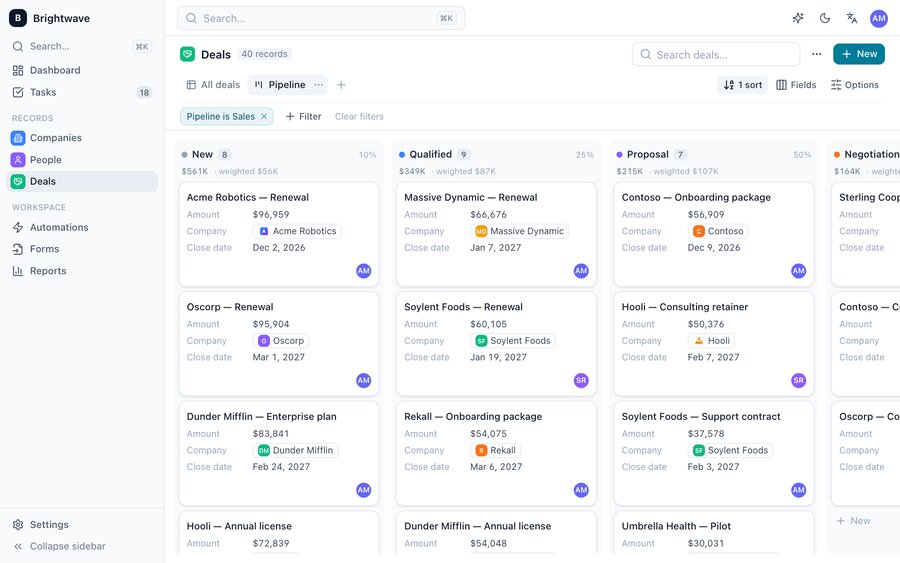
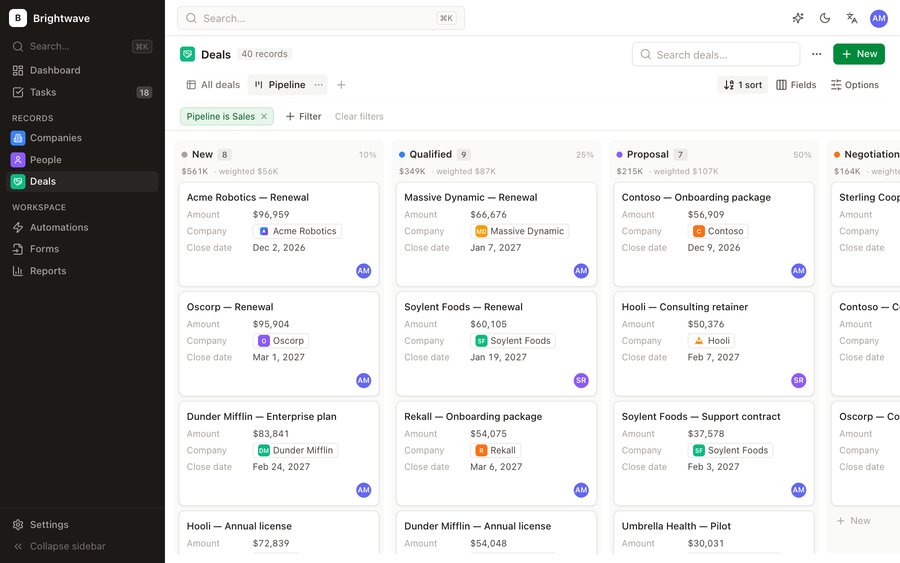
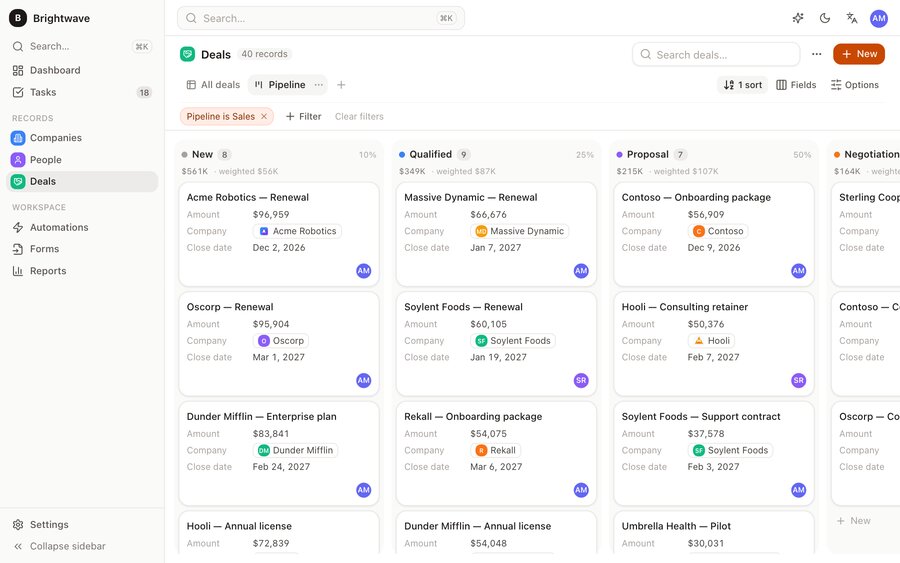
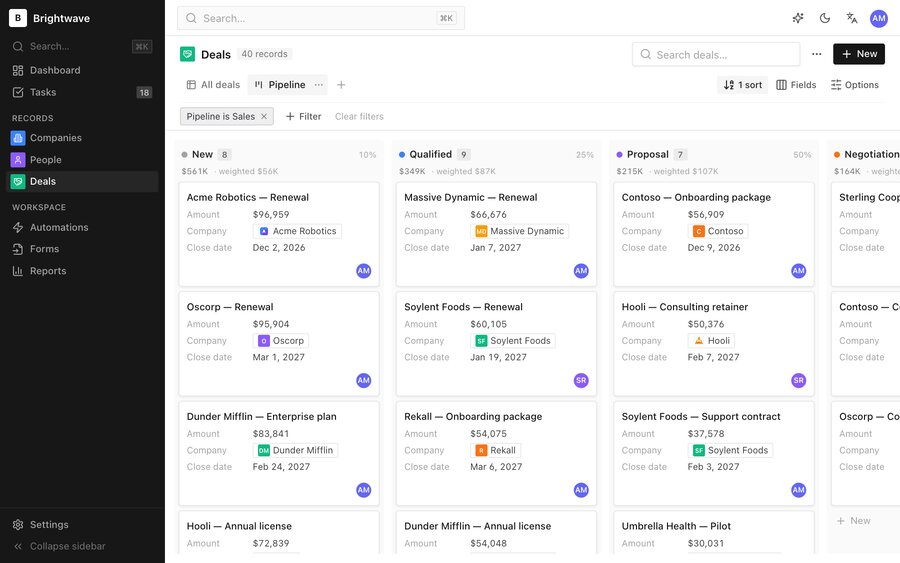
![A real Claude Code session: the agent sets a teal accent, a dark sidebar and the Inter font, and turns off the lead forms and email modules; it ends on the re-themed admin](https://raw.githubusercontent.com/fleox/agentcrm/master/.github/assets/demo-customize.gif)  
外观和模块由代理通过与Sets相同的引擎被更改. 加速了×8.

| 探员 | 设置 |
| --- | --- |
| **克劳德代码** | 以上插件: 技能 `agentcrm-install`, (中文(简体) ), `agentcrm-manage`, (中文(简体) ), `agentcrm-admin`, (中文(简体) ), `agentcrm-sales`, (中文(简体) ), `agentcrm-extensions` |
| **Claude 桌面、 光标、 任意 MCP 客户端** | 页:1 [MCP 服务器](https://npmcn.com/package/%40fleox-agent-crm/agentcrm/#readme-mcp-server)数字 : `agentcrm mcp --site <alias>` |
| **赫尔墨斯探员** / Python 剂 | 用 Python 包装器生成的技能, 参见 [主题/](https://github.com/fleox/agentcrm/tree/master/hermes) |
| **编码器、 风流器、 任何其他代理** | 指着它 [一般事务人员(其他职等)](https://github.com/fleox/agentcrm/blob/master/AGENTS.md) 和马克下的技能 [插件/ 技能/ 设备](https://github.com/fleox/agentcrm/tree/master/plugin/skills) |

### 没有经纪人

```bash
npx -y @fleox-agent-crm/agentcrm@0.12.2 serve
```

这开始您计算机上的管理员(Node.js 20+). 打开已打印的 URL 并跟踪设置向导 : **数据 / 安装**先看看周围,挑 **此浏览器** 用演示数据:没有东西离开你的机器。 向导还可以将管理员放入GitHub / GitLab / Cloudflare Pages或一桶上,因此你的团队只需要浏览器.

脚本安装( S)`install --plan plan.json`页:1 [文件/东道主,md](https://github.com/fleox/agentcrm/blob/master/docs/hosting.md) 财务报告和审定财务报表 [文件/目录](https://github.com/fleox/agentcrm/blob/master/docs/cli.md)。 。 。 .

## 特征

![The AgentCRM dashboard: open pipeline, weighted forecast, deals won this month, new leads, overdue tasks, pipeline by stage, won / lost, lead sources and activity by user](https://raw.githubusercontent.com/fleox/agentcrm/master/.github/assets/admin-dashboard-light.jpg)

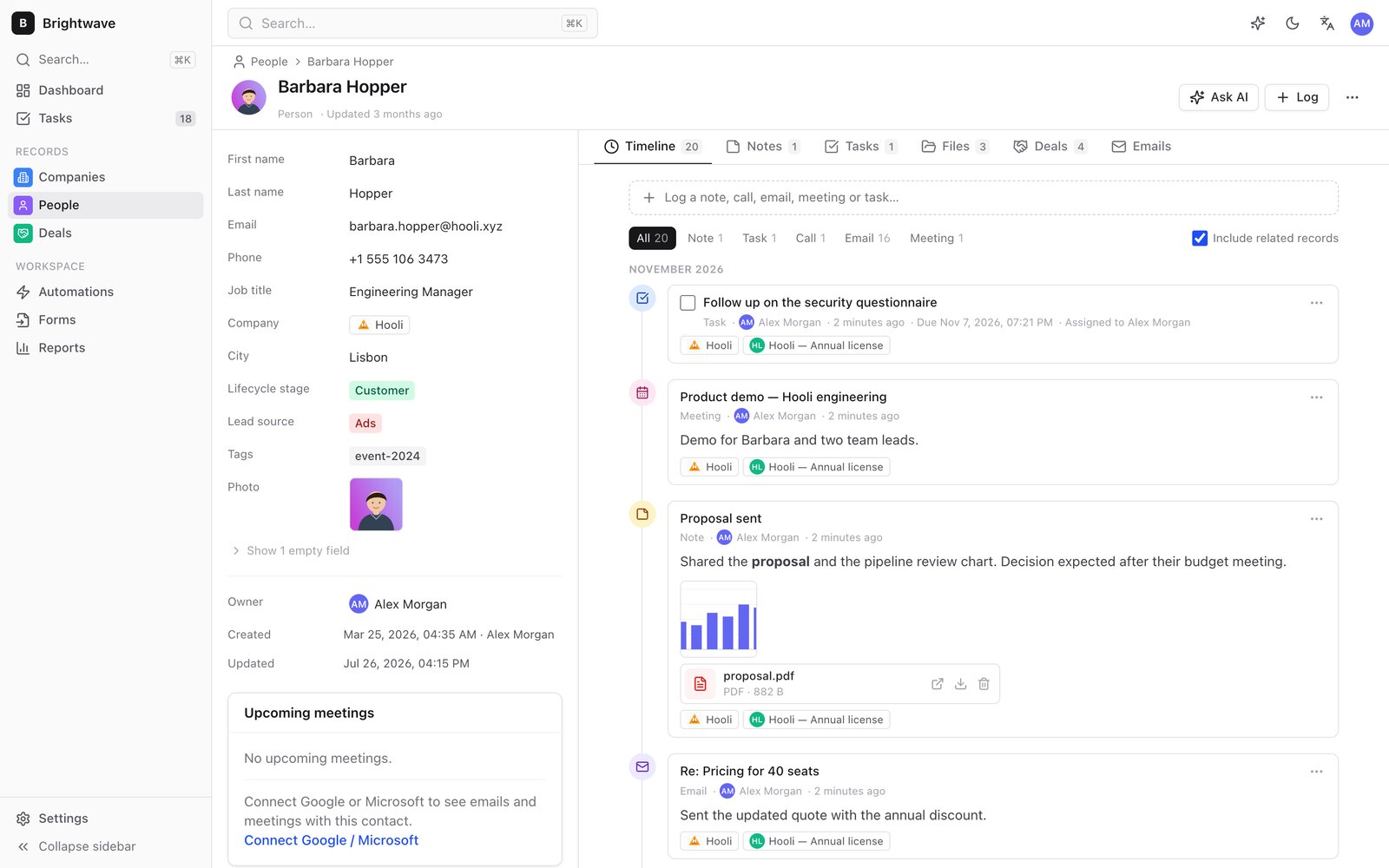
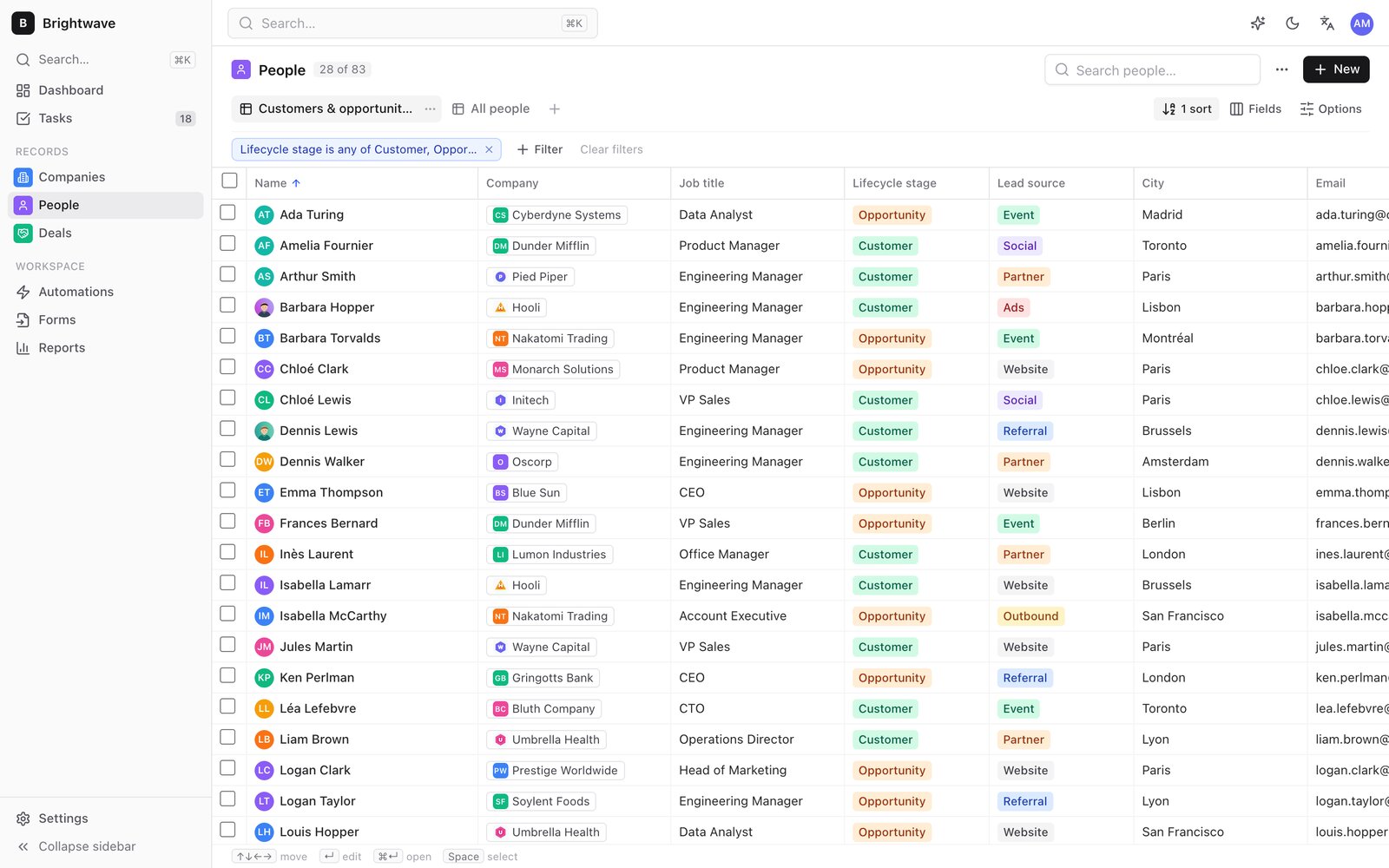
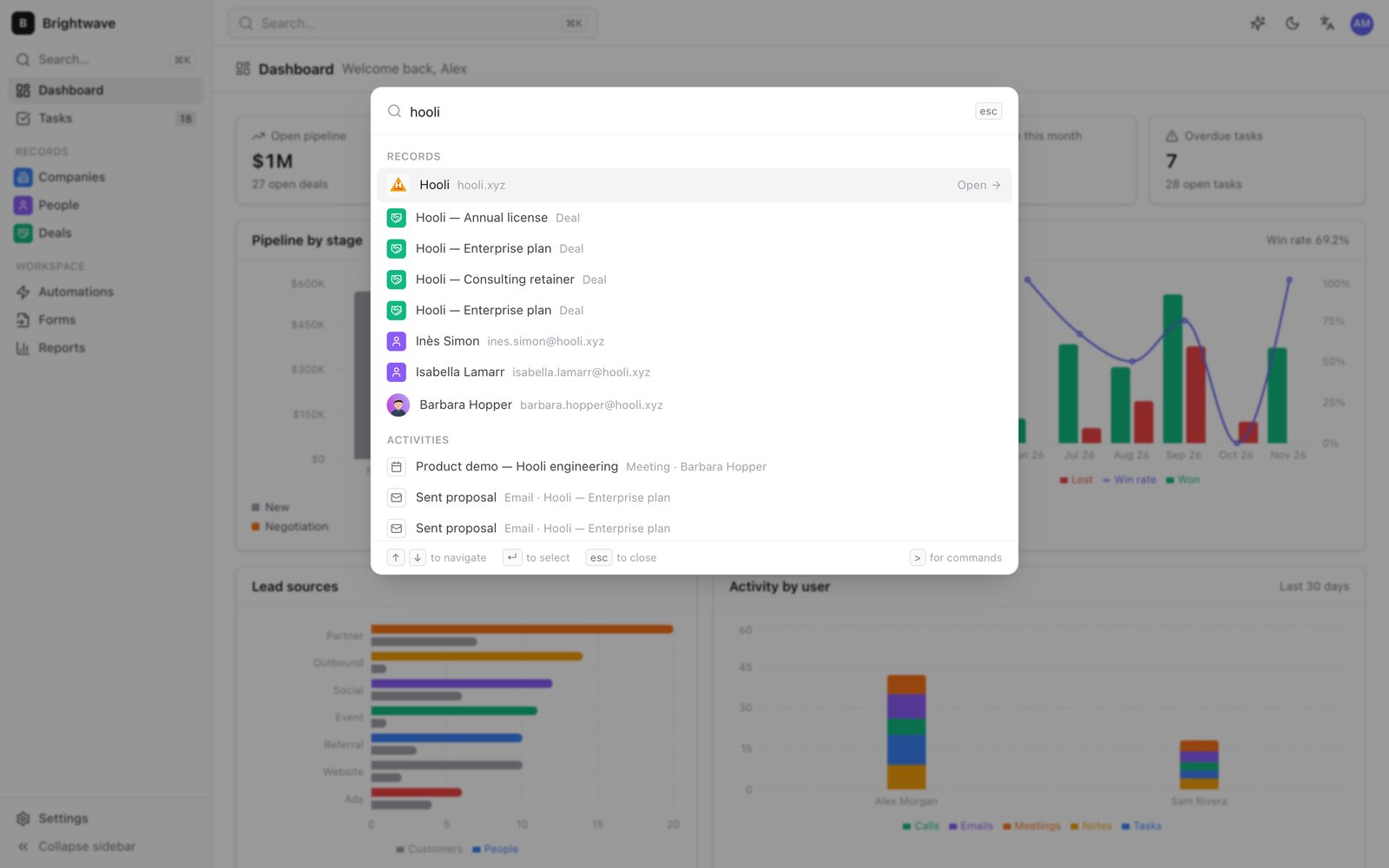
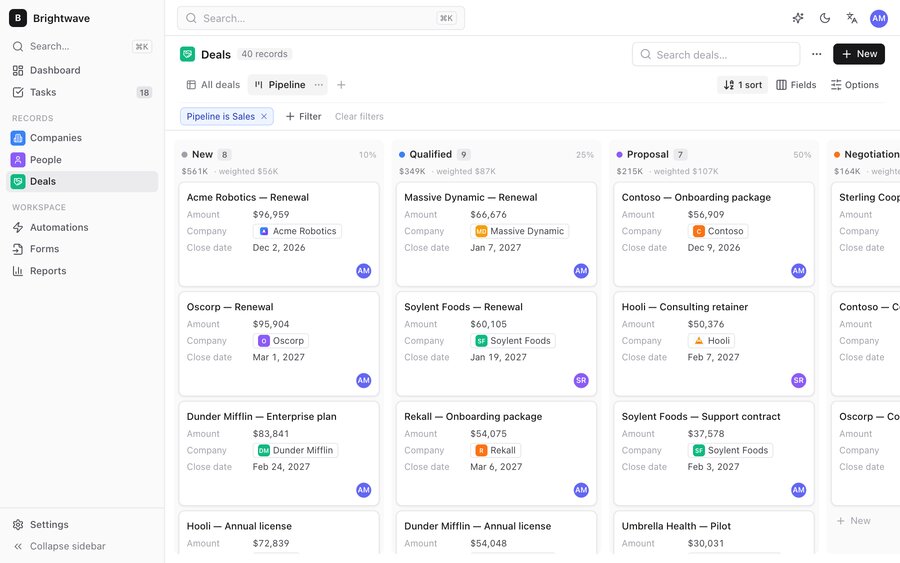
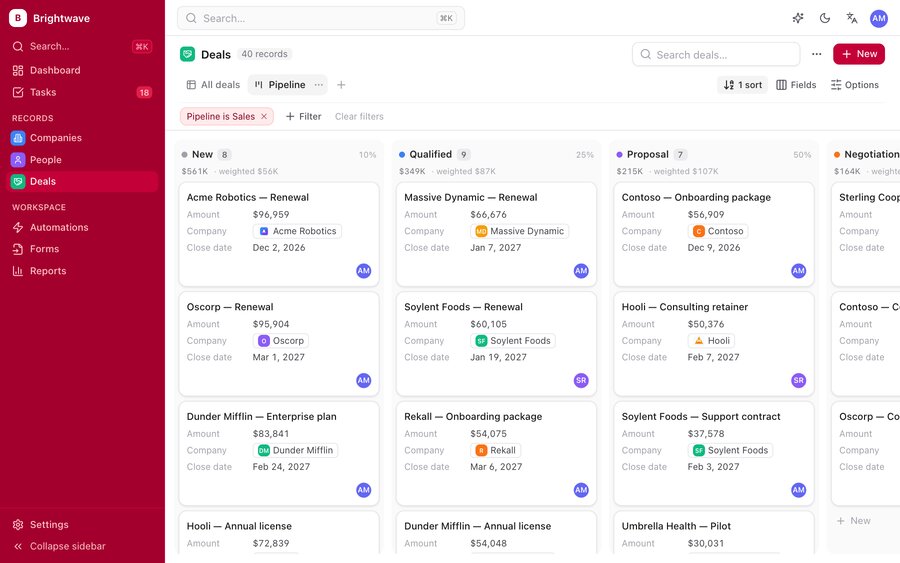
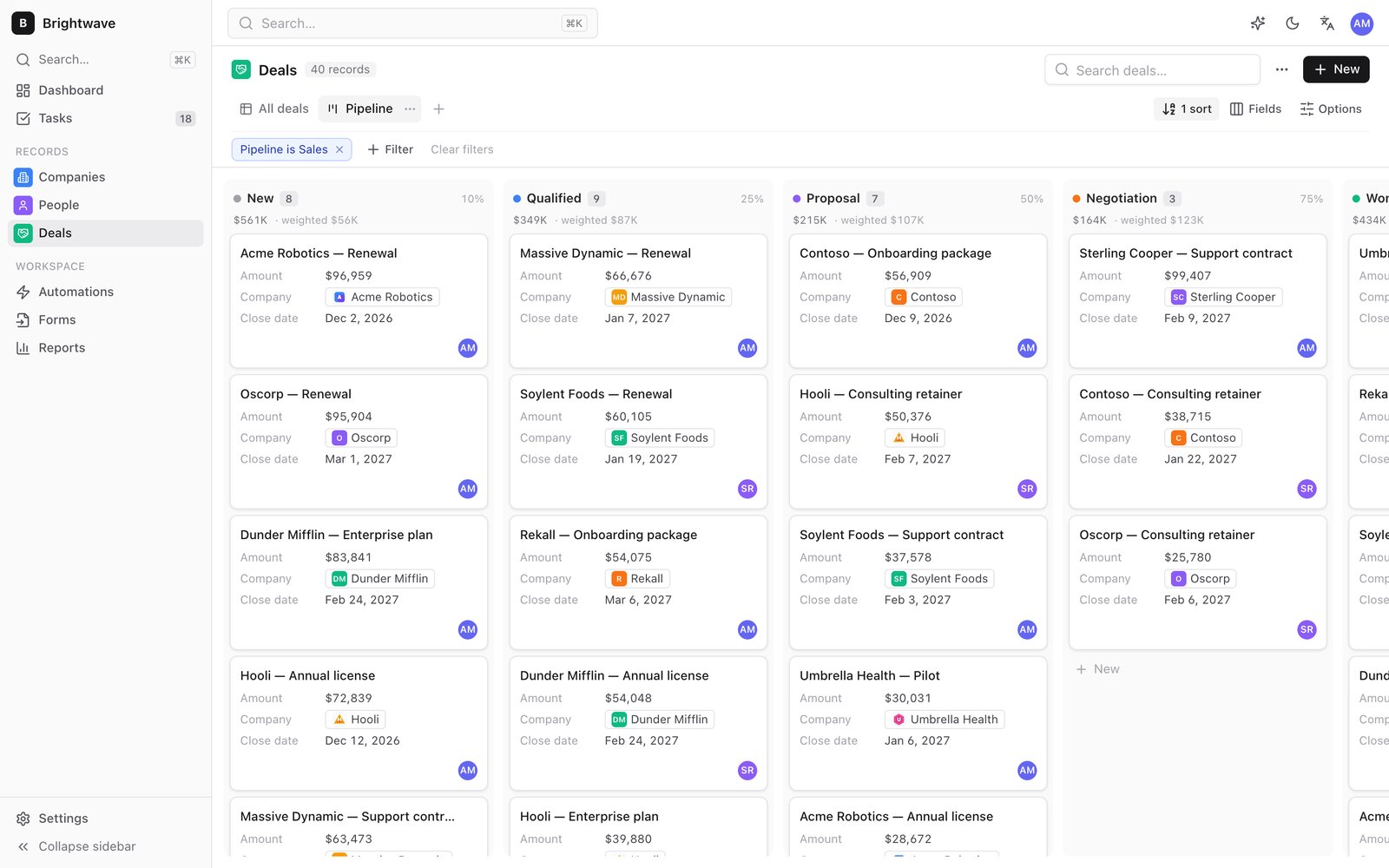
<table><tbody><tr><td><img alt="The deals pipeline as a kanban board, with amounts and weighted totals per stage" src="https://raw.githubusercontent.com/fleox/agentcrm/master/.github/assets/admin-kanban-light.jpg" loading="lazy" decoding="async" referrerpolicy="no-referrer"><p><b>管道</b>: 各阶段之间拖放交易,加权预测</p></td><td><img alt="A person's record page: portrait, fields, company link and a timeline with a task, a meeting, a note with an image and a PDF, and an email" src="https://raw.githubusercontent.com/fleox/agentcrm/master/.github/assets/admin-record-light.jpg" loading="lazy" decoding="async" referrerpolicy="no-referrer"><p><b>记录页</b>: 字段、关系、时间表、文件</p></td></tr><tr><td><img alt="A people table in a saved view filtered on lifecycle stage, with avatars, company logos and coloured values" src="https://raw.githubusercontent.com/fleox/agentcrm/master/.github/assets/admin-table-light.jpg" loading="lazy" decoding="async" referrerpolicy="no-referrer"><p><b>表格</b>: 内置编辑、过滤、保存视图、批量动作</p></td><td><img alt="The Cmd+K command palette searching across companies, deals, people and activities" src="https://raw.githubusercontent.com/fleox/agentcrm/master/.github/assets/admin-search-light.jpg" loading="lazy" decoding="async" referrerpolicy="no-referrer"><p><b>计算机+K</b>搜索所有东西,跳到任何地方</p></td></tr></tbody></table>

**卖**

-   公司、人员、交易和 **自定义对象** 有20个字段类型(货币,关系一/多,选择,用户,评分,地址,图像,文件.)
-   几个 **管道** 具有概率和开放/胜/失阶段、按阶段分列的坎班、加权预测
-   在Markdown、电话、电子邮件、会议和 **任务** gmail、 Google 日历和浏览器的 Outlook 日志( OAuth, 没有服务器)
-   联系照片、公司标志和记录及活动附件,用你的数据存储并加密

**组织**

-   有内置编辑、过滤器、类型、保存的视图和批量动作的表格视图;每个用户的布局都通过设备跟踪它们
-   **钻倒** 财务报告和审定财务报表 **滚动** 字段:一个市场公司与这些公司的联系,一个公司的地位被重算为您过滤的市场
-   复制检测并合并, CSV 有自动映射和干运行导入, CSV / JSON 导出, 完整 ZIP 备份
-   **谁改变了什么**:每张记录都保留着每个字段最后的写者,以及当从管理员,CLI,导入和同步时

**自动化并报告**

-   **自动化** 创建、更新、字段更改、舞台更改、日程安排或不活动:创建任务、更新字段、添加注释、指定所有者(圆形robin)、调用 webhook
-   **铅表单**: 将一个静态格式页面发布到您拥有的收件箱; 提交内容变为被复制的记录
-   **报告**:按阶段、预测、赢/输、每个用户的活动、铅源、呆账交易、转换
-   管理员开放时, 或从 [GitHub 动作曲线](https://github.com/fleox/agentcrm/blob/master/docs/automations.md) 在你的私人财产

**以代码运行**

-   **Schema 作为代码**: 一个JSON文件中的物体、字段、管道和视图,适用时有计划,具有独断专行,绝不具有破坏性([指南](https://github.com/fleox/agentcrm/blob/master/docs/schema-as-code.md)(中文(简体) )
-   **镜像另一个系统**数字 : `records sync` 以密钥保持对象与外部源同步, 归档所剩的, 只写差异([指南](https://github.com/fleox/agentcrm/blob/master/docs/sync.md)(中文(简体) )

**设计安全**

-   默认加密:密码句 → PBKDF2-SHA256(60万次重复) → AES-256-GCM
-   机密(存储密钥、 git 令牌、 密码句) 留在每个用户的浏览器或 CLI 中 `0600` 证书文件, 从未在 `config.js`,数据或数字
-   管理员,成员和取景者角色,由引擎本身执行(由生成的Firestore规则以Firebase模式执行)
-   GDPR:软删除,然后 `compact` 删除已删除的记录和文件; 随时导出所有文件
-   行政部门有英文和法文版

## 把它给你

下面的一切都在 **设置**,并且一个代理人也可以做所有的工作(CLI,MCP工具,技能),在任何改变之前有一个计划.

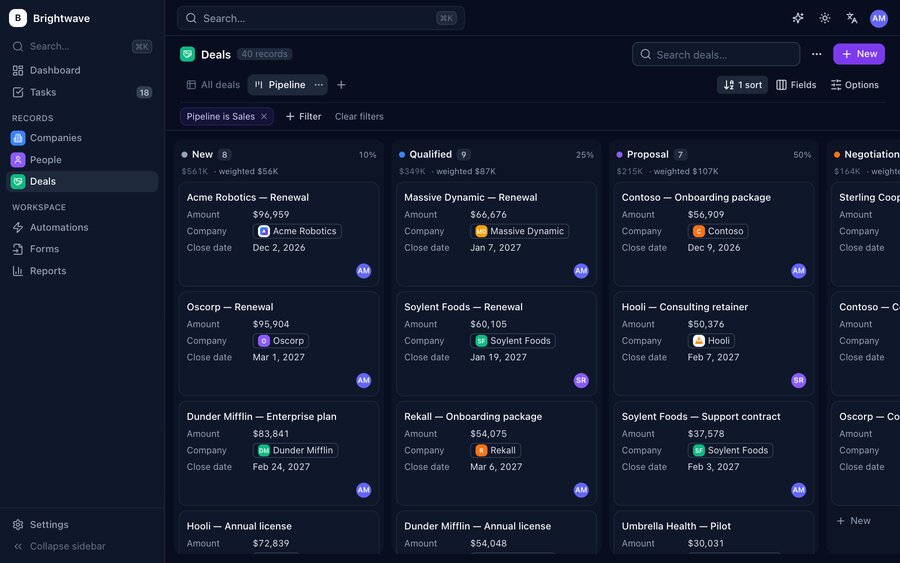
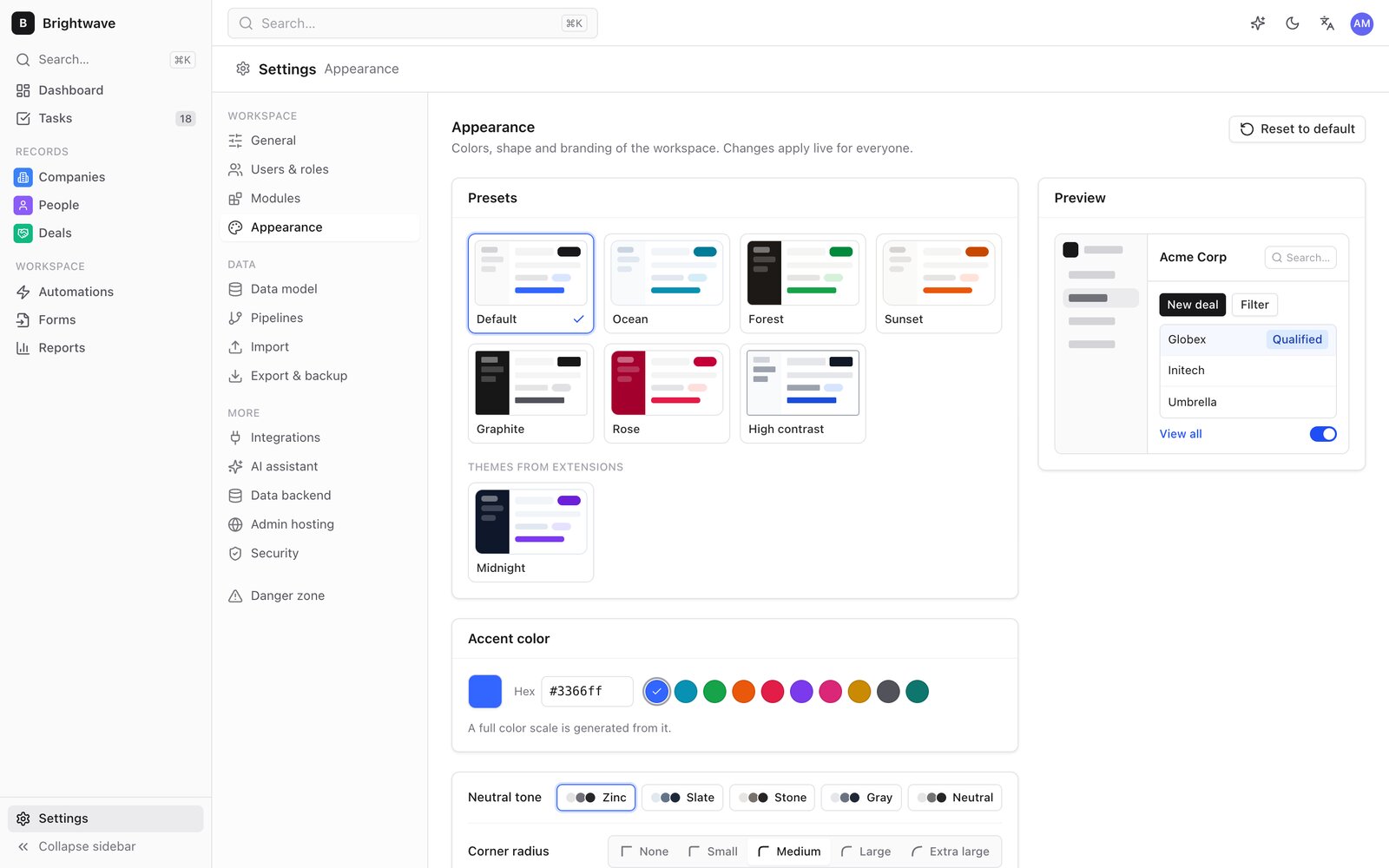
**观相相相.** 一个口音颜色产生整个调色板. 选择灰色,半径,密度,字体,侧边栏样式,默认情况下为暗色或光线,您的标志和favicon,自定义 CSS,或预设和主题扩展之一. [外观引导](https://github.com/fleox/agentcrm/blob/master/docs/appearance.md)

<table><tbody><tr><td><img alt="Default preset" src="https://raw.githubusercontent.com/fleox/agentcrm/master/.github/assets/preset-default.jpg" loading="lazy" decoding="async" referrerpolicy="no-referrer"><p>默认</p></td><td><img alt="Ocean preset" src="https://raw.githubusercontent.com/fleox/agentcrm/master/.github/assets/preset-ocean.jpg" loading="lazy" decoding="async" referrerpolicy="no-referrer"><p>海洋</p></td><td><img alt="Forest preset" src="https://raw.githubusercontent.com/fleox/agentcrm/master/.github/assets/preset-forest.jpg" loading="lazy" decoding="async" referrerpolicy="no-referrer"><p>森林</p></td><td><img alt="Sunset preset" src="https://raw.githubusercontent.com/fleox/agentcrm/master/.github/assets/preset-sunset.jpg" loading="lazy" decoding="async" referrerpolicy="no-referrer"><p>日落</p></td></tr><tr><td><img alt="Graphite preset" src="https://raw.githubusercontent.com/fleox/agentcrm/master/.github/assets/preset-graphite.jpg" loading="lazy" decoding="async" referrerpolicy="no-referrer"><p>石墨</p></td><td><img alt="Rose preset" src="https://raw.githubusercontent.com/fleox/agentcrm/master/.github/assets/preset-rose.jpg" loading="lazy" decoding="async" referrerpolicy="no-referrer"><p>萝丝</p></td><td><img alt="Midnight theme extension in dark mode" src="https://raw.githubusercontent.com/fleox/agentcrm/master/.github/assets/preset-midnight.jpg" loading="lazy" decoding="async" referrerpolicy="no-referrer"><p>午夜(主题扩展)</p></td><td><img alt="Settings, Appearance: preset gallery, accent colour and live preview" src="https://raw.githubusercontent.com/fleox/agentcrm/master/.github/assets/admin-appearance-light.jpg" loading="lazy" decoding="async" referrerpolicy="no-referrer"><p>设置-外观</p></td></tr></tbody></table>

**模块.** 关闭您不使用的东西( 磁盘、 交易和管道、 报告、 领导表格、 任务、 自动化、 电子邮件和日历、 AI 助手) 。 页面、导航和部件已消失;没有删除数据. [模块指南](https://github.com/fleox/agentcrm/blob/master/docs/modules.md)

**延伸.** 模块(页面,记录标签,仪表板部件,设置页面,AI工具,自动化动作,钩子)和主题都是运行时安装的ZIP文件,没有重建. 它们被存储在CRM自己的数据中,所以每个管理员,CLI和MCP服务器都加载. 安装显示是谁做的 以及它添加了什么 安全模式从没有开始. [扩展指南](https://github.com/fleox/agentcrm/blob/master/docs/extensions.md)

```bash
npx -y @fleox-agent-crm/agentcrm@0.12.2 ext new module deal-radar   # Vite project, typings, en / fr
cd deal-radar && npm install && npm run build
npx -y @fleox-agent-crm/agentcrm@0.12.2 ext check .                 # validates it and loads it like the admin
npx -y @fleox-agent-crm/agentcrm@0.12.2 ext install . --site acme   # plan; add --yes to install
```

![Terminal: scaffolding an AgentCRM extension module, building and checking it, installing it on a CRM and calling its new AI tool](https://raw.githubusercontent.com/fleox/agentcrm/master/.github/assets/demo-extension.gif)  
模块的AI工具即刻在CLI,MCP服务器和管理员助理中直播.

指南: [创建模块](https://github.com/fleox/agentcrm/blob/master/docs/creating-a-module.md) • 妇女 [创建主题](https://github.com/fleox/agentcrm/blob/master/docs/creating-a-theme.md) • 妇女 [运行时间 API](https://github.com/fleox/agentcrm/blob/master/docs/runtime-api-reference.md) • 妇女 [实例](https://github.com/fleox/agentcrm/tree/master/external)与克劳德代码 `agentcrm-extensions` 技巧驱动整个循环.

## 如何运作

![You and your AI agent use four front doors (the admin, the in-admin assistant, the CLI, the MCP server). All of them call one engine (roles, validation, automations), which reads and writes your data where you choose: encrypted journal on a bucket, a git repo or a local folder, Firebase, a private git repo as JSON, or this browser. The admin is hosted on any static host. No server of ours.](https://raw.githubusercontent.com/fleox/agentcrm/master/.github/assets/how-it-works-light.png)

所有商业规则都用一个引擎 管理员,CLI,MCP服务器和助手是它的四个前门,因此一个代理可以完全做一个用户可以做的:没有更多的(应用了),没有更少. 这个 **数据后端** (客户关系管理所居住的地方) **托管** (提供行政服务的地方)是独立的选择.

| 数据后端 | 何处 | 不错 | 已加密 | 若干用户 |
| --- | --- | --- | --- | --- |
| **加密日记** _(默认)_ | S3相容桶( AWS, R2, OVH, Scalway...), 私有 GitHub / GitLab repo, 本地文件夹 | 大部分队伍:在你控制下的个人资料 | 对 | 是,没有冲突 |
| **基地** | Firestore + Auth 在您的工程中 | 有登录的实时团队; 加载量符合免费计划 | 谷歌休息时 | 是,生成的规则中的角色 |
| **二等兵(JSON)** | 每个记录一个可读的 JSON 文件 | 可读历史, 每个用户代号 | 没有( 历史保留了 旧值) | 对 |
| **此浏览器** | 索引数据库 | 试试看 | —— 说 | 没有 |

日记附加每个书写一个加密段,没有锁,并用混合逻辑时钟将它们按字段合并; `compact` 将其折叠成快照并删除被删除的内容。 管理员自己继续 **GitHub 页面**, (中文(简体) ), **GitLab 页面**, (中文(简体) ), **云旗页**,一个 **S3相容桶**,本地文件夹或 ZIP;其 `config.js` 从来没有秘密。 见 [结构](https://github.com/fleox/agentcrm/blob/master/docs/architecture.md), (中文(简体) ), [托管](https://github.com/fleox/agentcrm/blob/master/docs/hosting.md) 财务报告和审定财务报表 [基地](https://github.com/fleox/agentcrm/blob/master/docs/firebase.md)。 。 。 .

## AgentCRM如何比较

|  | 代理客户关系 | 二十个 | 枢纽点 | 电子表格 |
| --- | --- | --- | --- | --- |
| 要运行的服务器或数据库 | 无 | ++postgres + 节点(或它们的云) | 他们的云 | 无 |
| 数据所在的地方 | 您的桶 / repo / Firebase, 加密 | 您的数据库或他们的云 | 他们的云 | 文件 |
| 费用 | 您的存储量, 经常为一分钱 | 主办者或座位 | 席位和等级 | 免费 |
| 管道、自动化、表格、报告 | ✅ | ✅ | ✅ | 手动 |
| 由AI代理完全驾驶 | \* 中央领导学院、MCP、技能、助理 | API 密码 | API,支付AI | 特设 |
| 缩放 | 中小型团队(内存中的全部数据集) | 大块 | 大块 | 小数 |

## 这个 `agentcrm` 国 际

特工使用的同一种发动机,用手: `npx -y @fleox-agent-crm/agentcrm@0.12.2 help`。每个命令接受 `--json` 并准确打印一个 `{ ok, data }` 或者说 `{ ok: false, error }` 对象,并命令修改工作空间打印计划直至添加 `--yes`。 。 。 .

![Terminal running the agentcrm CLI: a filtered deals list, creating a person, moving a deal to Won, adding a task and a pipeline report](https://raw.githubusercontent.com/fleox/agentcrm/master/.github/assets/demo-cli.gif)  
从终端或脚本运行 CRM,运行在与管理员相同的数据上.

描述文件中的数据模型,并使一个对象与另一个系统同步:

![Terminal applying a JSON schema to the CRM (plan, apply, already up to date), then mirroring a list of markets with records sync: created, updated and archived records](https://raw.githubusercontent.com/fleox/agentcrm/master/.github/assets/demo-schema.gif)  
`schema apply` 财务报告和审定财务报表 `records sync`:计划先发后发,一心一意,无所删减.

**所有命令**

| 区域 | 图标 |
| --- | --- |
| 设置 | `status`, (中文(简体) ), `options`, (中文(简体) ), `credentials set|list|remove|copy|verify|types`, (中文(简体) ), `install --plan`, (中文(简体) ), `site list|show|add|use|rename|forget|credentials|runtime`, (中文(简体) ), `doctor`, (中文(简体) ), `serve`, (中文(简体) ), `deploy-admin` |
| 记录 | `records list|get|create|update|delete|restore|search|duplicates|merge|image|sync`, (中文(简体) ), `files list|upload|get|delete|usage` |
| 司马 | `schema apply`, (中文(简体) ), `objects list|get|create|update|delete`, (中文(简体) ), `fields add|update|delete` |
| 工作 | `activities add|list|done`, (中文(简体) ), `notes add`, (中文(简体) ), `tasks list|add|done|reassign`, (中文(简体) ), `pipelines list|move` |
| 管理员 | `views list|create|delete`, (中文(简体) ), `users list|add|role|disable`, (中文(简体) ), `settings get|set` |
| 数据 | `import csv|zip`, (中文(简体) ), `export csv|json|zip`, (中文(简体) ), `report <name>`, (中文(简体) ), `stats`, (中文(简体) ), `compact` |
| 自动化 | `automations list|enable|disable|run`, (中文(简体) ), `forms list|publish|ingest` |
| 自定义 | `modules list|get|enable|disable|config`, (中文(简体) ), `appearance get|presets|set|preset|logo|favicon|css|reset`, (中文(简体) ), `ext new|check|pack|install|list|enable|disable|uninstall|export` |
| 大赦国际 | `tools list|call`, (中文(简体) ), `mcp` |

全文 : [文件/目录](https://github.com/fleox/agentcrm/blob/master/docs/cli.md)。 。 。 .

## MCP 服务器

```bash
claude mcp add agentcrm -- npx -y @fleox-agent-crm/agentcrm@0.12.2 mcp --site acme
```

![Terminal adding the AgentCRM MCP server to Claude Code, the server reported as connected, and a search tool call returning JSON](https://raw.githubusercontent.com/fleox/agentcrm/master/.github/assets/demo-mcp.gif)

**工具** 是共享的AI目录:搜索,列表,获取,创建,更新,删除和合并记录,注释,活动,任务,交易阶段,报告,CSV导入,自动化,模块和外观,加上网站启用的扩展模块的工具. **资源** 是计划、管道、模块和外观. **提示** 包括管道审查、后续电子邮件和领导资格. `--read-only` 隐藏每个写作的工具。 Claude 桌面和光标设置 : [医生/医生](https://github.com/fleox/agentcrm/blob/master/docs/mcp.md)。 。 。 .

管理员也有一个 **大赦国际助理** 从浏览器中用自己的密钥调用 Claude API 的面板,使用相同的工具; 写入请求确认的工具.

## 文档

|  |  |
| --- | --- |
| [托管](https://github.com/fleox/agentcrm/blob/master/docs/hosting.md) | 数据后端、 存储选项、 管理员托管、 保护 |
| [基地](https://github.com/fleox/agentcrm/blob/master/docs/firebase.md) | 控制台设置、生成规则、邀请、CLI登录、费用 |
| [数据模型](https://github.com/fleox/agentcrm/blob/master/docs/data-model.md) | 物体、领域、关系、钻井、滚接、管道 |
| [Schema 作为代码](https://github.com/fleox/agentcrm/blob/master/docs/schema-as-code.md) • 妇女 [同步](https://github.com/fleox/agentcrm/blob/master/docs/sync.md) | 文件中的数据模型; 映射另一个系统 |
| [国 际](https://github.com/fleox/agentcrm/blob/master/docs/cli.md) • 妇女 [MCP 磁共振](https://github.com/fleox/agentcrm/blob/master/docs/mcp.md) | 每个命令; MCP 客户端 |
| [自动化](https://github.com/fleox/agentcrm/blob/master/docs/automations.md) • 妇女 [导入/导出](https://github.com/fleox/agentcrm/blob/master/docs/import-export.md) • 妇女 [文件](https://github.com/fleox/agentcrm/blob/master/docs/files.md) | 触发和预定运行; CSV, JSON, ZIP; 图像和附件 |
| [模块](https://github.com/fleox/agentcrm/blob/master/docs/modules.md) • 妇女 [外观](https://github.com/fleox/agentcrm/blob/master/docs/appearance.md) • 妇女 [扩展](https://github.com/fleox/agentcrm/blob/master/docs/extensions.md) | 自定义工作空间 |
| [建筑](https://github.com/fleox/agentcrm/blob/master/docs/architecture.md) | 引擎、日记、代码布局 |
| [一般事务人员(其他职等)](https://github.com/fleox/agentcrm/blob/master/AGENTS.md) | 对在该仓库工作的人工智能人员的指示 |

## 捐款

欢迎虫子报告和想法: [打开一个问题](https://github.com/fleox/agentcrm/issues/new/choose)读取 [捐款额](https://github.com/fleox/agentcrm/blob/master/CONTRIBUTING.md) 在打开拉出请求之前。 关于安全问题,如下: [警卫](https://github.com/fleox/agentcrm/blob/master/SECURITY.md) 而不是公开讨论.

```bash
npm install --legacy-peer-deps
npm run dev        # admin at http://localhost:5180
npm test           # Vitest
npm run build      # admin + CLI
```

## 许可证

资源来源 [非商业许可证 1.0.0](https://github.com/fleox/agentcrm/blob/master/LICENSE)个人、爱好者、教育、研究和其他非商业用途是免费的,可以按照同样的条件叉、修改和再分配.

**商业用途需要书面授权.** 这包括出售软件或作为有偿服务托管软件。 商业执照, [打开一个问题](https://github.com/fleox/agentcrm/issues)。 。 。 .

## 常见问题

### @fleox-agent-crm/agentcrm 是什么？

您的AI代理可以运行的静态CRM:一个20/HubSpot风格的CRM,它完全通过代理crm CLI在浏览器中运行或无头运行,并存有您自己存储的数据\.

### 如何安装 @fleox-agent-crm/agentcrm？

在项目目录运行 npm install @fleox-agent-crm/agentcrm，或使用 pnpm add / yarn add / bun add。它还提供命令行工具 agentcrm，可以用 npx agentcrm 直接运行。

### @fleox-agent-crm/agentcrm 支持 TypeScript 吗？

该包的 package\.json 没有声明类型入口。需要类型提示时，可以在 npm 上查找社区维护的 @types/fleox-agent-crm\_\_agentcrm 是否存在。

### @fleox-agent-crm/agentcrm 支持 ESM 还是 CommonJS？

以 ES Module 形式发布，推荐使用 import 引入。在 CommonJS 项目中，Node\.js 20\.19\+ / 22\.12\+ 可以直接 require\(\) 不含顶层 await 的 ES Module，更早的版本需要改用动态 import\(\)。

### @fleox-agent-crm/agentcrm 需要什么版本的 Node\.js？

package\.json 的 engines 字段要求 Node\.js \>=20。版本不符时 npm 默认只给出警告，开启 engine-strict 后会拒绝安装。

### @fleox-agent-crm/agentcrm 可以商用吗？

@fleox-agent-crm/agentcrm 使用 SEE LICENSE IN LICENSE 许可。许可条款写在包内的独立文件中，请阅读该文件确认可否商用。以上为概括，不构成法律意见，请以许可原文为准。

### @fleox-agent-crm/agentcrm 的下载量有多少？

根据 npm 官方下载统计，@fleox-agent-crm/agentcrm 在 2026/10/15 – 2026/11/13 这 30 天内被下载 3,875 次，日均约 129 次。下载量会把 CI 构建、镜像同步和作为其他包依赖的安装一并计入，适合横向比较热度，不能直接等同于使用人数。

### @fleox-agent-crm/agentcrm 还在维护吗？

最新版本 0\.12\.2 发布于 2026/11/07（9 天前）；至今共发布 20 个版本，其中过去 12 个月发布了 20 个；首次发布于 2026/11/04。发布频率只是参考信号：功能稳定的工具可能很少需要更新，建议结合源码仓库的 issue 和提交记录判断。