# @formfacade/embed-react 中文文档
规范地址:https://npmcn.com/package/%40formfacade/embed-react/
版本:1\.1\.2
npm 元数据更新时间:2024-11-07T16:49:01.188Z
中文译文更新时间:2026-11-15T08:48:23.447Z
软件包许可:ISC
本文由上游 README 翻译,可能存在偏差,请结合原文核对 API、命令与配置。版权与许可归原作者所有。
原始 npm 页面:https://www.npmjs.com/package/%40formfacade/embed-react
原文对照:https://npmcn.com/package/%40formfacade/embed-react/?lang=original
项目主页:https://formfacade.com/
源码仓库:https://github.com/formfacade/embed-react
## 关键信息(来自 npm 元数据)
- 包体积(解压后):10.2 kB,5 个文件
- 模块格式:ESM + CJS
- TypeScript 类型:未声明
- 运行依赖:0 个
- 首次发布:2024-02-02T13:17:45.316Z
- 最新版本发布:2024-11-07T16:49:00.992Z
- 近 30 天下载量:2116(2026-10-16 至 2026-11-14,npm 官方下载统计)
- 已发布版本数:10(近 12 个月 0 个)
## 中文简介
提高你的Google Form的外表,以无缝配合您网站使用Formfacade的品牌.
## 安装
```sh
npm install @formfacade/embed-react
```
也可以使用:`pnpm add @formfacade/embed-react`、`yarn add @formfacade/embed-react`、`bun add @formfacade/embed-react`
## README

# 自定义UI并嵌入回放中的Google表格而无需Iframe.
[](https://npmcn.com/package/%40formfacade/embed-react/LICENSE.md)
## 说明
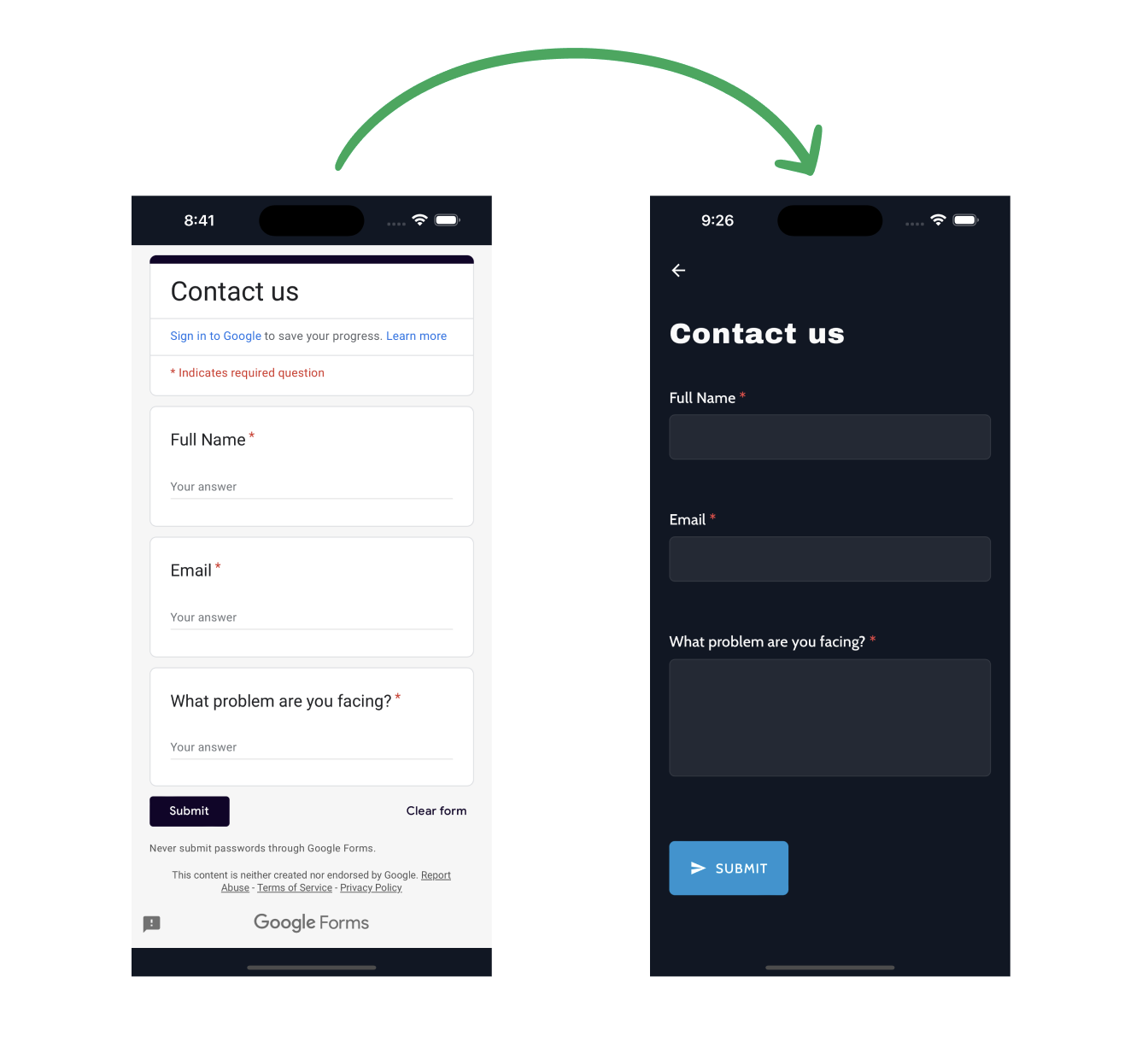
使用Formfacade将Google表格集成到您的React应用程序中,并配有用户界面来补充您的网站并摆脱Google表格品牌.
## 特征
- 适合与光明和黑暗背景无缝融合的用户界面
- 在提交表单时容易执行召回功能
- 嵌入脚本取而代之为iframe,以方便装入并方便UI.
## 目录
- [安装](https://npmcn.com/package/%40formfacade/embed-react/#readme-installation)
- [使用量](https://npmcn.com/package/%40formfacade/embed-react/#readme-usage)
- [示例](https://npmcn.com/package/%40formfacade/embed-react/#readme-example)
- [支助](https://npmcn.com/package/%40formfacade/embed-react/#readme-support)
## 安装
1. **下载窗体外观插件 :** 从中获取窗体外观插件 [谷歌工作空间市场](https://workspace.google.com/marketplace/app/formfacade/743872305260)。 。 。 .
2. **访问 Google 表格 :** 打开您的谷歌表单
3. **添加窗体加载:**
- 点击谷歌表格中的“ ad-ons” 按钮 .
- 从可用的添加列表中选择“ Formfacade ” .
- 选择“ 在网页中嵌入” .
4. **嵌入表单中 :**
- 点击“ Embed” 时, 将会出现一个对话框, 问“ 您要嵌入此表单吗 ? ”
- 选择"Embed in React App"进行整合.
- 从此选择获取“ 格式化 ” .
5. **与 React App 整合 :** 使用以下 npm 命令安装将窗体嵌入到您的 React 应用程序中所需的软件包 :
```bash
npm i @formfacade/embed-react
```
详情请访问 [如何将Google表单嵌入到您的 React app 中而不用 Iframe ?](https://formfacade.com/enhance/embed-google-forms-in-react-app.html)
## 使用量
```javascript
import FormfacadeEmbed from "@formfacade/embed-react";
```
| Prop | 类型 | 默认值 | 所需/可选 |
| --- | --- | --- | --- |
| 窗体结构 | 字符串 | 需求 | 需求 |
| 提交表格 | 函数 | `() => console.log('Form Submitted');` | 可选 |
| 预填表 | 函数 | 未说明 | 可选 |
| 格式记录 | 函数 | `() => console.log('Form loaded');` | 可选 |
| 冲出 | 布尔 | 虚假 | 可选 |
- **窗体结构**: Formfacade嵌入式谷歌表格的URL. 这是一个需要的领域.
- **提交表格**: 在表单提交时触发的回调函数.
- **预填表**: 要预先填充窗体数据的函数。 选取之.
- **格式记录**: 当一个窗体被装入时可以引用的函数。 选取之.
- **冲出**: 禁用自动保存.
### 示例
[](https://codesandbox.io/p/sandbox/determined-matan-g996k4?file=%2Fsrc%2FApp.js)
```javascript
import React from "react";
import FormfacadeEmbed from "@formfacade/embed-react";
const FORMFACADE_URL = "https://formfacade.com/include/109671923741510513923/form/1FAIpQLSetAzIt89c0hBCWhI1AzUWRXDQ0VV1JAUph6i_3dvNpT-ZpqA/classic.js?div=ff-compose";
const App = () => {
const prefillForm = () => {
// Optional: Refer to the provided link to find the entry IDs for prefilling input fields:
// https://formfacade.com/website/does-formfacade-support-pre-filled-survey-links-like-native-google-forms-on-1FAIpQLSfGvg22V7Lzyw_5AEbKBSpklS_TMw6tKxcQiDqlC9KvfBVTgQ.html
return {
'entry.1297600622': '@formfacade/embed-react',
'entry.813617742': `${new Date()}`
};
};
const onSubmitForm = () => {
// Add your specific form submission handling code below.
console.log("----FORM SUBMITTED----");
};
const onFormLoad = () => {
console.log("----FORM LOADED----");
};
return (
);
};
export default App;
```
## 支助
支持, 电子邮件 [支持@ formfacade.com](mailto:support@formfacade.com)
## 常见问题
### @formfacade/embed-react 是什么?
提高你的Google Form的外表,以无缝配合您网站使用Formfacade的品牌\.
### 如何安装 @formfacade/embed-react?
在项目目录运行 npm install @formfacade/embed-react,或使用 pnpm add / yarn add / bun add。
### @formfacade/embed-react 支持 TypeScript 吗?
该包的 package\.json 没有声明类型入口。需要类型提示时,可以在 npm 上查找社区维护的 @types/formfacade\_\_embed-react 是否存在。
### @formfacade/embed-react 支持 ESM 还是 CommonJS?
同时提供 ES Module 与 CommonJS 入口,import 和 require\(\) 都可以使用,打包工具会自动选择合适的版本。
### @formfacade/embed-react 可以商用吗?
@formfacade/embed-react 使用 ISC 许可。宽松许可:允许商业使用、修改和再分发,通常只需在分发时保留原版权与许可声明。以上为概括,不构成法律意见,请以许可原文为准。
### @formfacade/embed-react 的下载量有多少?
根据 npm 官方下载统计,@formfacade/embed-react 在 2026/10/16 – 2026/11/14 这 30 天内被下载 2,116 次,日均约 71 次。下载量会把 CI 构建、镜像同步和作为其他包依赖的安装一并计入,适合横向比较热度,不能直接等同于使用人数。
### @formfacade/embed-react 还在维护吗?
最新版本 1\.1\.2 发布于 2024/11/08(2 年前);至今共发布 10 个版本,其中过去 12 个月发布了 0 个;首次发布于 2024/02/02。发布频率只是参考信号:功能稳定的工具可能很少需要更新,建议结合源码仓库的 issue 和提交记录判断。