# @gitgraph/js 中文文档
规范地址:https://npmcn.com/package/%40gitgraph/js/
版本:1\.4\.0
npm 元数据更新时间:2022-04-05T14:21:56.878Z
中文译文更新时间:2026-11-16T10:42:20.869Z
软件包许可:MIT
本文由上游 README 翻译,可能存在偏差,请结合原文核对 API、命令与配置。版权与许可归原作者所有。
原始 npm 页面:https://www.npmjs.com/package/%40gitgraph/js
原文对照:https://npmcn.com/package/%40gitgraph/js/?lang=original
项目主页:https://github.com/nicoespeon/gitgraph.js#readme
源码仓库:https://github.com/nicoespeon/gitgraph.js
## 关键信息(来自 npm 元数据)
- 包体积(解压后):221 kB,24 个文件
- 模块格式:ESM + CJS
- TypeScript 类型:包内自带
- 运行依赖:1 个
- 首次发布:2019-04-05T12:09:12.455Z
- 最新版本发布:2021-03-06T19:40:45.250Z
- 近 30 天下载量:7339(2026-10-17 至 2026-11-15,npm 官方下载统计)
- 已发布版本数:15(近 12 个月 0 个)
## 中文简介
在浏览器中绘制漂亮的图形
## 安装
```sh
npm install @gitgraph/js
```
也可以使用:`pnpm add @gitgraph/js`、`yarn add @gitgraph/js`、`bun add @gitgraph/js`
## README
# `@gitgraph/js`
[](https://www.npmjs.com/package/@gitgraph/js) [](https://github.com/nicoespeon/gitgraph.js/blob/master/packages/gitgraph-js/CHANGELOG.md)
和香草JS一起画漂亮的图.
> 这是梵地拉JS的图书馆 [GitGraph.js (英语)](https://github.com/nicoespeon/gitgraph.js/)。 。 。 .
## 试试看 [在线操场](https://codepen.io/nicoespeon/pen/arqPWb?editors=1010)
## 开始吧
您有两个选项:
1. [让 GitGraph.js 捆绑直接用于浏览器](https://npmcn.com/package/%40gitgraph/js/#readme-browser-usage)
2. [从 npm 调取 GitGraph 用 JS 捆绑器](https://npmcn.com/package/%40gitgraph/js/#readme-bundler-usage)
### 浏览器捆绑, 准备使用
从以下来源中获取捆绑:
- jsDelivr CDN (英语): [https://cdn.jsdelivr.net/npm/@gitgraph/js (中文(简体) )](https://cdn.jsdelivr.net/npm/@gitgraph/js)
- 未读 pkg CDN : [https://unpkg.com/@gitgraph/js (中文(简体) )](https://unpkg.com/@gitgraph/js)
创建一个 `index.html` 文件并开始编码 :
```html
```
服务您的文件 - 使用 npm, 您可以运行 `npx serve .`
请参看下图:
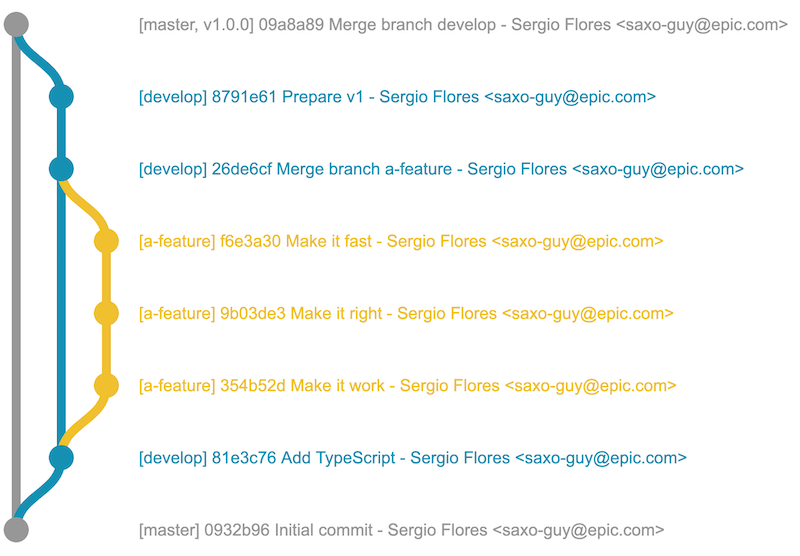
### 使用捆绑器(例如使用ParcelJS)
> 你必须要有 [无](https://www.npmjs.com/get-npm) 已安装.
为您的工程创建新文件夹, 并去那里 : `mkdir your-project && cd your-project`
初始化您的 npm 工程 : `npm init -y`
用 npm 安装软件包 : `npm i --save @gitgraph/js`
安装 Parcel 捆绑器 : `npm i --save-dev parcel-bundler`
现在你可以用 `createGitgraph` 以 DOM 元素渲染您的图 :
创建一个 `index.html` 文件 :
```html
```
创建一个 `index.js` 文件 :
```js
import { createGitgraph } from "@gitgraph/js";
// Get the graph container HTML element.
const graphContainer = document.getElementById("graph-container");
// Instantiate the graph.
const gitgraph = createGitgraph(graphContainer);
// Simulate git commands with Gitgraph API.
const master = gitgraph.branch("master");
master.commit("Initial commit");
const develop = gitgraph.branch("develop");
develop.commit("Add TypeScript");
const aFeature = gitgraph.branch("a-feature");
aFeature
.commit("Make it work")
.commit("Make it right")
.commit("Make it fast");
develop.merge(aFeature);
develop.commit("Prepare v1");
master.merge(develop).tag("v1.0.0");
```
在您的开始命令中添加 `package.json`数字 :
```diff
{
"name": "your-project",
"version": "1.0.0",
"scripts": {
+ "start": "parcel index.html"
}
```
运行 `npm start`。请参见下图:

## 更多实例
[一堆场景](https://github.com/nicoespeon/gitgraph.js/tree/master/packages/stories/src/gitgraph-js/) 我们的故事书里已经模拟过了 看看他们
## 如果你来自 `gitgraph.js` 软件包
[这是帮助你迁徙的指南](https://github.com/nicoespeon/gitgraph.js/blob/master/packages/gitgraph-js/MIGRATE_FROM_GITGRAPH.JS.md) 改为 `@gitgraph/js`。 。 。 .
## 常见问题
### @gitgraph/js 是什么?
在浏览器中绘制漂亮的图形
### 如何安装 @gitgraph/js?
在项目目录运行 npm install @gitgraph/js,或使用 pnpm add / yarn add / bun add。
### @gitgraph/js 支持 TypeScript 吗?
支持。包内自带 TypeScript 类型声明(package\.json 声明了 types 入口),安装后即可获得类型提示,无需再安装 @types 包。
### @gitgraph/js 支持 ESM 还是 CommonJS?
同时提供 ES Module 与 CommonJS 入口,import 和 require\(\) 都可以使用,打包工具会自动选择合适的版本。
### @gitgraph/js 可以商用吗?
@gitgraph/js 使用 MIT 许可。宽松许可:允许商业使用、修改和再分发,通常只需在分发时保留原版权与许可声明。以上为概括,不构成法律意见,请以许可原文为准。
### @gitgraph/js 的下载量有多少?
根据 npm 官方下载统计,@gitgraph/js 在 2026/10/17 – 2026/11/15 这 30 天内被下载 7,339 次,日均约 245 次。下载量会把 CI 构建、镜像同步和作为其他包依赖的安装一并计入,适合横向比较热度,不能直接等同于使用人数。
### @gitgraph/js 还在维护吗?
最新版本 1\.4\.0 发布于 2021/03/07(5 年前);至今共发布 15 个版本,其中过去 12 个月发布了 0 个;首次发布于 2019/04/05。发布频率只是参考信号:功能稳定的工具可能很少需要更新,建议结合源码仓库的 issue 和提交记录判断。