# @hyzyn/dsh-plugin-kit 中文文档
规范地址:https://npmcn.com/package/%40hyzyn/dsh-plugin-kit/
版本:0\.1\.69
npm 元数据更新时间:2026-11-01T08:38:04.500Z
中文译文更新时间:2026-11-01T10:07:20.900Z
软件包许可:Apache-2\.0
本文由上游 README 机器翻译,可能存在偏差,请结合原文核对 API、命令与配置。版权与许可归原作者所有。
原始 npm 页面:https://www.npmjs.com/package/%40hyzyn/dsh-plugin-kit
原文对照:https://npmcn.com/package/%40hyzyn/dsh-plugin-kit/?lang=original
项目主页:https://github.com/hyzyn/dsh-plugin-kit#readme
源码仓库:https://github.com/hyzyn/dsh-plugin-kit
## 关键信息(来自 npm 元数据)
- 包体积(解压后):54.6 kB,6 个文件
- 模块格式:ES Module
- TypeScript 类型:未声明
- Node.js 要求:\>=22\.19\.0
- 运行依赖:11 个
- peer 依赖:@deepseek-ai/dsh ^0\.1\.7-rc\.2 \|\| ^0\.2\.0-rc\.1 \|\| ^0\.2\.0-rc\.2 \|\| ^0\.2\.1-alpha\.1 \|\| ^0\.2\.1-alpha\.2 \|\| ^0\.2\.1-alpha\.5 \|\| ^0\.2\.1-rc\.1 \|\| ^0\.2\.1-rc\.2 \|\| ^0\.2\.1-rc\.3 \|\| ^0\.2\.1-rc\.4 \|\| ^0\.2\.1-rc\.5
- 首次发布:2026-08-17T04:41:44.434Z
- 最新版本发布:2026-11-01T08:38:04.367Z
- 已发布版本数:69(近 12 个月 69 个)
## 中文简介
通用 DSH 插件库(pnpm monorepo):模板插件、插件开发工具包、一键聚合安装包。根包同时是全家桶 bundle(dsh.bundle.patch),DSH 与插件市场可直接识别安装。
## 安装
```sh
npm install @hyzyn/dsh-plugin-kit
```
也可以使用:`pnpm add @hyzyn/dsh-plugin-kit`、`yarn add @hyzyn/dsh-plugin-kit`、`bun add @hyzyn/dsh-plugin-kit`
## README
# dsh-plugin-kit · DSH 插件全家桶
中文 | [English](https://npmcn.com/package/%40hyzyn/dsh-plugin-kit/README.en.md)
     
**DeepSeek Harness(DSH)Web GUI 的插件全家桶**
_日志查询 · 环境变量 · MCP 服务器 · Prompt · Profile · RSS · 全局搜索 · Codegraph 集成 · 终端面板 · 容器面板 · 插件脚手架_
`dsh plugin --profile web add @hyzyn/dsh-all`
一次装齐,重启 `dsh web` 生效 · 只想要其中几个 → [按需安装](https://npmcn.com/package/%40hyzyn/dsh-plugin-kit/#readme-%E5%BF%AB%E9%80%9F%E5%BC%80%E5%A7%8B)
[是什么](https://npmcn.com/package/%40hyzyn/dsh-plugin-kit/#readme-%E6%98%AF%E4%BB%80%E4%B9%88) · [包索引](https://npmcn.com/package/%40hyzyn/dsh-plugin-kit/#readme-%E5%8C%85%E7%B4%A2%E5%BC%95) · [快速开始](https://npmcn.com/package/%40hyzyn/dsh-plugin-kit/#readme-%E5%BF%AB%E9%80%9F%E5%BC%80%E5%A7%8B) · [开发新插件](https://npmcn.com/package/%40hyzyn/dsh-plugin-kit/#readme-%E5%BC%80%E5%8F%91%E6%96%B0%E6%8F%92%E4%BB%B6) · [文档地图](https://npmcn.com/package/%40hyzyn/dsh-plugin-kit/#readme-%E6%96%87%E6%A1%A3%E5%9C%B0%E5%9B%BE) · [参与贡献](https://npmcn.com/package/%40hyzyn/dsh-plugin-kit/#readme-%E5%8F%82%E4%B8%8E%E8%B4%A1%E7%8C%AE)
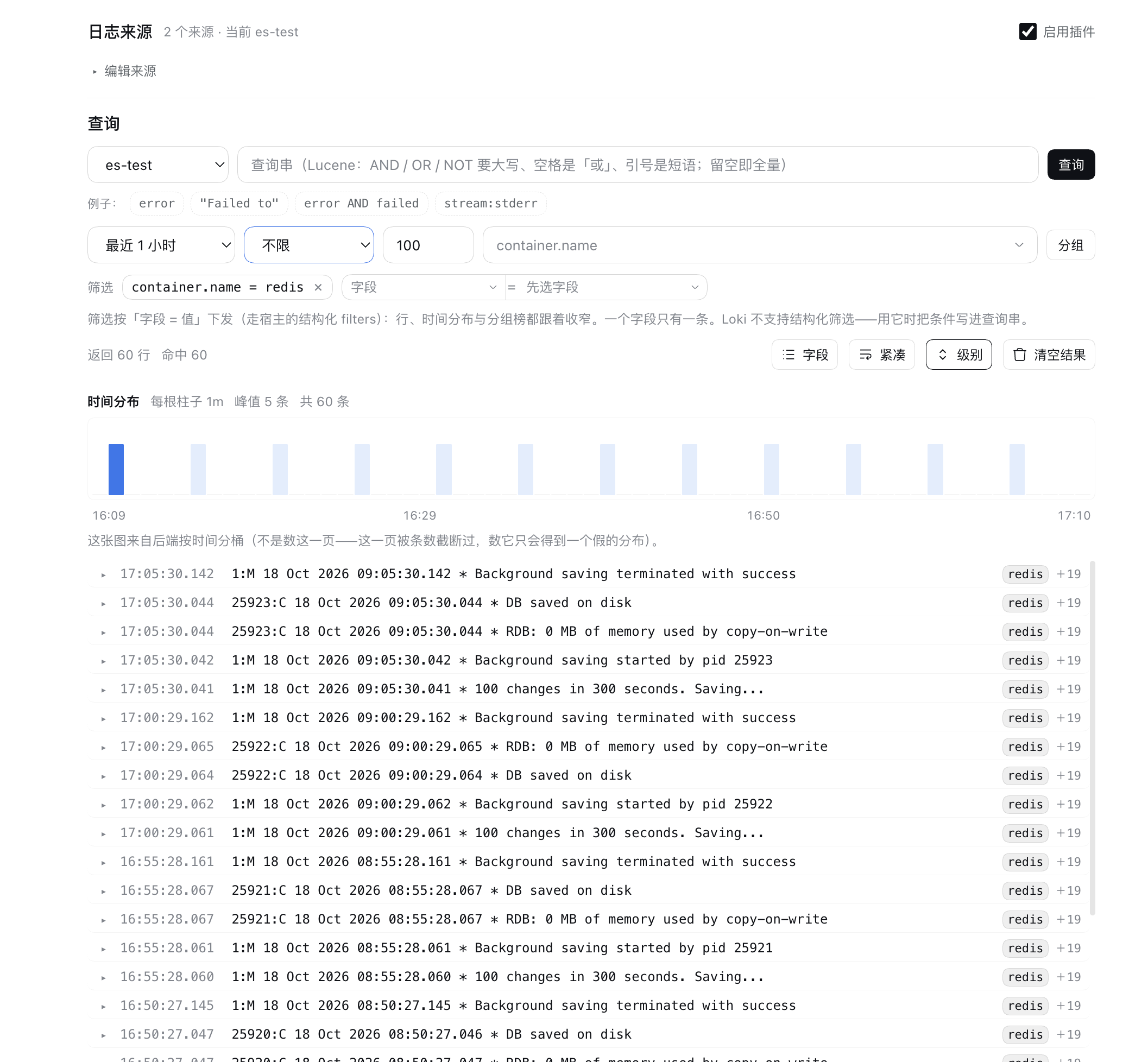
## 新上架 · 日志查询(`@hyzyn/dsh-loglens`)
[](https://npmcn.com/package/%40hyzyn/dsh-plugin-kit/packages/loglens/README.md)
在一张卡片里完成 **Elasticsearch / OpenSearch** 的日志检索:多来源统一清单、直连查询、时间分布与按字段分组下钻; agent 侧注册 `loglens_*` **只读**工具(`loglens_sources` / `loglens_search` / `loglens_fields` / `loglens_facets` / `loglens_context`)。Docker 容器日志不另起一套:作为**采集来源**复用现成的 `docker_logs`。
- **统一查询面**:多个来源在同一张卡片里切换与检索;查询串按来源方言给出可点示例与占位提示
- **从结果继续下钻**:时间分布上点柱即缩放到该时间窗(可撤销);字段分组榜回答「哪个服务在报错」,点榜上的值即成为筛选条件
- **两种消费者同源**:面板与 agent 工具走同一层归一化与参数夹取,`loglens_search` 的返回形状与面板所见一致
- **只读,且受围栏约束**:四条路由都在回环加固档下(除「开关」这一动作外都要同源证明);出站按解析后的 IP 判定(链路本地 / 云元数据地址拒绝)、不跟随重定向、有体积与超时上限
```sh
dsh plugin --profile web add @hyzyn/dsh-loglens
```
完整用法、配置形状与契约 → [packages/loglens/README.md](https://npmcn.com/package/%40hyzyn/dsh-plugin-kit/packages/loglens/README.md)。
## 是什么
dsh-plugin-kit 是给 DeepSeek Harness(DSH)Web GUI 用的通用插件集合。所有插件都走官方 profile 机制挂载到 `dsh web`,**不改 DSH 源码**;可以逐个安装,也可以用聚合包一次装齐。
按「配置类」→「面板类」→「开发类」排:
| 能力 | 原生 `dsh web` | dsh-plugin-kit |
| --- | --- | --- |
| MCP 服务器 | 手改 patch / 命令行 | 可视化卡片 + 连接测试 + 保存后热加载 |
| 环境变量 | 手改 `env.yml` / 命令行 | Web GUI 卡片,保存即写入 `process.env` |
| Prompt 管理 | 手改配置 | 可视化编辑 + 版本管理 / A/B 测试 / 导出分享 |
| Profile 管理 | 命令行 | 可视化创建 / 复制 / 重命名 / 删除 |
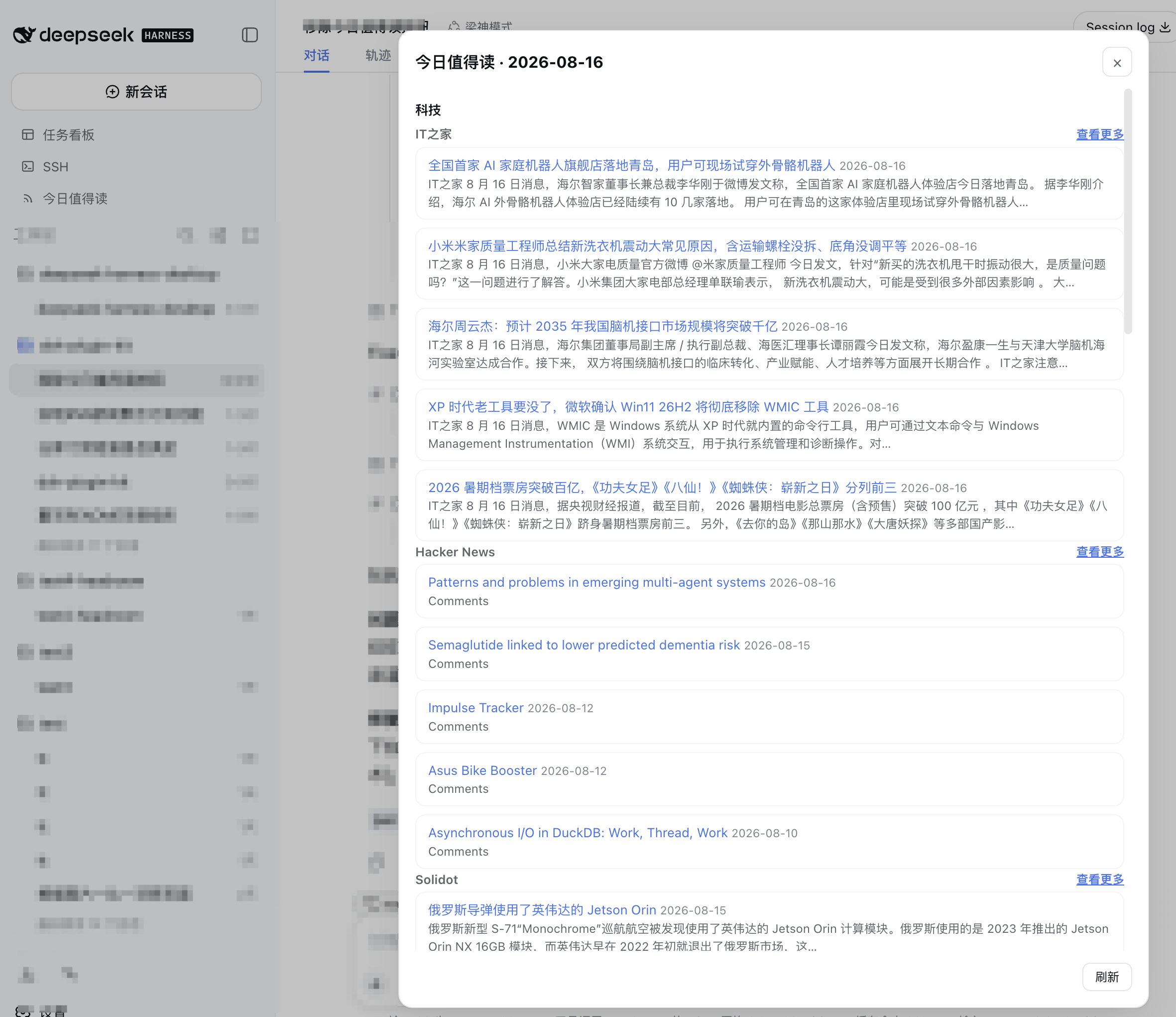
| RSS 聚合 | 无 | 多源订阅 + 每日「今日值得读」+ 可选 AI 摘要(跟随宿主默认模型,零配置) |
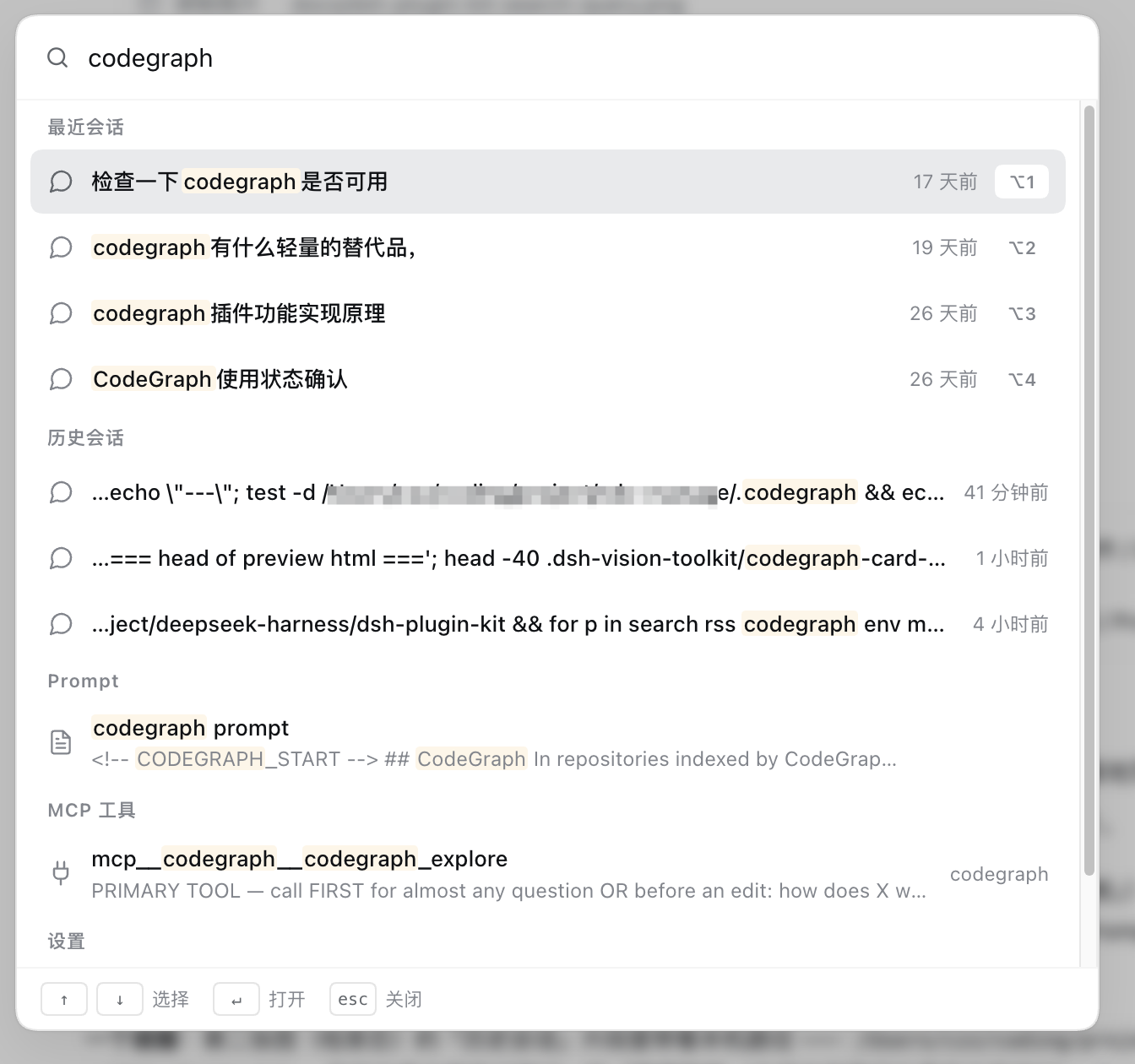
| 全局搜索 | 仅会话标题 / 内容 | 侧边栏一处全文检索历史会话、Prompt、MCP 工具与设置面板 |
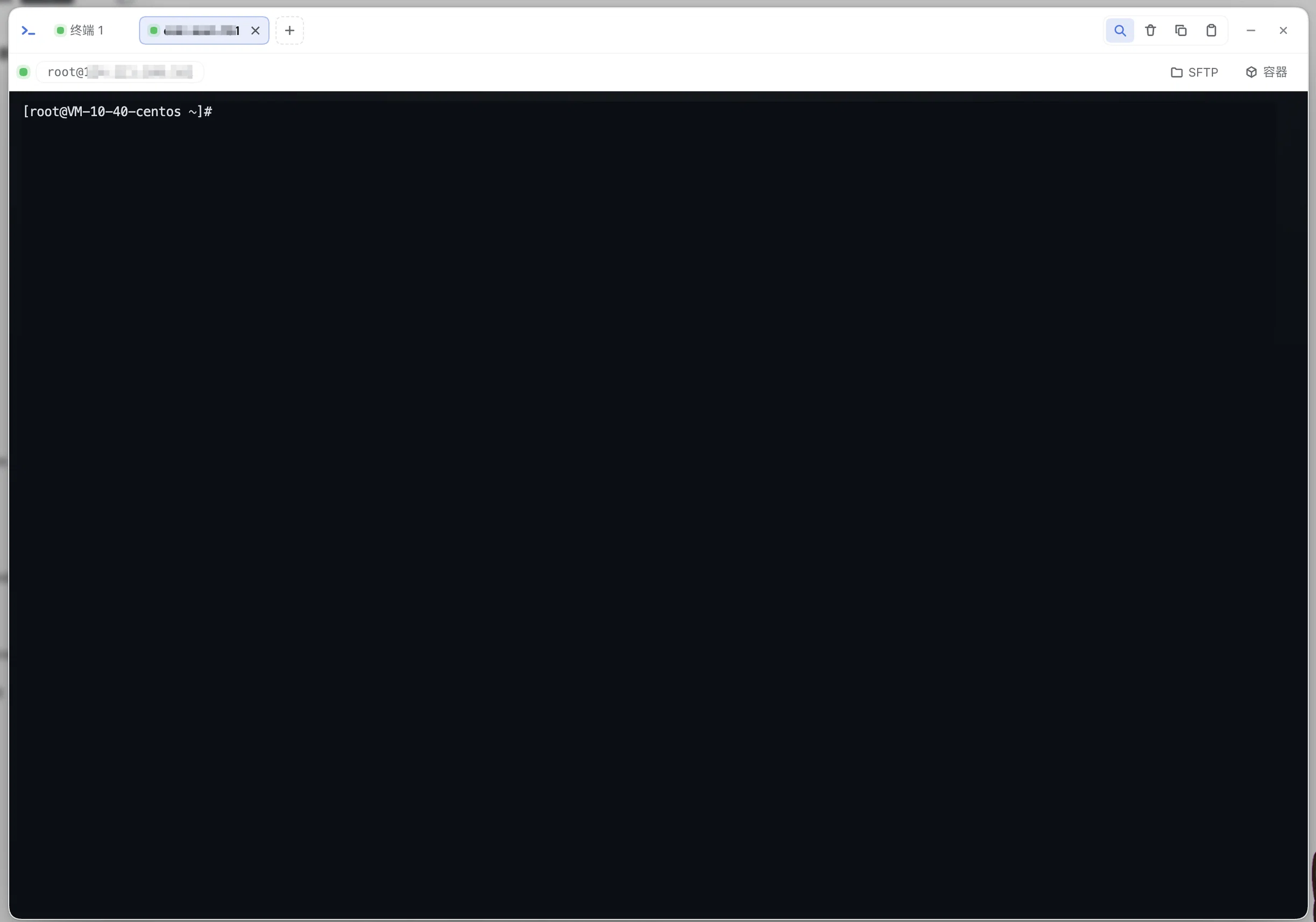
| 终端面板 | 无 | xterm.js 多标签真实 PTY + SSH 直连(连接簿 / 指纹钉扎 / 断线重连)+ SFTP 双栏直传;注册 `tty_*` / `sftp_*` 工具 |
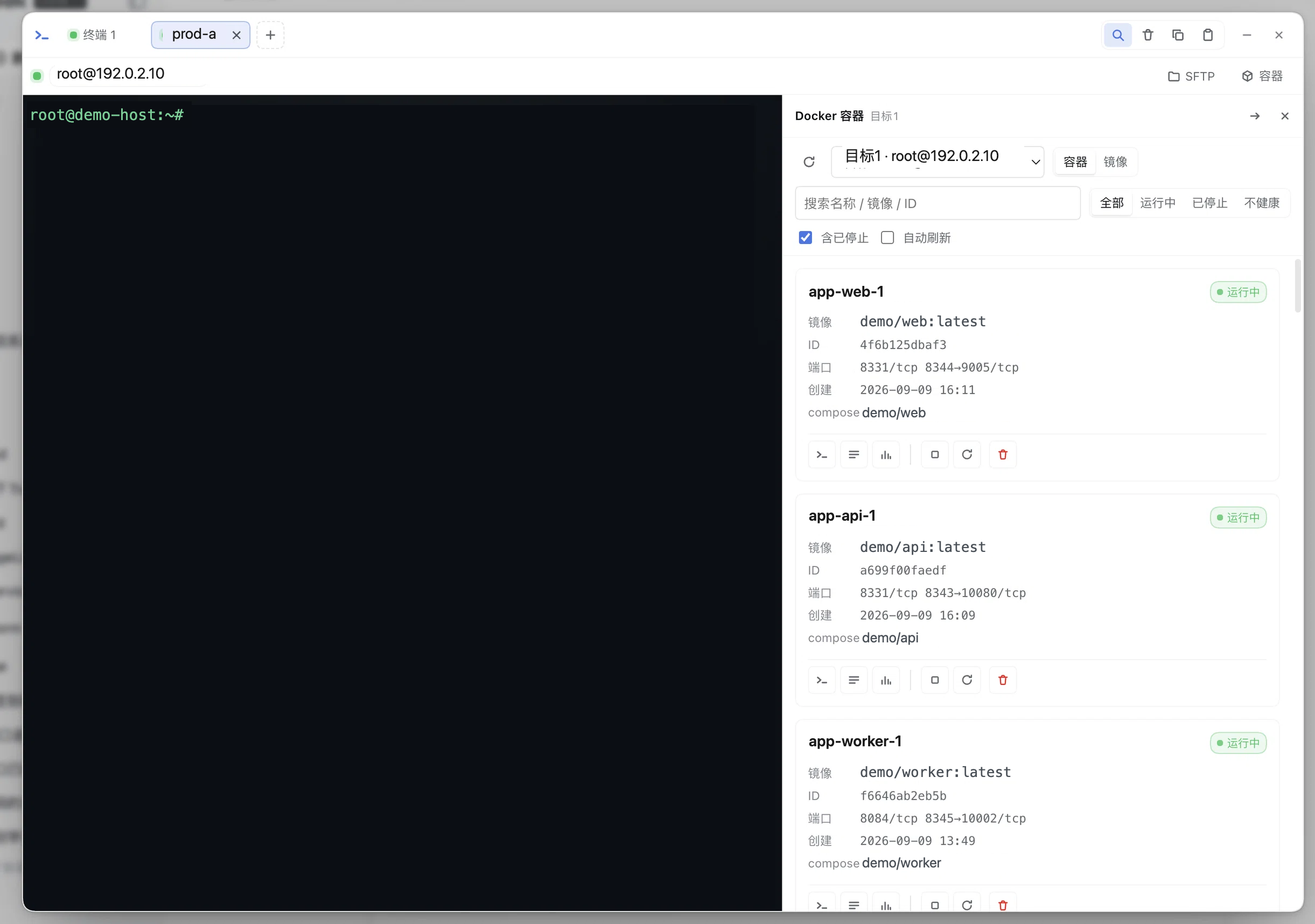
| Docker 容器面板 | 无 | 容器 / 镜像 / Compose / 实时日志与统计 / 多目标总览;**默认只读**,变更与 exec 需显式开关;注册 `docker_*` 工具 |
| 日志查询 | 无 | **新**:Elasticsearch / OpenSearch 归一化成一个查询面(Docker 走现成 `docker_logs`;Loki 适配器在仓库里但**本版不在界面开放**);面板里直接查 + 时间分布 + 分组榜;注册 `loglens_*` 工具(全 read 档) |
| Codegraph 集成 | 无 | 代码图谱卡片:索引状态 / 符号搜索 / 调用链 / 影响面 / 一键 sync-index |
| 插件开发 | 手写样板 | `pnpm create-plugin` 脚手架 + `@hyzyn/dsh-kit` 共享工具库 |
> **每个插件的完整功能、截图与注意事项在它自己的 README 里**(见下表)。本文件只讲「是什么 + 装哪个」。
## 包索引
**1 个共享库 + 11 个功能插件 + 1 个聚合包**;包之间的关系、依赖方向与跨插件协作见 [docs/architecture.md](https://npmcn.com/package/%40hyzyn/dsh-plugin-kit/docs/architecture.md)。
| 包 | 干什么 | 文档 |
| --- | --- | --- |
| `@hyzyn/dsh-kit` | **库**(非插件):宿主半体共享工具——HTTP 回环围栏、托管区块、`!!js` 表达式、服务读取 | [README](https://npmcn.com/package/%40hyzyn/dsh-plugin-kit/packages/kit/README.md) · [DEFECTS](https://npmcn.com/package/%40hyzyn/dsh-plugin-kit/packages/kit/DEFECTS.md) |
| `@hyzyn/dsh-env` | 环境变量 / 密钥管理 | [README](https://npmcn.com/package/%40hyzyn/dsh-plugin-kit/packages/env/README.md) |
| `@hyzyn/dsh-mcp` | MCP 服务器配置卡片,保存后热加载 | [README](https://npmcn.com/package/%40hyzyn/dsh-plugin-kit/packages/mcp/README.md) |
| `@hyzyn/dsh-prompt` | systemPrompt 编辑 / 版本 / A/B | [README](https://npmcn.com/package/%40hyzyn/dsh-plugin-kit/packages/prompt/README.md) |
| `@hyzyn/dsh-profile` | `~/.dsh/profiles` 图形化管理 | [README](https://npmcn.com/package/%40hyzyn/dsh-plugin-kit/packages/profile/README.md) |
| `@hyzyn/dsh-kit-settings` | 在官方「设置」里补一行「插件配置」入口 | [README](https://npmcn.com/package/%40hyzyn/dsh-plugin-kit/packages/kit-settings/README.md) |
| `@hyzyn/dsh-rss` | RSS 聚合 → 每日「今日值得读」 | [README](https://npmcn.com/package/%40hyzyn/dsh-plugin-kit/packages/rss/README.md) |
| `@hyzyn/dsh-search` | 侧边栏全局搜索(⌘ / Ctrl + K) | [README](https://npmcn.com/package/%40hyzyn/dsh-plugin-kit/packages/search/README.md) |
| `@hyzyn/dsh-codegraph` | 代码图谱卡片 + MCP 托管 + 采纳率测量 | [README](https://npmcn.com/package/%40hyzyn/dsh-plugin-kit/packages/codegraph/README.md) · [DEFECTS](https://npmcn.com/package/%40hyzyn/dsh-plugin-kit/packages/codegraph/DEFECTS.md) · [ROADMAP](https://npmcn.com/package/%40hyzyn/dsh-plugin-kit/packages/codegraph/ROADMAP.md) |
| `@hyzyn/dsh-tty` | 终端面板:PTY / SSH / SFTP / 隧道 | [README](https://npmcn.com/package/%40hyzyn/dsh-plugin-kit/packages/tty/README.md) · [DEFECTS](https://npmcn.com/package/%40hyzyn/dsh-plugin-kit/packages/tty/DEFECTS.md) · [ROADMAP](https://npmcn.com/package/%40hyzyn/dsh-plugin-kit/packages/tty/ROADMAP.md) |
| `@hyzyn/dsh-docker` | Docker 容器面板(本机 / SSH),默认只读 | [README](https://npmcn.com/package/%40hyzyn/dsh-plugin-kit/packages/docker/README.md) · [DEFECTS](https://npmcn.com/package/%40hyzyn/dsh-plugin-kit/packages/docker/DEFECTS.md) · [ROADMAP](https://npmcn.com/package/%40hyzyn/dsh-plugin-kit/packages/docker/ROADMAP.md) |
| `@hyzyn/dsh-loglens` | **新**:日志查询——Elasticsearch / OpenSearch / Docker 归一化查询前端 + `loglens_*` 工具(**只读**,无写操作) | [README](https://npmcn.com/package/%40hyzyn/dsh-plugin-kit/packages/loglens/README.md) · [DEFECTS](https://npmcn.com/package/%40hyzyn/dsh-plugin-kit/packages/loglens/DEFECTS.md) · [ROADMAP](https://npmcn.com/package/%40hyzyn/dsh-plugin-kit/packages/loglens/ROADMAP.md) |
| `@hyzyn/dsh-all` | 聚合安装包:一条 bundle patch 挂载上面 11 个插件 | [README](https://npmcn.com/package/%40hyzyn/dsh-plugin-kit/packages/all/README.md) |
## 快速开始
### 系统要求
- 已安装 DeepSeek-Harness,`dsh web` 可正常启动。**当前适配十一档基线:DSH `0.1.7-rc.2`、`0.2.0-rc.1`、 `0.2.0-rc.2`、`0.2.1-alpha.1`、`0.2.1-alpha.2`、`0.2.1-alpha.5`、`0.2.1-rc.1`、`0.2.1-rc.2`、`0.2.1-rc.3`、`0.2.1-rc.4` 与 `0.2.1-rc.5`**; `0.1.6-alpha.2` 及更早不再支持(最新五档 `0.2.1-rc.1` / `0.2.1-rc.2` / `0.2.1-rc.3` / `0.2.1-rc.4` / `0.2.1-rc.5` 都是纯显式声明:对宿主零差异; 第六档 `0.2.1-alpha.5` 才带着真实的宿主行为变化, 逐条证据见 [`scripts/check-dsh-peers.mjs`](https://npmcn.com/package/%40hyzyn/dsh-plugin-kit/scripts/check-dsh-peers.mjs) 头部的 cohort 说明)。
- 兼容性由每个可安装插件在 `peerDependencies` 里声明的 `@deepseek-ai/dsh` 范围保证,DSH 在**安装前** 与**启动时**各校验一次。被拦下长什么样、怎么临时放行 → [docs/troubleshooting.md § 兼容性校验](https://npmcn.com/package/%40hyzyn/dsh-plugin-kit/docs/troubleshooting.md#%E5%85%BC%E5%AE%B9%E6%80%A7%E6%A0%A1%E9%AA%8C)。
- npm 安装无额外要求;从仓库源码安装需要 Node.js >= 22.19 与 pnpm 10(低于此版本 `pnpm install` 会**直接失败**,不是警告——判据见 [docs/conventions.md § 环境下限](https://npmcn.com/package/%40hyzyn/dsh-plugin-kit/docs/conventions.md#%E7%8E%AF%E5%A2%83%E4%B8%8B%E9%99%90%E5%A3%B0%E6%98%8E--engine-strict-%E6%89%8D%E7%9C%9F%E7%9A%84%E4%BC%9A%E6%8B%A6))。 npm 侧只会打 `EBADENGINE` 提示、不阻塞安装。
### 从 npm 安装
**推荐按需装**——下面一行一个包,只装你要的。从「配置三件」起步最省(`env` / `mcp` / `prompt`, 都不向模型注册工具):
```sh
dsh plugin --profile web add @hyzyn/dsh-env # 环境变量 / 密钥
dsh plugin --profile web add @hyzyn/dsh-mcp # MCP 服务器
dsh plugin --profile web add @hyzyn/dsh-prompt # systemPrompt
dsh plugin --profile web add @hyzyn/dsh-profile # Profile 管理
dsh plugin --profile web add @hyzyn/dsh-kit-settings # 设置里的「插件配置」入口
dsh plugin --profile web add @hyzyn/dsh-rss # RSS「今日值得读」
dsh plugin --profile web add @hyzyn/dsh-search # ⌘/Ctrl+K 全局搜索
dsh plugin --profile web add @hyzyn/dsh-codegraph # 代码图谱卡片
dsh plugin --profile web add @hyzyn/dsh-tty # 终端面板(PTY / SSH / SFTP)
dsh plugin --profile web add @hyzyn/dsh-docker # Docker 容器面板
dsh plugin --profile web add @hyzyn/dsh-loglens # 日志查询(ES / OpenSearch / Docker)
```
包名、一句话说明与各自的文档见上方 [包索引](https://npmcn.com/package/%40hyzyn/dsh-plugin-kit/#readme-%E5%8C%85%E7%B4%A2%E5%BC%95)。
**装之前知道一件事:各包动到的面不一样**(细节在各包 README;机制见 [docs/architecture.md § 7](https://npmcn.com/package/%40hyzyn/dsh-plugin-kit/docs/architecture.md#7-%E4%B8%80%E6%9D%A1%E8%AF%B7%E6%B1%82%E7%BB%8F%E8%BF%87%E4%BB%80%E4%B9%88)):
| 装了它 | 意味着 |
| --- | --- |
| **给模型注册工具**,真正改变 agent 能力 | `tty`(`tty_*` / `sftp_*`——真实的 shell / SFTP 通道)· `docker`(`docker_*`)· `loglens`(`loglens_*`,全部 **read** 档:只查你配置的日志后端)· `codegraph`(替宿主托管 codegraph MCP 行,于是 `mcp__codegraph__*` 进模型工具箱) |
| **只往 systemPrompt 添一段** | `rss`(「今日值得读」那段)· `search`(插件能力公告);`prompt` 卡片做的本身就是编辑 systemPrompt |
| **只动你自己的配置与界面** | `env`(保存即写进宿主的 `process.env`,环境变量仍是你自己的配置)· `profile` · `kit-settings` · `mcp`(它是配置入口——自己不加工具,你填进去的服务器会) |
一次装齐就是聚合包,**权限敞口是各包的并集**——不知道要哪个就先别装它:
```sh
dsh plugin --profile web add @hyzyn/dsh-all # 聚合安装包
dsh plugin --profile web add @hyzyn/dsh-plugin-kit # 仓库根 bundle(同样挂载全家桶)
```
装完**重启** `dsh web`,插件配置页里出现全部条目即生效;条目没出现多半就是没重启, 也可以用 `dsh --profile web --dump-config` 确认插件配置层已挂载。 卸载:`dsh plugin --profile web remove @hyzyn/dsh-all`(或对应子包名),再重启。
> **配置入口在哪一版**:DSH ≥ `0.1.6-alpha.2` 有**两个**入口,指向同一份配置——侧边栏 **「插件」**→ 选插件 → 该行的「配置」(官方新版两视图页面),以及**设置 →「插件配置」** (与「通用设置」平级的一行,由 `@hyzyn/dsh-kit-settings` 提供)。 客户端半体同时注册三代插槽(`plugins.row.config`、`settings.kit.item`、`settings.plugin.item`), 一份产物在各代上都能用。 这份配置本身落在**当前 profile 的插件 entry**(`cordis.patch.yml` 用户层),不再是全局 `settings.yaml` section,见 [术语表](https://npmcn.com/package/%40hyzyn/dsh-plugin-kit/docs/glossary.md)。
装不上 / 卡片不出现 / **插件整体消失** / 接口报 401、403 → [docs/troubleshooting.md](https://npmcn.com/package/%40hyzyn/dsh-plugin-kit/docs/troubleshooting.md)。
### 从 GitHub 仓库安装(开发调试)
仓库根目录本身也是一个 DSH bundle(`package.json#dsh.bundle.patch`,由 `pnpm aggregate` 生成):
```sh
git clone https://github.com/hyzyn/dsh-plugin-kit.git
cd dsh-plugin-kit
pnpm install
pnpm build
dsh plugin --profile web add link:$(pwd) # 根包即 bundle,等价于安装 @hyzyn/dsh-all
dsh web
```
> ⚠️ 如果 web profile 里已经装过 `@hyzyn/dsh-all` 或任一 `@hyzyn/dsh-<包名>`, 不要再 add 根包(或 `packages/all`),否则插件行重复挂载会在启动时报 `duplicate loader entry id`。
> 只想用某个子包:最后一步改为 `dsh plugin --profile web add link:$(pwd)/packages/`。
> 根包声明了 `dsh` 字段后,GitHub 的 DSH 插件市场会把本仓库识别为 DSH 插件(cordis-plugin)。
## 开发新插件
```sh
pnpm create-plugin [id]
# 例:pnpm create-plugin timer → packages/timer(@hyzyn/dsh-timer,插件 id: timer)
# 例:pnpm create-plugin pet-tracker pt → packages/pet-tracker(插件 id: pt)
```
脚本会复制 `templates/hello` 模板、替换包名与插件 id,并自动更新聚合包。然后编辑 `packages//src/index.ts`,构建后本地调试:
```sh
pnpm --filter @hyzyn/dsh- build
dsh plugin --profile web add link:$(pwd)/packages/
```
**新包要建哪些文档、多长、编号怎么起**,**插件包的解剖**(`dsh.bundle.patch` / `cordis.patch.yml` / `src/index.ts` / `dsh.client`),以及**六条容易踩的硬规矩**(客户端半体的地址来源、逻辑抽模块、 点击委托作用域、样式变量名与取值等) → [docs/conventions.md § 客户端半体](https://npmcn.com/package/%40hyzyn/dsh-plugin-kit/docs/conventions.md#%E5%AE%A2%E6%88%B7%E7%AB%AF%E5%8D%8A%E4%BD%93%E5%85%AD%E6%9D%A1%E7%A1%AC%E8%A7%84%E7%9F%A9)。
## 文档地图
| 想知道 | 看 |
| --- | --- |
| 项目是什么、装哪个 | 本文件 |
| 刚上手,想先建立全局(按顺序读) | [docs/architecture.md](https://npmcn.com/package/%40hyzyn/dsh-plugin-kit/docs/architecture.md) → [docs/conventions.md](https://npmcn.com/package/%40hyzyn/dsh-plugin-kit/docs/conventions.md) → [docs/agent-real-test.md](https://npmcn.com/package/%40hyzyn/dsh-plugin-kit/docs/agent-real-test.md) |
| 13 个包怎么协作、依赖方向、谁写哪个配置文件 | [docs/architecture.md](https://npmcn.com/package/%40hyzyn/dsh-plugin-kit/docs/architecture.md) |
| 命名 / 提交 / 文档分层 / 编号规范 / 插件解剖 | [docs/conventions.md](https://npmcn.com/package/%40hyzyn/dsh-plugin-kit/docs/conventions.md) |
| 术语(宿主半体、托管区块、TOFU、三代插槽…) | [docs/glossary.md](https://npmcn.com/package/%40hyzyn/dsh-plugin-kit/docs/glossary.md) |
| 装不上、卡片不出现、插件整体消失、接口 401/403、已知限制 | [docs/troubleshooting.md](https://npmcn.com/package/%40hyzyn/dsh-plugin-kit/docs/troubleshooting.md) |
| 真机测试怎么跑、什么算通过 | [docs/agent-real-test.md](https://npmcn.com/package/%40hyzyn/dsh-plugin-kit/docs/agent-real-test.md) |
| 某个跨包方案的完整设计与验收(跳板机 / 就地提权 / i18n…) | `docs/` 下的 `*-plan.md` 与 `i18n.md`,由 [conventions.md 的知识归属表](https://npmcn.com/package/%40hyzyn/dsh-plugin-kit/docs/conventions.md) 路由 |
| Windows 11 真机环境搭建 | [scripts/windows/README.md](https://npmcn.com/package/%40hyzyn/dsh-plugin-kit/scripts/windows/README.md) |
| 开发环境里插件与宿主的 runtime 链接 | [docs/link-dsh-runtime.md](https://npmcn.com/package/%40hyzyn/dsh-plugin-kit/docs/link-dsh-runtime.md) |
| 跨包待办 | [ROADMAP.md](https://npmcn.com/package/%40hyzyn/dsh-plugin-kit/ROADMAP.md) |
| 发版流程(含 cohort 变更清单) | [RELEASING.md](https://npmcn.com/package/%40hyzyn/dsh-plugin-kit/RELEASING.md) |
| 某个包怎么用 | `packages//README.md` |
| 某个编号是什么意思 | `packages//DEFECTS.md` |
## 参与贡献
- 新插件用脚手架生成:`pnpm create-plugin [id]`,避免手写样板。
- 提 issue 走模板(**Bug 报告** / **功能请求**,空白 issue 已关闭):必填的环境 / 版本 / 复现步骤 / **自查结果**对应 [docs/troubleshooting.md](https://npmcn.com/package/%40hyzyn/dsh-plugin-kit/docs/troubleshooting.md#%E9%80%9A%E7%94%A8%E9%A1%BA%E5%BA%8F) 的 通用顺序,填全了才有人能在第一轮定位。格式约束见 [docs/conventions.md § Issue](https://npmcn.com/package/%40hyzyn/dsh-plugin-kit/docs/conventions.md#issue%E6%8F%90-issue-%E7%9A%84%E6%A0%BC%E5%BC%8F%E7%BA%A6%E6%9D%9F)。
- 提交信息遵循 Conventional Commits(如 `fix(mcp): 修复连接测试超时`), 用户可见变更请附截图或验证证据。
- 提交前过门禁:`pnpm typecheck && pnpm build && pnpm test && pnpm aggregate`; 增删插件后必须跑 `pnpm aggregate` 重新生成 `packages/all` 聚合清单。
- 命名 / 编号 / 文档分层等完整规范见 [docs/conventions.md](https://npmcn.com/package/%40hyzyn/dsh-plugin-kit/docs/conventions.md)。
## 许可证
本仓库以 [Apache License 2.0](https://npmcn.com/package/%40hyzyn/dsh-plugin-kit/LICENSE) 授权。
## 贡献者
**喜欢这个项目?点个 Star。**
[报告 Bug](https://github.com/hyzyn/dsh-plugin-kit/issues) · [请求功能](https://github.com/hyzyn/dsh-plugin-kit/issues) · [查看 Releases](https://github.com/hyzyn/dsh-plugin-kit/releases)
## 常见问题
### @hyzyn/dsh-plugin-kit 是什么?
通用 DSH 插件库(pnpm monorepo):模板插件、插件开发工具包、一键聚合安装包。根包同时是全家桶 bundle(dsh\.bundle\.patch),DSH 与插件市场可直接识别安装。
### 如何安装 @hyzyn/dsh-plugin-kit?
在项目目录运行 npm install @hyzyn/dsh-plugin-kit,或使用 pnpm add / yarn add / bun add。
### @hyzyn/dsh-plugin-kit 支持 TypeScript 吗?
该包的 package\.json 没有声明类型入口。需要类型提示时,可以在 npm 上查找社区维护的 @types/hyzyn\_\_dsh-plugin-kit 是否存在。
### @hyzyn/dsh-plugin-kit 支持 ESM 还是 CommonJS?
以 ES Module 形式发布,推荐使用 import 引入。在 CommonJS 项目中,Node\.js 20\.19\+ / 22\.12\+ 可以直接 require\(\) 不含顶层 await 的 ES Module,更早的版本需要改用动态 import\(\)。
### @hyzyn/dsh-plugin-kit 需要什么版本的 Node\.js?
package\.json 的 engines 字段要求 Node\.js \>=22\.19\.0。版本不符时 npm 默认只给出警告,开启 engine-strict 后会拒绝安装。
### @hyzyn/dsh-plugin-kit 可以商用吗?
@hyzyn/dsh-plugin-kit 使用 Apache-2\.0 许可。宽松许可:允许商业使用、修改和再分发,并附带明确的专利授权;分发时需保留许可与 NOTICE 文件,修改过的文件要注明改动。以上为概括,不构成法律意见,请以许可原文为准。
### @hyzyn/dsh-plugin-kit 还在维护吗?
最新版本 0\.1\.69 发布于 2026/11/01(2 天前);至今共发布 69 个版本,其中过去 12 个月发布了 69 个;首次发布于 2026/08/17。发布频率只是参考信号:功能稳定的工具可能很少需要更新,建议结合源码仓库的 issue 和提交记录判断。