@14islands/r3f-scroll-rig

Progressively enhance a React website with WebGL using @react-three/fiber and smooth scrolling.


[ Features | Introduction | Installing | Getting Started | Examples | API | Gotchas ]
Features 🌈
- 🔍 Tracks DOM elements and draws Three.js objects in their place using correct scale and position.
- 🤷 Framework agnostic - works with
next.js,gatsby.js,create-react-appetc. - 📐 Can render objects in viewports. Makes it possible for each object to have a unique camera, lights, environment map, etc.
- 🌠 Helps load responsive images from the DOM. Supports
<picture>,srsetandloading="lazy" - 🚀 Optimized for performance. Calls
getBoundingClientRect()once on mount, and uses IntersectionObserver/ResizeObserver to keep track of elements. - 🧈 Uses Lenis for accessible smooth scrolling
- ♻️ 100% compatible with the @react-three ecosystem, like Drei, react-spring and react-xr
Introduction 📚
Mixing WebGL with scrolling HTML is hard. One way is to have multiple canvases, but there is a browser-specific limit to how many WebGL contexts can be active at any one time, and resources can't be shared between contexts.
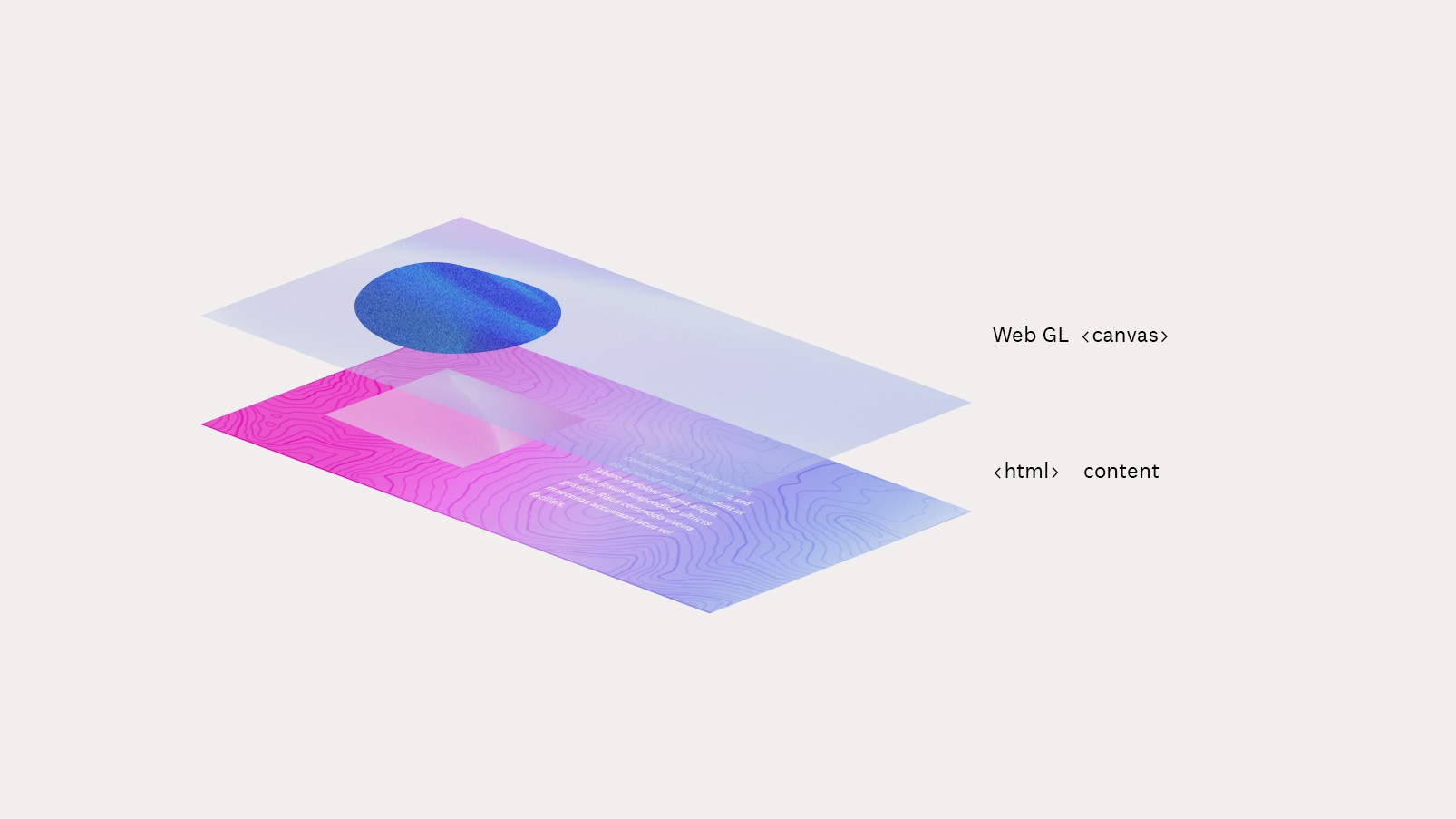
The scroll-rig has only one shared <GlobalCanvas/> that stays in between page loads.
React DOM components can choose to draw things on this canvas while they are mounted using a custom hook called useCanvas() or the <UseCanvas/> tunnel component.
The library also provides means to sync WebGL objects with the DOM while scrolling. We use a technique that tracks “proxy” elements in the normal page flow and updates the WebGL scene positions to match them.
The <ScrollScene/>, <ViewportScrollScene/> or the underlying useTracker() hook will detect initial location and dimensions of the proxy elements, and update positions while scrolling.
Everything is synchronized in lockstep with the scrollbar position on the main thread.
Further reading: Progressive Enhancement with WebGL and React
Installing 💾
yarn add @14islands/r3f-scroll-rig @react-three/fiber three
Getting Started 🛫
-
Add
<GlobalCanvas>to your layout. Keep it outside of your router to keep it from unmounting when navigating between pages. -
Add
<SmoothScrollbar/>to your layout. In order to perfectly match WebGL objects and DOM content, the browser scroll position needs to be animated on the main thread.
Next.js
import { GlobalCanvas, SmoothScrollbar } from '@14islands/r3f-scroll-rig'

// _app.jsx
function App({ Component, pageProps }: AppProps) {
  return (
    <>
      <GlobalCanvas />
      <SmoothScrollbar />
      <Component {...pageProps} />
    </>
  )
}
Gatsby.js
// gatsby-browser.js
import { GlobalCanvas, SmoothScrollbar } from '@14islands/r3f-scroll-rig'

export const wrapRootElement = ({ element }) => (
  <>
    <GlobalCanvas />
    <SmoothScrollbar />
    {element}
  </>
)
- Track a DOM element and render a Three.js object in its place
This is a basic example of a component that tracks the DOM and use the canvas to render a Mesh in its place:
import { UseCanvas, ScrollScene } from '@14islands/r3f-scroll-rig'

export const HtmlComponent = () => (
  const el = useRef()
  return (
    <>
      <div ref={el}>Track me!</div>
      <UseCanvas>
        <ScrollScene track={el}>
          {(props) => (
            <mesh {...props}>
              <planeGeometry />
              <meshBasicMaterial color="turquoise" />
            </mesh>
          )}
        </ScrollScene>
      </UseCanvas>
    </>
  )
)
How it works:
- The page layout is styled using normal HTML & CSS
- The
UseCanvascomponent is used to send its children to theGlobalCanvaswhile the component is mounted - A
<Scrollscene>is used to track the DOM element - Inside the
<ScrollScene>we place a mesh which will receive the correct scale as part of the passed downprops
⚠️ Note: HMR might not work for the children of <UseCanvas> unless you defined them outside. Also, the props on the children are not reactive by default since the component is tunneled to the global canvas. Updated props need to be tunneled like this.
Learn more about edge cases and solutions in the gotchas section.
Examples 🎪
- ScrollScene basic example
- ScrollScene with GLB model & events from both DOM & Canvas
- ViewportScrollScene with custom camera and controls
- Loading textures from <img> tags
- Load responsive texture from the DOM
- HTML parallax with useTracker() and Framer Motion
- A sticky ScrollScene from the powerups samples
- A basic Post Processing example
API ⚙️
All components & hooks are described in the API docs
Components |
Hooks |
Gotchas 🧐
The default camera
The default scroll-rig camera is locked to a 50 degree Field-of-View.
In order to perfectly match DOM dimensions, the camera distance will be calculated. This calculation is based on screen height since Threejs uses a vertical FoV. This means the camera position-z will change slightly based on your height.
You can override the default camera behaviour, and for instance set the distance and have a variable FoV instead:
<GlobalCanvas camera={{ position: [0, 0, 10] }} />
Or change the FoV, which would move the camera further away in this case:
<GlobalCanvas camera={{ fov: 20 }} />
If you need full control of the camera you can pass in a custom camera as a child instead.
Use relative scaling
Always base your sizes on the `scale` passed down from ScrollScene/ViewportScrollScene/useTracker in order to have consistent scaling for all screen sizes.The scale is always matching the tracked DOM element and will update based on media queries etc.
<ScrollScene track={el}>
  {{ scale }} => (
  <mesh scale={scale} />
  )}
</ScrollScene>
Scale is a 3-dimensional vector type from vecn that support swizzling and object notation. You can do things like:
position.x === position[0]
position.xy => [x,y]
scale.xy.min() => Math.min(scale.x, scale.y)
Z-Fighting on 3D objects (scaleMultiplier)
By default the scroll-rig will calculate the camera FoV so that 1 pixel = 1 viewport unit.
In some cases, this can mess up the depth sorting, leading to visual glitches in a 3D model. A 1000 pixel wide screen would make the scene 1000 viewport units wide, and by default the camera will also be positioned ~1000 units away in Z-axis (depending on the FoV and screen hight).
One way to fix this is to enable the logarithmicDepthBuffer but that can be bad for performance.
A better way to fix the issue is to change the GlobalCanvas scaleMultiplier to something like 0.01 which would make 1000px = 10 viewport units.
<GlobalCanvas scaleMultiplier={0.01} />
The scaleMultiplier setting updates all internal camera and scaling logic. Hardcoded scales and positions would need to be updated if you change this setting.
Matching exact hex colors
By default R3F uses ACES Filmic tone mapping which makes 3D scenes look great.
However, if you need to match hex colors or show editorial images, you can disable it per material like so:
<meshBasicMaterial toneMapping={false} />
Cumulative layout shift (CLS)
All items on the page should have a predictable height - always define an aspect ratio using CSS for images and other interactive elements that might impact the document height as they load.
The scroll-rig uses ResizeObserver to detect changes to the document.body height, for instance after webfonts loaded, and will automatically recalculate postions.
If this fails for some reason, you can trigger a manual reflow() to recalculate all cached positions.
const { reflow } = useScrollRig()

useEffect(() => {
  heightChanged && reflow()
}, [heightChanged])
Performance tips
- Use CSS animations whenever possible instead of JS for maximum smoothness
- Consider disabling SmoothScrollbar and all scrolling WebGL elements on mobile - it is usually laggy.
- Make sure you read, understand and follow all performance recomendations associated with
Reactandthree:
How to catch events from both DOM and Canvas
This is possible in R3F by re-attaching the event system to a parent of the canvas:
const ref = useRef()
return (
  <div ref={ref}>
    <GlobalCanvas
      eventSource={ref} // rebind event source to a parent DOM element
      eventPrefix="client" // use clientX/Y for a scrolling page
      style={{
        pointerEvents: 'none', // delegate events to wrapper
      }}
    />
  </div>
)
Can I use R3F events in `ViewportScrollScene`?
Yes, events will be correctly tunneled into the viewport, if you follow the steps above to re-attach the event system to a parent of the canvas.
inViewportMargin is not working in CodeSandbox
The CodeSandbox editor runs in an iframe which breaks the IntersectionObserver's rootMargin. If you open the example outside the iframe, you'll see it's working as intended.
This is know issue.
HMR is not working with UseCanvas children
This is a known issue with the UseCanvas component.
You can either use the useCanvas() hook instead, or make HMR work again by defining your children as top level functions instead of inlining them:
// HMR will work on me since I'm defined here!
const MyScrollScene = ({ el }) => <ScrollScene track={el}>/* ... */</ScrollScene>

function MyHtmlComponent() {
  return (
    <UseCanvas>
      <MyScrollScene />
    </UseCanvas>
  )
}
A similar issue exist in tunnel-rat.
Global render loop
The scroll-rig runs a custom render loop of the global scene inside r3f. It runs with priority 1000.
You can disable the global render loop using globalRender or change the priority with the globalPriority props on the <GlobalCanvas>. You can still schedule your own render passes before or after the global pass using useFrame with your custom priority.
The main reason for running our own custom render pass instead of the default R3F render, is to be able to avoid rendering when no meshes are in the viewport. To enable this you need to set frameloop="demand" on the GlobalCanvas.
Advanced - run frameloop on demand
If the R3F frameloop is set to demand - the scroll rig will make sure global renders and viewport renders only happens if it's needed.
To request global render call requestRender() from useScrollRig on each frame. ScrollScene will do this for you when the mesh is in viewport.
This library also supports rendering separate scenes in viewports as a separate render pass by calling renderViewport(). This way we can render scenes with separate lights or different camera than the global scene. This is how ViewportScrollScene works.
In this scenario you also need to call invalidate to trigger a new R3F frame.
How to use post-processing
Post processing runs in a separate pass so you need to manually disable the global render loop to avoid double renders.
<GlobalCanvas globalRender={false} scaleMultiplier={0.01}>
  <Effects />
</GlobalCanvas>
Note: ViewportScrollScene will not be affected by global postprocessing effects since it runs in a separate render pass.
How can I wrap my UseCanvas meshes in a shared Suspense?
Please read the API docs on using children as a render function for an example.
In the wild 🐾
- 14islands.com by 14islands
- v2.14islands.com by 14islands
- Pluto.app by 14islands
- Myriad.video by 14islands
- Neko Health by 14islands
- Playgoals.com by 14islands
- Goals studio by 14islands
- Pluto dev portal by 14islands
- Quantum Wallet by 14islands
- Metamask Learn by Antinomy Studio
- Lynxeye by 14islands
- Astra Nova by estudio/nk and @juliperoncini
- Axolot Games by 14islands