AceDataCloud TypeScript SDK
Official TypeScript/Node.js client for the AceDataCloud API.
Requires Node.js 18+ (uses native fetch).
Get your Ace Data Cloud API key
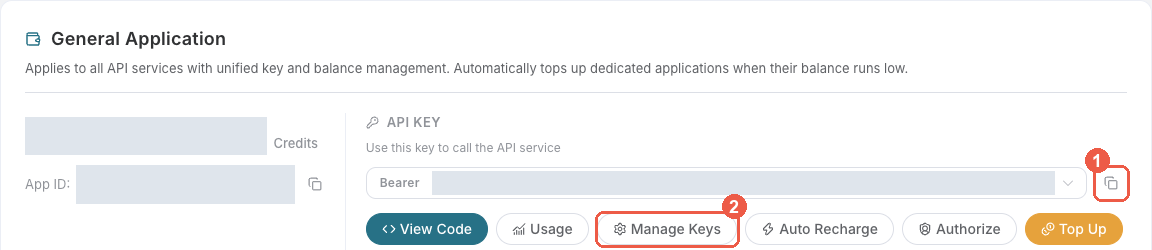
- Open Ace Data Cloud → Applications. Sign in, or register an account first.
- Find General application. If it has not been created, choose Initialize General Application. A general key can use the services available to your account; a dedicated application's key is limited to its service. Check the required service/model access and current pricing.
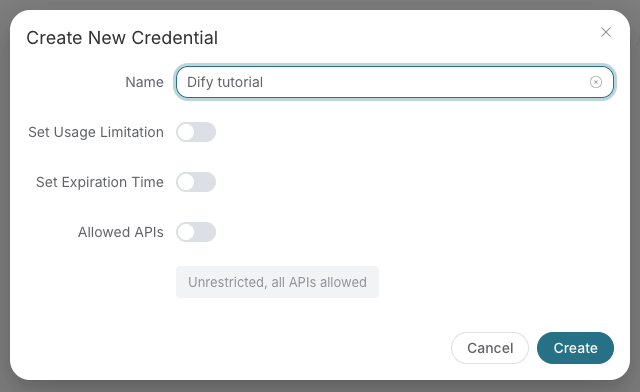
- Copy the API Key from the application card, or open Keys / Manage Keys → Create to create a separate key for this integration. Give it a recognizable name so you can revoke or rotate it independently.
- When creating a key, review Expiration Time, Set Usage Limitation, and Allowed APIs. Enable only the restrictions you need, allow the operations you will call, then click Create and copy the token from the key list. Task lookup does not grant permission to submit a generation. Confirm the application's balance can cover your first request; any trial allowance is whatever your account currently displays.
- Copy only the token value, without quotation marks, spaces, or
Bearer. An API Key / API Token field expects this raw value; only a manually configured HTTPAuthorizationheader needs theBearerprefix. Aplatform-...account-management token cannot replace a generation API key.
Save the key in the client's credential store or the environment variable shown below. Never put it in a prompt, shared workflow, screenshot, or Git commit. If authentication fails, check the full copied value, application/service access, expiration, usage limit, and balance before creating another key.
Use this application key for API requests. SDK account-management methods require the separate credential described in their management documentation; do not interchange it with the API key. The optional x402 payment flow below is a separate way to pay for supported requests.
Installation
npm install @acedatacloud/sdk
Quick Start
import { AceDataCloud } from '@acedatacloud/sdk';

const client = new AceDataCloud({ apiToken: 'your-token' });

// OpenAI-compatible chat completions
const response = await client.openai.chat.completions.create({
  model: 'gpt-4o',
  messages: [{ role: 'user', content: 'Hello!' }],
});
console.log(response.choices[0].message.content);
Streaming
const stream = await client.openai.chat.completions.create({
  model: 'gpt-4o',
  messages: [{ role: 'user', content: 'Tell me a story' }],
  stream: true,
});

for await (const chunk of stream) {
  process.stdout.write(chunk.choices?.[0]?.delta?.content ?? '');
}
Resources
| Resource | Description |
|---|---|
client.openai | OpenAI-compatible chat completions and responses |
client.chat | Native chat messages |
client.images | Image generation (Flux, Seedream, Nano Banana, etc.) |
client.audio | Music generation (Suno) |
client.video | Video generation (Luma, Sora, Veo, etc.) |
client.search | Web search (Google SERP) |
client.face | Face analysis & transformation (swap, beautify, age, cartoon) |
client.shorturl | Short URL creation |
client.tasks | Cross-service async task polling |
client.files | File uploads |
client.platform | Applications, credentials, models management |
Chat usage and billing
Accepted model requests through Chat Completions, Responses, and Messages are
billed by the selected model's input, output, and cache usage, not a fixed fee
per request. Switching protocol formats does not change this to per-call billing
or guarantee that a model accepts that format. Consult current model prices and
usage.cost for the charge; the SDK preserves reported usage without recalculating it.
- Chat Completions
prompt_tokensincludes reported cached tokens. - Responses
input_tokensincludes reported cached tokens. - Messages
input_tokensexcludes separately reportedcache_read_input_tokensandcache_creation_input_tokens; those dimensions are charged separately.
Do not add cached tokens to the input total again for Chat Completions or Responses, or treat Messages input alone as the full input/cache usage.
Public Chat Completions models
Pass these public IDs to client.openai.chat.completions.create({ model, messages });
use stream: true for streaming. The SDK passes model-specific fields through
without rewriting model IDs or enforcing a catalog.
gpt-6.1-terra: supports text/image input, streaming, function tools, and structured output. Usereasoning_effort: 'low'initially; supported levels arelow,medium,high,xhigh, andmax, notnoneorminimal. Responses usesreasoning: { effort: 'low' }instead. Inputs over 272,000 tokens use long-context pricing; consult current prices and reported usage.claude-opus-5-5: supports text and streaming Chat Completions withn: 1. Omittemperatureandtop_pto use model defaults; do not set temperature below 1 or a non-default top-p. Usetool_choice: 'auto', not forced tools. For native thinking blocks, signatures, and native tool semantics, useclient.chat.messages.gemini-4-argon: supports text and streaming Chat Completions. Thinking can consume output budget; Google recommends at leastmax_tokens: 32768for ordinary tasks. This does not expose Interactions background long-output functionality.kimi-k3.1-pro: always reasons; passreasoning_effort: 'low','high', or'max'. Do not disable reasoning. Keep the full assistant message, includingreasoning_contentandtool_calls, in multi-turn and tool-call history. The existingkimi-k3alias remains available; usereasoning_effort: 'max'for it.
Check current account access and prices before calling. A model's advertised context size does not guarantee the platform's per-request limit.
Native Claude Messages
For structured output, pass
output_config: { format: { type: 'json_schema', schema: yourSchema } } to
client.chat.messages.create(...). Read the generated JSON from Messages content
text blocks; this does not change the response envelope or increase maxTokens.
Thinking and output configuration are passed through without SDK model-specific
enum or combination checks. The selected model determines which values it accepts.
For the beta display: 'updates' mode, set the required header on a dedicated
client (client headers apply to every request):
const claude = new AceDataCloud({
  apiToken: 'your-token',
  headers: { 'anthropic-beta': 'thinking-display-updates-2026-08-18' },
});

const response = await claude.chat.messages.create({
  model: 'claude-sonnet-5-5',
  messages: [{ role: 'user', content: 'Explain this code.' }],
  thinking: { type: 'adaptive', display: 'updates' },
  output_config: { effort: 'high' },
});
Streaming and claude.chat.messages.countTokens(...) also preserve thinking
configuration. Parameter pass-through does not guarantee model support; API errors
are returned through the SDK's normal error handling.
OpenAI Embeddings
const embeddings = await client.openai.embeddings.create({
  model: 'text-embedding-3-small',
  input: 'The food was delicious and the waiter...',
});
Supported models are text-embedding-3-small and text-embedding-3-large.
text-embedding-ada-002 is no longer available. When migrating an existing index,
regenerate its vectors and rebuild the index; do not mix old and new model vectors.
Image Generation (with Task Polling)
// Default provider (nano-banana)
const task = await client.images.generate({ prompt: 'A sunset over mountains' });
const result = await task.wait();
console.log(result.image_url);

// Use a specific provider
const fluxTask = await client.images.generate({
  prompt: 'A sunset over mountains',
  provider: 'flux',
});
Nano Banana 2.1
Select model: 'nano-banana-2.1' explicitly for generation or editing at
1K, 2K, or 4K. Omitting model still uses nano-banana; there is no
nano-banana-2.1:official variant.
const task = await client.nanobanana.generate({
  action: 'generate',
  model: 'nano-banana-2.1',
  prompt: 'A blue ceramic vase on a cream background',
  resolution: '2K',
  aspectRatio: '1:1',
});
await task.wait();
const imageUrls = task.urls();

const editTask = await client.nanobanana.generate({
  action: 'edit',
  model: 'nano-banana-2.1',
  prompt: 'Change the vase to green; preserve the background',
  imageUrls,
  resolution: '4K',
});
await editTask.wait();
The public model ID also works with client.openai.images.generate(...) and
client.openai.images.edit(...); those use the OpenAI-compatible fields
(image for editing) and return response objects, not task handles.
GPT Image 2.5 / 2.6 quality
client.openai.images.generate(...) and .edit(...) pass quality through
unchanged. GPT Image models accept auto, low, medium, and high;
2.5 and 2.6 Flare/Sunburst models (including :reverse and :official
variants) additionally accept xhigh and max.
For both methods, :reverse is an explicit alias of the corresponding
unsuffixed Flare/Sunburst model. Pass the complete model ID unchanged, such as
gpt-image-2.6-flare or gpt-image-2.6-sunburst:reverse; do not use the
incomplete gpt-image-2.6. The SDK does not select a fallback.
The server may use GPT Image 2.5 Flare during automatic recovery for 2.0 / 2.5
reverse models, while preserving the requested model and per-successful-image
billing; 2.6 does not configure cross-model substitution.
gpt-image-2, both 2.5 models, and their :reverse aliases have a base price
of 0.19 Credits per successful image. The 2.6 Flare/Sunburst models and their
:reverse aliases have a base price of 0.22 Credits per successful image.
Official-channel requests are billed by actual token usage, not a fixed fee per
image; 2.6 uses the same official rates as 2.5. Check current account pricing and
usage records for final charges.
Both 2.6 models use the existing raster parameters: outputFormat is png,
jpeg, or webp (plus GIF for GPT Image 2.6; SVG is not supported), and size is auto or WIDTHxHEIGHT.
Explicit dimensions must be multiples of 16, with a longest side of at most
3840, 655,360–8,294,400 total pixels, and an aspect ratio of at most 3:1.
Editing uses image URLs through the SDK's JSON interface; Backend multipart
file upload support is not exposed by these helpers.
Maestro Video Production
Use the provider client to request one finished video in one language:
const task = await client.maestro.generate({
  prompt: 'Explain vector databases to beginners in 20 seconds',
  langs: ['en'],
  aspect: '9:16',
  duration: 20,
  scenario: 'narrated',
});
const result = await task.wait();
langs defaults to ['zh-cn'] and must contain exactly one language; create
separate tasks for other languages. The completed result contains one video in
response.data.variants. To revise a video, use action: 'remix', 'edit', or
'extend' with refTaskId: task.id.
There is no quality tier: all videos use 1080p/30fps and target durations of
5–300 seconds. Successful tasks cost 0.7 Credits per actual delivered second,
with integer billed seconds capped at the requested duration (falling back to
that duration if it cannot be read). All scenarios, actions, and languages have
the same rate; failed tasks and /maestro/tasks polling are free.
style accepts a freeform visual hint as well as named presets. voice accepts
named voice presets or a 32-character hexadecimal voice reference_id; pass it unchanged.
Producer action-specific inputs
await client.producer.generate({ action: 'generate', prompt: 'A jazz song' })
uses inspiration mode (custom: false by default). For custom vocals, set
custom: true and provide lyric; for custom instrumental music, set
custom: true, instrumental: true without inventing lyrics or a prompt.
Extensions require audioId, positive continueAt (seconds, including fractions),
and lyric unless instrumental. Covers, variations, section replacement,
vocal/instrument swaps, and stems require the source audioId. lyric and prompt
are no longer required for every action; generation still returns a task handle.
WebExtrator navigation and cache
client.webextrator.extract(...) and .render(...) accept cookies,
bypassCache, and cacheTtlSeconds, mapped to the API's snake_case cache fields.
Each cookie requires name, value, and domain; optional fields are path,
expires (Unix seconds), httpOnly, secure, and sameSite (Strict, Lax,
or None). Keep cookie values out of logs and Git.
The server defaults waitUntil to load, navigation timeout to 30 seconds,
and cache TTL to 3600 seconds. timeout must be a positive integer; delay and
cacheTtlSeconds must be nonnegative integers. bypassCache: true skips cache
reads but can still cache the fresh result; cacheTtlSeconds: 0 disables caching
that result. Omitted options remain omitted.
Kling reference-video billing
Pass videoList: [{ videoUrl: referenceUrl, referType: 'feature' }]
to client.kling.generate with model: 'kling-o1' or 'kling-v3-omni'.
Reference videos use a separate billing tier: 1.202 Credits/second in std
mode and 1.602 Credits/second in pro mode. For a 5-second O1 result,
std / pro cost 4.005 / 5.340 Credits without a reference video, or
6.010 / 8.010 Credits with one.
referType: 'base' (the default) edits may follow the reference video's length;
billing uses the actual output duration rounded to the nearest integer second.
referType: 'feature' uses the requested duration. Read
response.usage.reference_video_seconds for the final billed seconds;
the request-time estimate can differ from the final charge. This is response
usage, not a request parameter. Image references and first/last frames alone do
not trigger reference-video billing. Do not combine videoList with
generateAudio: true.
Suno music processing
For a private voice created by client.suno.voices(...), upload the original
song with await client.suno.upload({ audioUrl: sourceUrl, personaId }).
This field is supported only for standard uploads (the default), not
mode: 'enhanced'. After upload succeeds, use the returned data.audio_id as
audioId and the same personaId in
await client.suno.generate({ action: 'upload_cover', audioId, personaId }).
Do not reuse a song ID uploaded without that voice association. Voice creation,
upload, and cover must use the same service channel. vocalGender is not
required and cannot replace personaId.
Before a cover or extension, optionally call
await client.suno.availability({ audioId }). Use the song's audio_id from a
completed task, not its task_id. This is a synchronous API-token-authenticated
check, currently without a Credits charge; it returns the response object
directly, not a task handle to poll. result.data.available is only true on
success: it is positive evidence on the current channel, not a guarantee that
a subsequent operation will work. An inconclusive check returns an error,
including 503 availability_unknown; never convert an error into false.
Preserve the error code and trace ID.
Use client.suno.generate({ custom: true, lyric, style, negativeTags }) for
custom-mode music. negativeTags describes styles or genres to exclude; there
is currently no fixed character limit, but overly long input may still fail,
so keep it concise. The SDK sends it as negative_tags without truncation.
A downloadable audio file does not guarantee that its audio_id remains usable
for covers, extensions or stem separation. If processing returns
suno_processing_unavailable, keep the original task_id (the task handle's
id, when available) and the error's traceId for support. The related codes
suno_model_unavailable and suno_processing_failed mean the selected model is
unavailable for that operation or processing returned no audio, respectively.
Suno can also return api_error with the message
the account may have been offline; this is a server error, not an SDK
authentication error.
These HTTP 500 errors retain their code, traceId and body on APIError.
Retrieve an existing task rather than submitting a replacement generation just
to check its result.
Fish voice models
client.fish.model({ title, voices: audioUrl }) creates a reusable voice from a
single publicly downloadable audio URL string, not an array or a multipart
upload. Prefer a direct URL ending in .mp3 or .wav. Successful creation
returns the model object directly (HTTP 201); its _id can be used as
referenceId in client.fish.generate.
Created voices are stored publicly long-term and may be searched and used by
other users. Omit visibility: passing private or unlist does not make the
voice private. For temporary reference audio without creating a saved model,
use client.fish.generate({ text, references: [{ audio: audioUrl, text: transcript }] }).
client.audio.listFishModels({ selfOnly: true, pageSize: 20, pageNumber: 1 })
lists voices created and saved through this platform by the calling account,
including voices created with its other API tokens. This only filters the list;
it does not restrict public use. Results are paginated in reverse creation order;
sortBy supports created_at and task_count, and authorId can further filter
them. Do not combine selfOnly: true with titleLanguage; that filter is for
the public library. Responses contain total, items, and has_more;
has_more is boolean for self queries and may be null for public-library queries.
File uploads
client.files.upload(fileBytes, { filename: 'photo.jpg' }) uses the
management-plane account token, not a generation API key. Use a separate client
configured with that token. Uploads return file_url and mime; use the returned
URL rather than constructing one. The platform assigns an uploads/<uuid> path
and preserves a safe filename extension. Supply a filename matching the actual
content: MIME inference from the filename does not convert the file. The default
single-file limit is 100 MB.
Multi-Provider Support
Image, video, and audio resources support a provider parameter to switch between services:
// Video — default is 'sora'
await client.video.generate({ prompt: 'A cat playing piano', provider: 'kling' });
await client.video.generate({ prompt: 'Ocean waves', provider: 'luma' });

// Audio — default is 'suno'
await client.audio.generate({ prompt: 'A jazz song', provider: 'producer' });
Available providers:
| Resource | Providers |
|---|---|
client.images | nano-banana (default), flux, seedream |
client.video | sora (default), luma, veo, kling, hailuo, seedance, wan, pika, pixverse |
client.audio | suno (default), producer, fish |
Error Handling
import { AceDataCloud, AuthenticationError, RateLimitError } from '@acedatacloud/sdk';

const client = new AceDataCloud({ apiToken: 'your-token' });
try {
  await client.search.google({ query: 'test' });
} catch (err) {
  if (err instanceof AuthenticationError) {
    console.error('Invalid or expired token');
  } else if (err instanceof RateLimitError) {
    console.error('Too many requests');
  }
}
Configuration
const client = new AceDataCloud({
  apiToken: 'your-token',
  baseURL: 'https://x402.acedata.cloud',
  platformBaseURL: 'https://platform.acedata.cloud',
  timeout: 300000,    // ms
  maxRetries: 2,
});
The token can also be set via the ACEDATACLOUD_API_TOKEN environment variable.
await client.platform.config.get() returns features and region. region
is the lowercase country/region code detected from the request IP, or null
when unknown. The endpoint accepts no country/region override. Keep any
user-selected display region in your own application; it does not change
server-side availability or security policies. Feature keys may change; use
safe defaults for missing keys and do not share cached config across users.
Paying with X402 Instead of a Bearer Token
The SDK supports a pluggable paymentHandler that is invoked when the
API returns 402 Payment Required. Combine it with
@acedatacloud/x402-client
to pay for requests on-chain (Base, Solana, SKALE) instead of using a
Bearer token:
npm install @acedatacloud/sdk @acedatacloud/x402-client
import { AceDataCloud } from '@acedatacloud/sdk';
import { createX402PaymentHandler } from '@acedatacloud/x402-client';

const client = new AceDataCloud({
  // No apiToken needed — the x402 handler pays per request.
  paymentHandler: createX402PaymentHandler({
    network: 'base',               // or 'solana' | 'skale'
    evmProvider: window.ethereum,
    evmAddress: '0xYourAddress...',
  }),
});

const result = await client.openai.chat.completions.create({
  model: 'gpt-4o-mini',
  messages: [{ role: 'user', content: 'Say hi in 3 words' }],
  max_tokens: 10,
});
On each API call, the SDK first sends the request unauthenticated. If
the server replies with 402, the SDK passes the accepts list to
the handler, which signs and returns an X-Payment header. The SDK
retries the request once with that header. Everything else — task
polling, streaming, retries, error mapping — keeps working exactly the
same.
You can still pass a Bearer token alongside the handler if you want a
mixed mode (some endpoints via subscription, others via x402) — the
SDK only invokes the handler when it actually sees a 402.
The companion TypeScript/Python signers also support Arbitrum One
(network: 'arbitrum' or 'eip155:42161') for exact payments with native USDC
(6 decimals), not bridged USDC. Availability is rolled out per network: only
select Arbitrum when the server's current accepts offers it. A configured
signer does not enable the network on the server. Use the returned payment
requirements and price rather than hard-coding an amount; the SDK forwards
accepts unchanged to the handler. The wallet must support and hold funds on
the target chain.
License
MIT
GPT Image 2.6 native GIF
GIF generation and editing are available for gpt-image-2.6-flare, its :reverse/:official variants, and all gpt-image-2.6-sunburst variants. Use output_format="gif" in Python, outputFormat: "gif" in TypeScript, or OutputFormat: "gif" in Go. Frame controls are frame_count/frame_duration_ms (Python), frameCount/frameDurationMs (TypeScript), and FrameCount/FrameDurationMS (Go).
GIF defaults to a 512x512 preview, 9 frames and 200 ms per frame; actual dimensions may be adjusted by the model. The static 4K presets (3840x2160, 2160x3840) remain supported for PNG/JPEG/WebP generation and editing on all 2.6 variants. GIF has separate size/frame constraints.
GPT Image 2.6 supports complexity="low"|"medium"|"high" (omitted: model default high). Static edits accept markup: a PNG with transparent pixels, matching the first reference after orientation, up to 16,777,216 pixels per image and 40MB for the annotation. JSON accepts an HTTPS URL, PNG data URL or an object containing only image_url; multipart accepts an annotation file. Do not combine markup with mask, GIF or prompt_rewriter. GIF frame count is 2–16; frame duration is 20–655350ms, rounded to 10ms. GIF rejects masks, custom compression and partial streaming. Pricing is unchanged.