@ 事实波/ 可追踪性- 地图
将要求纳入e2e/整合测试代码并生成 二. 可追溯性矩阵 你的项目。 目前,该图书馆有一个适配器可与 齐压 测试.
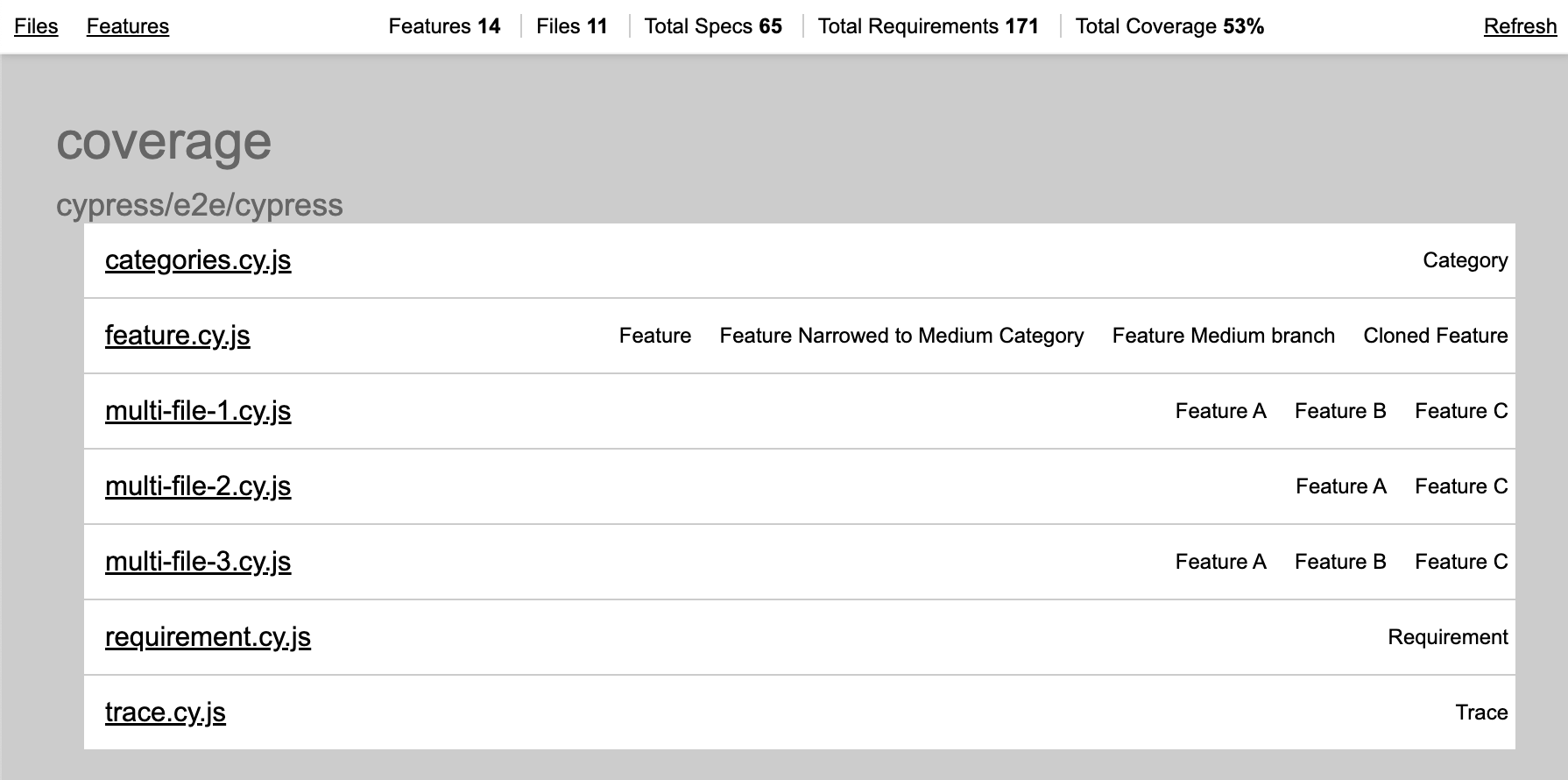
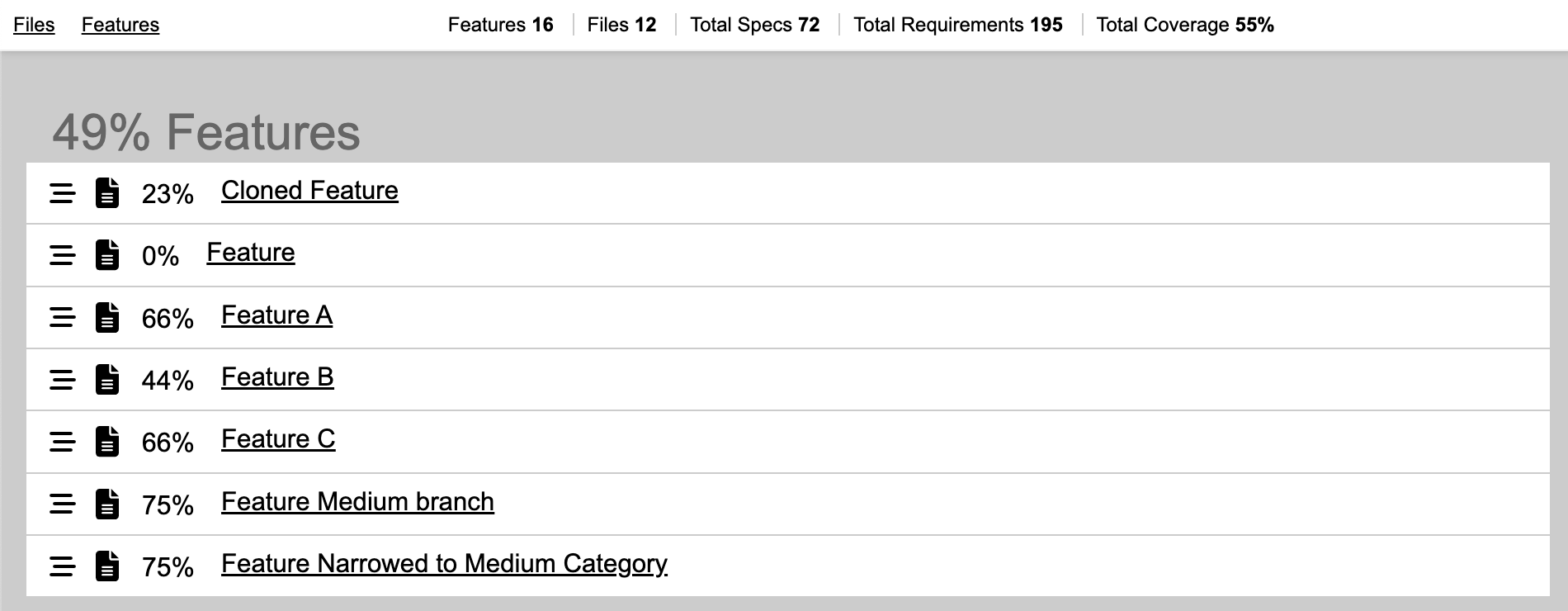
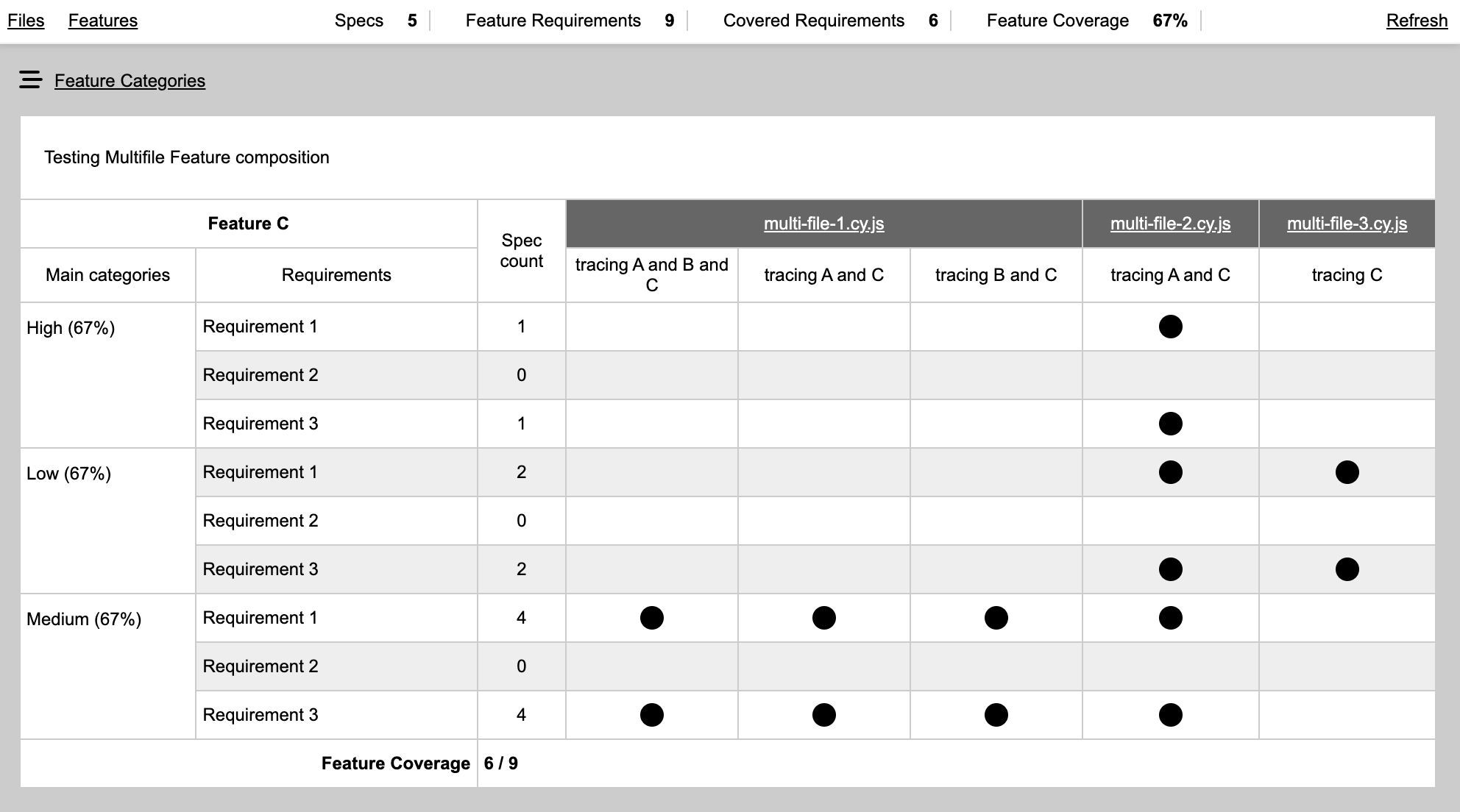
所生成的覆盖面报告实例可在此查阅 默认覆盖模板 财务报告和审定财务报表 紧凑覆盖模板。 。 。 .
1.1.0版本断开更改
此版本使用cy.env()来代替Cypress.env(),Cypress版本15.10.0及以上出现. 因此,从1.1.0版本开始,这个软件包具有cypress QQ15.10.0是同级依赖.
如何运作
当创建 E2E 或集成测试时,工程师会使用 trace() 功能,它记录测试特性的哪些要求得到满足,并将这些信息保存在JSON文件中作为覆盖。 测试运行后,可以查看或使用此覆盖信息生成HTML或LCOV覆盖报告.
微量通常是这样的,它接受一个要求的名称或包含完整分类路径的字符串阵列.
it("should do something according to requirement #1", () => {
  // by requirement name
  feature.trace("requirement #1");

  // by full category path
  feature.trace(["category", "sub category", "requirement #2"]);

  expect(something).toEqual(somethingElse);
});
这个 feature 上述示例中使用的对象代表了一个包含其要求结构的具体特征。 特性对象可以在测试文件中被创建,导入到测试文件中或通过解析马克当,YAML,XML,HTML或JSON格式的文档来创建.
测试运行后生成的文件是一个 JSON 文件, 不适合查看, 要生成可查看的信息和实际矩阵/表, 用户应当使用命令 traceability-matrices generate 生成带有报表的静态 HTML 文件或 traceability-matrices serve 用报告启动本地的 HTTP 服务器.
实例项目见 git repo (英语)
安装
通过国家预防机制安装软件包
npm install -D @actualwave/traceability-matrices
或者亚伦
yarn add -D @actualwave/traceability-matrices
然后通过定义环境变量配置 TRACE_RECORDS_DATA_DIR,可以在 cypress 配置文件中做到这一点
const { defineConfig } = require("cypress");

module.exports = defineConfig({
  e2e: {
    setupNodeEvents(on, config) {
      // implement node event listeners here
    },
    env: {
      // will store coverage reports in <feature-root>/cypress/coverage
      TRACE_RECORDS_DATA_DIR: "cypress/coverage",
    },
  },
});
另外,在软件包中添加命令也是有益的. json
  "scripts": {
    "tm:serve": "traceability-matrices serve --target-dir=cypress/coverage",
    "tm:generate": "traceability-matrices generate --target-dir=cypress/coverage --output-dir=coverage-static"
  },
电话 npm run tm:serve 将启动本地的 HTTP 服务器,并配有覆盖报告 npm run tm:generate 将生成 HTML 报表到 coverage-static 文件夹.
图标
此软件包支持多个命令在测试运行后与生成的覆盖报告合作. 所有命令接受所需的参数 --target-dir 在覆盖报告根文件夹中指向的文件夹,它与定义的文件夹相同 TRACE_RECORDS_DATA_DIR 环境变量。 可以提供这个参数多次指向多覆盖目录生成合并报告.
提供可追踪地图
运行带有覆盖报告的HTTP/S服务器,并在默认浏览器中打开.
参数:
--target-dir- 需要路径,包含覆盖报告目录--port- HTTP/S服务器的端口,默认为8477--key财务报告和审定财务报表--cert- 应指向私钥并签名证书文件启动 HTTPS 服务器,默认启动 HTTP 服务器--compact- 可选用途 hTML 表格的紧凑变体,分类以行而非列显示。 默认值为虚假 。 也许更可取的方法 使地物具有深层的结构.--theme-设置UI主题,支持的值为"光","暗","hc-light"和"hc-dark". "光"是默认的主题.
示例
traceability-matrices serve --target-dir=cypress/coverage --compact=true --theme=dark
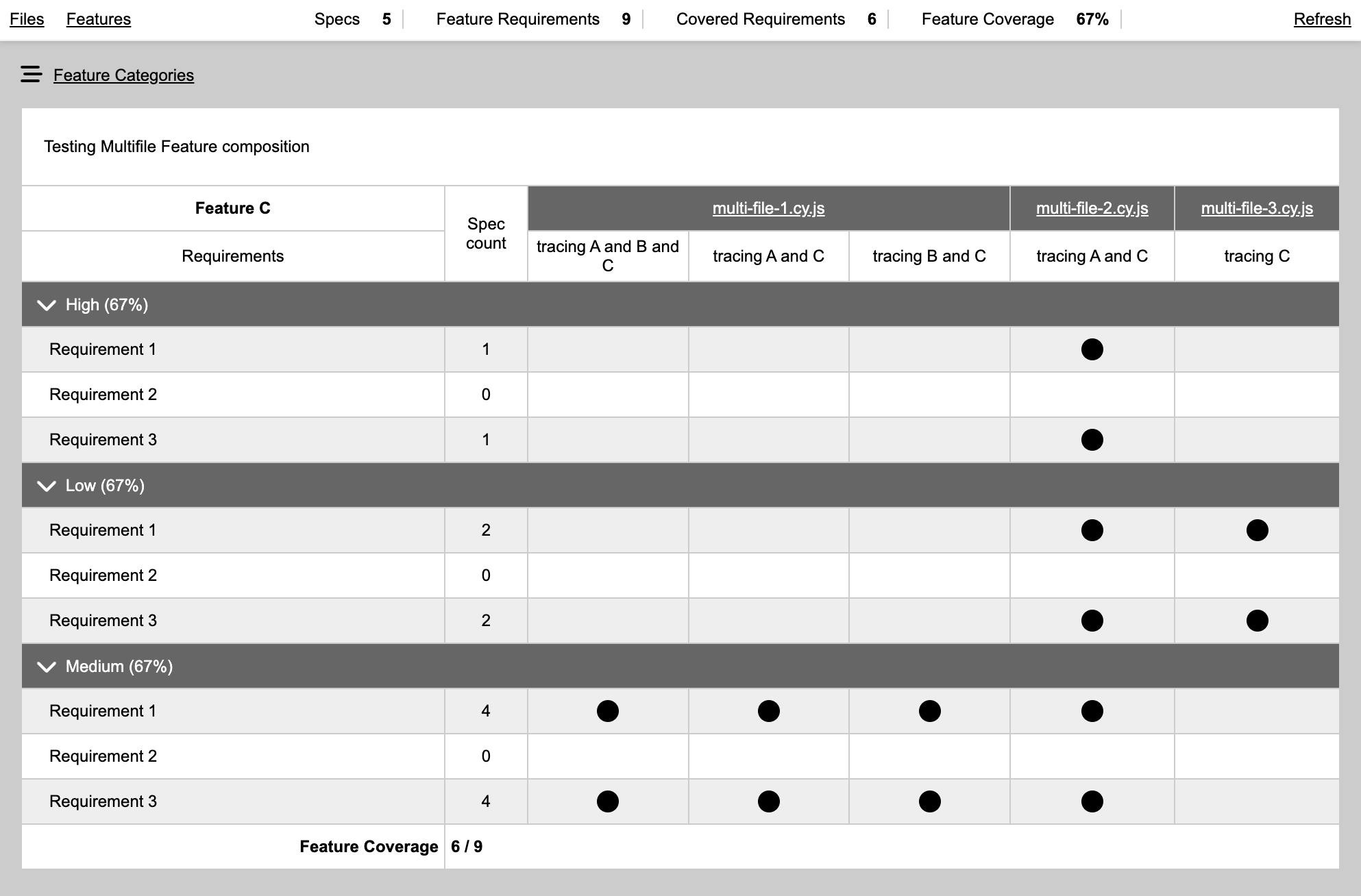
要运行 HTTPS 服务器, 提供相对于工作目录的密钥和证书文件的路径
traceability-matrices serve --target-dir=coverage --output-dir=statics --compact=true --key=./key.pem --cert=./cert.pem
生成可追溯性矩阵
生成包含覆盖报告的静态 HTML 文件 .
参数:
--target-dir- 需要路径,包含覆盖报告目录.--output-dir- 需要,应该存储生成的 HTML 文件的文件夹路径--compact=true- 可选用途 hTML 表格的紧凑变体,分类以行而非列显示。 默认值为虚假 。 也许更可取的方法 使地物具有深层的结构.--force-cleanup=true- 在生成新内容之前删除输出文件夹的所有内容 .--theme-设置UI主题,支持的值为"光","暗","hc-light"和"hc-dark". "光"是默认的主题.
示例
traceability-matrices generate --target-dir=cypress/coverage --output-dir=coverage-static
追踪-矩阵阈值
如果未达到覆盖阈值, 则失败( 带有错误代码的退出) .
参数:
--target-dir- 需要路径,包含覆盖报告目录.--total- 可选的,定义的全球覆盖阈值,值可以在0到100之间. 如果对所有特性的综合覆盖达不到阈值,则无法命令.--per-feature- 可选的、适用于每个特性的、定义的覆盖阈值,值可以在0至100之间。 如果至少有一个特性达不到阈值, 则无法命令 .
示例
traceability-matrices threshold --target-dir=cypress/coverage --total=80 --per-feature=60
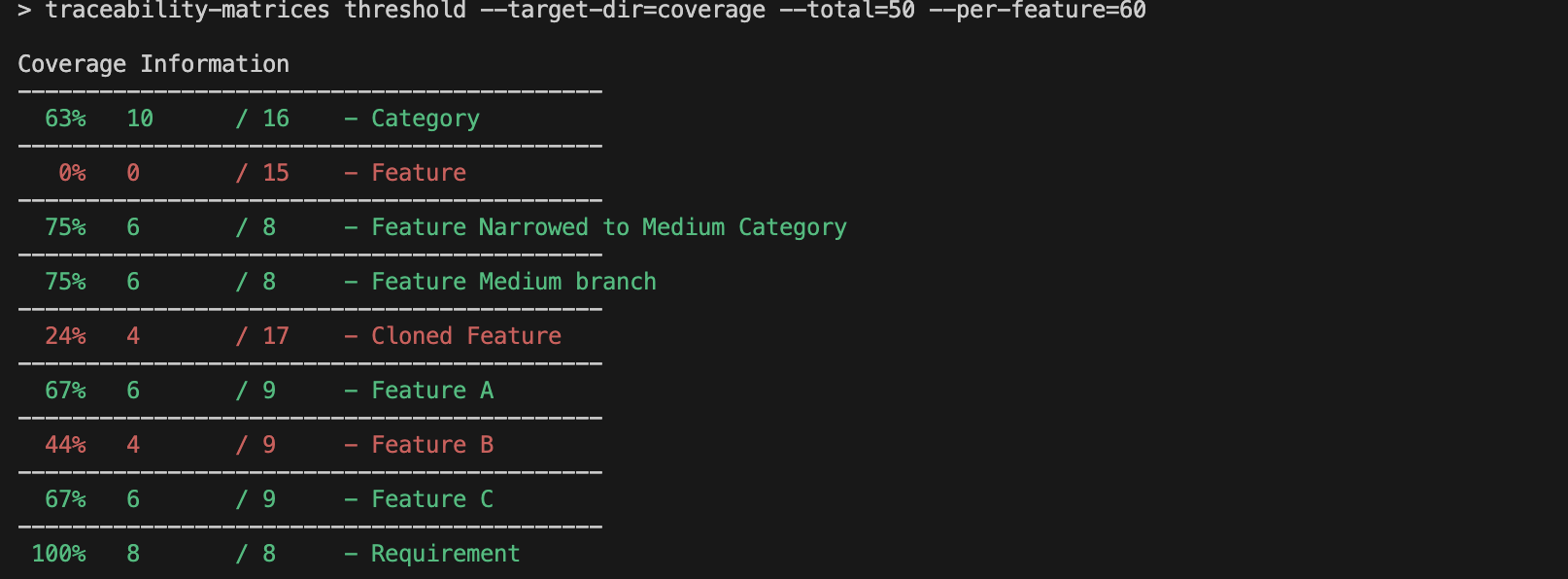
追踪数据
产出覆盖面信息,每个特点都有需求.
参数:
--target-dir- 需要路径,包含覆盖报告目录.
示例
traceability-matrices stats --target-dir=cypress/coverage
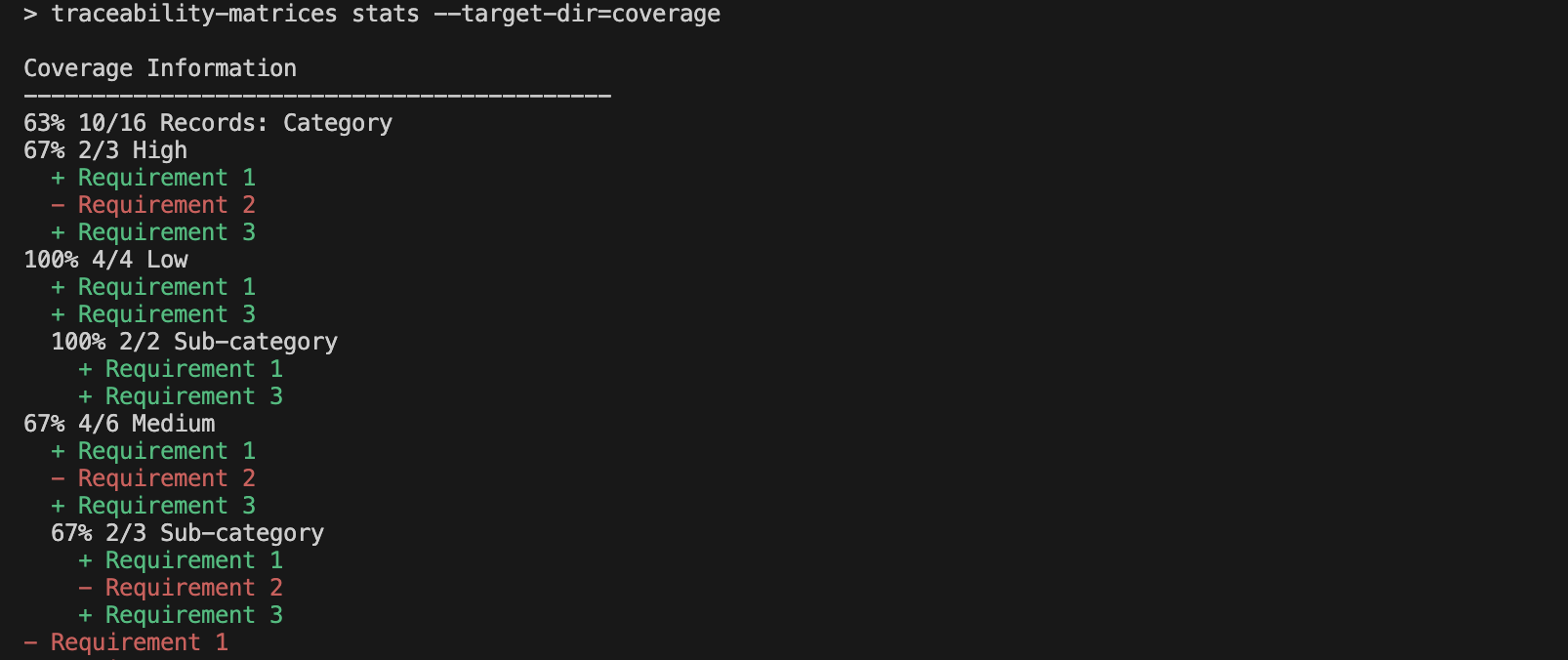
追踪-地图lcov
生成一个LCOV文件,其中包含测试覆盖范围和文件严格度,其特性信息可以用作源文件,成为覆盖目标. 此功能可用于任何覆盖读取器或分析器工具, 如 声纳Qube。 。 。 .
参数:
--target-dir- 需要路径,包含覆盖报告目录.--output-dir- 存放LCOV覆盖信息并生成“源”文件的文件夹,这些文件可用作参考覆盖阅读工具.--relative-dir- 用来在报道中预置文件路径。 默认情况下, 已录入的源路径将会是lcov/*。 。 。 .--force-cleanup=true- 在生成新内容之前删除输出文件夹的所有内容 .
示例
traceability-matrices lcov --target-dir=coverage --output-dir=generated_coverage_lcov --relative-dir=generated_coverage_lcov
有了SonarQube这样的工具,可以追踪特性覆盖的改变时间和设置阈值.
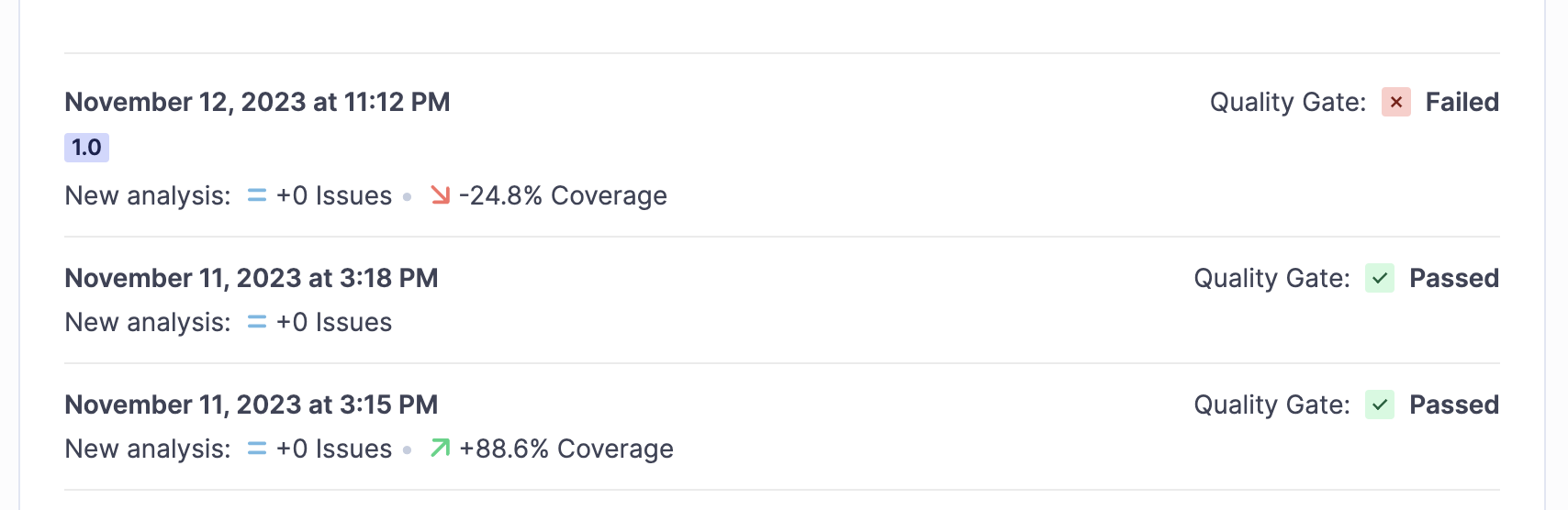
SonarQube中的文件列表除了覆盖百分比外没有显示任何有用的信息,因为生成的"源"100%由注释组成.
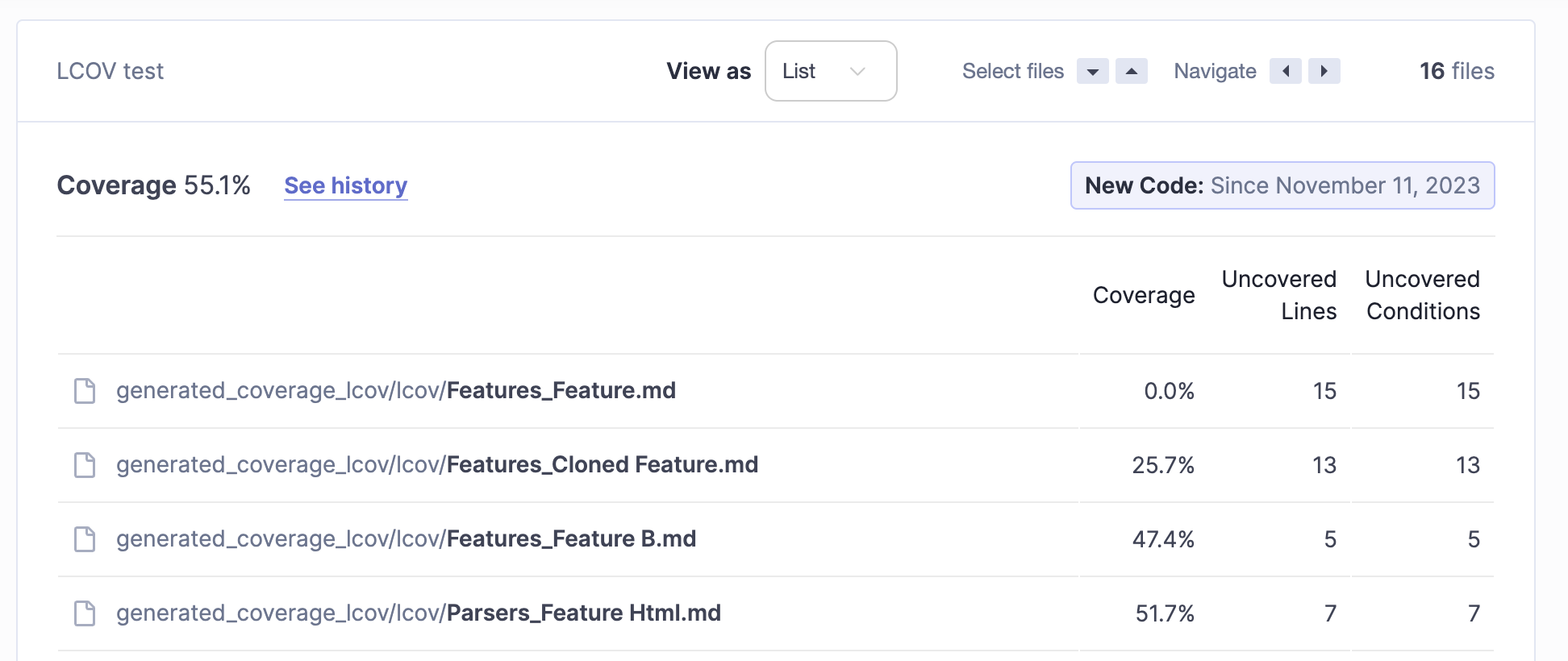
特性文件的内容, SonarQube 显示未发现的要求
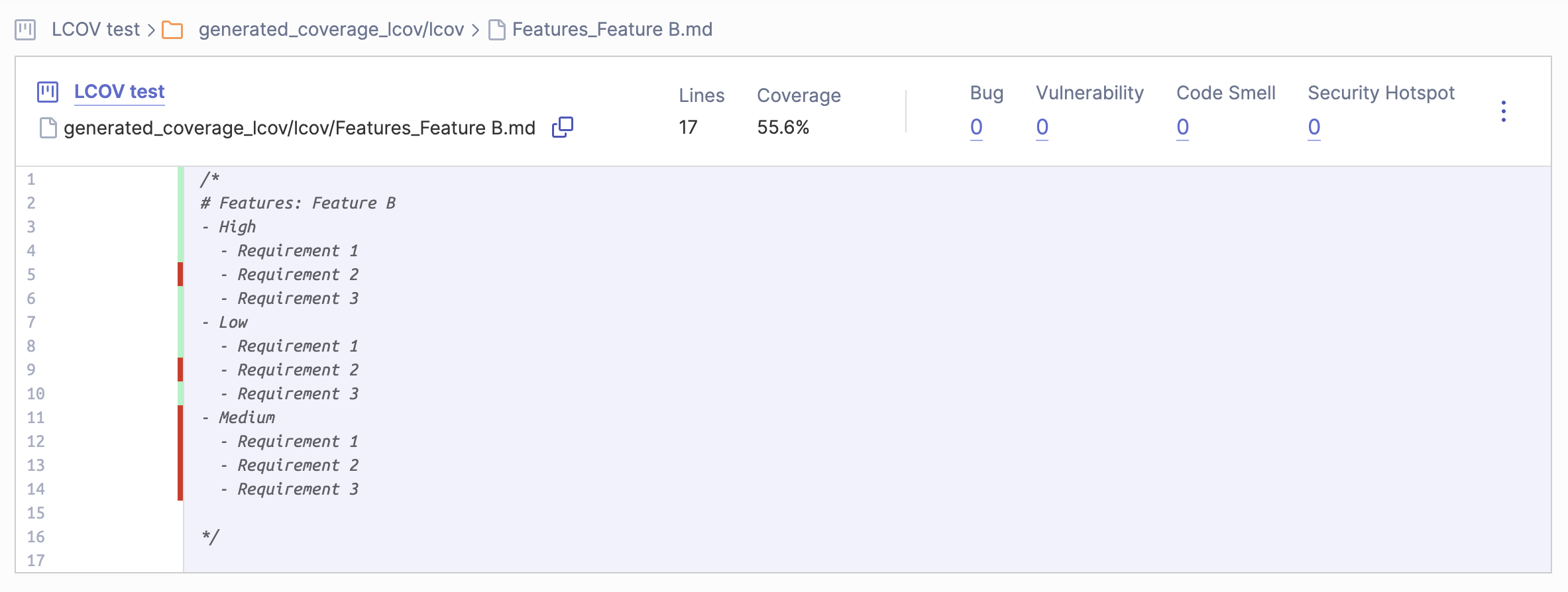
这个声纳Qube配置需要将其配置为读取 *.md 文件为JavaScript 文件,使其显示覆盖信息.
追溯-地图扫描
搜索为所支持的特性文件提供了目录,并以目标目录创建报告. 创建报告是一个隐蔽的覆盖报告,没有覆盖,这样,即使没有在测试中使用,所有被发现的特征都会被添加到报告上.
参数:
--features-dir- 必需的,带有特性文件的目录的路径,如果特性存储在不同文件夹中,可以被多次添加. 子目录也将进行递归扫描.--target-dir- 需要的,通往有覆盖报告目录的路径.
示例
traceability-matrices scan --features-dir=./cypress/features --target-dir=coverage
Cypress 整合
Cypress 集成从添加开始 TRACE_RECORDS_DATA_DIR 用于 cypress 配置的环境变量, 用于显示存储覆盖报告的位置
const { defineConfig } = require("cypress");

module.exports = defineConfig({
  e2e: {
    env: {
      TRACE_RECORDS_DATA_DIR: "cypress/coverage",
    },
  },
});
并定义测试文件中的特性
import { createFeature } from "@actualwave/traceability-matrices/cypress";

const feature = createFeature({
  title: "My Feature",
  description: "This is a description of my new feature",
  group: "Features",
});
createFeature({ title: string, description?: string, group?: string }) 接受特征标题和可选描述及组合。 特性标题必须是独特的字符串 。 地物描述可以是HTML字符串,它会显示在地物覆盖表上并适合放置各种地物链接和其他有用的信息. 组合将被用于一个功能列表,以显示同一组下的特性,并在视觉上将它们与其他特性相分离.
import { createFeature } from "@actualwave/traceability-matrices/cypress";

const feature = createFeature({
  title: "My Feature",
  description: `
<h1>Useful information</h1>
<a href="https://react.dev/">Learn React</a>`,
  group: "Features",
});
已创建 feature 提供各种方法,使测试规格与特性再配对,并生成测试记录,一旦测试运行完成,这些记录将存储在JSON文件中.
特性. trace ()
为了与规格相符,应在规格内放置痕迹,例如:
// test spec
it("should do something according to requirement #1", () => {
  // trace requirement
  feature.trace("requirement #1");

  expect(something).toEqual(somethingElse);
});
注意:要正确匹配要求字符串与特征结构要求,必须在其特征内有一个独特的字符串.
运行此测试后, 覆盖范围将包含一个 spec should do something according to requirement #1 测试 requirement #1 页:1 一种种类可能包含多种等效物,而痕迹可能包含期望或被嵌入.
it("should do something according to multiple requirements", () => {
  feature.trace("requirement #1", () => {
    expect(something).toEqual(somethingElse);

    feature.trace("requirement #3", () => {
      expect(something).toEqual(somethingElse);

      feature.trace("requirement #4", () => {
        expect(something).toEqual(somethingElse);
      });
    });
  });

  feature.trace("requirement #2");
  expect(something).toEqual(somethingElse);
});
feature.trace() 可以通过提供一系列字符串来生成需要树
it("should do something according to requirement #1", () => {
  feature.trace(["High", "General", "PRD I", "requirement #1"]);
  feature.trace(["High", "General", "PRD I", "requirement #2"]);
  feature.trace(["High", "General", "PRD I", "requirement #3"]);
  feature.trace(["Low", "PRD IVa", "requirement #45"]);
  feature.trace(["Low", "PRD IVa", "requirement #46"]);
  feature.trace(["optional requirement #1"]);

  expect(something).toEqual(somethingElse);
});
这将产生需求结构
- 高级
- 常规
- PRD I 软件
- 要求 # 1
- 要求 # 2
- 要求 3号
- PRD I 软件
- 常规
- 低级
- PRD 四年级a
- 要求# 45
- 要求# 46
- PRD 四年级a
- 可选要求 # 1
这种结构也可以使用下列方法建立: feature.structure() 方法
feature.structure({
  High: {
    General: {
      "PRD I": {
        "requirement #1": {},
        "requirement #2": {},
        "requirement #3": {},
      },
    },
  },
  Low: {
    "PRD IVa": {
      "requirement #45": {},
      "requirement #46": {},
    },
  },
  "optional requirement #1": {},
});
并使用此名称 feature.trace() 打电话,
it("should do something according to requirement #1", () => {
  feature.trace("requirement #3");
  expect(something).toEqual(somethingElse);
});
它将被匹配到结构的叶节点。 如果无法在结构中找到要求,则在生成覆盖时将添加到结构的根上.
没有包含所有特性要求的结构,该特性将具有100%的覆盖性,因为只有从放入规格的痕迹(已经标为覆盖)中加入要求. 具备所有功能要求的结构可以进行适当的覆盖计算。 就保险的计算而言,如果结构是平整的或按类别排列,则无关紧要(纯粹的视觉利益).
注:此类结构中的分类(branches,不是叶子节点)可以包含HTML标记. 在要求字符串中使用 HTML 标记也是可能的,它会被适当渲染,但在测试规格中使用时可能会不舒服.
特性. 要求( )
与 feature.trace(),工程师可以使用 feature.requirement() 并指定在多处使用的要求.
const req1 = feature.requirement("requirement #1");
一旦创建,它可用于替换测试生命周期钩,如 describe() 财务报告和审定财务报表 it()
req1.describe('When someting', () => {
  ...
});

req1.it('should do', () => {
  ...
});
两人将在这些地方测试记录要求.
特性. 类别( )
category() 方法允许为可追踪的要求指定类别路径。 它返回对象 category(), (中文(简体) ), trace() 财务报告和审定财务报表 requirement() 函数。 如果特性在多个地方含有相同的要求,则使用 trace() 来自特定类别,有助于找到确切的要求.
例如,如果我们有这种结构
{
  "Requirement 1": null,
  "Requirement 2": null,
  "Category 1": {
    "Requirement 1": null,
    "Requirement 2": null,
  },
  "Category 2": {
    "Requirement 1": null,
    "Requirement 2": null,
  },
}
追查要求 Requirement 1 从未来的水平将寻找第一个要求的发生,所以所有痕迹都将记录在 Requirement 1 在根类中.
it("should trace requirement 1 from category 2", () => {
  feature.trace("Requirement 1");
});
使用 trace() 从某一具体类别来看,有助于指出其水平的要求.
const category1 = feature.category("Category 2");

it("should trace requirement 1 from category 2", () => {
  category1.trace("Requirement 1");
});
这个可以追踪 Requirement 1 从 Category 2。 。 。 .
这个功能可以被多次使用,并且可以接受多类来进行深筑巢的要求.
const child = feature.category("Parent Category", "Child Category");
这两个例子是等同的.
const parent = feature.category("Parent Category");
const child = parent.category("Child Category");
特性. set Trace to Requirement Matcher ()
在某些情况下,在测试文件中将全部要求的文本放入痕迹可能不舒服。 使用此功能要求可以使用独特的识别符进行查询. 它接受一个自定义函数,该函数将使用被跟踪的字符串和一个断层对象来调用,它的目的是识别并返回要求文本或路径数组 [category, ..., requirement] 指结构中的特定要求.
import {
  createFeature,
  readStructureRequirements,
} from "@actualwave/traceability-matrices/cypress";

const Feature = createFeature({
  title: "Requirement matcher",
  group: "Features",
});

Feature.structure(
  {
    High: {
      "HR-1 Requirement text is so long that might be difficult to use in tests.":
        null,
      "HR-2 Requirement text is so long that might be difficult to use in tests.":
        null,
      "HR-3 Requirement text is so long that might be difficult to use in tests.":
        null,
    },
    "RR-1 Requirement text is so long that might be difficult to use in tests.":
      null,
    "RR-2 Requirement text is so long that might be difficult to use in tests.":
      null,
    "RR-3 Requirement text is so long that might be difficult to use in tests.":
      null,
  },
  ["Category", "Requirement"]
);

Feature.setTraceToRequirementMatcher(({
  name,
  structure
}) => {
  if (name instanceof Array) {
    return name;
  }

  /*
   * readStructureRequirements() reads structure and returns all requirements in a form of 2-dimensional array
   * [
   *   [requirement, path]
   * ]
   *
   * where
   *  requirement - requirement text
   *  path - an array or strings that identifies requirement in a structure
   */
  const reqs = readStructureRequirements(structure);
  const [, path] = reqs.find(([key]) => key.startsWith(name));

  return path || name;
});

describe("Matcher", () => {
  describe("High category requirements", () => {
    it("trace second requirement", () => {
      /*
       * this trace will use matcher to identify requirement using inuque identifier
       * matcher will result with
       *  [
       *   "High",
       *   "HR-2 Requirement text is so long that might be difficult to use in tests."
       *  ]
       */
      Feature.trace("HR-2");
    });
  });
});
category() 允许为其要求和子类要求设置自定义匹配器.
const RootCategory = feature.category("Root Category");
RootCategory.setTraceToRequirementMatcher(findRootCategoryRequirement);

const ChildCategory = feature.category("Root Category", "Child Category");
ChildCategory.setTraceToRequirementMatcher(findChildCategoryRequirement);

const DescendantCategory = ChildCategory.category("Descendant Category");
DescendantCategory.setTraceToRequirementMatcher(
  findDescendantCategoryRequirement
);
删除匹配者( 通过设置到)
undefined)如果设置,将恢复使用母类或特性匹配器.
在设置一个类的匹配器时,它不会被按照路径指定为类,而是被指定为对象内部状态.
所以,当呼叫 category() 下次返回对象时,在同一类别上将不会有相同的匹配者.
const ChildCategory1 = feature.category("Root Category", "Child Category");
// setting matcher to ChildCategory1
ChildCategory1.setTraceToRequirementMatcher(findChildCategoryRequirement);

// it does not have the matcher previously set to same category but different object,
// you have to set it again for ChildCategory2 to make it work for this object
const ChildCategory2 = feature.category("Root Category", "Child Category");
// now it also has the matcher
ChildCategory2.setTraceToRequirementMatcher(findChildCategoryRequirement);
特性.结构( )
feature.structure() 用于指定分类树,它只应当与对象相建。 这种结构的叶片对象将被确定为可测试要求,其他分支属于类别,无法测试.
feature.structure({
  High: {
    General: {
      "PRD I": {
        "requirement #1": {},
        "requirement #2": {},
        "requirement #3": {},
      },
    },
  },
});
可选择提供结构树表头列表, 用于在报表中制作 HTML 表格
feature.structure(
  {
    High: {
      General: {
        "PRD I": {
          "requirement #1": {},
          "requirement #2": {},
          "requirement #3": {},
        },
      },
    },
  },
  ["Priority", "Category", "Requirement"]
);
如果测试会包含到分类中的痕量,则该记录将作为叶节点被添加到结构的根上.
feature.structure() 返回带有附加方法的用于结构工作的对象.
add(...path: string[]) => Record<string, object>- 如果不存在,在结构中增加类别/要求get(...path: string[]) => Record<string, object>-取回结构的一个分支merge(source: Record<string, object>) => void- 合并外部结构clone(...path: string[]) => Record<string, object>- 克隆并返回整个结构或分支branch(path: string[], featureTitle: string, featureDescription?: string) => FeatureApi- 从结构分支创建子地貌。 子地貌不会与当前特性连接,结构会被复制.narrow(path: string[], featureTitle: string, featureDescription?: string) => FeatureApi- 将树枝从提供的路径中去除,从而创建具有结构的子地貌。 子地貌不会与当前特性连接,结构会被复制.
特性.headers ()
允许指定 HTML 表格头的列表。 在紧凑模式中,仅使用上一个头.
特性.clone ()
克隆人特性,创建了具有相同结构和空测试记录的新特性.
特性. valueOf ()
返回特性的内部状态
解析器
此工程包括允许从各种文件类型读取特征信息的解析器. 全部返回特性 API 对象,并以同样的方式工作,就像从 createFeature()。 。 。 .
标记
Markdown 文件结构应该从第1级头开始, 头头将作为特性标题解析 。 如果标题中有斜线,则会被拆分为组和标题.
# Feature Group / Feature Title

This is the text of feature description, may contain images, links etc.
标题下的任何文字都用作特征描述. 特征结构上标有下等头和列表.
- Requirement 1

# Category

- Requirement 2

## Sub Category

- Requirement 3
转换为特性结构 :
- 所需经费1
- 类别
- 所需经费2
- 子类
- 所需经费 3
同一结构只能用信头描述
# Requirement 1

# Category

## Requirement 2

## Sub Category

### Requirement 3
或者只列出
- Requirement 1
- Category
  - Requirement 2
  - Sub Category
    - Requirement 3
类别由下级标题或以下列表的可用性所定义.
# This is a category

## Because this lower level header exists
如果信头下面没有下级信头,则会被解为要求.
# This is not a category because there are no lower level headers or lists under it

# Category

## Requirement
标题下的任何文本会与要求或类别文本合并.
# Category

More text with some details about this category

## Requirement
特征示例
# Parsers / Feature Markdown

My feature description with [HTML](https://google.com)

## High

- High Requirement 1
- High Requirement 2
- High Requirement 3
Cypress测试中的用法
import { createFeatureFromMarkdownAsync } from "@actualwave/traceability-matrices/markdown";

const Feature = createFeatureFromMarkdownAsync(
  "cypress/features/ParserMarkdown.md"
);

describe("Markdown", () => {
  describe("High requirements", () => {
    it("trace high requirements", () => {
      Feature.trace("High Requirement 2");
    });
  });
});
也门
YAML 应该有这些属性在根层
title: string- 地物名称,需要.structure: object- 特征结构,需要.description: string- 特征描述,可选。 可能包含 HTML 标记 .group: string- 特质组,可选的. 结构对象应当包含特征要求. 要求字段可能有原始或空对象作为值. 它还可能包含有字段的数组或其他对象,这些将被视为类别.
structure:
  Requirement 1: null
  Category:
    Requirement 2:
    Sub Category:
      - Requirement 3
结构不能有空分类 -- 空对象将被解析为需要 .
特征示例 :
title: Feature Yaml
description: My feature description with <a href=\"https://google.com\">HTML</a>
group: Parsers
structure:
  High:
    - High Requirement 1
    - High Requirement 2
    - High Requirement 3
Cypress测试中的用法
import { createFeatureFromYamlAsync } from "@actualwave/traceability-matrices/yaml";

const Feature = createFeatureFromYamlAsync("cypress/features/ParserYaml.yaml");

describe("YAML", () => {
  describe("High requirements", () => {
    it("trace high requirements", () => {
      Feature.trace("High Requirement 2");
    });
  });
});
XML 数据
XML 文件结构从根标记开始 feature。它应该包含这些标签
title- 地物名称,要求.structure- 特征结构,需要.description- 特征描述,可选.group- 特质组,可选的.
值是文本内容和子节点,标记属性被忽略.
结构用两个标记描述 category 类别和 requirement 所需经费。 类别标签应包含 name 包含类别名称和 requirment 标记以指定此类要求,它也可能包含其他 category 子类标记.
<structure>
  <requirement>Requirement 1</requirement>
  <catgegory>
    <name>Category</name>
    <requirement>Requirement 2</requirement>
    <catgegory>
      <name>Sub Category</name>
      <requirement>Requirement 3</requirement>
    </category>
  </category>
</structure>
结构不能包含空类, 它们将被转换成要求 .
特征示例 :
<feature>
  <title>Feature Xml</title>
  <description
    >My feature description with
    <a href="https://google.com">HTML</a></description
  >
  <group>Parsers</group>
  <category>
    <name>High</name>
    <requirement>High Requirement 1</requirement>
    <requirement>High Requirement 2</requirement>
    <requirement>High Requirement 3</requirement>
  </category>
</feature>
Cypress测试中的用法
import { createFeatureFromXmlAsync } from "@actualwave/traceability-matrices/xml";

const Feature = createFeatureFromXmlAsync("cypress/features/ParserXml.xml");

describe("XML", () => {
  describe("High requirements", () => {
    it("trace high requirements", () => {
      Feature.trace("High Requirement 1");
      Feature.trace("High Requirement 2");

      // using full path
      Feature.trace(["High", "High Requirement 3"]);
    });
  });
});
HTML 语言
HTML 打印器的使用 data- 属性以查找与特性相关的信息,并可能具有任何类型的标记。 没有适当数据属性的标记会被忽略.
支持属性
data-feature-title- 特征标题,应该有价值data-feature-group- 特征组,shold有价值,必须与所有权属性相同.data-feature-description- 特征描述。 如果没有定义为描述的值,则将带走元素的 HTML 内容.data-feature-requirement- 结构要求,将加入特征结构。 如果将具有这一属性的元素归入类别元素,则要求将被添加到相应的类别中. 应定义属性值中的要求名称 .data-feature-category- 结构类别,该类别要素的后人界定的所有要求,也将是特征结构中这一类别的后人。 结构会重复 HTML 树的结构,忽略所有不包含的元素类别或要求属性. 应在属性值中定义类别名称.
HTML 特性示例
<!DOCTYPE html>
<html>
  <head>
    <title>HTML Feature Document</title>
  </head>
  <body>
    <h1 data-feature-title="Feature Html" data-feature-group="Parsers">
      Feature HTML
    </h1>
    <strong data-feature-description
      >My feature description with <a href="https://google.com">HTML</a></strong
    >
    <h4>Structure</h4>
    <span data-feature-requirement="Requirement 1"
      >Some freature requirement</span
    >
    <strong>Structure Category</strong>
    <ul data-feature-category="Category">
      <li data-feature-requirement="Requirement 2">Requirement 2</li>
      <li data-feature-category="Sub category">
        <strong>Sub category structure</strong>
        <ul>
          <li data-feature-requirement="Requirement 3">
            Sub category Requirement 3
          </li>
        </ul>
      </li>
    </ul>
  </body>
</html>
Cypress测试中的用法
import { createFeatureFromHtmlAsync } from "@actualwave/traceability-matrices/html";

const Feature = createFeatureFromHtmlAsync("cypress/features/ParserHtml.html");

describe("HTML", () => {
  describe("Category requirements", () => {
    it("trace category requirements", () => {
      Feature.trace("Requirement 2");

      // using full path
      Feature.trace(["Category", "Sub category", "Requirement 3"]);
    });
  });
});
贾森
JSON 文件结构应该有这些属性在根层
title: string- 地物名称,需要.structure: object- 特征结构,需要.description: string- 特征描述,可选。 可能包含 HTML 标记 .group: string- 特质组,可选的. 结构对象应当包含特征要求. 要求字段可能有原始或空对象作为值. 它还可能包含有字段的其他物体,这些物体将作为类别处理.
"structure": {
  "Requirement 1": null,
  "Category": {
    "Requirement 2": "",
    "Sub Category": {
      "Requirement 3": {},
    }
  }
}
结构不能有空分类 -- 空对象将被解析为需要 .
特征示例 :
{
  "title": "Feature Json",
  "description": "My feature description with <a href=\"https://google.com\">HTML</a>",
  "group": "Parsers",
  "structure": {
    "High": {
      "High Requirement 1": {},
      "High Requirement 2": {},
      "High Requirement 3": {}
    }
  }
}
Cypress测试中的用法
import { createFeatureFromJsonAsync } from "@actualwave/traceability-matrices/json";

const Feature = createFeatureFromJsonAsync("cypress/features/ParserJson.json");

describe("JSON", () => {
  describe("High requirements", () => {
    it("trace high requirements", () => {
      Feature.trace("High Requirement 1");
      Feature.trace("High Requirement 2");

      // using full path
      Feature.trace(["High", "High Requirement 3"]);
    });
  });
});
Claude/AI 代理整合
此套件会传送一个技能文件( NameSKILLL.MD (英语)格式化为 代理技能.io 规格。 它让克洛德和其他相容的AI代理完全上下文关于库的API,parsers,和CLI命令,这样你就可以在不手工粘贴docs的情况下提问或得到生成的代码.
该技能包括:
SKILL.md概述、快速启动和关键概念references/api.md——全 Cypress API 参考文献references/parsers.md——所有解析器的文件格式细节references/cli.md——完整CLI旗参考
在 Claude 代码中安装
将技能复制到您的项目 Claude 技能目录中 :
# project-level (only available in this project)
mkdir -p .claude/skills/traceability-matrices
cp node_modules/@actualwave/traceability-matrices/SKILL.md .claude/skills/traceability-matrices/
cp -r node_modules/@actualwave/traceability-matrices/references .claude/skills/traceability-matrices/
或者在全球安装 这样每个项目都可以使用:
mkdir -p ~/.claude/skills/traceability-matrices
cp node_modules/@actualwave/traceability-matrices/SKILL.md ~/.claude/skills/traceability-matrices/
cp -r node_modules/@actualwave/traceability-matrices/references ~/.claude/skills/traceability-matrices/
安装后克洛德码会自动使用与可追溯性矩阵相关的提问或请求码时的技能.
链接
最新版本的UI 我免费使用夫妇 字体帅哥图标。 。 。 .