QRCode 终端版 
去之前没有QRCode去过的地方.
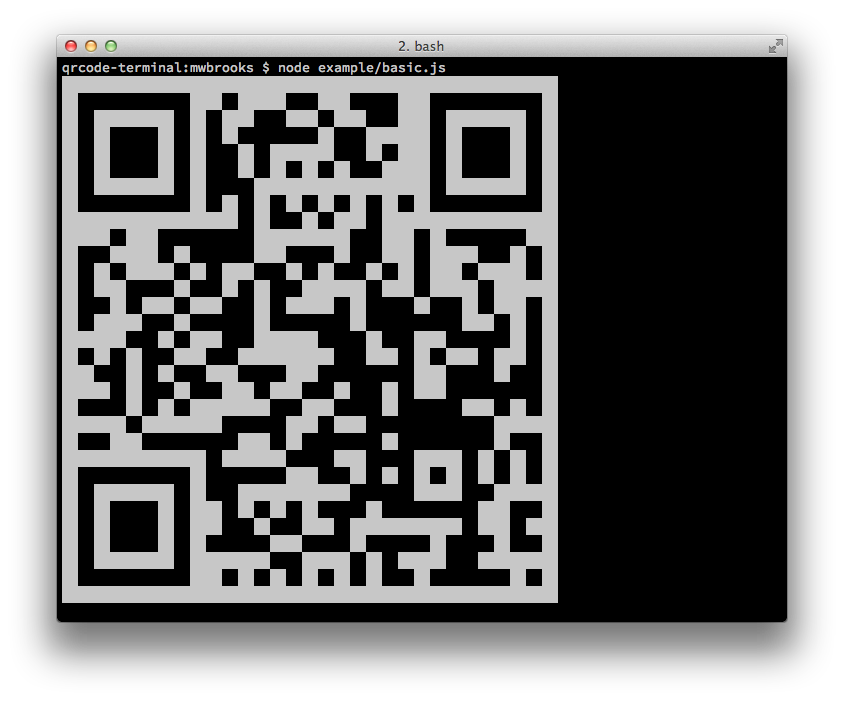
节点库
安装
可安装如下:
$ npm install qrcode-terminal
用于:
var qrcode = require('qrcode-terminal');
使用量
要向终端显示一些数据,只需拨打:
qrcode.generate('This will be a QRCode, eh!');
您甚至可以指定错误级别( 默认为“ L ” ):
qrcode.setErrorLevel('Q');
qrcode.generate('This will be a QRCode with error level Q!');
如果您不想显示在终端上, 但只想字符串, 您可以提供回调 :
qrcode.generate('http://github.com', function (qrcode) {
    console.log(qrcode);
});
如果您想要显示小的输出, 请提供 opts 与 small数字 :
qrcode.generate('This will be a small QRCode, eh!', {small: true});

qrcode.generate('This will be a small QRCode, eh!', {small: true}, function (qrcode) {
    console.log(qrcode)
});
命令行
安装
$ npm install -g qrcode-terminal
使用量
$ qrcode-terminal --help
$ qrcode-terminal 'http://github.com'
$ echo 'http://github.com' | qrcode-terminal
支助
- 操作系统X
- 链接
- 窗口
服务器侧
节点-qrcode 是一个流行的服务器侧 QRCode 生成器
制造给 canvas 对象.
发展中国家
设置开发环境运行 npm install
运行测试运行 npm test
贡献者
Gord Tanner <[email protected]>
Micheal Brooks <[email protected]>