卡农里 


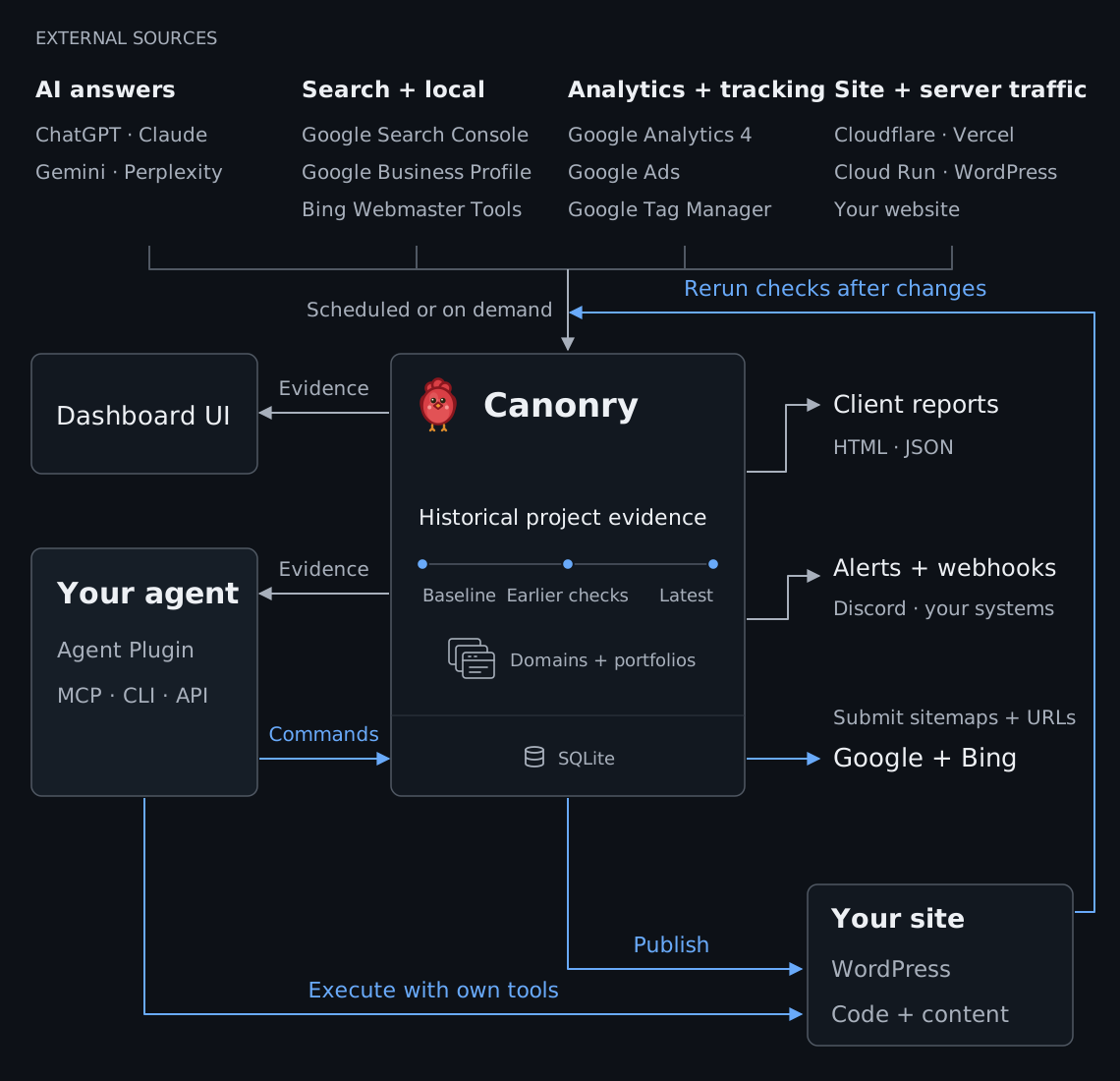
卡农里是个 代理-一号(CLI,MCP,API),开源AEO操作平台,并设有综合网络UI. 跟踪AI的能见度 调查搜索和流量的变化 并测量您或您的代理行为后的进展.
自行托管,使用SQLite,并自有(BYOK)提供密钥. 网络UI和你的经纪人也看到了同样的证据.
现场UI Demo • 妇女 快开始 • 妇女 证据 • 妇女 行动 • 妇女 一体化 • 妇女 文档 • 妇女 支助
快开始
从您的代理开始
复制第一次设置请求
Help me set up Canonry for my public site.

Use the official Canonry docs:
- Agent quickstart: https://github.com/Canonry/canonry#or-use-any-shell-capable-coding-agent
- CLI reference: https://github.com/Canonry/canonry/blob/main/skills/canonry/references/canonry-cli.md
- Plugin setup: https://github.com/Canonry/canonry/blob/main/docs/plugins.md
- MCP setup: https://github.com/Canonry/canonry/blob/main/docs/mcp.md

Pick one path and stay on it. Use connected Canonry tools (plugin or MCP) only if you have them and I have not pointed you at a specific install. A connected tool runs in its own process and never sees `CANONRY_CONFIG_DIR`, `CANONRY_PORT`, or anything else you export in a shell, so it always acts on my default install. If I named a config directory, a port, or a sandbox, that is the shell path: use `cnry` and tell me which path you chose. Never mix the two in one run, and never create a duplicate project. The `cnry` and `canonry` commands are interchangeable.

1. Ask for my public domain, country, and language. Do not create or scan anything yet. Country and language are only applied when a project is created, so if you reuse an existing project, report its country and language instead of changing them.
2. Shell path only: confirm `cnry` is on PATH, then run `cnry --version`. If Canonry is missing, propose `npm install -g @canonry/canonry` and wait for approval. Then run `cnry doctor --format json`, which is the command that says whether config, database, and server are in place. `cnry --version` does not read config and succeeds on a completely unconfigured install, so it cannot answer this. If config is missing, run `cnry bootstrap` yourself: it is not interactive, takes about a second, and is safe to rerun. Do not hand it to me and wait. The interactive command is `cnry init`, which is optional provider and OAuth setup that Page Health does not need. Bootstrap prints an API key, so do not repeat its output back to me, and never ask me to paste passwords, API keys, OAuth credentials, or command output.
3. Confirm the API is reachable. `cnry doctor --format json` reports it, and any project read exits non-zero with `CONNECTION_ERROR` when it is not. If it is unreachable, propose `cnry start` and wait for approval. Use `cnry start`, which is the background daemon, and not `cnry serve`, which runs in the foreground and will block you until I stop it, even though some error messages suggest it. Stop anything you started with `cnry stop`.
4. List projects with the connected project tool or `cnry project list --format json`, and reuse one whose domain matches. Confirm the proposed name is not already assigned to a different domain. To find out whether a project has already been scanned, run `cnry technical-aeo score <project> --format json` with no `--run-id`, which reports the latest run. Read the `hasData` field, not the score: this command exits 0 and reports `aggregateScore: 0` for a project that has never been scanned, so reading the score alone would have you tell me my site scored zero. If `hasData` is true and `runStatus` is `completed` or `partial`, read that scan instead of starting a new one. If no project matches, show the exact create operation and wait for approval.
5. Propose a bounded Site Health scan: `--max-pages 100` for a first look, plus whether dead-link checking is on (it is off unless you pass `--check-dead-links`). Show the connected operation or the exact `cnry technical-aeo run <project> --max-pages 100 --wait --format json` command with the project name filled in, and wait for separate approval before scanning. `--wait` polls for up to 15 minutes and returns only the run id and status. If the status it returns is still `queued` or `running`, the scan has not finished: do not rerun it or report results, poll `cnry technical-aeo progress <project> --run-id <run-id> --format json` until it is terminal. If `--wait` outruns your own tool timeout first, recover the run id with `cnry technical-aeo score <project> --format json` and poll the same way.
6. When the run is `completed` or `partial`, read `cnry technical-aeo crawl <project> --run-id <run-id> --format json` first. It is the only one of these commands that carries `termination` and `complete`; the score and pages commands do not. Then read `cnry technical-aeo score <project> --run-id <run-id> --format json` and `cnry technical-aeo pages <project> --run-id <run-id> --sort score-asc --limit 10 --format jsonl`. Tell me the termination reason in plain words and whether the scan covered the whole site or stopped at a page, link, depth, or time limit. A `partial` run scored the pages it reached and not my site, so never present it as a full-site result. If it stopped early, the fix depends on the reason, so say which: a page or depth limit needs a larger budget, a time limit needs a smaller scan (a lower `--max-pages` or `--max-depth`). If the run failed or was cancelled, inspect the run error and stop.
7. Summarize only completed evidence, then propose AI Visibility setup. Ask before you add queries, connect providers, start a provider-backed or quota-consuming run, edit files, or publish.
或使用官方 Claude 和 Codex 插件
或者自己在本地开始
-
安装Canonry.
npm install -g @canonry/canonry -
初始化加农利.
cnry bootstrap -
开始加农利.
cnry serve -
打开 http://127.0.0.1:4100/设置 并跟踪设置扫描您的网站.
爬行节省了一个Page健康基线. AI能见度是可选的,并有单独的设置.
扫描和读取终端的结果
保留 cnry serve 活动。 在第二个终端中,创建一个工程并启动有界限的扫描:
cnry project create my-site --domain example.com --country US --language en
cnry technical-aeo run my-site --max-pages 100 --wait --format json
从输出读取运行的ID和状态 。 如果状态是 completed 或者说 partial,从中读取证据:
cnry technical-aeo score my-site --run-id <run-id> --format json
cnry technical-aeo pages my-site --run-id <run-id> --sort score-asc --limit 10 --format jsonl
--wait 民调最多15分钟. 如果扫描仍然有效,请使用 cnry technical-aeo progress <project> --run-id <id> --format json。 。 。 .
如果扫描失败或取消, 请读取错误 cnry run show <run-id> --format json。 。 。 .
探索证据
你的经纪人和仪表板使用相同的项目API. 仪表板提供了趋势、准确答案和地点调查结果,供人类审查.
AI 可见度
通过查询和回答引擎,跟踪品牌随着时间的推移提及和引用. 找到引用竞争对手的答案,但忽略了您的网站.
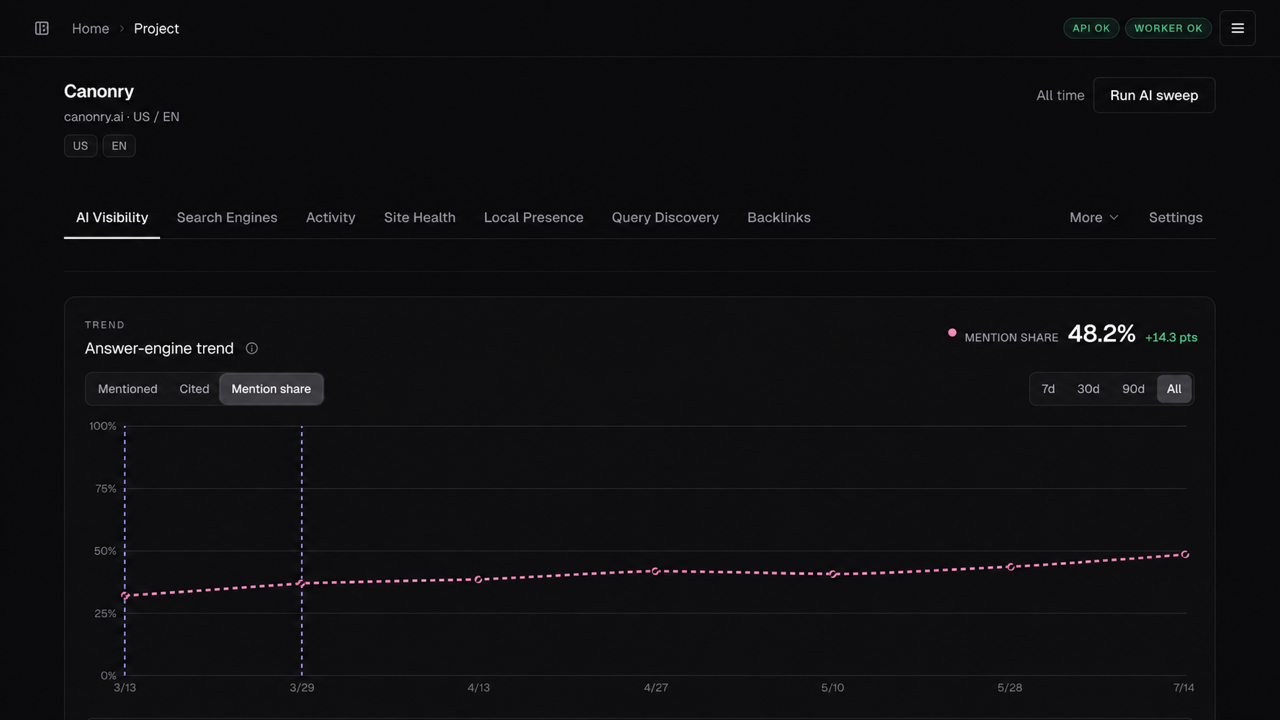
追踪你那份的答覆引擎品牌 提到一段时间.
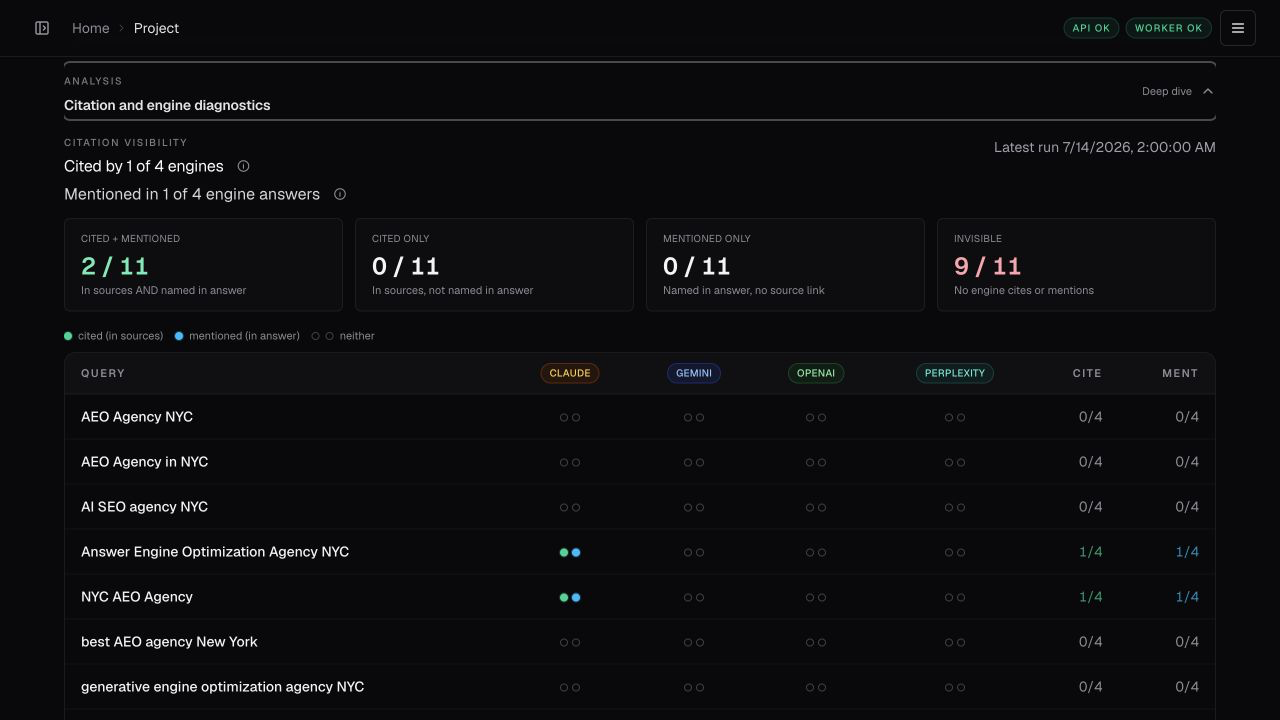
引用地图显示所有查询和引擎的引用和引用范围. 引用域和页名,然后检查每个结果背后的准确答案和URL.
配置一个提供者并运行可见度检查
对于已存在的工程,请使用自己的密钥配置一个提供者 .
| 提供者 | 密钥来源 | 环境变量 |
|---|---|---|
| 双子座 | 谷歌AI工作室 | GEMINI_API_KEY |
| 开放AI | OpenAI 平台 | OPENAI_API_KEY |
| 梅塔 (缪斯) | Meta 模型 API | MUSE_API_KEY |
| 克劳德 | 自动控制台 | ANTHROPIC_API_KEY |
| 复杂 | 复杂度设置 | PERPLEXITY_API_KEY |
| 本地模式 | 任意 OpenAI 兼容的终点 | LOCAL_BASE_URL |
在您的项目中添加重要的查询 :
cnry query add my-site "your first query" "your second query"
cnry run my-site --wait
cnry visibility-stats my-site --by-provider
Canonry 为什么使用直接提供者 API
Canonry 使用直接提供者 API 获取答案、引用和可用 搜索模式路由器可以省略的细节。 这个更丰富的数据帮助我们测量 品牌引用和网站引用准确 并解释您的更改 可见度. 更多信息:准确性以及我们为什么单独选择模型和直接提供者API适配器。 。 。 .
发现问题或一次性研究
扩展你的跟踪问题. 运行 cnry discover run <project> --icp "..."。这不会改变跟踪的问题.
预览已完成的会话 cnry discover promote preview <project> <session-id>. 只有在批准后才能晋升.
研究不改变跟踪. 运行 cnry research run <project> "query one" "query two" --wait。 。 。 .
对于配置的组合目标,请选择一个 --market <key> 或者说 --property <key>; Canonry 在不更改查询的情况下用答案保存目的地. 添加对齐 --template-id <id> --template-version <version> 只为保存已扩展模板出处. 研究从不给跟踪的问题添加询问.
搜索、交通和场地健康
以搜索和本地性能、爬行者访问、AI页面取取取、转介和转换等证据调查能见度的变化. 现场审计显示,技术调查结果与这些证据相配合.
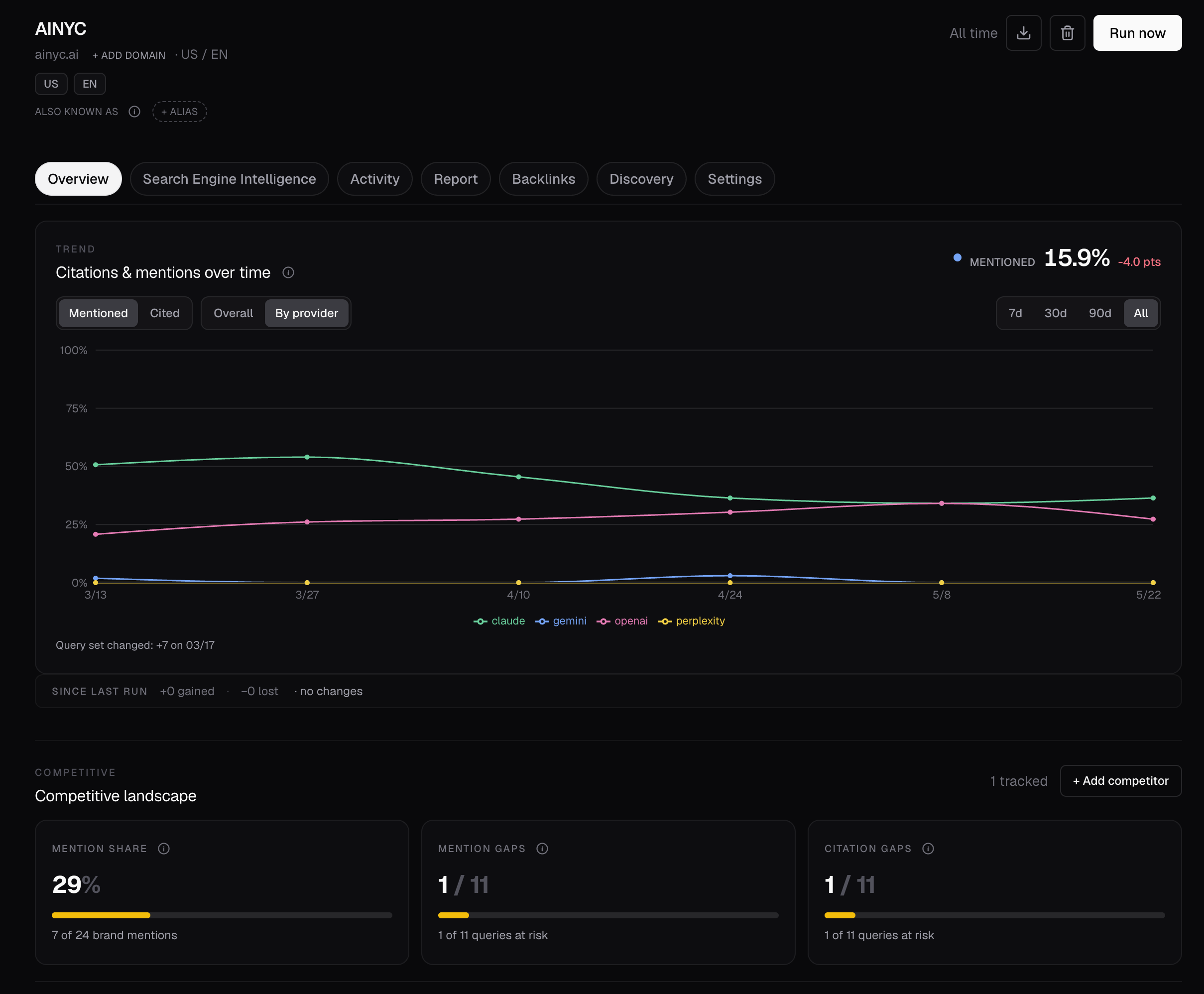
地图可爬行的页面和连接它们的内部链接.
组合和竞争者
使用 版本计量计划 用于地点、产品或站点部分的组合.
- 属性 : 为每个地产指定查询、引擎、模型和位置。 将品牌和非品牌覆盖分开.
- 市场集团: 组织重叠的一组属性,每个属性都有自己的竞争对手.
- 比较: 比较属性、组、引擎和位置。 打开准确的答案并引用每个结果背后的 URL .
证据行动
你的经纪人通过卡农里和它自己的工具协调工作.
- 改进网站: 把你的经纪人的编码工具 和Canonry的内容结合起来, 文字新闻出版JSON -LD,还有 索引工作流程。 。 。 .
- 更改后的计量 : 配置 独立时间表 用于数据同步和检查。 将新结果与早期证据相提并论.
- 导出并跟踪 : 读取 AI 可见度证据 财务报告和审定财务报表 流量分析发送 网络提示 去Discord,Slack, 或者你的系统.
您连接代理的示例任务 :
找出竞争者被引用的地方 而我们没有 使用搜索数据和站点审计来编写拉出请求或WordPress草稿以供审查. 船开后,重新检查,报告变化.
一体化
连接您使用的源 。 每项整合都为同一项目工作流程增加了证据或工具.
| 区域 | 支持的一体化 |
|---|---|
| 大赦国际的答复 | ChatGPT · Claude · 双子座 · Meta( Muse) · 复杂度 · OpenAI 兼容本地模型 |
| 搜索和本地 | 谷歌搜索控制台 • 妇女 Bing 网络主工具 • 妇女 谷歌商业简介 |
| 分析 | 谷歌分析 4 |
| 换算计量 | Google Ads + Google 标签管理器:只读快照和申报转换合同 |
| 服务器流量 | Cloudflare – Vercel – 云跑 – 文字新闻 |
| 后链接 | 常见爬行 超链接发布, 用 DuckDB 本地查询 |
| 出版和索引 | 文字压力 · JSON-LD 网站映射和 URL 提交 |
| 聊天游戏 广告 | 运动量度、暂停运动编辑、经核准启动和操作调节 |
自我接待和API
卡农里是单租户. 运行一个操作员或团队的例子。 保持不相关的团队在单独的情况.
CLI和REST API是主要接口. 它们暴露了测量、诊断、行动、证据出口和时间表.
OpenAPI 可用时间 GET /api/v1/openapi.json。 。 。 .
见 部署指南 用于反向代理,守护进程模式, Docker, systemd, 和 Tailscale .
文档
- 运行卡通: CLI 参考 • 妇女 代理插件 • 妇女 MCP 磁共振
- 使用内置 Aero : 设置和分析工作流程
- 了解系统: 建筑 • 妇女 数据模型
- 安装独立代理技能 :
cnry skills install(单位:千美元)指南(中文(简体) ) - 浏览所有向导 : 文件索引
故障处理安装、扫描和能见度结果
| 问题 | 下一步 |
|---|---|
| 站点扫描仍在进行中 | 读取准确的计数器 cnry technical-aeo progress <project> --run-id <id> --format json。 。 。 . |
| 站点扫描失败 | 读取错误为 cnry run show <run-id> --format json。读取最后一个阶段,然后与进度命令对等. |
| 无能见度结果 | 检查当前与 cnry runs <project> --format json,则 cnry run show <run-id> --format json。这不会开始另一次付费运行. |
npm install 失败 node-gyp | 安装构建工具 better-sqlite3 (单位:千美元)指南) (中文(简体) ). |
支助
请加入 卡农里迪斯科德 支持和质疑关于卡农里.
捐款
git clone https://github.com/Canonry/canonry.git && cd canonry
pnpm install
就当地代理工作而言,只有在修改完成并可以推后或审查后才能进行测试.
pnpm verify 本地选项。 见 捐款额 编辑 测试指南。 。 。 .
许可证
麻省理工学院从Canonry 5.0.0开始 使用,修改,自主,再分配,并和Canonry一起打造商业产品. 将版权和许可通知复制件或软件的大部分.
早先的释放保留了他们的原许可证,包括任何未来许可证赠款。 依赖和捆绑的资产保留自己的许可证;见 第三方通知。 。 。 .