微前端的 Amadeus 工具箱
通讯
用于微前端的Amadeus工具包提供了一个消息系统,允许微前端相互通信. 通讯系统基于 频道消息API 并工作跨出iFrames。 也可以在同一文档中用于与作为Web组件包件的MFE交谈.
特征
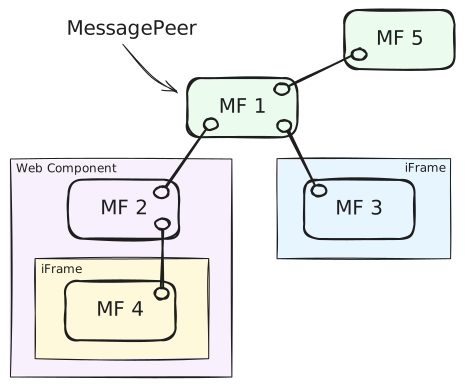
- 已键入和版本信件交换
MessagePeers - 在所有连接的微前端广播消息(前.
MF1(给大家) - 在两个特定的微前端之间发送信件(ex.
MF4改为MF3(中文(简体) ) - 生命周期信息(前).
MF5断开,MF3已连接) - 发送前和接收时信件验证
常见用例
创建信件端点
您可以创建多个消息端点, 并且以任何避免循环的方式将它们连接在一起 。 您在创建对等点时需要提供一些选项 。 仅 id 技术要求.
import { Message, MessagePeer } from '@amadeus-it-group/microfrontends';

// 'one' is unique identifier for this peer in the network
const peer = new MessagePeer({ id: 'one' });
连接到另一个端口
端点可以等待来自另一个端点的连接通过 .listen() 或通过 .connect()。 。 。 .
import { MessagePeer } from '@amadeus-it-group/microfrontends';

// Create two peers.
// First peer waits for any incoming connection
const one = new MessagePeer({ id: 'one' });
one.listen();

// Second peer connects to the first one
const two = new MessagePeer({ id: 'two' });
const disconnect = two.connect('one');

// if connection crosses iFrames, you might need to provide
// expected window and origin for `connect` and `listen`  methods
two.connect('one', {
  window: oneWindow,
  origin: 'https://example.com',
});

// Disconnecting
disconnect(); // 'two' disconnects from 'one'
one.disconnect('two'); // 'one' disconnects from 'two'
one.disconnect(); // 'one' disconnects from all connected peers
监听连接
一个对等者可以决定要接受哪个连接 。 最简单的用法是听所有连接而无需过滤 :
const stop = peer.listen(); // start listening
stop(); // stop listening; can restart anytime
更高级的用法允许您根据对等的ID,源窗口,出处或自定义逻辑来过滤接入的连接.
// 1. Using simple peer ids
peer.listen('two');
peer.listen(['two', 'three']);

// 2. Using matching objects
// ex. from peer 'two' from a specific iframe of the expected origin
peer.listen({
  id: 'two',
  source: iframe.contentWindow,
  origin: 'https://example.com',
});

// ex. any connection from this particular iframe
peer.listen({
  source: iframe.contentWindow,
});

// ex. any connection from this origin
peer.listen({
  origin: 'https://example.com',
});

// 3. Using a combination of ids and objects
peer.listen(['one', 'two', { id: 'three', origin: 'https://example.com' }]);

// 4. Using a custom function
// ex. filter connections based on the handshake message and where it comes from
peer.listen((message, source, origin) => {
  return true; // you decide whether to accept the connection
});
声明信件类型
这是可选的,但允许在发信和收信时进行类型检查.
import { Message } from '@amadeus-it-group/microfrontends';

interface HelloMessage_1_0 extends Message {
  type: 'hello';
  version: '1.0';
  greeting: string;
}

interface HelloMessage_2_0 extends Message {
  type: 'hello';
  version: '2.0';
  greetings: string[];
}

export type MyMessage = HelloMessage_1_0 | HelloMessage_2_0;
发送和接收信息
import { MessagePeer } from '@amadeus-it-group/microfrontends';

// Receiving messages
const one = new MessagePeer<MyMessage>({ id: 'one' });

// An observable-like interface consuming messages
one.messages.subscribe(({ payload }: MyMessage) => {
  if (payload.type === 'hello') {
    switch (payload.version) {
      case '1.0':
        console.log(payload.greeting); // string
        break;
      case '2.0':
        console.log(payload.greetings); // string[]
        break;
    }
  }
});

// Broadcast a message. Message will be type checked.
two.send({
  type: 'hello',
  version: '1.0',
  greeting: 'Hello, world!',
});

// Send a message to a specific peer. Other peers will not receive it.
two.send(
  {
    type: 'hello',
    version: '2.0',
    greetings: ['Hello', 'world!'],
  },
  {
    to: 'one',
  },
);
服务信息
有一些生命周期信息(ServiceMessage)由图书馆自动发送。 你可以听他们使用 .serviceMessages 溪流,以避免在 .message 流线.
import { MessagePeer, ServiceMessage } from '@amadeus-it-group/microfrontends';

const peer = new MessagePeer({ id: 'one' });

peer.serviceMessages.subscribe(({ payload }: ServiceMessage) => {
  switch (payload.type) {
    case 'handshake':
      // instance of `HandshakeMessage`
      break;
    case 'connect':
      // instance of `ConnectMessage`
      break;
    case 'disconnect':
      // instance of `DisconnectMessage`
      break;
    case 'error':
      // instance of `ErrorMessage`
      break;
  }
});
日志
可以通过 : enableLogging() 方法。 它会记录所有发送和接收的邮件以进行调试.
import { enableLogging } from '@amadeus-it-group/microfrontends';

enableLogging();
关于网络的信息
// List all known peers and their accepted messages
one.knownPeers; // a map of known peers and messages they accept
one.knownPeers.get('two'); // a list of message types peer 'two' accepts