@angular-extensions/pretty-html-log
Improved debugging of Angular component tests with Jest!
The @angular-extension/pretty-html-log is a module that makes debugging component tests with Jest a breeze. It adds a
phlmethod which pretty prints the innerHTML of aComponentFixture, aDebugElement, aNativeElementor an HTML string.

Why you should use this module
When debugging component tests, it’s often necessary to inspect the DOM. The most common approach to do so is by using the good old console.log which has some downsides.
First of all, it’s annoying to always type
fixture.debugElement.nativeElement.innerHTML;
Moreover, the console.log statement doesn’t print the HTML in a very readable way. Therefore we still need to copy the string in a new HTML file and format it to be able to inspect it. Not with @angular-extensions/pretty-html-log!
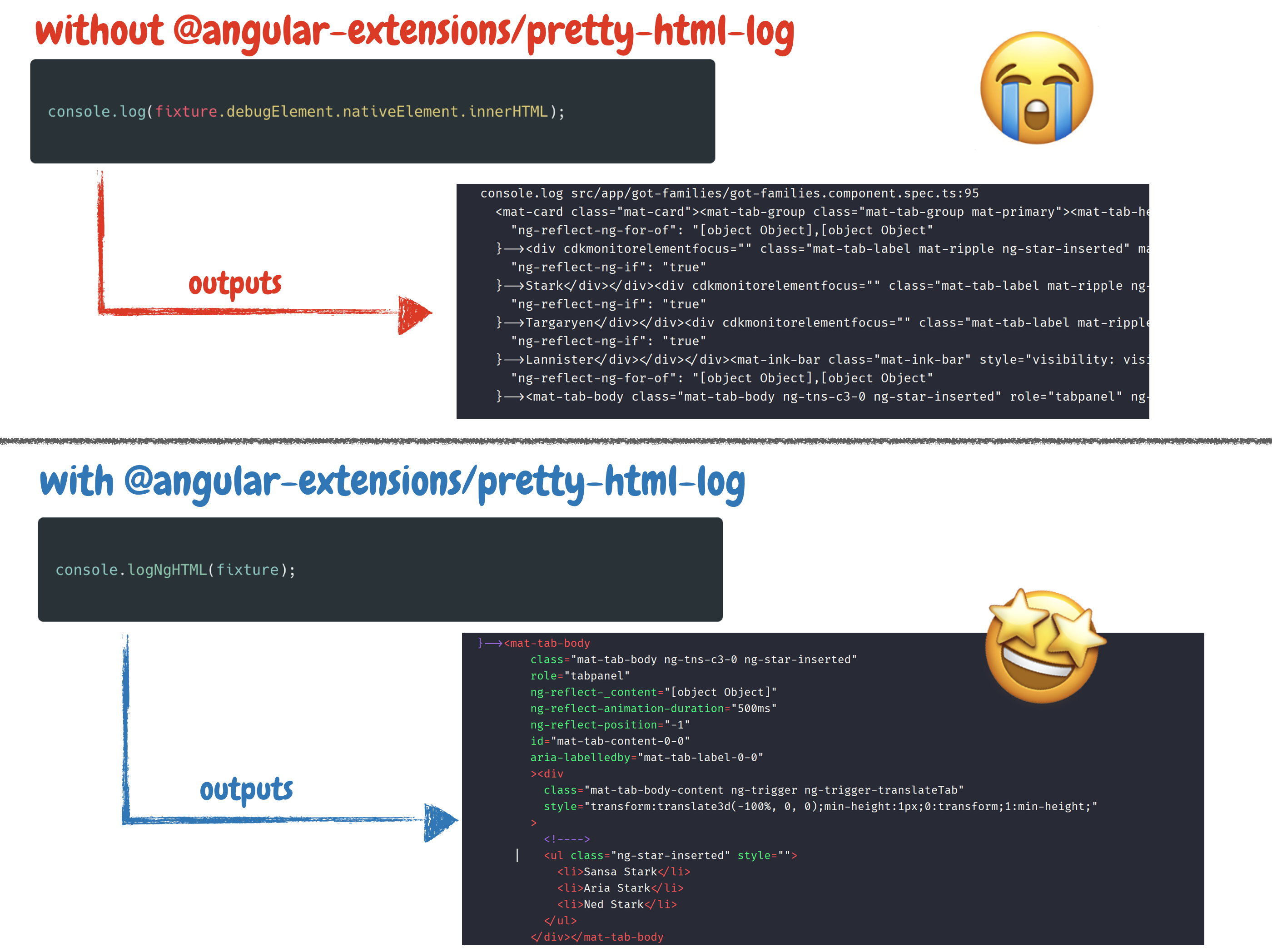
Features
- Provides a
phlmethod that highlights and pretty prints afixture,debugElement,nativeElementor even a plain HTML string - you don't have to worry how to get to the HTML, just pass the thing you want to print to thephlmethod. - in case you are using prettier (which you should ;)), pretty-html-log will pick up your prettier config and pretty print the HTML string based on your prettier configuration. 🤩
Getting started
Installation
This module will only be used during development and can therefore be installed as a dev dependency.
npm i -D @angular-extensions/pretty-html-log
Usage
pretty-html-log can be used in two different ways. The first and most
simple way is to simply import the phl function into your test.
Usage via import
The @angular-extensions/pretty-html-log package provides a phl method that you can use to pretty print a fixture, debugElement, nativeElement or even a plain HTML string. Simply import it while debugging and pretty print that HTML.
import { phl } from '@angular-extensions/pretty-html-log';

describe('my test suite', () => {
  it('should be green', () => {
    phl(fixture); // This will pretty print the fixture
    expect(myTable.getRows()).toBe(5);
  });
});
Importing the phl function is straightforward. However, since phl is often used as a temporary tool, it can be bothersome to add an import at the top of the file. This is easy to forget and requires manual cleanup afterward.
Wouldn't it be cool if we can simply use the phl function without the need of an import. Let's check out how to setup the phl function globally.
To make sure unused import statement get cleaned up we should configure our eslint to clean up unused imports. More: https://www.npmjs.com/package/eslint-plugin-unused-imports.
Usage via globals
To make phl globally available, import and run the following method within a jest.setup.ts file.
import { setupPhl } from '@angular-extensions/pretty-html-log';

setupPhl();
API
The phl method has the following signature:
<T>(
  ngHTMLElement: NgHTMLElement<T>,
  enableComments = false,
  theme = THEMES.DRACULA
)
| Property | Description |
|---|---|
| ngHTMLElement | Value to extract the html from and pretty print it to the console: ComponentFixture |
| enableComments (default: false) | When set to true we print the generated comments by Angular. For example: <!--bindings={"ng-reflect-ng-for-of":... |
| theme: (default: DRACULA) | pretty-html-log themes (DRACULA, VSCODE and MATERIAL) |
Examples
Pass in specific DebugElement
In your test you can simply write the following line.
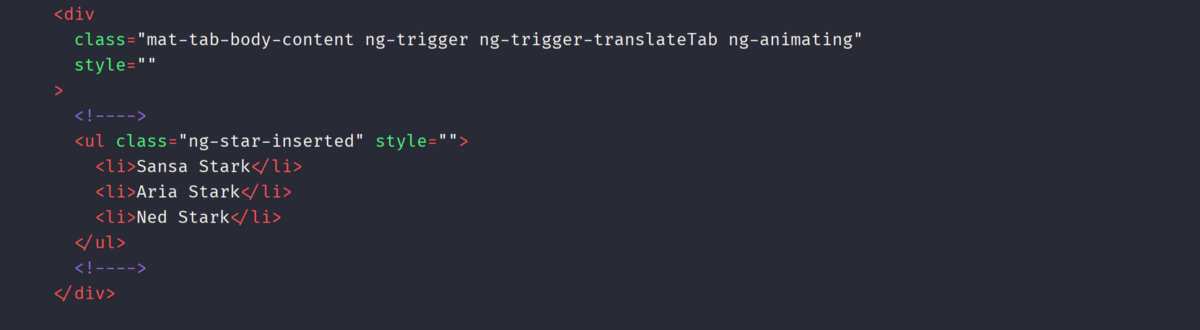
phl(fixture.debugElement.query(By.css('mat-tab-body')));
Which will print the following string to your console. Depending on your test configuration you
might run into an issue with the patch of the console. In such cases its best to report an issue and use the logNgHTML function directly.
phl(fixture.debugElement.query(By.css('mat-tab-body')));
Examples
Log the content innerHTML of a fixture
phl(fixture);
of a debugElement (or multiple debugElements)
phl(fixture.debugElement);
of a nativeElement (or multiple nativeElements)
phl(fixture.debugElement.nativeElement);
or even a simple HTML string
phl('<h1>Foo</h1>');
Print Angular comments
Angular adds some comments to our HTML file. Usually, when debugging our tests, we don't need them. Therefore they
are not printed by default. However, there are cases where you want to print those comments. To do so, you
can pass true as an additional flag tot he logNgHTML method.
phl(fixture, true);
Change the theme
@angular-extensions/pretty-html-log allows you to print the html logs in different themes.
Currently, we support (DRACULA, VSCODE and MATERIAL). The themes can be importet from pretty-html-log, the base library @angular-extensions/pretty-html-log depends on.
import { THEMES } from 'pretty-html-log';

console.logNgHTML(fixture, false, THEMES.VSCODE);
Further resources
Blog post
Improved debugging of Angular component tests in Jest is a write up on AngularInDepth that shows how @angular-extensions/pretty-html-log is used and set up in a project.
Video tutorial