
@angular-material-extensions/select-country - 允许用户选择具有自动完成特性的国家或国籍的Angular 材料组件




由开发者建并供开发者使用 : 心脏 :
你有什么问题或建议吗? 请不要犹豫联系我们! 或者,提供PR QQ打开一个适当的问题 这里
如果你喜欢这个项目,请支持 角-材料-扩展 由主演: 明星: 分享它 : 高音:
目录
演示
在 https://angular-material-extension.github.io/select-country 互联网档案馆的存檔,存档日期2014-12-22
图书馆的组成部分
<mat-select-country>用于显示主组件
依赖关系
- 角质 开发并测试
17.x
安装
1. 通过 纳克后加. (建议)
如果未设置角材料设计, 请运行 ng add @angular/material 学习更多
现在通过 angular schematics
ng add @angular-material-extensions/select-country
2. 通过 无. (备选案文)
安装对等依赖
npm i svg-country-flags -s
然后更新您的 angular.json 类似下面( svg- country- flags)
"assets": [
              "src/favicon.ico",
              "src/assets",
              {
                "glob": "**/*",
                "input": "./node_modules/svg-country-flags/svg",
                "output": "src/assets/svg-country-flags/svg"
              }
            ],
现在安装 @angular-material-extensions/select-country 通过:
npm install --save @angular-material-extensions/select-country
导入库
如果您通过角图安装库, 您可以跳过此步骤
安装后需要导入主模块和 HttpClientModule数字 :
import { MatSelectCountryModule } from "@angular-material-extensions/select-country";
import { MatSelectCountryModule } from '@angular-material-extensions/select-country';
import {HttpClientModule} from '@angular/common/http';

@NgModule({
  declarations: [AppComponent, ...],
  imports: [
              MatSelectCountryModule.forRoot('de'), // you can use 'br' | 'de' | 'en' | 'es' | 'fr' | 'hr' | 'hu' | 'it' | 'nl' | 'pt' --> MatSelectCountrySupportedLanguages
             HttpClientModule, ...],
  bootstrap: [AppComponent]
})
export class AppModule {
}
其他模块
import { MatSelectCountryModule } from '@angular-material-extensions/select-country';
import {HttpClientModule} from '@angular/common/http';

@NgModule({
  declarations: [AppComponent, ...],
  imports: [MatSelectCountryModule, HttpClientModule, ...],
  bootstrap: [AppComponent]
})
export class AppModule {
}
您应用程序中的其他模块, 如懒惰的装入导入 MatSelectCountryModule 输入您的特性模块 :
API 密码
<mat-select-country> 用于显示主组件 - 参见演示示例
| 选项 | 绑定 | 类型 | 默认 | 说明 |
|---|---|---|---|---|
| 价值 | Input() | Country | - 说吧 | 选定国家(通过一个空的国家对象,其中包含有alpha2代码以进行alpha2检索) |
| 外观 | Input() | MatFormFieldAppearance | - 说吧 | 可能的外观样式 mat-form-field ("legacy","标准","填充"或"外线") |
| 国家 | Input() | Country[] | 储存在解放区的所有国家 | 应加载的国家 - 预先确定你只需要的国家! |
| 标签 | Input() | boolean | - 说吧 | mat-form-field 标签的文本 |
| 记录大小 | Input() | number | - 说吧 | 应获取的国家数目 -- > 改善了业绩 |
| 车手 | Input() | boolean | - 说吧 | 输入占位符文本 |
| 已禁用 | Input() | boolean | - 说吧 | 组件是否禁用 |
| 装入 | Input() | boolean | - 说吧 | 组件是否正在装入 |
| 无效 | Input() | boolean | - 说吧 | 组件是否能够发射 null |
| 只读 | Input() | boolean | - 说吧 | 是否只读取组件 |
| 选项卡索引 | Input() | number | string | - 说吧 | 组件是否可被聚焦, 以及它在哪里参与相继键盘导航 |
| 显示呼叫代码 | Input() | boolean | 虚假 | 在标签和选择中显示国家调用代码的组件 |
| 类 | Input() | string | - 说吧 | 类属性对输入文本或验证忽略( 可选) 应用样式 |
| 语言 | Input() | string | - 说吧 | 语言,如果未指定 MatSelectCouncilModule.forRoot ('XX') 将使用(可选) |
| 名称 | Input() | string | 国家 | 输入元素的属性名称 |
| 自动补全 | Input() | string | - 说吧 | 输入元素的属性自动完成,以避免一些浏览器提出“ 不” 的建议 |
| 选定国家 | Output() | EventEmitter<Country> | - 说吧 | 将选定国家发送为对象(见下文界面) |
interface Country {
  name: string;
  alpha2Code: string;
  alpha3Code: string;
  numericCode: string;
  callingCode: string;
}
使用量
添加 <mat-select-country> 模板中的元素 :
<mat-select-country>
</mat-select-country>

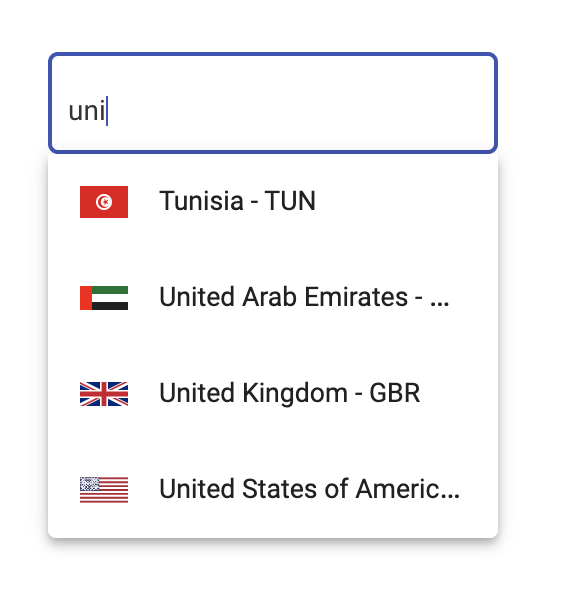
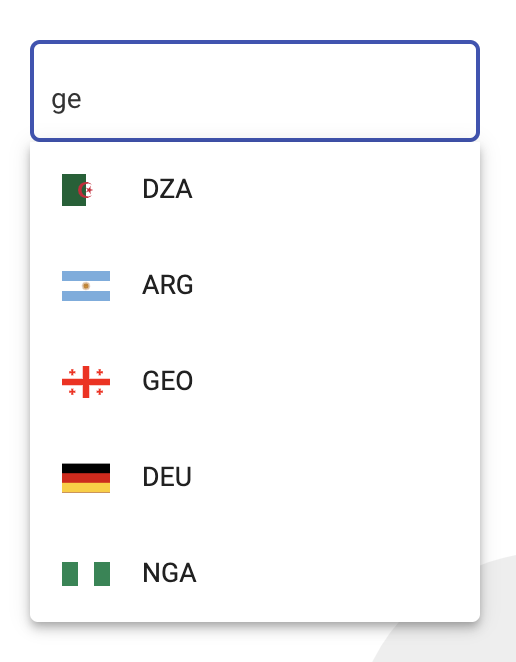
使用带有反应表单的库
选项 1 有反应窗体
<mat-select-country appearance="outline"
                    label="Country"
                    [formControl]="countryFormControl"
                    (onCountrySelected)="onCountrySelected($event)">
</mat-select-country>
有反应窗体的选项2
<form [formGroup]="countryFormGroup">
    <div fxLayoutAlign="center">
      <mat-select-country appearance="outline"
                          label="Country"
                          class="className"
                          formControlName="country"
                          (onCountrySelected)="onCountrySelected($event)">
      </mat-select-country>
    </div>
  </form>
import {Component,OnInit} from '@angular/core';
import {FormControl} from '@angular/forms';

import {Country} from '@angular-material-extensions/select-country';

@Component({
  selector: 'app-root',
  templateUrl: './app.component.html',
  styleUrls: ['./app.component.scss']
})
export class AppComponent implements OnInit{
  title = 'select-country';

  countryFormControl = new FormControl();
  countryFormGroup: FormGroup;

  constructor(private formBuilder: FormBuilder) {
    angulartics2GoogleAnalytics.startTracking();
  }

  ngOnInit(): void {

    this.countryFormGroup = this.formBuilder.group({
      country: []
    });

    this.countryFormGroup.get('country').valueChanges
.subscribe(country => console
.log('this.countryFormGroup.get("country").valueChanges', country));

    this.countryFormControl.valueChanges
.subscribe(country => console
.log('this.countryFormControl.valueChanges', country));
  }


  onCountrySelected($event: Country) {
    console.log($event);
  }
}
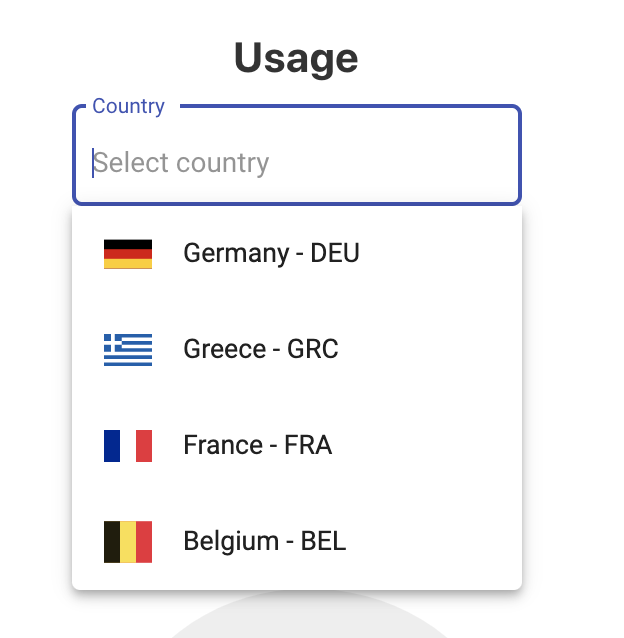
预先定义要装入的国家
<mat-select-country appearance="outline"
                    label="Country"
                    [countries]="predefinedCountries"
                    (onCountrySelected)="onCountrySelected($event)">
</mat-select-country>
import {Country} from '@angular-material-extensions/select-country';

predefinedCountries: Country[] = [
  {
    name: 'Germany',
    alpha2Code: 'DE',
    alpha3Code: 'DEU',
    numericCode: '276',
    callingCode: '+49'
  },
  {
    name: 'Greece',
    alpha2Code: 'GR',
    alpha3Code: 'GRC',
    numericCode: '300',
    callingCode: '+30'
  },
  {
    name: 'France',
    alpha2Code: 'FR',
    alpha3Code: 'FRA',
    numericCode: '250',
    callingCode: '+33'
  },
  {
    name: 'Belgium',
    alpha2Code: 'BE',
    alpha3Code: 'BEL',
    numericCode: '056',
    callingCode: '+32'
  }
];
结果 :
改进业绩----使用 itemsLoadSize 属性
<mat-select-country appearance="outline"
                    label="Country"
                    [itemsLoadSize]="5">
</mat-select-country>
只有5个国家会得到!
动态更改语言 - 使用 language 属性
<mat-select-country appearance="outline"
                    label="Country"
                    [language]="languageSelected"
                    (onCountrySelected)="onCountrySelected($event)">
</mat-select-country>
本地运行 Demo 应用程序
构建库
$ npm run build:lib
服务演示程序
$ npm start
其他角图书馆
- ngx-auth-fire-baseui (英语)
- ngx-链接js
- @angular-material-extensions/password-strength (原始内容存档于2019-09-26) (英语)
- @angular-material-extension/google-maps-自动完成
- @angular-material-extensions/link-preview (英语)
- @angular-material-extensions/fab-menu (法语)
- @angular-material-extensions/页面
- @angular-material-extensions/ contacts (英语)
谁用这个图书馆?
纳豪斯.de - 数字和自动房地产管理
把你的项目放在这里,请放下适当的公关
支助
由开发商建造

这个项目得到下列机构的支持: 喷射板 1个产品包 OS License 包括. 网络风暴
许可证
版权(c)2020-2024年 安东尼·纳哈斯获得麻省理工学院许可证
