(Deprecated) AnvilSignatureFrame
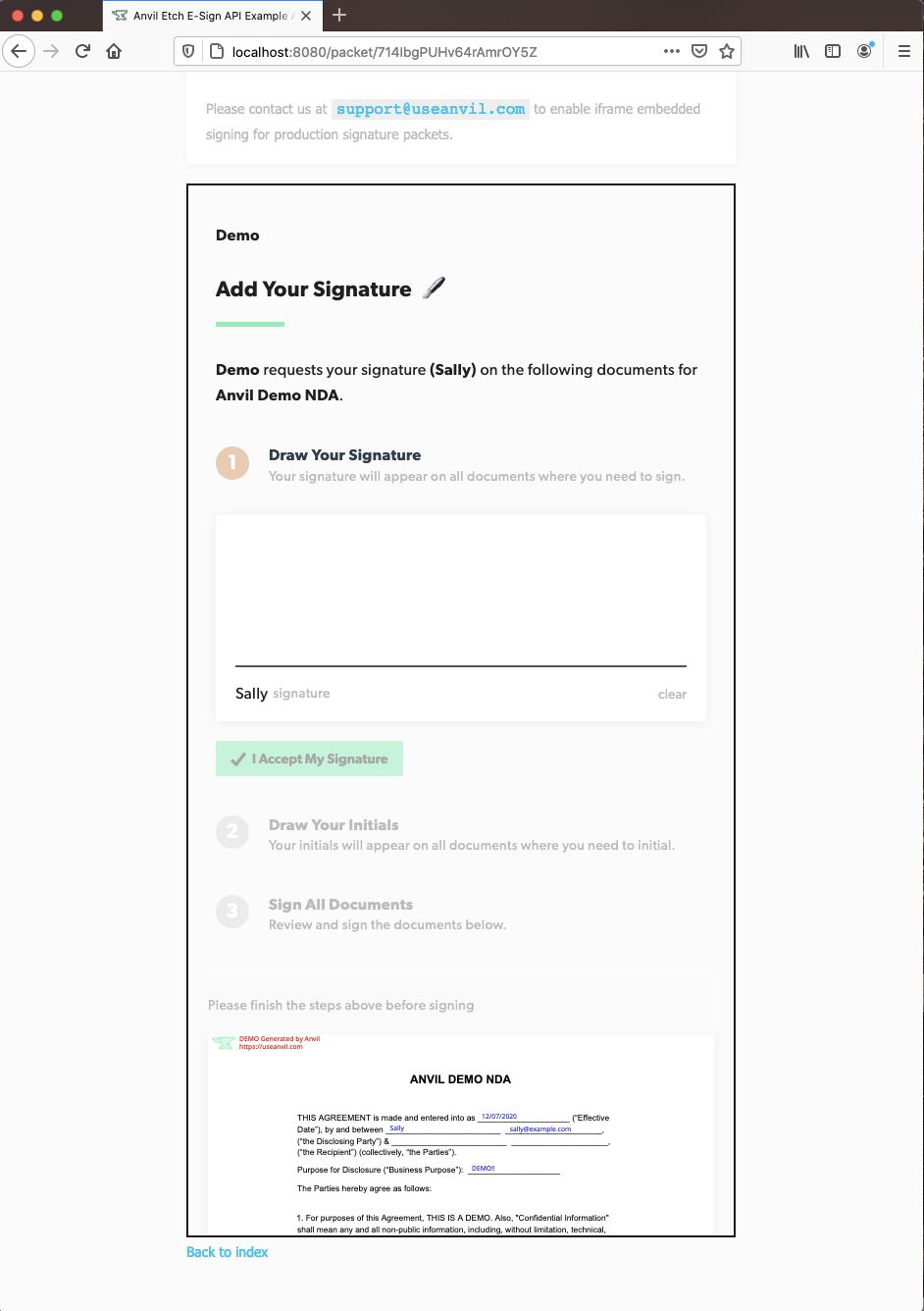
A very minimal component that allows you to embed Anvil Etch e-signatures in your app with an iframe. It will give you information via callbacks through the signing process lifecycle.
See the live demo and open-source demo repository for a usage example.
What is Anvil?
Anvil provides easy APIs for all things paperwork.
- PDF filling API - fill out a PDF template with a web request and structured JSON data.
- PDF generation API - send markdown or HTML and Anvil will render it to a PDF.
- Etch E-sign with API - customizable, embeddable, e-signature platform with an API to control the signing process end-to-end.
- Anvil Workflows (w/ API) - Webforms + PDF + E-sign with a powerful no-code builder. Easily collect structured data, generate PDFs, and request signatures.
Learn more on our Anvil developer page.
Usage
yarn add @anvilco/react-signature-frame
npm install @anvilco/react-signature-frame
import AnvilSignatureFrame from '@anvilco/react-signature-frame'

<AnvilSignatureFrame
  signURL={signURL}
  scroll="smooth"
  onLoad={() => setLoading(true)}
  onFinishSigning={(payload) => console.log(payload)}
  onError={(errorPayload) => console.log(errorPayload)}
/>
Props
signURL
string (required) - A URL to the Anvil signature page generated from the generateEtchSignURL GraphQL mutation. The signature frame will be displaying the signing page through this URL.
Example:
signURL={`https://app.useanvil.com/etch/8iJDbq8dkEmjrsNw7Dnb/sign?token=dsa...`}
scroll
string | null - Optionally scroll to the signing frame
auto- scrolls the window to the signing frame when mountedsmooth- smoothly scrolls the window to the signing frame when mountednull- disables scrolling
onLoad
function - This function is called when the signing page has finished loading.
Example:
onLoad={() => setLoading(false)}
onFinishSigning
function - A callback function with payload as a parameter. It is called when a user has successfully finished signing.
Example:
onFinishSigning={(payload) => console.log(payload)}

/*
{
  action: "signerComplete",
  signerEid: "kJzR6mcIWKoZs6KOxV4w",
  signerStatus: "completed",
  nextSignerEid: "HRLhx4khticpfxsUFSpj",
  documentGroupEid: "9fQnvfy51p7oKrEYajMh",
  documentGroupStatus: "partial",
  etchPacketEid: "J1phQTO6WQH6gZcMJAG5", // If from an EtchPacket
  weldDataEid: "J1phQTO6WQH6gZcMJAG5", // If from a workflow
}
*/
onError
function - A callback function with an error-specific payload as a parameter. It is called when a user experienced an error while attempting to sign. See the docs for details on how to recover from errors.
Example:
onError={(payload) => console.log(payload)}

/*
{
  action: "signerError",
  errorType: "tokenExpired", tokenExpired || tokenInvalid || notFound
  error: "Token Expired",
  message: "Error specific message",
  signerEid: "kJzR6mcIWKoZs6KOxV4w",

  // depending on the errorType, you may or may not receive the following
  signerStatus: "sent",
  nextSignerEid: "HRLhx4khticpfxsUFSpj",
  documentGroupEid: "9fQnvfy51p7oKrEYajMh",
  documentGroupStatus: "sent",
  etchPacketEid: "J1phQTO6WQH6gZcMJAG5", // If from an EtchPacket
  weldDataEid: "J1phQTO6WQH6gZcMJAG5", // If from a workflow
}
*/
onFinish (deprecated)
function - This function will have redirectURL as a parameter; called when a user has finished signing or experienced and error. Please use onFinishSigning and onError above.
Example:
onFinish={(redirectURL) => console.log(redirectURL)}
enableDefaultStyles
boolean (default: true) - Set to false to disable the default inline styles of the component.
iframeWarningProps
object - Pass in custom props into the paragraph tag displayed if the user's browser does not support iframes.
Example:
iframeWarningProps={{ className: 'warning-text' }}
Styling
Customize the component by disabling enableDefaultStyles and importing CSS or passing in inline styles. Override IDs or classNames by passing them in as props.
Anvil Etch E-Sign Docs
Links 🔗
Notes
- To enable Iframe embedding: go to your organization's settings in Anvil, and enable "Iframe Embedding" in the API section.
- React >= v16.0 required.
Bugs
Please file an issue for bugs, missing documentation, or unexpected behavior.
Questions or Feedback
Please email us at [email protected].