Reasonbook — decisions that survive the session


Reasonbook keeps a local record of your project's decisions, reasons and lessons so the next agent session can pick up where you left off. You make the decisions; agents handle the bookkeeping. No dashboard account is required.
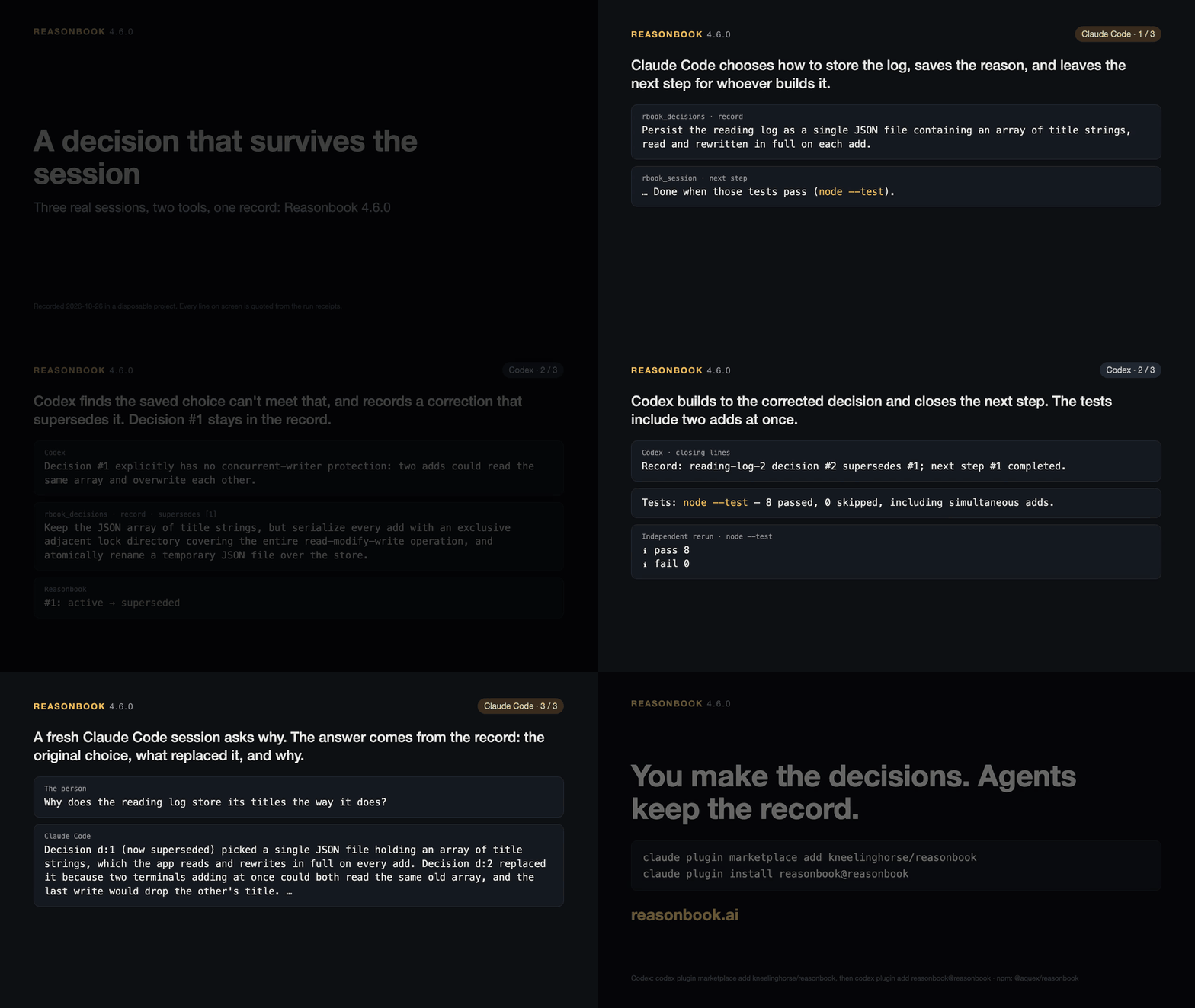
A 65-second replay of recorded runs. Read the demo's receipts and what Reasonbook sends and stores.
Try it
Choose a plugin below, or install the CLI with npm. Your first ten minutes takes you from installation to recording a choice and finding its reason in another session.
Commit the generated agent instructions, rbook/.gitignore and your project documents; keep the SQLite store, WAL/SHM files and snapshots out of Git.
Install it in Claude Code
Install the plugin once for all your projects:
claude plugin marketplace add kneelinghorse/reasonbook
claude plugin install reasonbook@reasonbook
Start a new Claude Code session after installation, then ask it to start a Reasonbook Ledger for this project. If the first session says Reasonbook is installing, start another once it finishes.
Get a project digest in three steps
Requires Node.js 20 or newer.
-
Install the pinned CLI:
npm install -g @aquex/[email protected]Ensure the global npm bin directory is on your PATH. If the former package is installed globally, run
npm uninstall -g @aquex/cmos-mcpfirst. Version 4 provides only thereasonbookcommand; update scripts and MCP configurations that use the old command. -
In the project folder you want to track, start a Ledger:
cd /absolute/path/to/your/project reasonbook init --level ledger -
Read its first digest:
reasonbook review --format=context
The digest names this project and shows its decisions, lessons and open work. A new Ledger starts empty. Planner adds next steps; Builder adds sprints and missions.
Commit the generated AGENTS.md, CLAUDE.md, rbook/.gitignore and the project documents you
maintain. A new record's ignore file keeps the SQLite store, its WAL/SHM files and snapshots out
of Git. Init preserves an existing ignore file. Shared records require the store to remain
untracked; exchange those records through Reasonbook's sharing commands.
A plugin installation does not put reasonbook on your terminal PATH. Plugin-only users can
replace reasonbook in these commands with npx --prefer-offline -y @aquex/[email protected],
for example npx --prefer-offline -y @aquex/[email protected] review --format=context.
Codex plugins
codex plugin marketplace add kneelinghorse/reasonbook
codex plugin add reasonbook@reasonbook
For chat workflows, use codex plugin add reasonbook-chat@reasonbook instead.
See Codex setup and verification limits.
Upgrading from CMOS
Use reasonbook doctor to inspect what needs changing and reasonbook migrate to preview a record move.
Follow the migration guide to upgrade clients before moving their records.
Propose a decision, then approve it
When a choice needs your approval, the agent ends its reply with one concrete line:
Would record: Use a weekly review because it keeps the reading list useful without daily upkeep.
With the developer hooks enabled and linked to that conversation, the Stop hook keeps this as a
draft. Your next reply can approve it, decline it, ask a question or amend the wording. The agent
records an approved draft with its returned P<n> id; a draft is not yet a decision. In the same
live conversation, an answer more than two hours later can still address an unexpired draft. Late
approvals record as agent-judged; late declines persist. Constraint, rule and profile drafts need
to be proposed again for plain approval. Inspect drafts from the project folder with:
reasonbook drafts list
reasonbook-chat makes a direct record of the choice and reasons you request or approve. It states
that you approved it in the conversation without quoting the conversation or using the draft runtime.
An explicit approval already given for the exact wording counts, so the agent need not ask again.
The method
- One project, one record of decisions, lessons, constraints and next steps.
- Start from that record; supported hooks bring it into the session automatically.
- Record decisions deliberately, with reasons. Supersede a changed decision.
- Make expiry and supersession visible; closing a sprint keeps records active by default.
- Keep the record with the project so it survives a change of tools.
The method gives the five lines in full, what Reasonbook does at each level, and how to move up; the starter templates hold the files each level starts with.
What leaves your machine
The record stays in your project's SQLite file. With a stored user-scoped key or legacy
environment credentials, explicit session and sprint closes attempt a background
upload of the whole file, including pending and declined proposals. For a registered project,
MCP tool writes also schedule an upload after 5 quiet minutes or 30 minutes of continuous writes;
the next poll starts it within 60 seconds when no upload lease or failure backoff blocks it.
Transfer time follows. See the timing and failure details under Optional: hosted dashboard.
RBOOK_CHECKPOINT_SYNC=off stops automatic uploads and manual rbook_db(action="backfill")
uploads. Other requested network actions and shared-record exchanges remain available.
Logging out leaves project keys valid for other requested dashboard calls, but closes and manual
backfill also require a stored user-scoped key or environment credentials. Implicit process-exit closes do not upload. A project shared through
reasonbook.ai keeps uploading its whole file until the share hands its record to the dashboard's
referee copy, then sends the shared record's changes until it is moved back. The client also supports a
member uploading a scrubbed SQLite copy when reasonbook.ai begins hosted recovery. The owner
reviews and confirms the recovery plan on the Shared record page. Either RBOOK_SHARED_SYNC=off or RBOOK_DASHBOARD_SHARING=off
stops recovery contributions, including during an explicit sync. Full network and data disclosure.
What it is
Reasonbook is the protocol + client. It runs locally on your machine, owns a SQLite database under rbook/db/rbook.sqlite, and exposes 15 typed tools over MCP. Claude Code and Codex are verified (see the harness guide); other MCP clients, such as Claude Desktop, Cursor, Zed, VS Code and Windsurf, are untested.
Out of the box you get:
- Sprint and mission state machines with auditable transitions
- Session capture for decisions, learnings, constraints, next-steps
- Strategic context that condenses across sprints, with FTS5 retrieval
- Full-text search across decisions, learnings, missions, sessions
- Database snapshots on demand; backup attempts around sprint closes; required backups before a restore or a snapshot prune with selected rows
- Per-project credential store and device-code auth (RFC 8628)
The dashboard at reasonbook.ai is optional. You can run Reasonbook standalone forever — sign-up unlocks dashboard uploads (SQLite → Postgres mirror), the project registry (rbook://you/* addresses), and cross-project messaging. Without it, every other tool still works locally.
Install
Recommended: a global install of this release. The server then starts from disk, with no registry lookup on launch:
npm install -g @aquex/[email protected]
If the former package is installed globally, run npm uninstall -g @aquex/cmos-mcp first. Version 4 provides only the reasonbook command; update scripts and MCP configurations that use the old command.
Or run it on demand with npx. Pin the version and prefer the local cache: an unpinned npx -y
can look the package up again on every launch.
npx --prefer-offline -y @aquex/[email protected]
Semantic (vector) search is optional. Without it, retrieval is keyword-only, and the install is
about 45 MB instead of about 306 MB. To add a vector term to retrieval, install
@xenova/transformers next to Reasonbook. rbook_db(action="health") reports whether it is on.
Requires Node.js 20 or newer.
Configure your MCP client
Claude Code and Codex are verified; the other blocks follow each client's own MCP configuration
and are untested with Reasonbook. Each example below runs a pinned version through npx, preferring the local cache; to upgrade,
change the version. With the global install, use "command": "reasonbook" and drop the npx
arguments (keep --project-root where an example has it).
Claude Code
claude mcp add-json rbook '{"command":"npx","args":["--prefer-offline","-y","@aquex/[email protected]"]}'
Claude Desktop
Add to ~/Library/Application Support/Claude/claude_desktop_config.json (macOS) or the equivalent on Windows/Linux:
{
  "mcpServers": {
    "rbook": {
      "command": "npx",
      "args": [
        "--prefer-offline",
        "-y",
        "@aquex/[email protected]",
        "--project-root",
        "/absolute/path/to/your/project"
      ]
    }
  }
}
Claude Desktop is expected to start servers with no project context (on macOS, from / with no
workspace roots; untested with Reasonbook), so name the project in the config. --project-root applies only to this server entry, and only to
calls with no project context: no projectRoot, no workspace roots, and a working directory of /,
your home directory or the server's install directory. A client that starts the server from any
other folder should pass projectRoot instead.
Cursor
Add to ~/.cursor/mcp.json:
{
  "mcpServers": {
    "rbook": {
      "command": "npx",
      "args": ["--prefer-offline", "-y", "@aquex/[email protected]"]
    }
  }
}
Zed
{
  "context_servers": {
    "rbook": {
      "command": "npx",
      "args": ["--prefer-offline", "-y", "@aquex/[email protected]"]
    }
  }
}
VS Code (Claude extension)
Use the Claude Code command above from the integrated terminal, or add the server
through /mcp in the Claude panel. The extension and CLI share MCP configuration;
start a new conversation after changing it. The extension does not add claude to
your terminal PATH, so the terminal route needs the standalone Claude CLI.
Claude Code in VS Code
Windsurf
{
  "mcpServers": {
    "rbook": {
      "command": "npx",
      "args": ["--prefer-offline", "-y", "@aquex/[email protected]"]
    }
  }
}
First call
Project tools work on a folder that has a Reasonbook database, so a new project starts with init:
rbook_project(action="init", projectRoot="/absolute/path/to/your/project")
init creates rbook/db/rbook.sqlite, the seed files, an AGENTS.md and a CLAUDE.md that imports it at the project root
(keeping either file if it already exists). In a folder without that database, the tools that read or write a project
refuse and name init; registry and sign-in actions need no project.
Then run rbook_agent_onboard once: on a new project it walks the first-session setup. Open every
later session with the session digest:
Run rbook_review to see the project state.
rbook_review returns the shared session digest: project identity, current sprint, open work and recent decisions. Its local text core is capped at 4,000 characters; appended portfolio context and the surrounding MCP response are outside that cap.
The full walkthrough — install → config → init → first sprint/mission/session loop — lives in docs/getting-started.md.
Tool surface
Reasonbook exposes 15 consolidated tools. 12 use an action parameter to select the operation; rbook_agent_onboard, rbook_status and rbook_review take no action. TOOL_REFERENCE.md publishes one parameter table per action, so it says which parameters actually apply to a given call.
| Tool | Purpose |
|---|---|
rbook_review | Session digest: identity, sprint, work, decisions, other projects' signals |
rbook_agent_onboard | Cold-start payload: identity, active sprint, missions, decisions, suggestions |
rbook_status | Diagnostic snapshot: rbook_address, dashboard_url, auth_tier, sync timestamps |
rbook_mission | Missions — create, update, query, and link dependencies |
rbook_mission_transition | Mission state machine — start, complete, block, unblock, drop, defer, reopen |
rbook_sprint | Sprints — CRUD, closeout, retro, and cross-sprint analytics |
rbook_session | Work sessions (optional) — start, capture insights, complete, list, search |
rbook_context | Master/project context — view, update, condense, snapshot, and search |
rbook_decisions | Strategic decisions — record, show, list, search, update, staleness review |
rbook_learnings | Cross-cutting learnings — list, search, show, update, and reaffirm |
rbook_db | Database ops — health, snapshot/restore, backfill, and a context-snapshot prune |
rbook_project | Projects — init, register, list, validate; share, invite, join, members, sync |
rbook_auth | Dashboard credential lifecycle — device-code login, rotate, revoke |
rbook_message | Cross-project messaging (requires the hosted dashboard) |
rbook_feedback | Agent-feedback channel — list, triage, resolve, archive |
See TOOL_REFERENCE.md for the exact per-action parameter reference — it is generated from the tool definitions on every build, so it never drifts from the shipped surface.
Share a project's record
The sharing guide covers the dashboard, SSH and bundles. Read the trust boundary before sharing a full record with another person.
Optional: hosted dashboard
See connecting the hosted dashboard for sign-in, uploads and their controls.
Project resolution
Reasonbook never acts on a project you did not name. For each tool call it picks one project, in this order, and refuses rather than falling back when that project cannot be used:
- The
projectRootparameter on the call: a project folder or an exact registeredrbook://owner/projectaddress. Address discovery reads stored identities without repairing them; no match, duplicate matches or an unreadable registered identity refuse. - For a supported Codex request, its conversation working folder. An invalid supplied folder refuses instead of falling back to the server's folder.
- The workspace roots your MCP client advertises: the first one inside a Reasonbook project.
- The working directory, or the nearest folder above it that is a Reasonbook project — one holding
rbook/db/; a plain folder namedrbookdoes not count (the search stops below your home directory). - Only when the server has no project context at all — no
projectRoot, no roots, and a working directory of/, your home directory or the server's install directory (as for a client that starts servers without a project folder): the--project-root <dir>argument in that server's config, then a registry default set withrbook_project(action="register", projectRoot="...", setAsDefault=true). - Otherwise the call is refused. In a folder that is not a Reasonbook project, a write names
rbook_project(action="init")and a read answers "No Reasonbook project in ''".
rbook_project(action="list") includes stored ids, addresses and folders. init, register and
unregister require folders; an address never becomes a filesystem path.
Every successful response names the project it used (projectRoot and resolvedBy in its data), and
says so in its text whenever the project came from workspace roots, --project-root or the registry
default. A registry default set before 3.2.0 is not applied until you re-run setAsDefault; the
server, rbook_message(action="whoami") and rbook_review say so when one exists.
Move work out of a central planning folder
If you collect several efforts in one Reasonbook project, use spin-out when an effort needs its
own project folder. It copies selected missions, their linked decisions, learnings and next
steps, and any additional record IDs you name. The source remains a readable history with
pointers to the new project.
Create the destination folder first. The source must be registered, and the two stores must
have distinct project identities. Both roots are required; this command does not use an ambient
project or registry default. Omit --apply to preview the selection and mapping:
reasonbook spin-out --from /work/projects --to /work/new-product --sprint sprint-12

# Or select missions, with additional decisions, learnings and next steps by ID:
reasonbook spin-out --from /work/projects --to /work/new-product \
  --missions product-plan,product-prototype \
  --decisions 41,42 --learnings 17 --next-steps 23,24

# Apply the same reviewed selection:
reasonbook spin-out --from /work/projects --to /work/new-product \
  --missions product-plan,product-prototype \
  --decisions 41,42 --learnings 17 --next-steps 23,24 --apply
Choose either --sprint or --missions. A destination without Reasonbook is reported as needing
initialization in the preview; --apply initializes it and takes database backups before
copying. Copied work retains its status but has no sprint assignment in the destination.
Assign it to a target sprint when ready. Source Queued, Blocked and Deferred missions become
Dropped; Completed and already Dropped missions retain their status. Source decisions and
learnings become archived, and source next steps become dropped. Default lists and retrieval
omit these transferred source rows. Sprint history retains its counts and identifies transfers
with their destination pointers. No sprint closes automatically.
Read a source or copied decision, learning or mission with its existing show action and an
explicit projectRoot; the result includes spunOutTo or spinOutOrigin and a readable address.
For a historical next step, use
rbook_context(action="next_steps", nextStepAction="list", nextStepIds=[23], projectRoot="/work/projects").
Explicit IDs include moved or dropped rows; an explicit nextStepStatus still filters them.
The ordinary next-step list continues to show open work. Target next steps without a sprint
are flagged idle after 42 days. The CLI does not upload either store immediately: each enters
the normal upload schedule after its next successful MCP write, subject to the configured
upload controls.
Retry the exact command after an interruption. A verified completed operation returns unchanged. If source records changed after the target copy committed, final source marking is refused and both stores are preserved for review. If a reserved retry lacks its committed target receipt, the command also refuses: it cannot distinguish a crash before copying from an erased proof of an earlier copy. Preserve both roots and the operation ID named in the remedy, inspect their ledgers and pre-write snapshots, and resolve or restore the conflicting state before retrying. Do not delete a reservation to force another copy; retries never silently overwrite copied work.
Environment variables
# Optional — connects to the hosted dashboard. Defaults to https://reasonbook.ai
# when unset; treat empty string as unset.
RBOOK_DASHBOARD_URL=https://reasonbook.ai

# Optional — the directory the server reads its own .env from. It does NOT select a project:
# use the projectRoot parameter, or --project-root in a server's config.
RBOOK_PROJECT_ROOT=/path/to/your/project

# Optional — override the credential + registry directory. Default: ~/.config/rbook
RBOOK_CONFIG_DIR=/custom/path

# Snapshot retention (default shown)
RBOOK_MAX_SNAPSHOTS=50

# Optional — disable timed uploads, explicit-close uploads and manual backfill for this server.
# Shared-record exchanges and other requested network actions remain available.
RBOOK_CHECKPOINT_SYNC=off

# Optional — disable shared-record exchanges started by hooks and the server timer.
# Explicit reasonbook sync and bundle commands remain available; recovery contributions stop.
RBOOK_SHARED_SYNC=off

# Optional — turn off starting a share or a join through reasonbook.ai on this machine
# (off, false, 0 or no, in any case). On by default; a project already shared through the
# dashboard syncs either way. Hosted recovery contributions are also stopped by this switch.
RBOOK_DASHBOARD_SHARING=off
Error response shape
Every tool returns a uniform envelope:
{
  "success": false,
  "error": {
    "code": "MISSION_NOT_FOUND",
    "message": "Mission 's99-m01' not found",
    "suggestion": "Use rbook_mission(action=\"list\") to see available missions"
  }
}
code is machine-readable, message is human-readable, suggestion is a concrete next step. Validation errors carry validValues (a string[]). State errors can carry currentState: generally a status string when the relevant mission, session, or sprint state is available, and — on SESSION_ALREADY_ACTIVE only — an object { id, type, title, startedAt, captureCount }. Branch on code before reading it.
Safety
- Append-only audit. Session events and mission transitions are append-only rows. Context snapshots keep their rows, ids and events, but
rbook_db(action="prune_snapshots")can empty the content of copies Reasonbook wrote on its own. - Atomic credential writes.
credentials.jsonis written via temp-file + rename with 0600 permissions. - Database snapshots.
rbook_db(action="snapshot")copies the database on demand. Arbook_sprint(action="complete")attempts a snapshot before and after the close; a snapshot failure warns without blocking completion. Applyingrbook_db(action="prune_snapshots")to a nonempty selection requires a backup, andrbook_db(action="restore")first copies the live database torbook/db/snapshots/pre-restore/.RBOOK_MAX_SNAPSHOTScaps how many are kept: taking one deletes the oldest beyond it, automatic ones included. Nothing else snapshots first, and there is no soft-delete net —rbook_db(action="purge")deletes this project's data from the dashboard mirror, and is refused while a project is shared through reasonbook.ai. See SECURITY.md. - Dry-run where it exists.
rbook_context(action="condense")acceptsdryRunto preview without committing. It is not a general property of mutating tools. Backfill's old event-replay dry run is retired and refuses withLEGACY_SYNC_RETIRED.
Known limits
- Shared records switch to protocol 2 only after every active copy reports support;
rbook_reviewnames blocking copies. Before the switch, id claims use their existing clock order. Afterwards, the first counted acceptance fixes a claim's position, pre-switch claims outrank later ones, and an accepted id is final once the copy holds every earlier-positioned claim's data. A predictable id can still be claimed first; recovery judges previously unjudged transactions in clock order. A gone copy must be set aside to stop blocking the switch. On reasonbook.ai, the owner uses Set aside this copy on the Shared record page. - After a protocol-2 switch, older readers receive each stream only before the whole transaction containing its first protocol-2 change. Joins, successors and planned moves to old or unreported readers refuse. Downgrading can rename ids locally: the old copy still sends its own writes but receives nothing past that boundary; an old authority holds members' protocol-2 writes. Upgrade every copy before continuing shared work. Recovery keeps the switch only when it is in the adopted authority prefix.
- Registered projects with dashboard credentials upload snapshots after writes and explicit closes while a server is running; manual
rbook_db(action="backfill")requests a whole-file upload immediately. Shared-record exchanges use their own hooks, timer andRBOOK_SHARED_SYNCcontrol. - SQLite is the source of truth; the dashboard holds the owner's uploaded mirror. Shared copies exchange their record with
reasonbook sync, through reasonbook.ai, over SSH or by bundle. - Through reasonbook.ai, moving a project back was measured with one member and automatic syncs off: the owner's copy caught the member's copy up over SSH before that copy had synced with the dashboard since the move. With automatic syncs on, the member's copy may well sync first. Not measured: a member's copy that syncs with the dashboard first, whose sync then says to sync with the owner's copy over SSH or with a bundle, and a member's copy the owner's machine cannot reach over SSH. The dashboard's activity feed shows 50 entries a page by default and at most 100, and its decisions page 20 decisions a page; older entries are on later pages.
- A project shared through reasonbook.ai changes through its members' agents; the dashboard's pages show the record. Hosted recovery collects surviving copies after a call discovers a lost or behind referee, and the owner reviews and confirms its plan. A same-record re-share after a move back retains member/account bindings, including removed members; members admitted only through direct sharing afterwards are refused. Every member keeps their local copy. Privacy describes the deployed membership reconciliation and its valid-census requirement.
- A share through reasonbook.ai names and refuses over the owner's other copies that wrote, exchanged successfully or retain an SSH route, including an observed or routed former owner copy. Dashboard-route rows, cut copies and this folder's former identities do not count. On the direct authority copy,
reasonbook set-aside --replica <id>previews one gone copy's held cutoff and last exchange; add--yesto record it. The person's other copies remain members. Role changes, removal and re-admission preserve the cut; later writes stay quarantined for the person to redo, and recovery does not wait for that copy. On a hosted project, the owner uses Set aside this copy on the Shared record page, with This copy is gone confirmation for a copy that called in the last seven days. This control is unavailable during recovery or a move back. Local administration is refused while the dashboard referees. - A record with a set-aside requires a reported library version of 4.5.0 or later at the target of a planned handover or dashboard share. Unknown reports refuse too; a share checks before uploading. A
reasonbook recoverrun by a pre-4.5.0 binary can undo a set-aside. Upgrade recovery copies before using them. The oldrbook_db(action="clone")andrbook_db(action="pull")actions refuse withLEGACY_SYNC_RETIRED; their action values remain until 5.0.0.
Documentation
- Documentation home — what it is, how to install it, the levels and where to read more.
- The handoff demo — a 65-second replay of recorded runs, with a transcript.
- Trust — what leaves your machine, what the hooks read, and how to turn each part off.
- Privacy — collection, dashboard visibility, retention and removal.
- The method — the five lines, the three levels and how to move up.
- Getting started — client configuration and an optional Builder walkthrough.
- Sharing and the hosted dashboard — sharing routes, sign-in and upload controls.
- Harness coverage — native adapters, MCP prompts and the fallback without hooks.
- Tool reference — every tool, action, and parameter (generated from the tool definitions).
- Changelog — release notes and tool-surface changes.
Development
For candidate testing, replace kneelinghorse/reasonbook with this checkout's absolute
path. Start a new Claude Code session after installation. The plugin supplies the
MCP server, hooks and commands; its first cold session may report that Reasonbook is
installing and load the record from the next session. Use /reasonbook:init for a new
record, /reasonbook:start to read it, /reasonbook:close-out to finish work, /reasonbook:plan to plan,
and /reasonbook:build to execute. Plugin installation.
Other tools use the harness adapters and coverage guide.
git clone https://github.com/kneelinghorse/reasonbook
cd reasonbook
npm install
npm run build
npm test
Development needs Node.js 20.17 or newer (lint-staged 16.4); the published package runs on Node.js 20 or newer.
Pre-commit hooks run lint + format via husky/lint-staged. This public repository is a code mirror; release validation and npm publishing run from the private source.