@av-pi-studio/cli
Pi-Studio's job is to drive Pi — the terminal coding agent by Earendil — locally
or remotely, through a long-lived daemon that manages agent processes, terminals, and git
worktrees. Two clients talk to that daemon: this CLI, and a full browser UI. pi-studio starts
the daemon and gets you into either one:
pi-studio daemon start   # start (or find) a local daemon, print a pairing QR
pi-studio ui             # serve the browser UI, connected to that daemon
Install
npm install -g @av-pi-studio/cli
This exposes the pi-studio binary on your PATH. Without a global install, run it via:
npx @av-pi-studio/cli [options] [command] [args]
Quick start
# log in to a model provider (the `pi` provider needs one before it can run a turn)
pi-studio auth login

# start a local daemon (if one isn't already running) and print a pairing QR code
pi-studio daemon start

# open the full browser UI, pointed at that daemon
pi-studio ui

# ...or stay in the terminal: run an agent, list it, attach to stream live output
pi-studio agent run --provider pi/claude-3-5-sonnet "implement user authentication"
pi-studio agent ls
pi-studio agent attach <agentId>

# target a remote daemon instead of the local one
pi-studio --host workstation.local:6767 agent ls
Run pi-studio --help (or <command> --help) for the full command tree.
The web UI
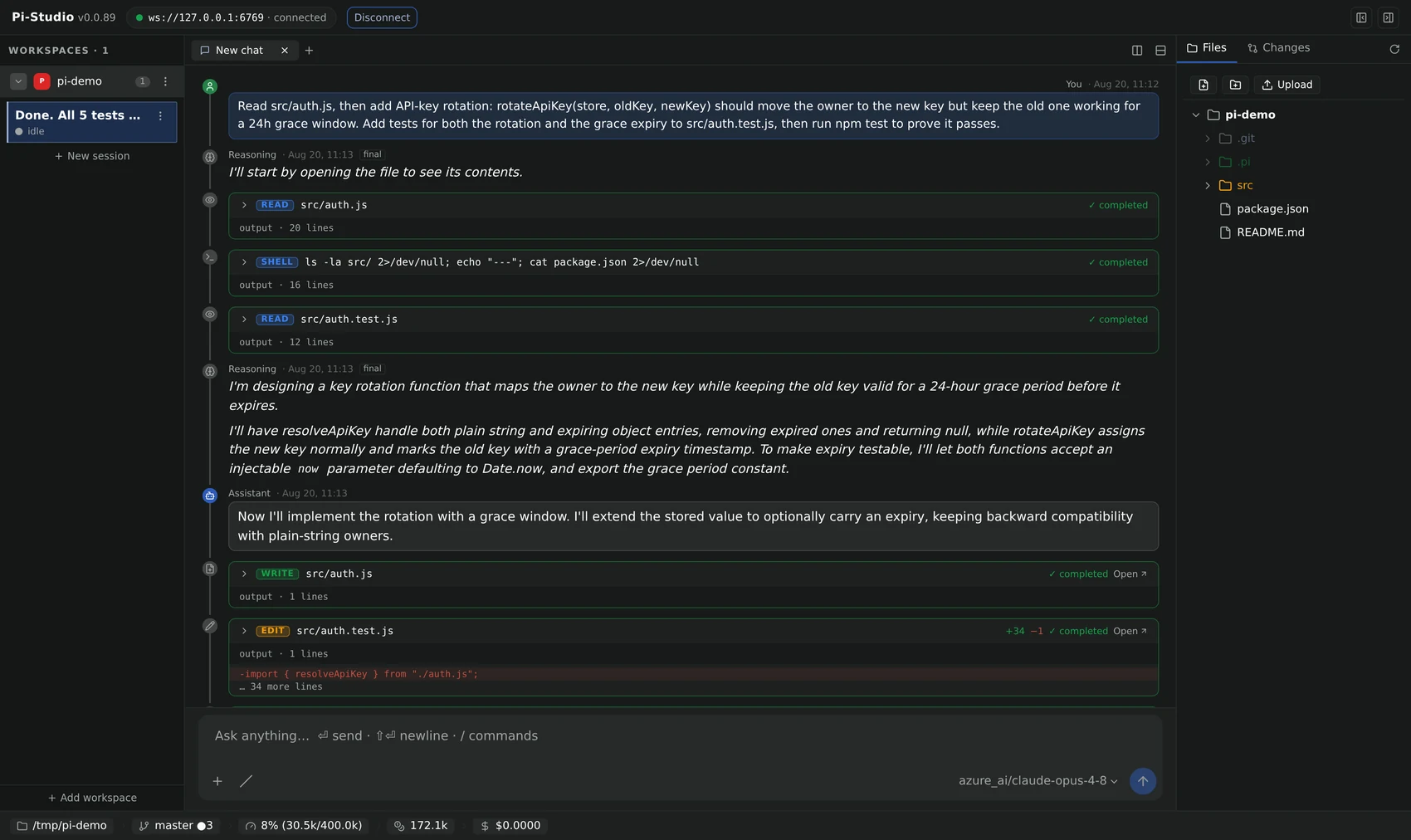
pi-studio ui serves the production Pi-Studio browser UI — a three-column workspace (sessions on
the left, chat/terminal/code in the middle, files and git changes on the right) — as a static site,
no separate install or build step needed. Point it at any daemon, local or remote:
pi-studio ui                                    # serves on http://localhost:4173, connects to the local daemon
pi-studio ui --ui-port 8080 --daemon-host workstation.local:6767
The hero shot above is real: every tool call an agent makes (read/edit/write/shell) renders as its own card, with live diff stats, right in the chat.
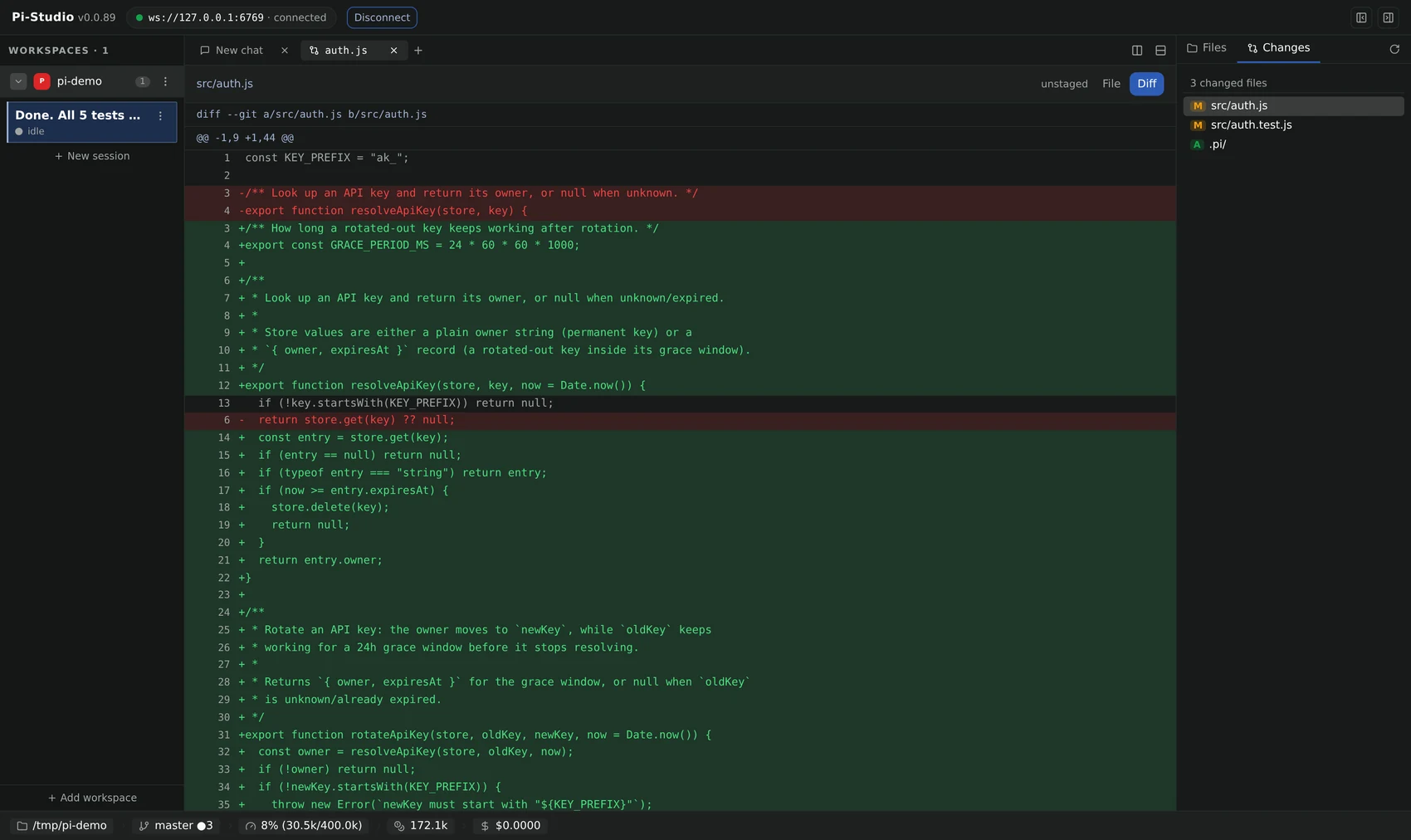
Review what it changed without leaving the tab — a full diff view, line by line:
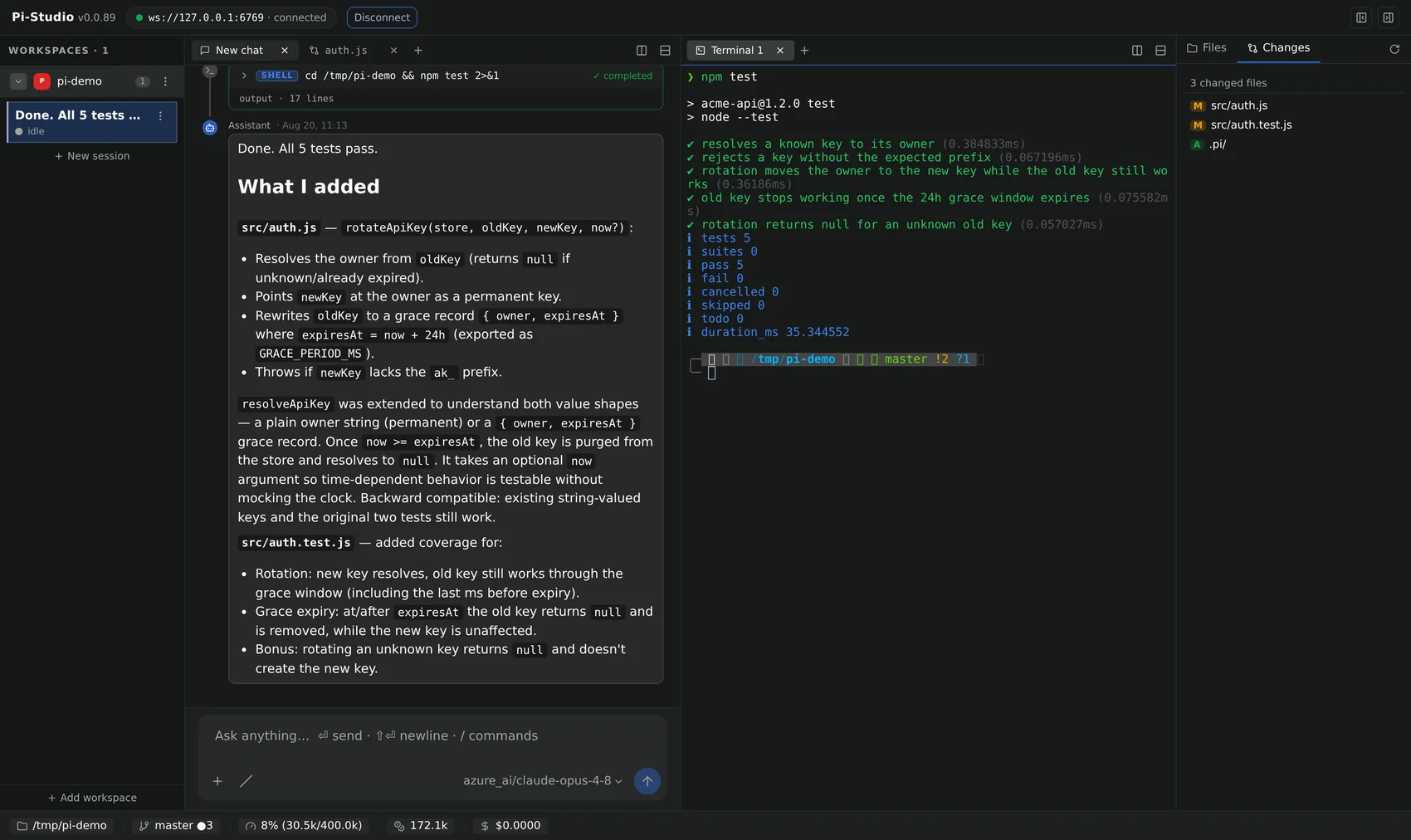
Split the workspace into multiple panes — chat next to a live terminal (backed by node-pty), a
file, or another session — and the layout persists across reloads:
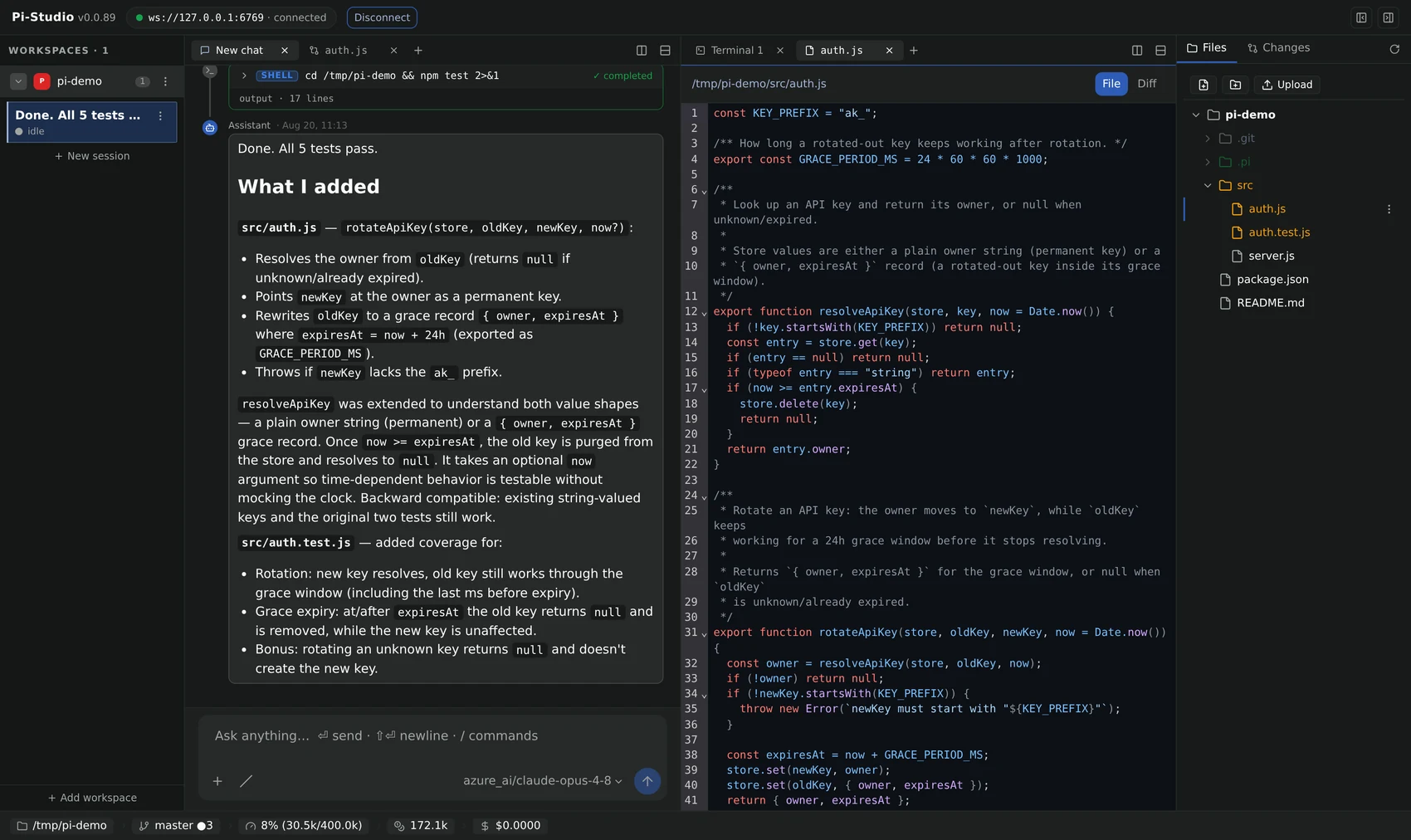
Every file opens with full syntax highlighting:
See the ui command below for every flag, and
CONTRIBUTING.md for how to run the UI from source in
dev mode.
Global options
| Flag | Description |
|---|---|
-H, --host <host> | Daemon target — bare host:port, or a URL with a ws:///wss:// or http:///https:// scheme (e.g. workstation.local:6767, https://box.local:6767) |
--password <password> | Password for a password-protected daemon |
--home <dir> | Override $PI_STUDIO_HOME (used for the client-id store) |
--pi-home <dir> | Override $PI_STUDIO_PI_HOME — the bundled Pi CLI's own .pi config dir. Selects the auth.json the auth group reads/writes, and is forwarded to a locally-spawned daemon and to pi-studio pi. Must precede the subcommand |
--json | Render command output as JSON instead of a table |
-v, --version | Print the installed CLI version and exit |
Connection resolution: --host host:port → ws://host:port; a ws:///wss:// URL is used
as-is; http:///https:// are accepted for familiarity and mapped to ws:///wss:// (the daemon
is an HTTP server that upgrades to WebSocket on the same port); wss:///https:// imply TLS. With
no --host, the CLI targets ws://127.0.0.1:6767.
Default action (no subcommand):
pi-studio <path>— open that path as a project on the daemon.pi-studio(bare) — ensure a local daemon is running, then print a pairing QR code.
Command tree
agent
| Command | Description |
|---|---|
agent run --provider pi/<model> "prompt" | Create an agent and run the first turn |
agent ls | List all agents |
agent attach <agentId> | Stream an agent's live events |
agent send <agentId> "prompt" | Send a follow-up prompt |
agent steer <agentId> "message" | Steer a running turn (after current tool calls) |
agent follow-up <agentId> "message" | Queue a message for after the agent stops |
agent stop <agentId> | Interrupt the current turn |
agent wait <agentId> | Block until the agent goes idle or closes |
agent logs <agentId> [-n <limit>] | Print paged timeline history |
agent inspect <agentId> | Print the full agent record |
agent update <agentId> | Update model/mode/thinking/title |
agent archive <agentId> | Soft-delete |
agent delete <agentId> | Hard delete |
agent reload <agentId> | Resume a closed session |
agent import <sessionRef> | Import a provider-native session by handle |
run, ls, attach, logs, send, and steer also work without the agent prefix
(pi-studio ls, pi-studio run …).
Session management mirrors Pi's own slash commands — agent session (/session), compact,
new-session, resume-session, fork, fork-messages, clone, name, export, model,
cycle-model, last-message, and commands (list extensions/prompts/skills); run
pi-studio agent --help for the full set.
Provider spec parsing (--provider): pi/claude-3-5-sonnet → provider pi, model
claude-3-5-sonnet; bare pi → provider only; mock → the credential-free mock provider.
auth
| Command | Description |
|---|---|
auth login [provider] [--type api_key|oauth] [--api-key <key>] | Log in to a model provider. With no arguments, pick one interactively; --api-key is the headless path |
auth status [--json] | Show which providers are configured, how (api key / oauth), and from where (stored credential vs. an ambient env var) |
auth logout <provider> | Remove a stored credential. Idempotent, and tells you when an ambient env var still configures the provider |
The pi provider needs a model-provider credential before it can run a turn. This is the
supported way to supply one — no hand-editing Pi's auth.json, no hunting for /login inside
pi-studio pi's interactive TUI:
pi-studio auth login                          # interactive: filter the provider list, pick, enter key
pi-studio auth login openai --api-key sk-...  # headless — for scripts, CI, Dockerfiles
pi-studio auth status
Local and daemon-free — unlike every other group here, auth never opens a WebSocket. It
writes Pi's own credential store at <piHome>/agent/auth.json (see --pi-home), which is the
exact file the daemon's spawned agents read, so a credential you add here is picked up on the next
agent spawn with no daemon restart. Interactive prompts need a TTY; use --api-key with an
explicit provider for non-interactive setups. Secrets are never echoed, and the store is written
0600.
daemon
| Command | Description |
|---|---|
daemon start | Spawn a local daemon if one isn't already running, then print a pairing QR |
daemon stop | Send SIGTERM to the local daemon |
daemon restart | Stop then start the local daemon |
daemon status | Print health + PID |
daemon set-password <pw> | Bcrypt-hash a password into $PI_STUDIO_HOME/config.json |
daemon pair | Print the pairing URL/QR for an already-running daemon |
daemon rotate-key | Mint a fresh pairing keypair — revokes every previously issued pairing link/QR |
pi-studio onboard (top-level) is an alias for daemon start's behavior, and bare pi-studio
does the same thing.
relay
| Command | Description |
|---|---|
relay start [--listen <host:port>] | Spawn a local relay server (default 0.0.0.0:7000), wait for health |
relay stop | Send SIGTERM to the local relay |
relay status [--listen <host:port>] | Print up/down for the relay at that address |
A self-hosted, zero-knowledge relay (@av-pi-studio/relay) that lets a client reach a daemon
behind a firewall/NAT — the daemon dials out to it; see that package's README for the full
picture. Runs as its own managed process, entirely decoupled from daemon lifecycle: point a
daemon at it via daemon.relay.endpoint in config.json (PI_STUDIO_RELAY_ENDPOINT env), not
through this command.
pi
| Command | Description |
|---|---|
pi [args...] | Run the embedded Pi coding-agent CLI, forwarding every argument verbatim |
A pure pass-through proxy to the exact pi binary bundled inside
@earendil-works/pi-coding-agent (the same one the daemon spawns) — so pi-studio pi ... is a
drop-in replacement for a globally-installed pi, with none of its flags, subcommands, or
interactive TUI reimplemented. pi-studio pi alone launches the interactive TUI, exactly like
bare pi (fullscreen by default since Pi 1.0.0 — pi-studio pi --tui-mode regular, or
"tuiMode": "regular" in Pi's settings.json, keeps the terminal's normal scrollback);
pi-studio pi -p "prompt" runs non-interactively. --pi-home (global option, must
come before pi on the command line) redirects the bundled CLI's .pi config dir, same as it
does for a locally-spawned daemon. Falls back to a global pi on $PATH if the bundled
dependency isn't installed. Never touches the daemon or the wire protocol.
ui
| Command | Description |
|---|---|
ui [--ui-host <host>] [--ui-port <port>] [--daemon-host <host>] | Serve the prebuilt web-client SPA as a static site |
Serves the built @av-pi-studio/web-client UI (dist/web) via a minimal static file server with
SPA fallback — no vite/dev dependency at runtime, works from any install shape. --daemon-host
(falls back to the global --host) pre-fills the printed URL's ?host=&connect=1 so the browser
tab auto-connects; the command never itself probes or starts a daemon. Blocks until
SIGINT/SIGTERM.
See The web UI above for screenshots.
update
| Command | Description |
|---|---|
update [--check] | Self-update to the latest @av-pi-studio/cli version published on npm |
Shells out to the same npm install -g @av-pi-studio/cli@<version> path used to install the CLI
in the first place (see Install above), so it respects your npm config (registry mirrors, auth,
proxies) instead of reimplementing a registry client. --check reports whether an update is
available without installing anything.
Feature groups
chat, terminal, loop, schedule, permit, provider, and worktree are sibling top-level
command groups (there is no feature wrapper, and no project group — opening a project is the
top-level open <path> command shown above):
| Group | Commands |
|---|---|
chat | create <name> [--purpose], ls, inspect <roomId>, post <roomId> <message> [--from], read <roomId> [-n], wait <roomId>, delete <roomId> |
terminal | ls, create [--workspace] [--cwd], capture <slot>, send-keys <slot> <data>, kill <slot> |
loop | run <prompt> [--max], ls, inspect <loopId>, logs <loopId>, stop <loopId> |
schedule | create <cron> <prompt>, ls, inspect <id>, update <id> [--cron] [--prompt], pause <id>, resume <id>, run-once <id>, logs <id>, delete <id> |
permit | ls, allow <permissionRequestId>, deny <permissionRequestId> |
provider | ls, models <providerId> |
worktree | create <name> [--workspace], ls, archive <name> |
Using it as a library
The CLI's building blocks are also exported for programmatic use:
import { withDaemon } from "@av-pi-studio/cli";

await withDaemon(ctx, opts, async (daemonClient) => {
  // daemonClient is a connected @av-pi-studio/client DaemonClient
});
withDaemon resolves the target URL from --host/defaults, connects, runs your callback, then
disconnects — handling RpcErrors and connection failures with clean stderr output and non-zero
exit codes along the way.
How it talks to the daemon
The CLI process never runs daemon/relay code in-process — it only speaks the WebSocket API to
drive an existing daemon. It resolves @av-pi-studio/server's/@av-pi-studio/relay/server's
absolute module URL via import.meta.resolve (never await import()) purely to bake that URL
into a detached node -e subprocess it spawns for daemon start/relay start — see
daemon-control.ts's subprocessStarter and relay-control.ts's subprocessRelayStarter. A
stable per-machine clientId is generated on first use and stored at
$PI_STUDIO_HOME/client-id; clientType is always "cli".
Development
npx vitest run packages/cli
Tests cover command parsing, provider-spec parsing, stream-event formatting, the daemon-control
state machine, output rendering, pairing-URL construction, and the auth group (path resolution,
prompt/notify rendering, login/status/logout orchestration) — all against an injected CliContext
(stub output sink + mock DaemonRuntime, fake AuthRuntime and terminal I/O), never a real
spawned daemon and never a real credential store.