storybook-formik
A Storybook Addon and Decorator to wrap Formik Fields and track their state in a Panel.
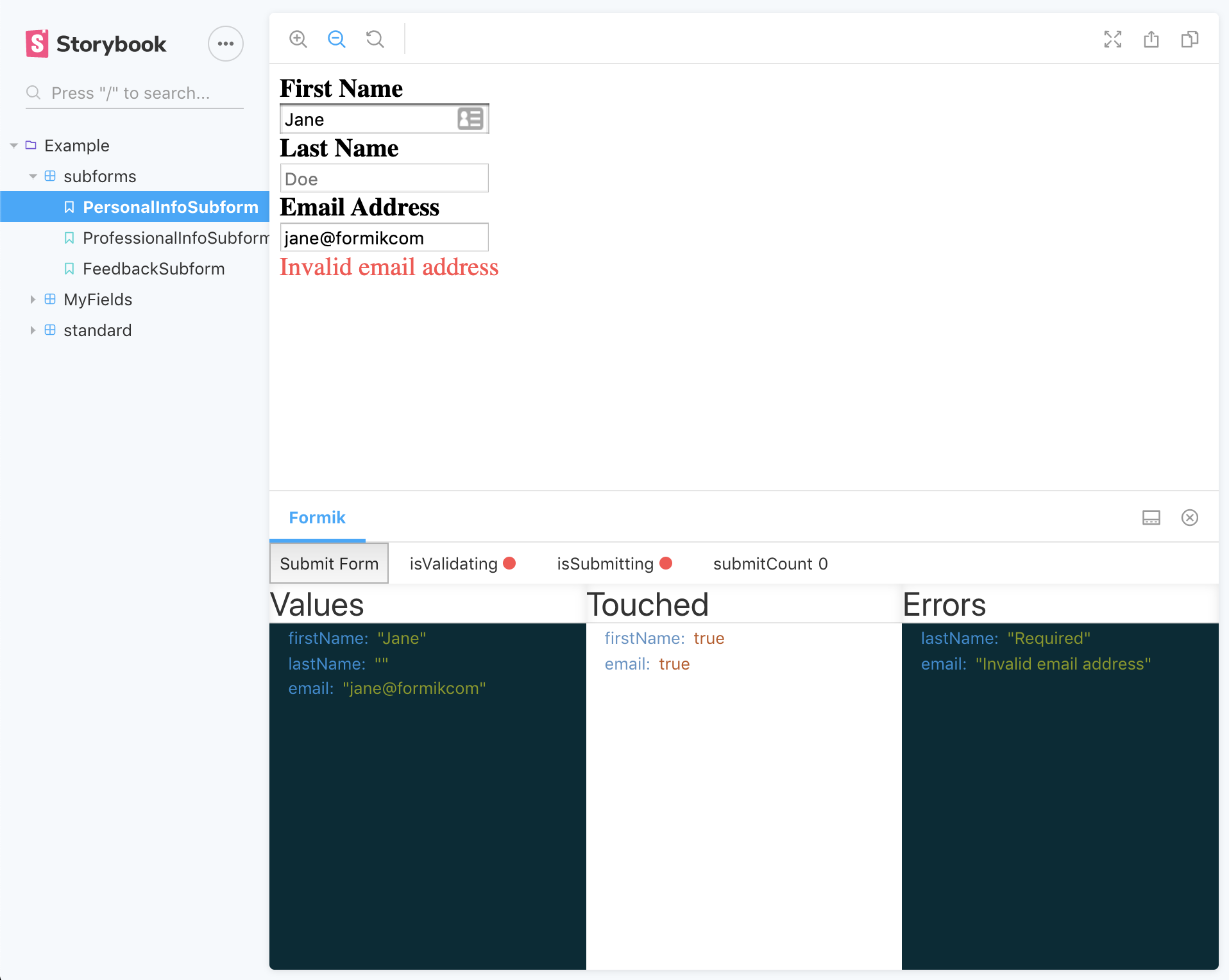
You can see the example stories in action here.
Thanks to @jaredpalmer for giving us the amazing formik library and making forms great again.
Migration to BBB Tech
Note, this package has been migrated to the org: BBB Tech. The only real difference this
means is that the package needs to be installed with a new command, scoped by the org's slug (i.e. npm i --save-dev @bbbtech/storybook-formik)
and to update the path when registering the package in your main.js.
It also means that all future versions will be released under the new package, so please migrate your dependency if you want to get future versions.
Install
npm install --save-dev @bbbtech/storybook-formik
Then register the addon in .storybook/main.js
module.exports = {
  stories: ['../stories/**/*.stories.tsx'],
  addons: ['@bbbtech/storybook-formik/register'],
};
Usage
Suppose you split your forms into smaller, re-usable components and these 'subforms' rely on formik context, each of these sub-forms may be used to build up a larger form, but you still want to test and run them independently. You can use the withFormik decorator so that we can wrap the subform in a Formik component, which will pass down the context as normal.
Given a simple subform:
import React from 'react';
import { Field } from 'formik';

const PersonalInfoSubform = () => (
  <div>
    <Field name="forename" type="input" />
    <Field name="surname" type="input" />
  </div>
);

export default PersonalInfoSubform;
You add the withFormik decorator to your stories and can pass any Formik props as a parameter to the individual story.
export const personalInfoSubform = () => (
  <>
    <p>
      The decorator can wrap Components that include Fields (or anything else
      expecting Formik context). This allows us to better componentise our
      larger forms.
    </p>
    <PersonalInfoSubForm />
  </>
);
personalInfoSubform.decorators = [withFormik];
// can use the DecoratorParams type and pass a type for type-safety of initialValues
const personalInfoParams: DecoratorParams<PersonalInfo> = {
  formik: {
    initialValues: personalInfoInitialValues,
    validationSchema: personalInfoValidationSchema,
  },
};
personalInfoSubform.parameters = personalInfoParams;
This gives you the benefit of rendering formik Fields that are expecting formik context, but also to track the key formik state within the storybook panel below.
See the example stories for further examples
Legacy story format
Example with the storiesOf syntax.
import { storiesOf } from '@storybook/react';
import withFormik from '@bbbtech/storybook-formik';

import PersonalInfoSubform from '<your_component_path>/PersonalInfoSubform';

storiesOf('Example', module)
  .addDecorator(withFormik)
  .add('default', () => <PersonalInfoSubform />, {
    formik: {
      initialValues: {
        forename: 'John',
        surname: 'Johnerson',
      },
    },
  });
Arguments
You can pass any Formik component props (initialValues, validationSchema, validateOnBlur, etc) as arguments to a story.
These props must be passed under the formik parameter key.
If no initial values are supplied, { enableReinitialize: true, initialValues: StoryContext.args || {} } will be used.
export const myTextInput = () => (
  <MyTextInput
    name="formikTweet"
    label="Describe formik in 80 characters"
    placeholder="I love formik because..."
  />
);
myTextInput.parameters = {
  formik: {
    initialValues: {
      formikTweet: '',
    },
    validationSchema: someSchema,
    onSubmit: v => console.log('I want to log these... ', v),
  },
};
formik.castValues with formik.validationSchema
If a validationSchema is provided in the formik config and { castValues: true }, then validationSchema.cast(initialValues || StoryContext.args || {}) will be called and the result passed in as initialValues.
This is useful if the form fields require a certain format to their values or when automatically converting StoryContext.args into a valid set of initialValues.
Using with Controls
If using @storybook/addon-essentials and StoryContext.args, withFormik will syncronize the form values with the storybook controls.
export const myTextInput = () => (
  <MyTextInput
    name="formikTweet"
    label="Describe formik in 80 characters"
    placeholder="I love formik because..."
  />
);
myTextInput.args = {
  formikTweet: '',
};
myTextInput.parameters = {
  formik: {
    validationSchema: someSchema,
    onSubmit: v => console.log('I want to log these... ', v),
  },
};
Mature Examples
In time, I will add more mature examples that show the usefulness of the subforms pattern on a larger scale. If anyone has any good examples then please do submit them.
Contributing
Development
You can test changes by building the package locally. The flow would be something like this:
- Make changes to addon
npm run build:watch- builds the dist bundle locally in watch modenpm run storybook- runs the package storybook with the example forms, preview changes herenpm run test- run unit tests
Releasing a new version
Deployment is pretty basic/simple right now, all you need to do is: npm version, and specify a new version, this will
kick off relevant lifecycle scripts defined in the package.json (including npm publish in the postversion script)