x 电子表格


基于网络的 JavaScript 电子表格
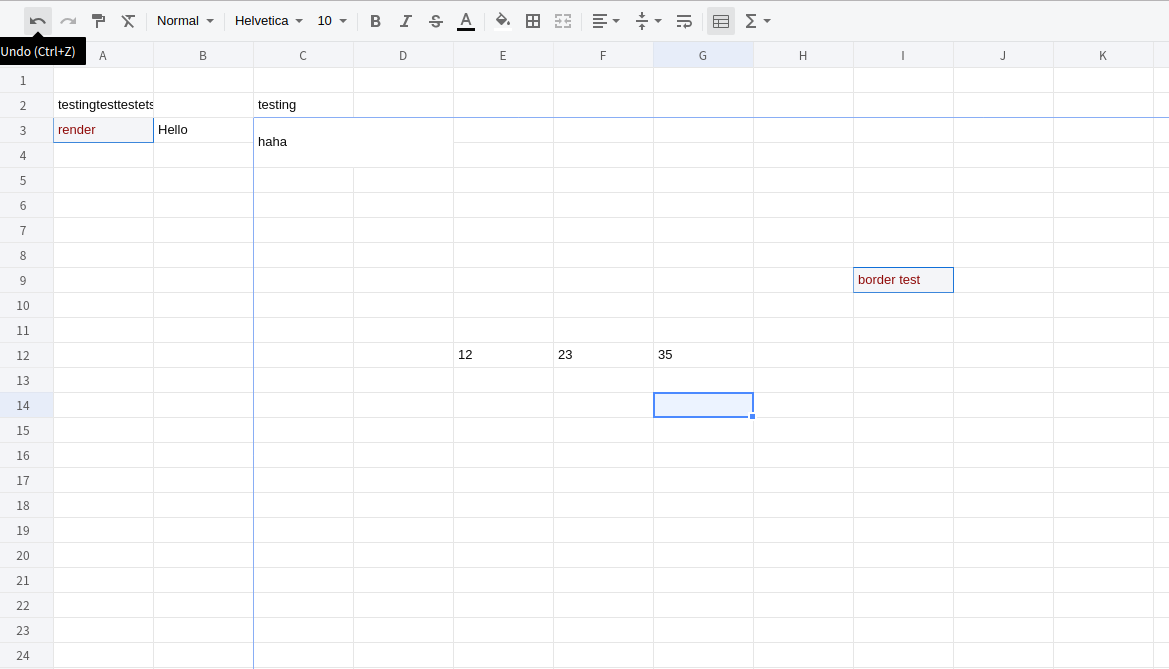
文档
- 内
- 日-克纳
光盘N
<link rel="stylesheet" href="https://unpkg.com/[email protected]/dist/xspreadsheet.css">
<script src="https://unpkg.com/[email protected]/dist/xspreadsheet.js"></script>

<script>
   x_spreadsheet('#xspreadsheet');
</script>
国家预防机制
npm install x-data-spreadsheet
<div id="x-spreadsheet-demo"></div>
import Spreadsheet from "x-data-spreadsheet";
// If you need to override the default options, you can set the override
// const options = {};
// new Spreadsheet('#x-spreadsheet-demo', options);
const s = new Spreadsheet("#x-spreadsheet-demo")
  .loadData({}) // load data
  .change(data => {
    // save data to db
  });

// data validation
s.validate()
// default options
{
  mode: 'edit', // edit | read
  showToolbar: true,
  showGrid: true,
  showContextmenu: true,
  view: {
    height: () => document.documentElement.clientHeight,
    width: () => document.documentElement.clientWidth,
  },
  row: {
    len: 100,
    height: 25,
  },
  col: {
    len: 26,
    width: 100,
    indexWidth: 60,
    minWidth: 60,
  },
  style: {
    bgcolor: '#ffffff',
    align: 'left',
    valign: 'middle',
    textwrap: false,
    strike: false,
    underline: false,
    color: '#0a0a0a',
    font: {
      name: 'Helvetica',
      size: 10,
      bold: false,
      italic: false,
    },
  },
}
导入% 1 导出 xlsx
https://github.com/SheetJS/sheetjs/tree/master/demos/xspreadsheet#保存-数据 互联网档案馆的存檔,存档日期2013-12-02
谢谢 https://github.com/SheetJS/sheetjs (中文(简体) )
捆绑事件
const s = new Spreadsheet("#x-spreadsheet-demo")
// event of click on cell
s.on('cell-selected', (cell, ri, ci) => {});
s.on('cells-selected', (cell, { sri, sci, eri, eci }) => {});
// edited on cell
s.on('cell-edited', (text, ri, ci) => {});
更新单元格文本
const s = new Spreadsheet("#x-spreadsheet-demo")
// cellText(ri, ci, text, sheetIndex = 0)
s.cellText(5, 5, 'xxxx').cellText(6, 5, 'yyy').reRender();
获得单元格和单元格样式
const s = new Spreadsheet("#x-spreadsheet-demo")
// cell(ri, ci, sheetIndex = 0)
s.cell(ri, ci);
// cellStyle(ri, ci, sheetIndex = 0)
s.cellStyle(ri, ci);
国际化
// npm
import Spreadsheet from 'x-data-spreadsheet';
import zhCN from 'x-data-spreadsheet/dist/locale/zh-cn';

Spreadsheet.locale('zh-cn', zhCN);
new Spreadsheet(document.getElementById('xss-demo'));
<!-- Import via CDN -->
<link rel="stylesheet" href="https://unpkg.com/[email protected]/dist/xspreadsheet.css">
<script src="https://unpkg.com/[email protected]/dist/xspreadsheet.js"></script>
<script src="https://unpkg.com/[email protected]/dist/locale/zh-cn.js"></script>

<script>
  x_spreadsheet.locale('zh-cn');
</script>
特征
- 撤销重做( R)
- 绘图格式
- 清晰格式
- 格式
- 字体
- 字体大小
- 字体粗体
- 字体斜体
- 下划线
- 罢工
- 文本颜色
- 填充颜色
- 边框
- 合并单元格
- 对齐
- 文本包装
- 冻结单元格
- 职能
- 调整行高和相距大小
- 复制、剪接、粘贴
- 自动填充
- 插入行,列
- 删除行, 列
- 隐藏行, 列
- 多个工作表
- 打印
- 数据验证
发展
git clone https://github.com/myliang/x-spreadsheet.git
cd x-spreadsheet
npm install
npm run dev
打开浏览器访问 http://127.0.0.1:8080.
浏览器支持
现代浏览器(chrome, firefox, Safari).
自由主义
麻省理工学院