Arnative
Refined aesthetics. Cohesive tools. Built for Pi.



Overview
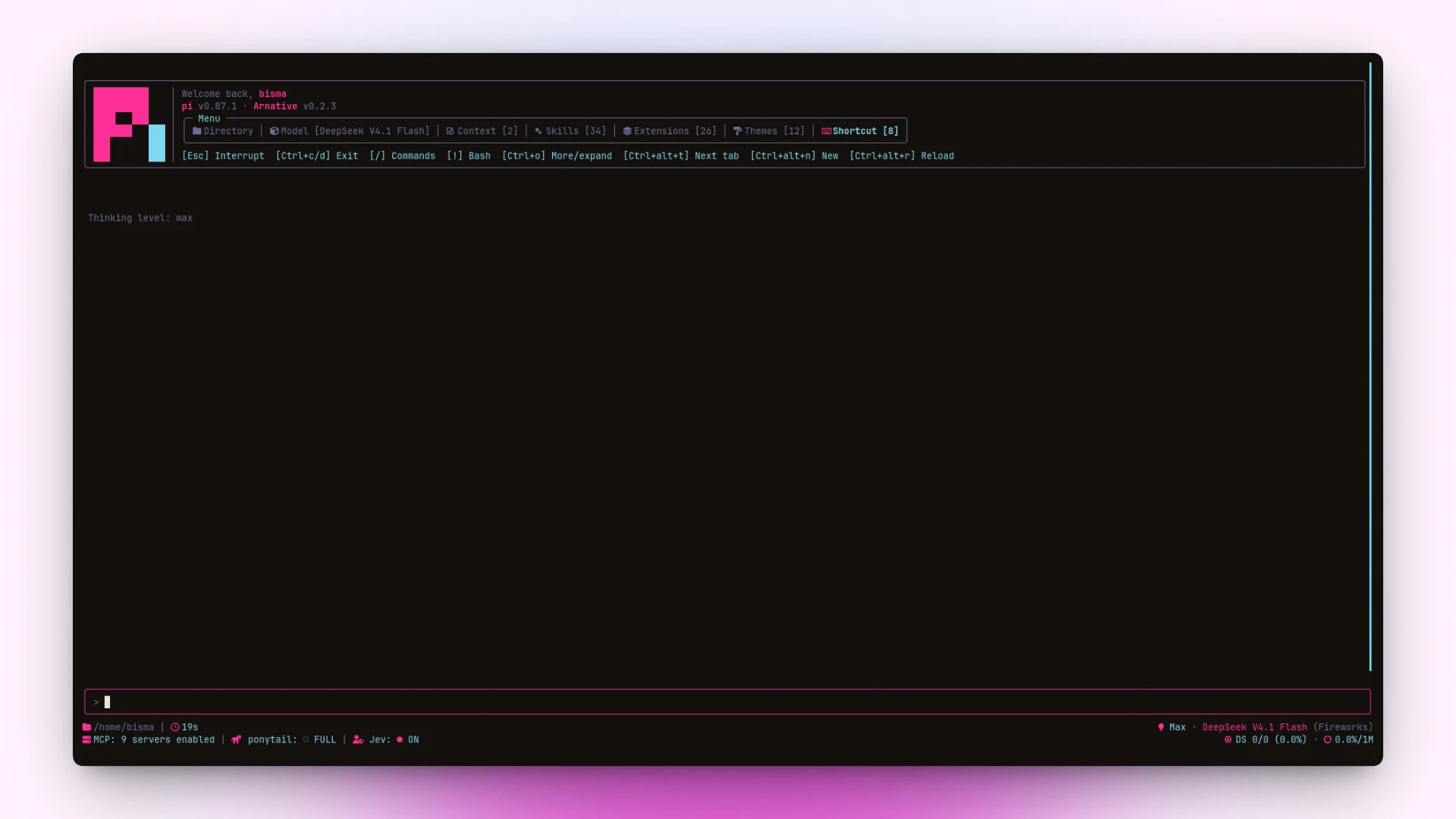
pi-arnative replaces pi’s default terminal chrome with a unified visual interface.
- Warm Themes: Contrast-checked OKLCH color palettes generated without drift (
arnativeplus 10 variants). - Tabbed Header: Compact box menu showing Directory, Model, Context, Skills, Extensions, and Shortcuts.
- Rounded Tool Boxes: Status, spinner, runtime duration, and clickable
[show]/[hide]output toggles. - Task List:
todotool,/todosview, and a boxed widget above the editor that auto-hides 30s after all tasks finish. - Enhanced Footer: 3-row status grid (
Arnative (Full)) or single collapsible row (Arnative (Minimal)) tracking branch, diff, active duration, and token speed. - Working Spinners: 18 animated presets with live picker preview and optional
[g]gradient sweep. - Transcript Clock: Per-message timestamps with clean bubble backgrounds.
- Usage Dashboard: Real-time token counts and cost tracking across local sessions via
/usage. - Custom Providers: Interactive
/providerswizard to probe endpoints, pick models, set thinking levels, edit the base URL, provider id or API key, and save OpenAI-, Anthropic-, Gemini-, or Ollama-compatible channels tomodels.jsonandauth.json. - Model Heal: Background sync (
/model-heal) that fills missing compat flags,/modelstoken limits, and accepted reasoning effort levels inmodels.json. - Auto-compact: Automatic context compaction after a turn settles using smart window tiers or a fixed token budget.
Configuration & Presets
Saved to ~/.pi/agent/arnative/config.json via /arnative:
- Headers & Footers:
Arnative (Full)(default),Arnative (Minimal)(footer only; click head text or pressctrl+alt+mto toggle), orPi (system). - Animations: 18 presets (
Arnativedefault,Pi (system), and alphabetical variants). Press[g]in the picker to toggle the Google gradient sweep. - Auto-compact: Off by default. Smart tiers trigger near ~200k tokens (
≥768k→20%,≥384k→40%,≥192k→80%,<192k→pi core), or pick a fixed budget (100kto400k). - Model heal: Full (default: offline compat flags,
GET /modelslimits with 6h TTL, reasoning effort probe with 24h TTL), Flags (offline only), or Off. Hand-edited fields are never overwritten. - Task list (
todo): Stored per session in~/.pi/agent/arnative/todos/<session-id>.json(uninstall@juicesharp/rpiv-todofirst to avoid tool name conflict). Click[click to expand]/[click to collapse]or pressctrl+alt+o(alt+o) to toggle; click↑/↓counters or pressctrl+alt+j/k(alt+j/k) to scroll. Auto-hides 30s after completion (setPI_ARNATIVE_TODO_HIDE_MSto override,0for immediate hide; expanding pauses the timer).
Install
pi install npm:@bismawy/pi-arnative
Requires a Nerd Font. On a fresh install, arnative is applied automatically if no theme is set; switch anytime via /arnative themes or /settings → Theme.
Local development:
npm run dev                  # run pi against this checkout, nothing installed
npm run overlay              # copy extensions/ lib/ themes/ into the installed npm package
To see a change before publishing it: npm run overlay, then press /reload in pi — pi
re-evaluates extension TypeScript in the same process, so the reload loads the copied code with no
reinstall and no restart. The package stays an npm install; nothing points pi at this directory. A
module deleted here is pruned from the installed copy (a stale entry point would keep loading), and
pi update --extensions restores the published code once a higher version exists.
npm run overlay -- --dry-run lists what would move; PI_CODING_AGENT_DIR targets another agent dir.
Shortcuts
| Key (Linux / Win) | Action |
|---|---|
ctrl+alt+t · alt+t | Cycle header tabs |
ctrl+alt+r · alt+r | Quick reload (/reload) |
ctrl+alt+n · alt+n | New session (/new) |
ctrl+alt+m · alt+m | Toggle Minimal footer |
ctrl+alt+o · alt+o | Expand or collapse task list |
ctrl+alt+j · alt+j | Scroll task list down |
ctrl+alt+k · alt+k | Scroll task list up |
Click [show] / [hide] · ctrl+o | Toggle tool output box |
← / Esc | Step back to parent menu / close active screen |
/arnative | Settings menu (Themes, Headers, Footers, Animations, Auto-compact, Model heal, Providers, Usage) |
/usage | Token & cost dashboard |
/todos | Full task list recap |
/providers | Custom provider manager |
/model-heal | Run models.json heal passes now |
Keybindings & Platform Notes
Bind app.session.new in ~/.pi/agent/keybindings.json:
{
  "app.session.new": ["ctrl+alt+n", "alt+n"]
}
- Windows / WSL: Windows Terminal maps
Ctrl+Altto AltGr; usealt+…or disablealtGrAliasing. - macOS: Use
ctrl+option+…. - tmux / Herdr: Set
PI_TUI_ESC_TIMEOUT=100ifEschas a delay.
Architecture
Extensions & Components
| File | Role |
|---|---|
extensions/arnative.ts | /arnative settings menu and live preview pickers |
extensions/section-headers.ts | Tabbed header and resource box |
extensions/footer.ts | 3-row status grid, Minimal footer, and boxed editor |
extensions/tools.ts | Rounded tool boxes, spinners, duration, and [show] / [hide] toggles |
extensions/todos.ts | todo tool, boxed widget above editor, and /todos screen |
extensions/animations.ts | Spinner preset picker and live preview |
extensions/autocompact.ts | Smart and fixed-budget context compaction |
extensions/model-heal.ts | Automatic models.json heal triggers and /model-heal |
extensions/timestamps.ts | Message timestamps and bubble backgrounds |
extensions/ui-render-tweaks.ts | Contrast tweaks, selection styling, and UI polish |
extensions/usage.ts | Token and cost dashboard (/usage) |
lib/todos.ts | Task state, window layout, box rows, and session store |
lib/spinner.ts | Spinner preset catalog, frames, and gradient painters |
lib/provider.ts | Custom provider probe, model picker, and config writer |
lib/model-heal.ts | Compat flags, /models limit sync, and reasoning effort probe |
lib/list-picker.ts | Shared live-preview and multi-select picker component |
Theme Variants & Development
Themes (themes/gen-themes.mjs + lib/color.ts): arnative · sun · zinc · violet · emerald · matrix · cyberpunk · synthwave · gruvbox · nord · dracula
npm test                              # Run self-checks and unit tests
npm run themes                        # Regenerate theme JSON files
npm run preview                       # Live preview in Pi and stamp .git/arnative-preview
git config core.hooksPath .githooks   # Enable pre-push preview verification hook
License
Distributed under the MIT license.