@bluecateng/smooth-reorder 

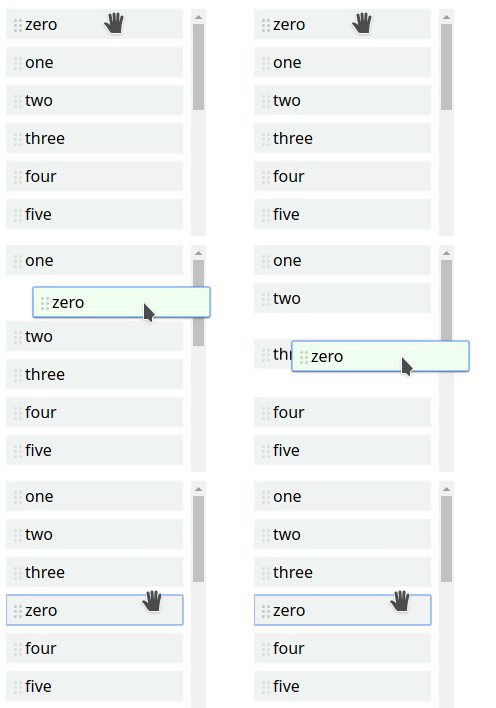
Allows reordering a list with either mouse dragging or keyboard using only vanilla JS. Elements are moved with CSS transitions where possible or with @bluecateng/nano-spring, so it feels more natural. The callbacks allow implementation of feedback for accessibility.
The article 4 Major Patterns for Accessible Drag and Drop / Sorting a List in Medium has an example of how to implement accessibility.
Size: 4,102 bytes before compression.
Installation
npm i -S @bluecateng/smooth-reorder
Example
import reorder from '@bluecateng/smooth-reorder';

const container = document.querySelector('#test');
reorder(container, {
    onStart: (element, position) => console.log(`Started moving element ${element} from ${position}`),
    onMove: (element, position) => console.log(`Element ${element} will move to ${position}`),
    onMoveEnd: (element, position) => console.log(`Element ${element} is now at ${position}`),
    onFinish: (element) => console.log(`Element ${element} moved`),
    onCancel: (element) => console.log(`Element ${element} move cancelled`),
});
This CSS must be added to the page:
.draggable {
    cursor: move;
    cursor: grab;
    touch-action: none;
}
.dragging {
    z-index: 1000;
}
.placeholder {
    opacity: 0;
}
.clone {
    position: absolute;
    left: 0;
    top: 0;
    will-change: transform;
}
Options
| Option | Description | Default |
|---|---|---|
horizontal | Whether the list is horizontal. | false |
selector | CSS selector for the elements to reorder. | .draggable |
handleSelector | CSS selector for the reorder handle. | selector |
focusSelector | CSS selector for the element to focus. | handleSelector |
duration | Duration in milliseconds of the move animation, 0 disables it. | 200 |
onStart | Called when reordering starts. | |
onMove | Called when the user asks to move the element with the keyboard (optional). | |
onMoveEnd | Called after the element has been moved in the DOM (optional). | |
onFinish | Called when the element is dropped. | |
onCancel | Called when reordering is cancelled. |
If the user prefers reduced motion (prefers-reduced-motion: reduce) the animation is disabled, the same as
setting duration to 0.
Lifecycle
Keyboard reordering: Space on the focused element grabs it, the arrow keys move it, Space drops it and Escape cancels.
onStart(element, index)is called immediately when the element is grabbed.- Each arrow key calls
onMove(element, index)immediately, with the index the element will have. The siblings then slide with a CSS transition and the DOM is not changed until the animation ends. - When the animation ends (
durationplus 5 ms) the element is moved in the DOM andonMoveEnd(element, index)is called with the actual index. This is the right place for announcements. - Space calls
onFinish(element); Escape callsonCancel(element)after the element is moved back to its original position. If an animation is running, keys pressed meanwhile (including drop and cancel) are queued and processed in order as each animation ends, soonFinishandonCancelalways see the final DOM.
Pointer reordering calls onMoveEnd each time the placeholder changes position, and onFinish once the dragged
element has settled in its final position. onStart and onMove are not called for the pointer.
State attribute
The container has the attribute data-reorder-state with one of these values, which can be used for styling or
for tests to know when it is safe to continue:
idle: no element is being reordered.grabbed: an element is grabbed or dragged and no animation is running.moving: a move animation is running.
The attribute is removed when the function returned by reorder is called.
Output