控制台饲料


从当前页面显示控制台日志、 iframe 或通过服务器传输的回放组件 .
谁用它
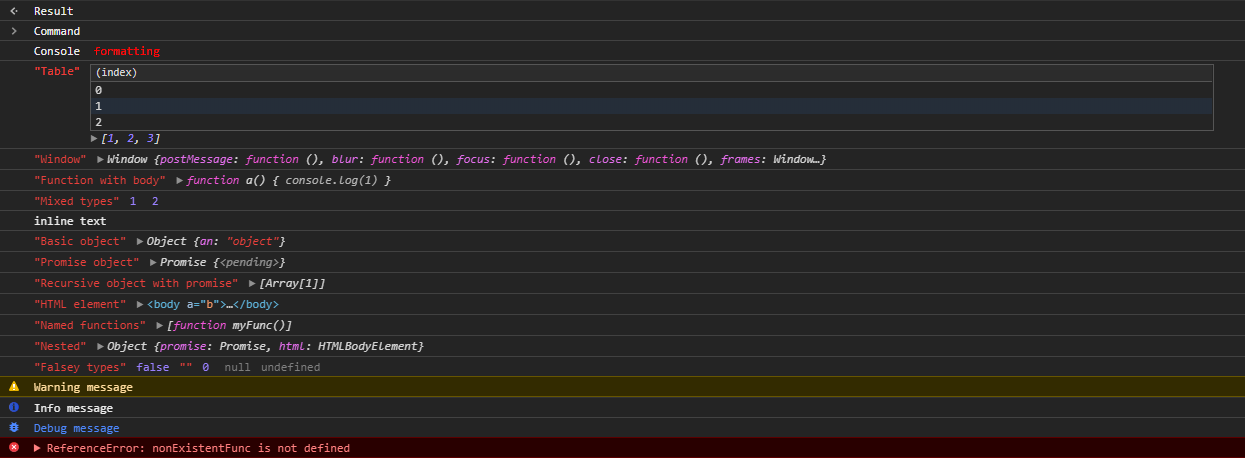
特征
- 控制台格式化 - 说吧 样式并给出日志颜色链接
- DOM 节点 - 方便检查和扩展 HTML 元素,并加亮语法
console.table- 用表格格式查看日志- 其他控制台方法数字 :
console.time- 以毫秒计算完成事件所需的时间console.assert- 声明是真实的console.count- 数一下发生多少事
- JSON 内置序列化 - 对象、函数和 DOM 元素可编码或解码为 JSON
安装
yarn add console-feed
# or
npm install console-feed
基本用途
import React from 'react'
import { Hook, Console, Decode } from 'console-feed'

class App extends React.Component {
  state = {
    logs: []
  }

  componentDidMount() {
    Hook(window.console, log => {
      this.setState(({ logs }) => ({ logs: [...logs, Decode(log)] }))
    })

    console.log(`Hello world!`)
  }

  render() {
    return (
      <div style={{ backgroundColor: '#242424' }}>
        <Console logs={this.state.logs} variant="dark" />
      </div>
    )
  }
}
主张 <Console /> 组件
logs: Log[]
由日志对象组成的数组 。 需求
filter?: Methods[]
过滤日志, 只显示某些方法的信息 .
variant?: 'light' | 'dark'
设置组件的字体颜色。 默认 - light
style?: Styles
定义组件上的自定义样式 - 参见 Styles.d.ts
searchKeywords?: string
过滤日志的字符串值
logFilter?: Function
如果您想要使用自定义日志过滤功能, 您可以提供自己的执行
日志方法
每个日志都有指定的方法. 该方法用于确定信件的样式和用于 filter 道具 (英语).
type Methods =
  | 'log'
  | 'warn'
  | 'error'
  | 'info'
  | 'debug'
  | 'command'
  | 'result'
Log 对象
日志对象包括以下内容:
type Logs = Log[]

interface Log {
  // The log method
  method: Methods
  // The arguments passed to console API
  data: any[]
}
序列化
默认使用时 Hook() API,日志被序列化,以便安全工作 JSON.stringify。为了将日志恢复到兼容格式 <Console /> 组件,您需要调用 Decode() 方法.
禁用序列化
如果 Hook 函数和 <Console /> 组件的源代码相同,可以禁用序列化来增加性能.
Hook(
  window.console,
  log => {
    this.setState(({ logs }) => ({ logs: [...logs, log] }))
  },
  false
)
发展中国家
运行 console-feed 本地, 只需运行 :
yarn
yarn start
yarn test:watch
头去 http://localhost:3000 在浏览器中,你会看到演示页出现。 在你做出修改后,你需要重新装入,但笑话测试会自动重启.