@byokit/ui



Headless sign-in, pairing and runtime-kit state, in plain words, for any UI.
It turns what your back end reports into the phase to draw and the sentence to show: a "Sign in with …" sheet, a
pairing sheet, the link's status, the route a phone takes home, and a runtime kit's runs, approvals and agents. Your
app keeps its own look. Everything except the React hooks is framework-free.
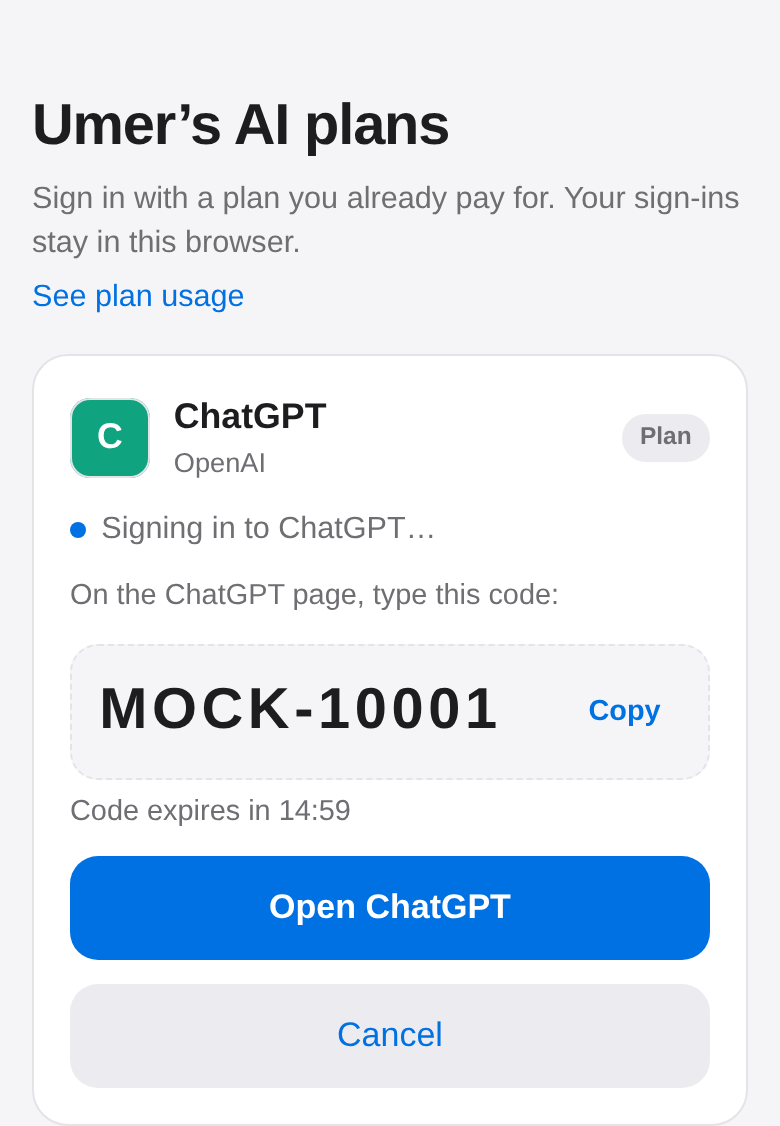
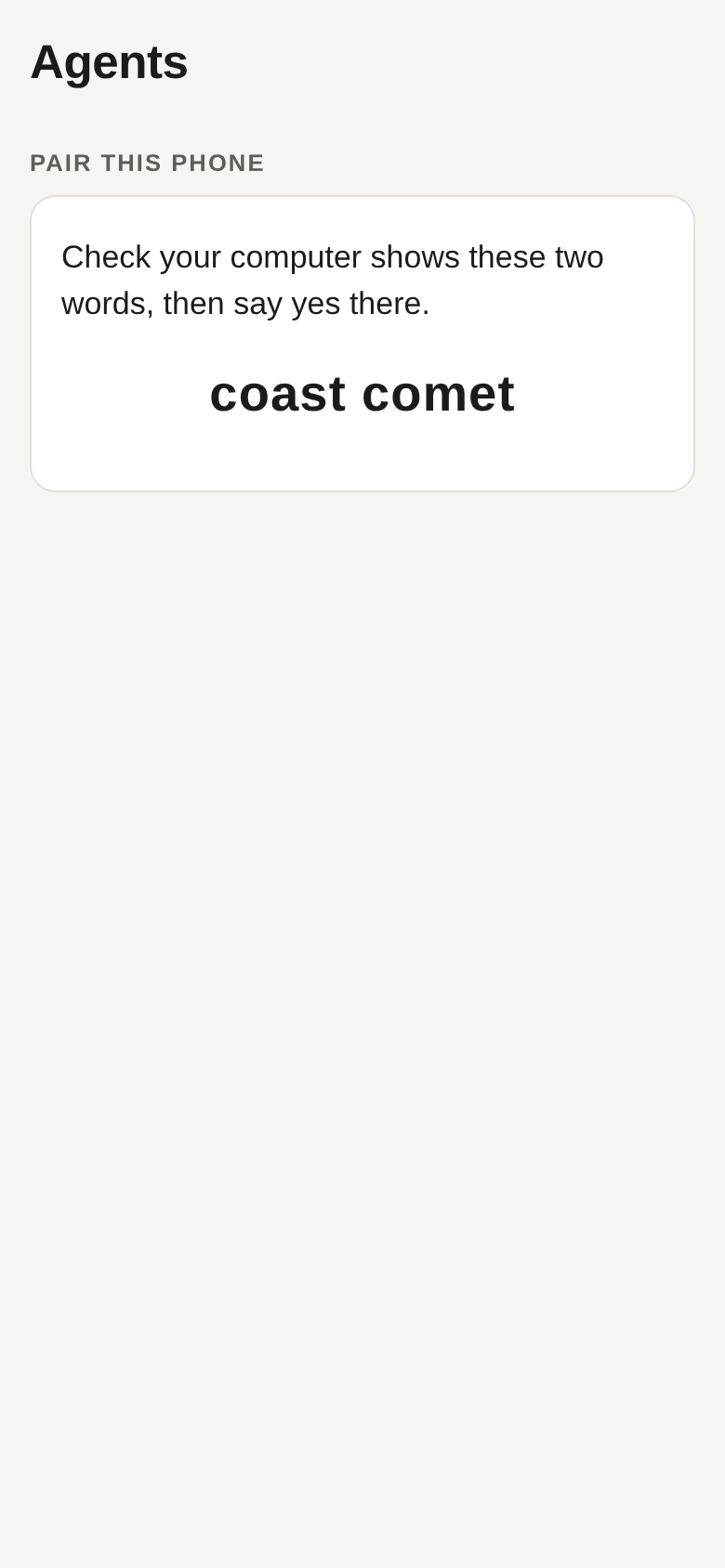
Left: the code phase from phaseOf(), drawn by examples/pwa against the mock OpenAI sign-in. Right: pairingView()'s compare words, drawn by examples/herdr-kit.
Install
npm install @byokit/ui

Migrating from @byokit/ui-core? See the deprecated shim's migration guide.
Quickstart
npm install @byokit/ui
React is an optional peer dependency, needed only for the hooks (useSignIn, useRun, useApprovals,
useHerdrTree, useBlocked, useConnect, useAccounts, useModelPicker).
import { phaseOf, stepOf } from '@byokit/ui/phase';
import { describeRoute } from '@byokit/ui/route';
import { consentWords, linkWords, pairingView, qrMatrix } from '@byokit/ui/link';

// What the back end reports: a sign-in waiting on a typed code.
const phase = phaseOf({ ready: false, signIn: { state: 'waiting', via: 'code', code: 'ABCD-1234' } });
console.log(phase, stepOf(phase));
console.log(phaseOf({ ready: true, work: true }));
console.log(phaseOf({ signIn: { state: 'failed', why: 'busy' } }));

console.log(describeRoute('wss://home.tail1234.ts.net/link'));
console.log(describeRoute('ws://100.101.102.103:7777'));

console.log(consentWords({ hostName: 'Kitchen computer', role: 'control' }));
console.log(pairingView({ phase: 'compare', hostName: 'Kitchen computer', words: 'coast comet' }));
console.log(linkWords('offline', 'Kitchen computer'));
console.log(qrMatrix('hello').length, 'rows');
Output from running it with Node:
code 1
work
busy
Tailscale
Private network
Pair with Kitchen computer? This device will be able to see and change things on it, until you remove it there.
{
  phase: 'compare',
  title: 'Check Kitchen computer shows these two words, then say yes there.',
  words: 'coast comet'
}
Can't reach Kitchen computer right now. This device keeps trying by itself.
25 rows
In React, useSignIn drives the whole sheet from three calls to your back end:
import { useSignIn } from '@byokit/ui';
import type { AccountView } from '@byokit/ui';

// Your back end's routes; the hook only needs these three calls.
declare const api: {
  account(): Promise<AccountView | null>;
  signIn(body?: { via?: 'code'; fresh?: boolean }): Promise<unknown>;
  cancel(): Promise<unknown>;
};

export function useChatGptSheet() {
  const s = useSignIn({ read: () => api.account(), start: (b) => api.signIn(b), cancel: () => api.cancel() });
  // s.phase: what to draw. s.code / s.url: what to show. s.start({ via: 'code' }): "Having trouble? Use a code instead".
  // s.cancel(), s.close(), s.keepWork(): the sheet's buttons. Leave `start` out when something else starts the
  // sign-in: the sheet then only watches, and nothing begins as it opens.
  return s;
}
API at a glance
| Export | What it does |
|---|---|
phaseOf(account, { offline, cancelled, keepWork }) | The sign-in phase to draw, from an @byokit/accounts view() plus whether the account is signed in |
stepOf(phase) | Where the three-step progress bar ("Open", "Say yes", "Done") stands |
useSignIn({ read, start?, cancel, offline?, ms?, pinned? }) | React hook: starts the sign-in as the sheet opens, polls, and handles cancel, close, keep-work and "use a code instead"; without start it only watches and nothing begins |
describeRoute(url, kind?) | Names the route a dial address takes, for a pairing or settings screen |
routeShort(route) | The route as words inside a connected line (same Wi-Fi) |
connectedWords(hostName, url?, kind?) | The connected line to render (Connected to Kitchen computer - same Wi-Fi.), plain with no route |
routeChoices() | Every onboarding route in everyday words ({ code, title, sentence, needs }), in recommendation order |
qrMatrix(text, { border }?) | The pairing QR as rows of dark and light modules, with its quiet border (2 unless given) |
qrText(text, { border }?) | The same QR as half-block text rows for a terminal |
consentWords({ hostName, role, device?, detail? }) | The question before pairing |
pairingView({ phase, hostName?, words?, error?, device?, detail? }) | The pairing sheet's title and words for each phase |
linkWords(status, hostName) | The link's status in one sentence |
pairErrorWords(error) | A failed pairing as expired, wrong or the link's own sentence |
stepsView(steps) | The stepper rows to draw, from the caller's own step ids and states |
stepsText(rows, { title }) | The same rows as text lines for a terminal |
runStore(oc), runView(state, { words, name }) | One run: the reply streaming in, the tool at work, how it ended in the kit's words |
approvalsStore(oc), approvalWords(a, words, helper) | The approvals waiting for a yes, live, each gone when answered or expired |
herdrStore(hd), herdrTreeView(tree), blockedView(state) | Herdr's agents by where they run, and the ones waiting for an answer, live |
cloudSource(provider, o?), cloudStore(source), cloudView(state, { now, words }) | Your cloud computers: the list, each one's state, newest copy and cost in plain words, the search, the pick, and what the host answered when it woke one |
useCloud(source) | React hook over that store |
signInsStore(oc), signInSheetView(request, { name, holder }), livePanelView(state) | The browser sign-in sheet (sentence, buttons, chat chip) and live panel for the OpenClaw kit's handoff |
useRun, useApprovals, useHerdrTree, useBlocked | React hooks over those stores |
connectView(routes, step?), connectStep(step, action) | Every account route the kits list, grouped by how the person pays, with the picked row and its key card |
signInFor(view, { read, start?, cancel }), useConnect({ routes, read, start?, cancel }) | useSignIn's options for the picked sign-in row; the hook holds the step |
accountRows(accounts, room, now, windows?), rowsOf(source, now), nameSuggestions(email, taken, provider?) | One plain-words row per account (ChatGPT · Work / Plus · 72% left this week), the honest words for every sign-in state, and untaken account-name suggestions |
agentView(agent, accounts, defaults?, models?) | One agent's sign-in methods (an Agent tab): its plans counted as 1 of 3 enabled, the one account in use, its default model, pay-per-use keys listed apart and never chosen |
useAccounts(source), useModelPicker(source, initial?) | React hooks: the rows live with refresh() and remove() (a failing room leaves only its row unknown; a mid-refresh remove still drops it), and the run picker with select() keeping the caller's selection across refreshes; accountsSource(accounts, member, room?) and cliSource(cli, room?) fill the source with one line per member (the openclaw adapter stays pending O14) |
| Types | Phase, SignInView, AccountView, UseSignIn, Route, RouteChoice, RouteCode, PairPhase, Role, DeviceKind, LinkStatus; RouteKind from @byokit/ui/route; Account, AccountRow, AccountAction, AccountsSource, AgentSpec, AgentView, AgentWay, AsOf, Billing, Room, RoomSpan, SignInState, UsageWindow, UsageWindows from @byokit/ui/accounts |
Entry points: @byokit/ui (everything, including the React hooks), @byokit/ui/phase,
@byokit/ui/route, @byokit/ui/link, @byokit/ui/kits, @byokit/ui/steps,
@byokit/ui/connect and @byokit/ui/accounts (no React dependency).
Sign-in phases
phaseOf() turns what your back end reports (an @byokit/accounts view() plus whether the account is signed in)
into the phase to draw:
| Phase | Meaning |
|---|---|
opening | getting the provider's page or a code ready |
waiting | say yes on the provider's page |
code | type this code on the provider's page instead |
done | signed in, and it works |
work | signed in with a work plan: offer a personal one |
cancelled | declined on the page, or cancelled here |
busy | something else on this computer is signing in |
expired | the page or code ran out of time |
failed | anything else, with a plain sentence |
offline | the home computer isn't answering |
phaseOf() and stepOf() also come from @byokit/ui/phase, which has no React dependency.
Routes
describeRoute(url, kind?) (also @byokit/ui/route, no React) names the route a dial address takes, for a
pairing or settings screen. Pass tailscale, direct, private, or lan when known (map
@byokit/discover's tailscale-direct to direct); without provenance, 100.64/10 reads as a private
network rather than assumed to be Tailscale, and the other home ranges read as same Wi-Fi.
routeChoices() (same entry, no React) is the one word table for the onboarding route list: { code, title, sentence, needs } per route in recommendation order, a superset of @byokit/discover's Via (it also covers the
temporary public link and your own server, which reach() there does not probe). recommend() from the same package
takes sentence and needs from here and only adds availability.
connectedWords(hostName, url?, kind?) (same entry) is the connected line a consumer renders: the computer with
the route just dialled (Connected to Kitchen computer - same Wi-Fi.), or plain (Connected to Kitchen computer.)
when there is no route to name.
import { routeChoices } from '@byokit/ui/route';

console.log(routeChoices().map((c) => `${c.title}: ${c.sentence}`));
Connect an account
connectView(routes, step?) (also @byokit/ui/connect, no React) draws the "Connect an AI account" list from
the routes the kits discover (D18 in docs/runtime-kits.md): pass @byokit/accounts routes(host) and
@byokit/openclaw routes(facts) together, unfiltered. Every route is listed, unavailable ones too, in these groups
(empty ones left out):
| Group | Rows | Offered by default |
|---|---|---|
| Plans | subscription and plan-key routes the kit offers by default | yes, when ready |
| Pay per use | API-billed routes | no, only when picked |
| On this computer | local runtimes | no |
| Your own server | endpoint routes; the person says how it is paid for | no |
| Cloud account | cloud credentials | no |
| Other ways to connect | free or unknown billing ("Billing set by …") | no |
| Speech, search and media | non-chat services | no |
Billing decides the group, never the route's offer alone: an API, cloud, local, server, free or unknown row can
never sit among Plans. Each row has billingWords ("Uses your ChatGPT plan", "Charged per use to your OpenAI
account"), method ("Sign in with a code") and status (a sentence per readiness), plus offered, ready and
does: signin, key, setup (the app's own cloud, local or server form) or unavailable. The view copies only
these fields, so a credential on a route never reaches it; nothing in it names a provider.
import { connectStep, connectView, signInFor } from '@byokit/ui/connect';
import { routes } from '@byokit/accounts';

declare const api: { account(id: string): Promise<null>; signIn(id: string, body?: object): Promise<void>; cancel(id: string): Promise<void> };
const step = connectStep({ at: 'list' }, { type: 'pick', key: 'accounts/openai:code' });
const view = connectView(routes({ platform: 'browser' }), step);
// view.groups → the list; view.chosen.row.does === 'signin' → draw the sign-in sheet:
const options = signInFor(view, { read: (row) => api.account(row.id), start: (row, body) => api.signIn(row.id, body), cancel: (row) => api.cancel(row.id) });
A key route's chosen.key is the existing keyView card, labelled for its billing ("Key from your plan" or "Key
(charged per use)"); submit the input straight to the kit and dispatch only { type: 'result', result }. A key
that acts for several workspaces (@byokit/accounts add answers workspaces) dispatches result: 'workspace':
list those workspaces, then submit again with the one picked.
useConnect({ routes, read, start?, cancel }) holds the step in React and returns the view with pick, back,
act and signIn, the options to pass to useSignIn in a sheet keyed by chosen.row.key.
Account rows
accountRows(accounts, room, now, windows?) (also @byokit/ui/accounts, no React) turns a list of accounts and a room reading
into one plain row each: the provider and the person's own name for the account (ChatGPT · Work), then the plan and
the room left (Plus · 72% left this week). A row also carries state, billing, low (room left at or below 20%,
exactly 20 included, never true for an unknown room) and, when it helps, an action: sign_in for a signed-out or
lapsed account, wait plus the until refill time for a resting one. accountRows reads only the fields it names,
so a credential on an account never reaches a row. A row that is not ready shows its own honest words ("Checking…",
"Cooling down", "Not signed in", "Sign in again", "Not in your plan") instead of the room.
Pass windows, the account's windowsView(reading, now) from @byokit/usage/view, as a fourth argument and a ready
row also carries windows (each usage window, tightest first: Week: 72% left with resets in 4d) and asOf
(Read 2 minutes ago, or Read 2 days ago (stale) past a day). A window whose reset is already past reads
Session: reset since this reading, with no percent or countdown, and the room line Reset since this reading. A stale row is never low; a reading without its own
time, such as an openclaw room, shows its resets and no asOf, never a made-up age.
AccountsSource is the shape an app fills from its own back end — accounts(), room(account) and optionally
windows(account) — and rowsOf(source, now) awaits them and builds the same rows; @byokit/accounts list() and a room reading fit it with one line per member.
nameSuggestions(email, taken, provider?) offers up to three untaken account names from an email's local part
(deduped case-insensitively against taken), falling back to the provider's name; the email itself is never offered.
import { accountRows, nameSuggestions, type Account, type Room } from '@byokit/ui/accounts';

declare const list: () => readonly Account[];
declare const reading: (account: Account) => Room;
const rows = accountRows(list(), reading, Date.now());
// rows → [{ title: 'ChatGPT · Work', detail: 'Plus · 72% left this week', state: 'ready', low: false, ... }]
console.log(nameSuggestions('[email protected]', rows.map((r) => r.title)));
In React, useAccounts(source) keeps those rows live (refresh() re-reads; remove(id) removes through
the back end and drops the row even mid-refresh), and useModelPicker(source) keeps the run picker live
(select() marks the selection at once and keeps it across refreshes). accountsSource(accounts, member, room?) fills the source from a live @byokit/accounts member and cliSource(cli, room?) from a live
cliAccounts() kit, each with one line per member; the openclaw adapter stays pending O14:
import { accountsSource, cliSource, useAccounts, useModelPicker } from '@byokit/ui';
import type { Accounts } from '@byokit/accounts';
import { cliAccounts } from '@byokit/accounts/cli';
import type { Account, Room } from '@byokit/ui/accounts';

declare const accounts: Accounts<any, number>;
declare const cli: ReturnType<typeof cliAccounts>;
declare const reading: (account: Account) => Room;
const fromMember = accountsSource(accounts, 1, reading);
const fromCli = cliSource(cli, reading);

export function useAccountList() {
  return useAccounts(fromCli); // { rows, ready, error, refresh, remove }
}
export function useRunPicker() {
  return useModelPicker(fromMember); // { rows, picker, selection, ready, error, select, refresh, remove }
}
Agent sign-ins
agentView(agent, accounts, defaults?, models?) (also @byokit/ui/accounts, no React) draws one agent the way an
Agent tab does. The app names the agent and the ways it can run ({ kind, name, ways }, each way a route as
connectView takes it, the routes it also passes @byokit/accounts as AgentCapabilities). accounts is list(),
defaults is defaults(member, kind) and models is the in-use account's models(). The view carries:
ways: the agent's plans, each with the accounts connected on it (same provider and billing) and astate:in_use,connected,sign_in, orunavailablewith the route's own words.count:1 of 3 enabled, the plans with a ready account. A pay-per-use way is never counted.perUse: pay-per-use and other ways, listed apart with their billing words (OpenAI API key,Charged per use to your OpenAI account). They are never offered or chosen for the person.rule(one at a time),inUseandnote. A saved account that is signed out or resting is never swapped for another one:notesays so and the agent stays unset, as the kit'spickrefuses it.model: the in-use account's own live models with the saved one selected. A saved model the list no longer offers selects nothing and says so.
The app saves a choice with setDefaults(member, { account, model }, kind); choosing another account replaces the
last one.
import { agentView, type Account, type AgentSpec } from '@byokit/ui/accounts';

declare const list: () => readonly Account[];
const codex: AgentSpec = { kind: 'codex', name: 'Codex', ways: [
  { id: 'chatgpt', provider: 'chatgpt', name: 'ChatGPT', company: 'OpenAI', via: 'code', billing: 'subscription', offer: 'default', readiness: 'ready' },
  { id: 'openai:key', provider: 'openai', name: 'OpenAI', company: 'OpenAI', via: 'key', billing: 'api', offer: 'explicit', readiness: 'ready' },
] };
const view = agentView(codex, list(), { account: 'chatgpt' });
// view.count → '1 of 1 enabled', view.note → 'Codex uses [email protected].', view.perUse.ways[0].title → 'OpenAI API key'
Pairing words
Pairing with @byokit/pair (published as @byokit/link up to 0.8.x), from @byokit/ui/link (no React either):
qrMatrix(offer.text, { border }?): the pairing QR as rows of dark and light modules, with its quiet border (2 unless given), to draw in any UI.qrText(offer.text, { border }?): the same QR as half-block text rows, soconsole.login a setup script shows a code a phone can scan.consentWords({ hostName, role, device?, detail? }): the question before pairing ("Pair with Kitchen computer? This device will be able to see and change things on it, until you remove it there.").devicenames the pairing side when it isn't the app (phone, orbrowserfor the web pairing link);detailadds one app sentence after.pairingView({ phase, hostName, words, error, device?, detail? }): scan, compare the two words, waiting for a yes, paired, failed.linkWords(status, hostName): the link's status in one sentence.
Stepper rows
stepsView() (also @byokit/ui/steps, no React) turns the caller's own steps into the rows a stepper or
inline checks draw, so a terminal and a phone show the same words. Each step keeps the id its caller chose, the
state it is in (todo, checking, ok, failed), the plain words to show, and the one next action when it
failed. stepsText() draws the same rows as text lines for a terminal; a phone draws the rows in its own list.
A failed step without its own fix says "Try again."
import { stepsText, stepsView } from '@byokit/ui/steps';

// Onboarding "Checking this computer": ids are the app's own, states come from its probes.
const rows = stepsView([
  { id: 'runner', state: 'ok', label: 'Agent runner', detail: 'ready' },
  { id: 'agents', state: 'ok', label: 'Agents found', detail: 'Claude Code (signed in) · Codex (needs sign-in)' },
  { id: 'wifi', state: 'ok', label: 'Wi-Fi', detail: 'this computer is at 192.168.1.144' },
  { id: 'tailscale', state: 'todo', label: 'Tailscale', detail: 'not installed on this computer' },
]);
console.log(stepsText(rows, { title: 'Checking this computer' }));

// "Setting up" reuses the same rows with its own ids; a failed check names its fix:
console.log(stepsView([
  { id: 'serve', state: 'failed', label: 'muxr', detail: 'not answering', fix: "muxr didn't start. Press r to retry." },
])[0]);
Output from running it with Node:
Checking this computer
  ✓ Agent runner: ready
  ✓ Agents found: Claude Code (signed in) · Codex (needs sign-in)
  ✓ Wi-Fi: this computer is at 192.168.1.144
  ○ Tailscale: not installed on this computer
{
  id: 'serve',
  state: 'failed',
  words: 'muxr: not answering',
  fix: "muxr didn't start. Press r to retry."
}
Runtime kits' state
Runtime kits' state, from @byokit/ui/kits (no React), typed to fit @byokit/openclaw/device and
@byokit/herdr/device as they are:
- Runs:
runStore(oc)withsend(message)andstop();runView(state, { words, name })gives the reply so far, the tool at work and, for a failed run, the kit's sentence (wordsfrom@byokit/openclaw/device,name"ChatGPT"). OpenClaw'sstarted,thinkingandaccountframes are accepted without changing the reply, tools or rendered state; the running phase begins atsend, not Gateway acceptance. - Approvals:
approvalsStore(oc)keeps the waiting list live (each leaves when answered anywhere or when it expires);approvalWords(approval, words, 'Your helper')asks the question. - Herdr:
herdrStore(hd)keeps the tree and the agents waiting for an answer live from one stream;herdrTreeView(tree)groups the agents by where they run, with the status the kit'sagentWordstakes;blockedView(state)names each waiting agent. - Cloud computers:
cloudStore(source)keeps the list live andcloudView(state)gives the rows — each machine's state, its newest copy and what it costs, in plain words — with the host's answer to an action in the row that asked for it. - Browser sign-in (
@byokit/openclawspec 5.17):signInsStore(oc)keeps the requests live from sign-in pings;signInSheetView(request, { name, holder })gives the sentence (a kit word key and its values), the buttons and the chat chip, which reads "entered" until a verified sign-in;livePanelView(state)says when to draw frames, take input, show "Reconnecting…", or ask to confirm an address the person didn't expect. Watching asks the helper nothing. - Each store is
{ get, subscribe }: draw fromget()in any UI; the firstsubscribestarts following, the last unsubscribe stops.runStep,approvalsStepandherdrStepare the reducers underneath.
In React or React Native: useRun(oc, { words, name }), useApprovals(oc), useHerdrTree(hd) and useBlocked(hd),
with the device client made once (useMemo(() => herdrDevice(link), [link])).
Your cloud computers
cloudSource(provider, { since, monthly, known, words }) (also @byokit/ui/kits, no React) turns a cloud provider
into the list a phone draws. The cloud kit's own Provider fits as it is, and so does one that lists more machines
with their own address, state and newest copy.
cloudStore(source) keeps that list live: it is read when the first listener arrives and again on refresh(), and
the answer to an action lands in the row that asked for it. cloudView(state, { now, words }) gives the rows to
draw — each with its title, its state in plain words (Awake, Asleep, Waking up…), its newest saved copy (Saved copy 2 hours ago), what it costs ($0.50 so far this month · about $5.00 a month), the action the person can take and
what the host said about it. The line above the list says how the read went: Loading your cloud computers…,
No cloud computers yet., No cloud computer matches lab. or Can't read your cloud computers right now., with
the host's own words under it.
cloudStep(state, action) is the reducer underneath; search(text), select(id) and act(id, action) are what
the store offers. In React or React Native, useCloud(source) gives the same view with those three.
import { cloudSource, cloudStore, cloudView } from '@byokit/ui/kits';

const provider = {
  list: async () => [{ id: 'sb-1', name: 'desk' }, { id: 'sb-2', name: 'lab' }],
  status: async (ref: { id: string }) => (ref.id === 'sb-1' ? 'on' as const : 'asleep' as const),
  snapshots: async (ref: { id: string }) => (ref.id === 'sb-1' ? [{ id: 'byokit-desk-today', at: new Date(Date.now() - 7_200_000).toISOString() }] : []),
  usage: async () => ({ from: '2026-10-01T00:00:00.000Z', to: new Date().toISOString(), hours: 24, amount: 0.5, currency: 'USD' }),
  wake: async () => {},
  sleep: async () => {},
};

const store = cloudStore(cloudSource(provider, {
  since: '2026-10-01T00:00:00.000Z',
  monthly: () => ({ perMonth: 5, currency: 'USD' }),
}));

const off = store.subscribe(() => {
  const { rows, headline } = cloudView(store.get());
  console.log(headline || 'Your cloud computers');
  for (const r of rows) {
    console.log(`  ${r.title} — ${r.stateWords}${r.copy ? ` · ${r.copy}` : ''}${r.cost ? ` · ${r.cost}` : ''}${r.actionWords ? ` · ${r.actionWords}` : ''}`);
  }
});
Output from running it with Node:
Your cloud computers
  desk — Awake · Saved copy 2 hours ago · $0.50 so far this month · about $5.00 a month · Put it to sleep
  lab — Asleep · $0.50 so far this month · about $5.00 a month · Wake it
Links
- byokit: the monorepo and its other packages, including
@byokit/accountsand@byokit/pair. - Examples:
examples/pwa(sign-in phases in a browser),examples/herdr-kit(pairing words andherdrStorefrom a phone browser),examples/expo(React Native). - CHANGELOG.md
License
Apache-2.0. See LICENSE and NOTICE.
@byokit/ui/kits also exports keyStep(state, action) and keyView(state, words) for an explicit
API key (billed per use) entry card. States are entry, checking, workspace, ok, invalid, not_included;
actions are submit, edit, and result with the kit's add-key outcome. Supply the OpenClaw kit's words
function for the label and sentences. These views never contain the entered key; submit it directly to the host
and clear the input afterwards.