
Native Audio
@capacitor-community/native-audio
⚡ Capacitor plugin for playing sounds natively.




Maintainers
| Maintainer | GitHub | Social |
|---|---|---|
| Maxim Bazuev | bazuka5801 | Telegram |
Demo
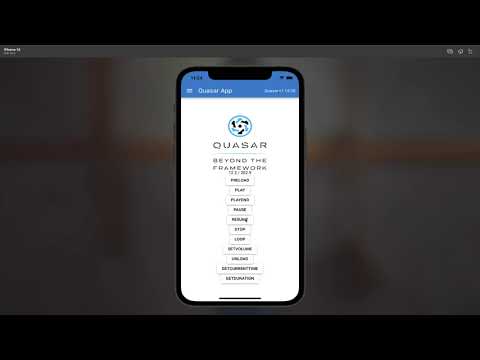
Preparation
All audio place in specific platform folder
Andoid: android/app/src/assets
iOS: ios/App/App/sounds
Web: assets/sounds
Installation
To use npm
npm install @capacitor-community/native-audio
To use yarn
yarn add @capacitor-community/native-audio
Sync native files
npx cap sync
On iOS, Android and Web, no further steps are needed.
Configuration
No configuration required for this plugin.
Supported methods
| Name | Android | iOS | Web |
|---|---|---|---|
| configure | ✅ | ✅ | ❌ |
| preload | ✅ | ✅ | ✅ |
| play | ✅ | ✅ | ✅ |
| pause | ✅ | ✅ | ✅ |
| resume | ✅ | ✅ | ✅ |
| loop | ✅ | ✅ | ✅ |
| stop | ✅ | ✅ | ✅ |
| unload | ✅ | ✅ | ✅ |
| setVolume | ✅ | ✅ | ✅ |
| getDuration | ✅ | ✅ | ✅ |
| getCurrentTime | ✅ | ✅ | ✅ |
| isPlaying | ✅ | ✅ | ✅ |
Usage
Example repository OR another complete Ionic/Angular application demonstrating every plugin method is available in the example-app directory
import {NativeAudio} from '@capacitor-community/native-audio'


/**
 * This method will load more optimized audio files for background into memory.
 * @param assetPath - relative path of the file or absolute url (file://)
 *        assetId - unique identifier of the file
 *        audioChannelNum - number of audio channels
 *        isUrl - pass true if assetPath is a `file://` url
 * @returns void
 */
NativeAudio.preload({
    assetId: "fire",
    assetPath: "fire.mp3",
    audioChannelNum: 1,
    isUrl: false
});

/**
 * This method will play the loaded audio file if present in the memory.
 * @param assetId - identifier of the asset
 * @param time - (optional) play with seek. example: 6.0 - start playing track from 6 sec
 * @returns void
 */
NativeAudio.play({
    assetId: 'fire',
    // time: 6.0 - seek time
});

/**
 * This method will loop the audio file for playback.
 * @param assetId - identifier of the asset
 * @returns void
 */
NativeAudio.loop({
  assetId: 'fire',
});


/**
 * This method will stop the audio file if it's currently playing.
 * @param assetId - identifier of the asset
 * @returns void
 */
NativeAudio.stop({
  assetId: 'fire',
});

/**
 * This method will unload the audio file from the memory.
 * @param assetId - identifier of the asset
 * @returns void
 */
NativeAudio.unload({
  assetId: 'fire',
});

/**
 * This method will set the new volume for a audio file.
 * @param assetId - identifier of the asset
 *        volume - numerical value of the volume between 0.1 - 1.0
 * @returns void
 */
NativeAudio.setVolume({
  assetId: 'fire',
  volume: 0.4,
});

/**
 * this method will get the duration of an audio file.
 * only works if channels == 1
 */
NativeAudio.getDuration({
  assetId: 'fire'
})
.then(result => {
  console.log(result.duration);
})

/**
 * this method will get the current time of a playing audio file.
 * only works if channels == 1
 */
NativeAudio.getCurrentTime({
  assetId: 'fire'
});
.then(result => {
  console.log(result.currentTime);
})

/**
 * This method will return false if audio is paused or not loaded.
 * @param assetId - identifier of the asset
 * @returns {isPlaying: boolean}
 */
NativeAudio.isPlaying({
  assetId: 'fire'
})
.then(result => {
  console.log(result.isPlaying);
})
API
configure(...)
configure(options: ConfigureOptions) => Promise<void>
| Param | Type |
|---|---|
options | ConfigureOptions |
preload(...)
preload(options: PreloadOptions) => Promise<void>
| Param | Type |
|---|---|
options | PreloadOptions |
play(...)
play(options: { assetId: string; time?: number; }) => Promise<void>
| Param | Type |
|---|---|
options | { assetId: string; time?: number; } |
pause(...)
pause(options: { assetId: string; }) => Promise<void>
| Param | Type |
|---|---|
options | { assetId: string; } |
resume(...)
resume(options: { assetId: string; }) => Promise<void>
| Param | Type |
|---|---|
options | { assetId: string; } |
loop(...)
loop(options: { assetId: string; }) => Promise<void>
| Param | Type |
|---|---|
options | { assetId: string; } |
stop(...)
stop(options: { assetId: string; }) => Promise<void>
| Param | Type |
|---|---|
options | { assetId: string; } |
unload(...)
unload(options: { assetId: string; }) => Promise<void>
| Param | Type |
|---|---|
options | { assetId: string; } |
setVolume(...)
setVolume(options: { assetId: string; volume: number; }) => Promise<void>
| Param | Type |
|---|---|
options | { assetId: string; volume: number; } |
getCurrentTime(...)
getCurrentTime(options: { assetId: string; }) => Promise<{ currentTime: number; }>
| Param | Type |
|---|---|
options | { assetId: string; } |
Returns: Promise<{ currentTime: number; }>
getDuration(...)
getDuration(options: { assetId: string; }) => Promise<{ duration: number; }>
| Param | Type |
|---|---|
options | { assetId: string; } |
Returns: Promise<{ duration: number; }>
isPlaying(...)
isPlaying(options: { assetId: string; }) => Promise<{ isPlaying: boolean; }>
| Param | Type |
|---|---|
options | { assetId: string; } |
Returns: Promise<{ isPlaying: boolean; }>
addListener('complete', ...)
addListener(eventName: 'complete', listenerFunc: (event: { assetId: string; }) => void) => Promise<PluginListenerHandle>
Listen for asset completed playing event
| Param | Type |
|---|---|
eventName | 'complete' |
listenerFunc | (event: { assetId: string; }) => void |
Returns: Promise<PluginListenerHandle>
Since: 5.0.1
Interfaces
ConfigureOptions
| Prop | Type | Description | Default |
|---|---|---|---|
fade | boolean | Indicating whether or not to fade audio. | false |
focus | boolean | Indicating whether or not to disable mixed audio. | false |
PreloadOptions
| Prop | Type |
|---|---|
assetPath | string |
assetId | string |
volume | number |
audioChannelNum | number |
isUrl | boolean |
PluginListenerHandle
| Prop | Type |
|---|---|
remove | () => Promise<void> |