OpenCode Insight


Local-first usage analytics and session insight for OpenCode.
- Dashboard: explore token usage, estimated cost, activity trends, and model/provider breakdowns. Drill into sessions and message/tool timelines, query usage from the CLI, and optionally sync aggregates across machines. Reads local OpenCode usage and Codex transcripts.
- OpenCode + OpenChamber Insight: an OpenCode V2 capture plugin and an OpenChamber panel for generation speed, context-source estimates, reported token usage, and tool timing. The panel works without the dashboard; the dashboard can also display V2 session insight.
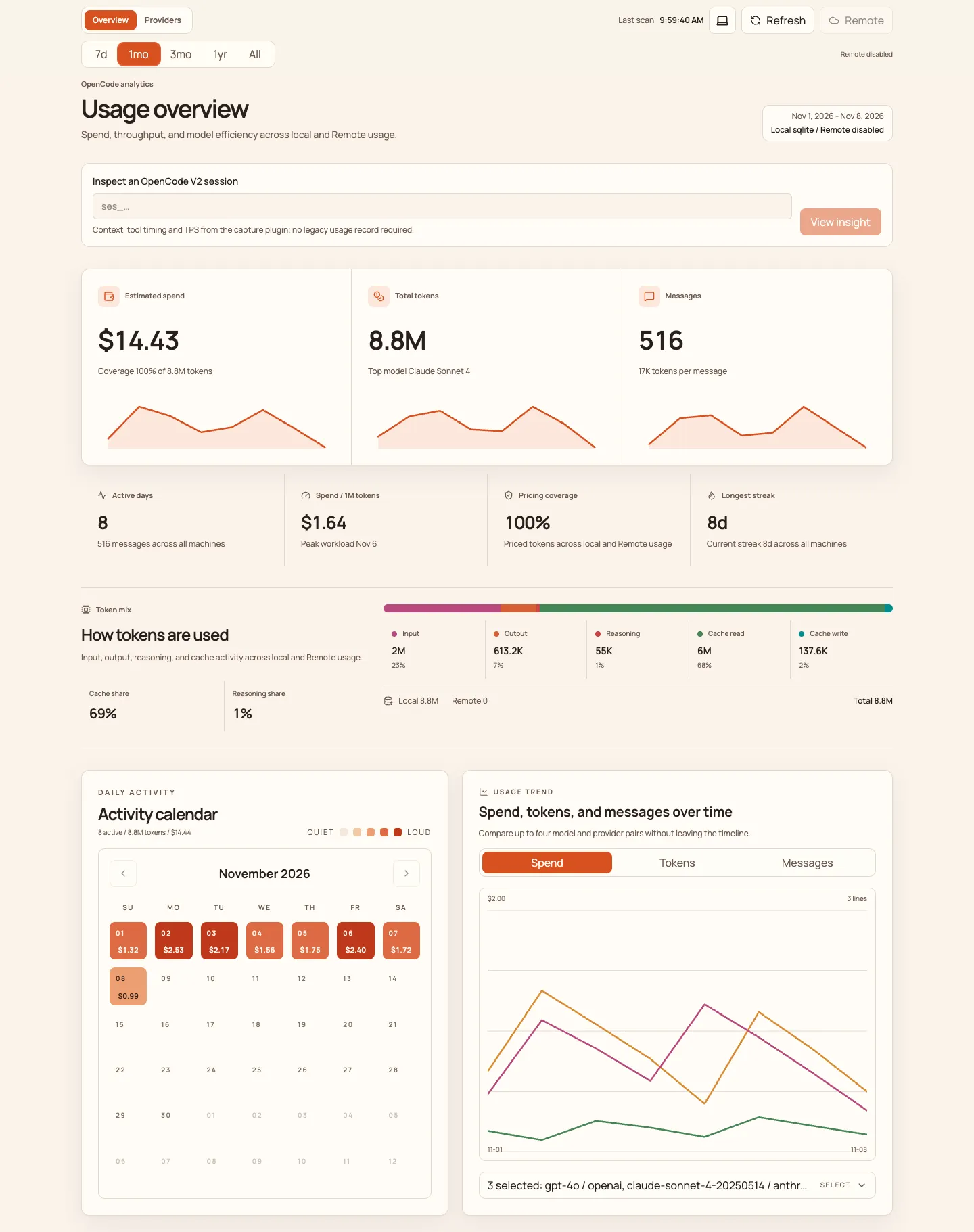
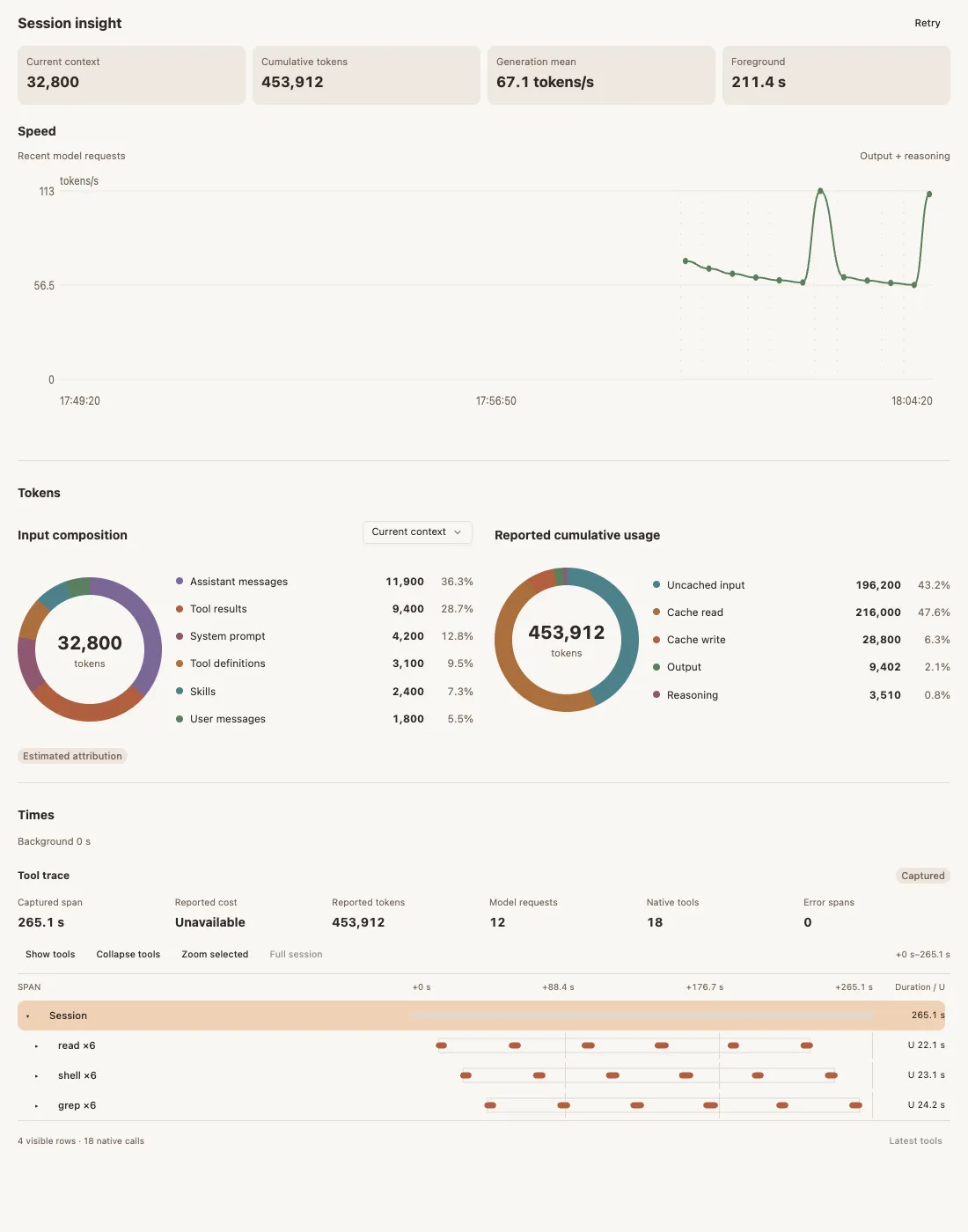
Screenshots use synthetic data. The Insight image is a standalone preview of the actual panel, not the OpenChamber application shell. Source estimates are not billing measurements, and capture begins when the plugin loads.
Usage
Dashboard
From npm (recommended)
Requires Node.js 24+. No source checkout, pnpm, or local build is needed.
npm install -g @changehow/[email protected]
opendash server
Open localhost:8787. Keep the default loopback binding: the dashboard has no authentication and can display private session content.
The dashboard reads OpenCode data from its default local directory and Codex transcripts from CODEX_HOME, defaulting to ~/.codex. For custom data paths or sync settings, create a .env.local file in your working directory. Set OPENCODE_DATA_DIR to your OpenCode data directory (containing opencode.db or legacy storage/), then explicitly load the file when starting the globally installed CLI:
OPENDASH_ENV=.env.local opendash server
Relative OPENDASH_ENV paths resolve from the directory where you run the command. If the daemon is already running, run opendash stop before restarting it to load the configuration.
opendash summary --range month
opendash models --json
opendash stop
From source
Requires Node.js 24+ and pnpm 10+. Use this option for development or local builds.
git clone https://github.com/ChangeHow/opencode-insight.git
cd opencode-insight
pnpm install
cp .env.example .env.local
Set OPENCODE_DATA_DIR in .env.local to your OpenCode data directory (containing opencode.db or legacy storage/). Codex transcripts are read from CODEX_HOME, defaulting to ~/.codex.
pnpm build
node scripts/opendash.mjs server
For this installation, use node scripts/opendash.mjs in place of opendash for the query and stop commands above.
For live V2 session metrics, install the capture plugin below, then use Inspect an OpenCode V2 session on the overview. Optional multi-machine sync is documented in Connect another machine.
OpenCode + OpenChamber plugins
Insight 1.2.0 requires Node.js 24+ and OpenChamber 2.7.0+ for the host-shared panel. OpenChamber 2.7.0 requires OpenCode 2.2.4+; this integration is verified with OpenCode 2.2.5. The panel follows OpenChamber's selected instance without a host patch. Insight 1.1.0 used independent connection discovery instead.
OpenChamber can load the bundled capture plugin into its managed OpenCode. For an externally managed local OpenCode or a standalone dashboard, add the matching package to plugins in your global ~/.config/opencode/opencode.jsonc or project-local opencode.jsonc, preserving existing entries:
{
  "$schema": "https://opencode.ai/config.json",
  "plugins": ["@changehow/[email protected]"],
}
OpenCode installs and loads the capture plugin itself. To install the OpenChamber panel:
npm install -g @changehow/[email protected]
opendash extension-path openchamber
In OpenChamber, open Settings → Extensions → Add, select the printed openchamber/ folder, and approve the local service, OpenCode reads, and bundled OpenCode plugin. Open Insight on the rail and select an OpenCode session. When upgrading, update both the panel and any separately configured capture plugin to the same version; avoid loading an older capture build alongside the host-managed bundle.
OpenCode must already be running with the capture plugin loaded. Insight never starts or restarts it. See the Insight guide for source builds, remote connections, upgrades, and measurement limits.
Host-shared instance
Insight 1.2.0 includes shared-instance support. It requires OpenChamber 2.7.0+, with no host patch, and the capture plugin and panel from the same Insight build.
The OpenChamber backend and OpenCode must run on the same machine. The browser may connect remotely. An OpenChamber backend pointing to OpenCode on another machine is not supported by this mode. The panel follows the host-selected instance exclusively; it never falls back to Service.discover() or connection.json.
For a source installation, build with pnpm install and pnpm build:extensions, then install the folder printed by node scripts/opendash.mjs extension-path openchamber. Approve the same capabilities as for the npm installation above. See host-shared connections for delivery limits.
License
Copyright (C) 2026 ChangeHow. Original project code is licensed under the GNU General Public License, version 3 only (GPL-3.0-only). When distributing covered versions, provide the corresponding source under the GPL; private use and modification do not require public disclosure. Vendored AgentPrism code retains its upstream MIT license and notices in THIRD_PARTY_NOTICES.md.