🏢 AgentHQ
A pixel-art office for your Claude Code and Codex sessions.
Website · How it works · Develop
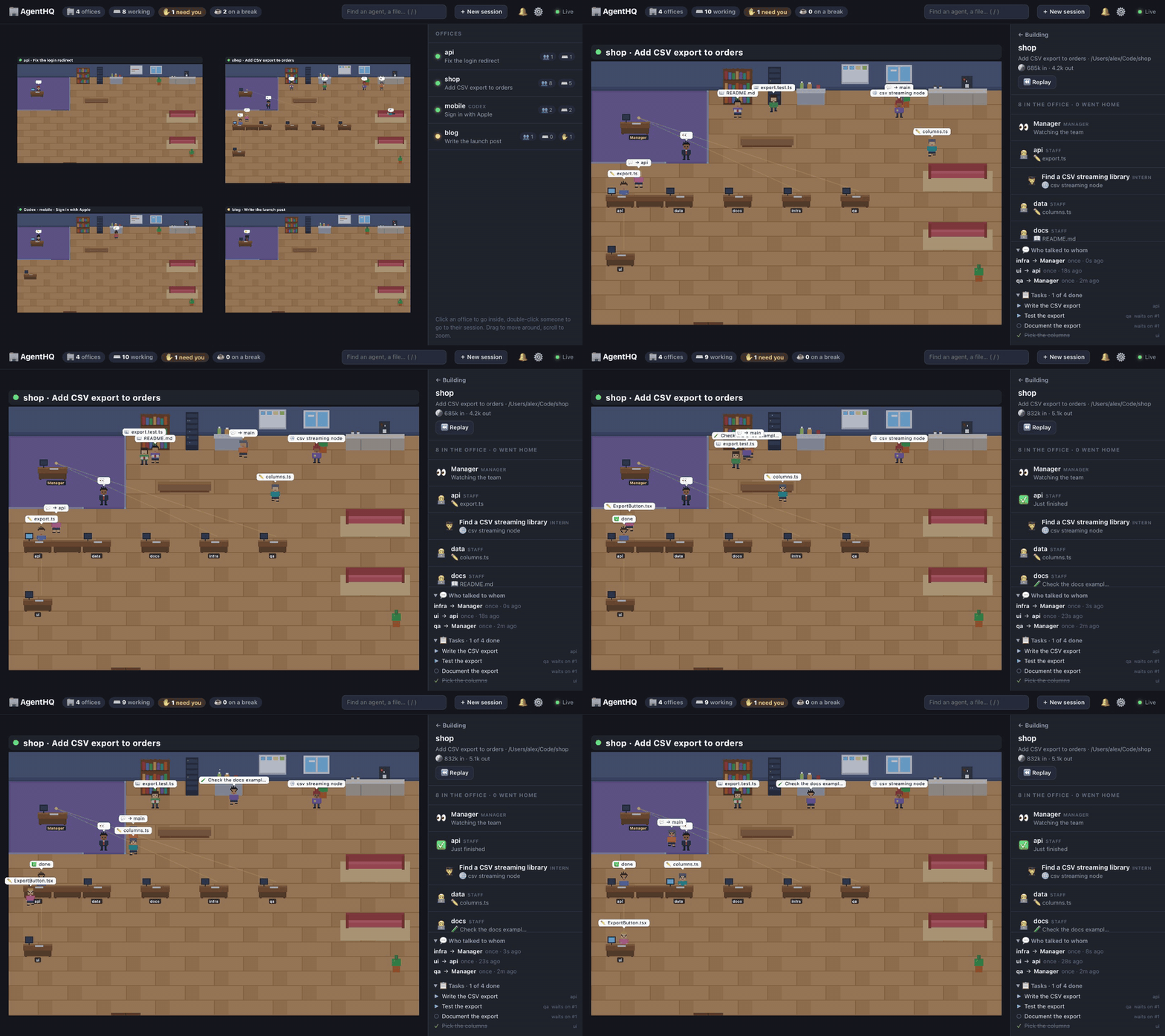
Every live session is an office. Its main agent is the manager, every teammate gets a desk, and the helpers they start sit beside them as interns. Working agents type at their desks, read at the bookshelf, run tests at the lab and walk over to talk to each other; idle ones get coffee, then nap on the couch.
Early (0.2), and moving fast. Works on macOS, Linux and Windows.
Run it
You need Node.js 20 or later. One command:
npx @charonova/agenthq          # opens the office at http://localhost:4747
npx @charonova/agenthq --list   # or print it in the terminal
Or install it: npm install -g @charonova/agenthq, then agenthq.
 |
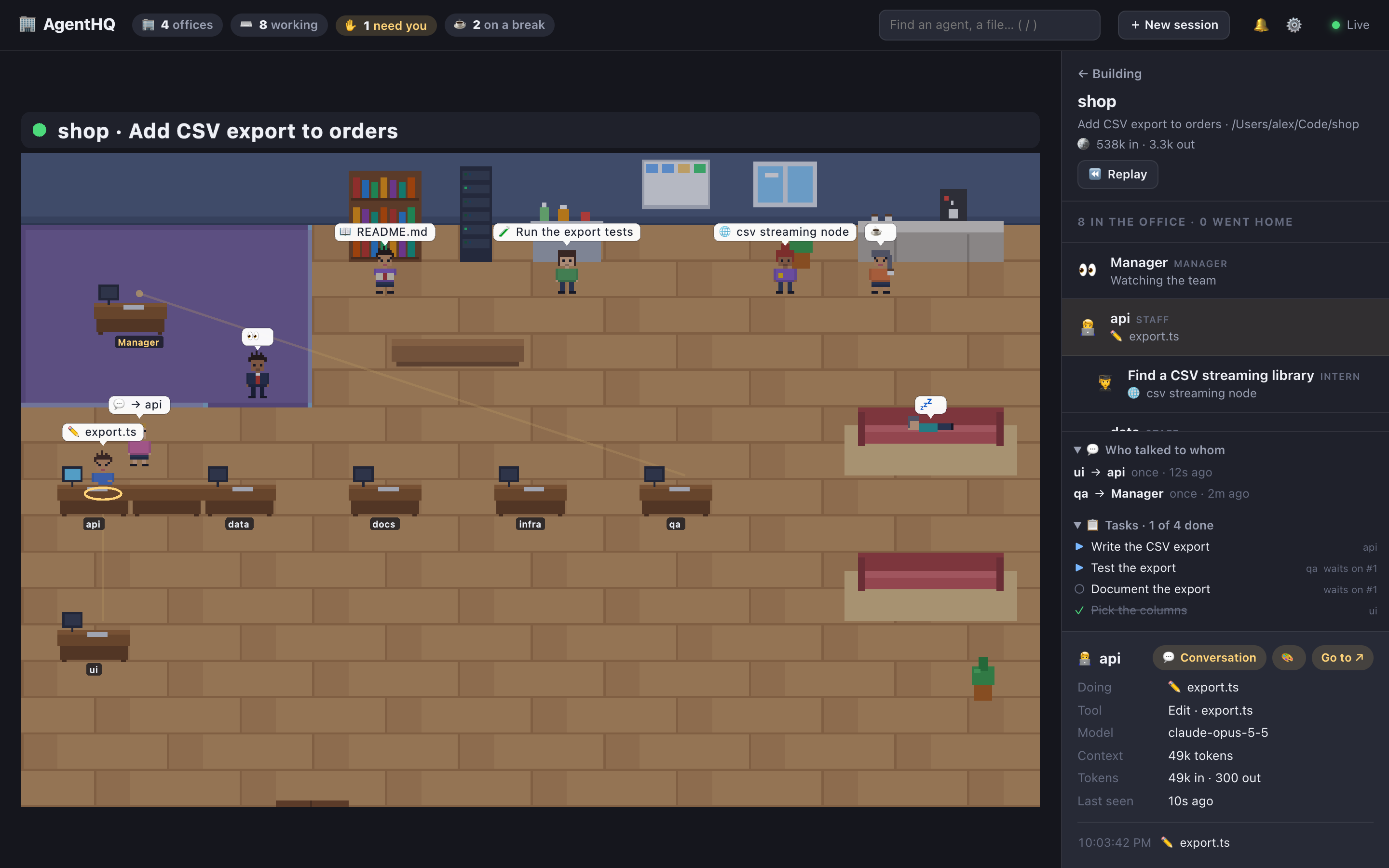 |
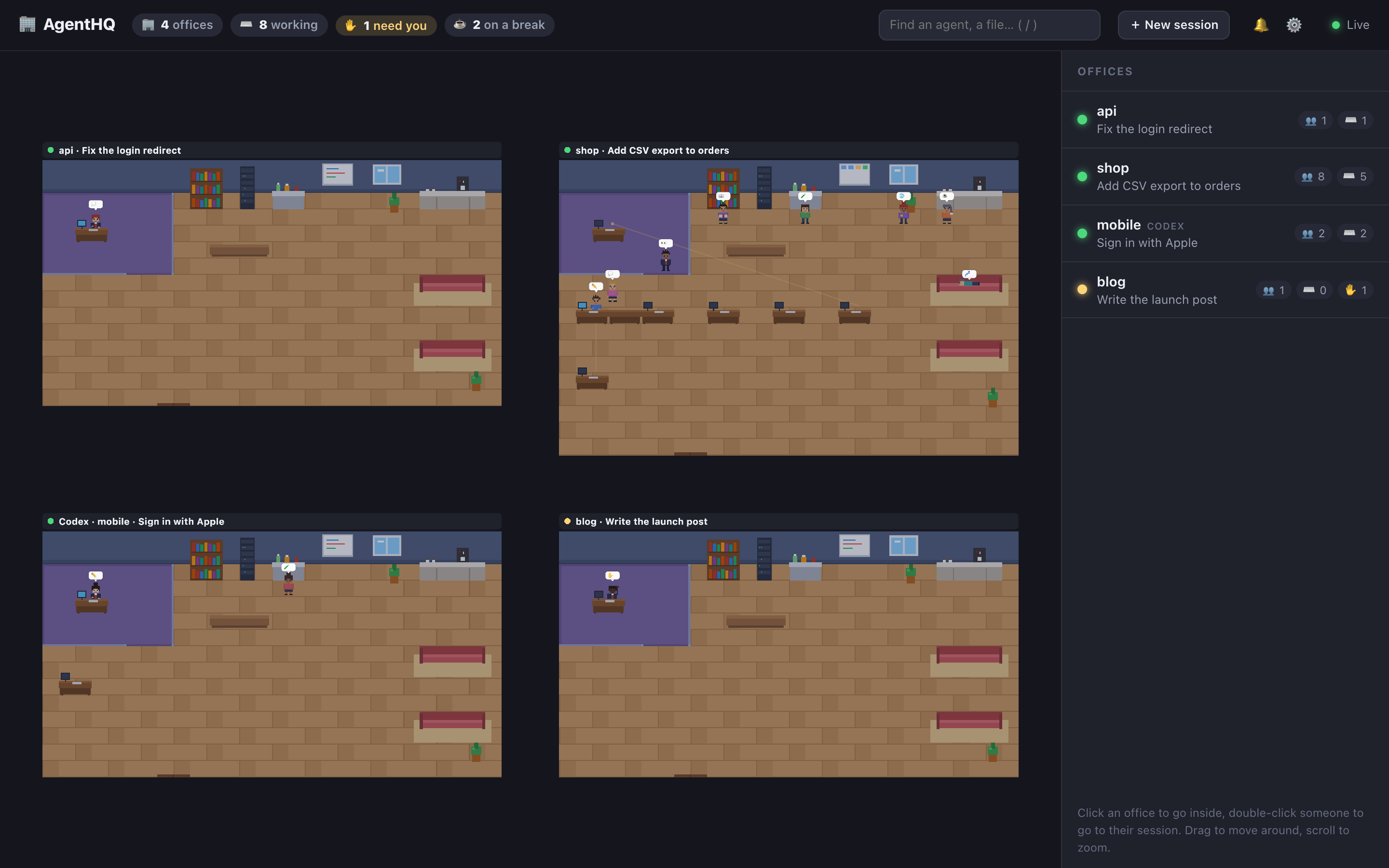
| The building · every live session, on one map | An office · click anyone for their task, tool, model and context |
 |
|
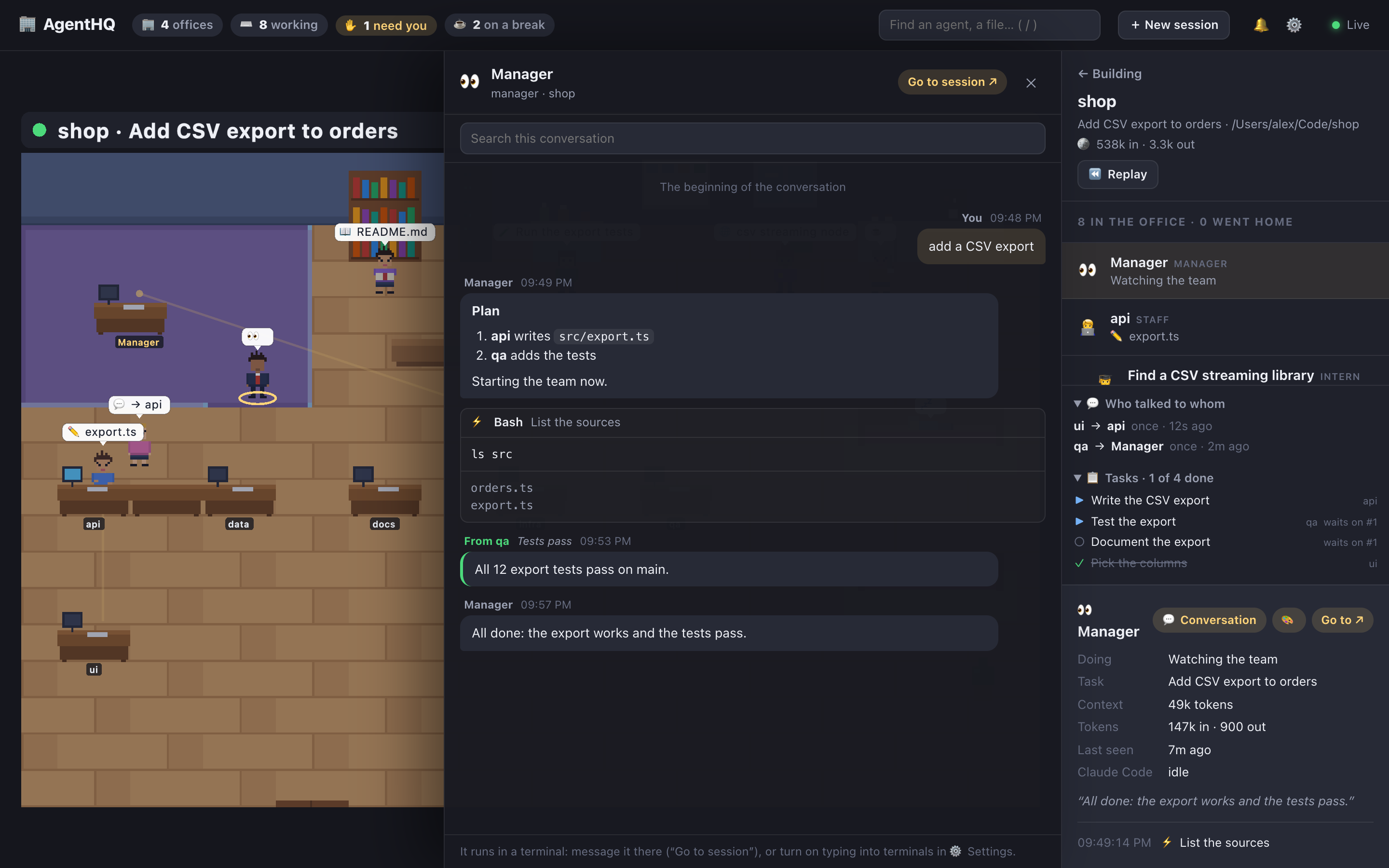
| A conversation · anyone's full chat, live, with every tool call and its output | |
The pictures come from made-up sessions (pnpm media); AgentHQ shows your own.
- The building: every live session as an office on one map. Drag to move around, scroll to zoom, click an office to go inside.
- In an office: the manager in a glass office, staff at desks in their team colour, interns beside whoever started them. Bubbles say what each one is doing; click anyone for their task, tool, model, context and last words.
- Where they go: writing code → their desk · reading → the bookshelf · commands → the server rack · tests → the lab · web → the window · plans → the whiteboard · messaging a teammate → that teammate's desk · waiting for you → a raised hand · idle → coffee, then the couch. They walk around the furniture.
- It tells you when someone needs you: a desktop notification and a chime when an agent starts waiting for you (🔔 in the header); click it to jump there. The tab title shows how many are waiting, and the ✋ need you counter goes to each in turn. Optionally, also when a session finishes.
- A timeline per agent: its latest tool calls, with times, under its details.
- 💬 The whole conversation: open anyone's conversation, manager, teammate or helper, Claude Code or Codex: your prompts, its replies, every tool call with its input and output, messages between teammates. It follows along live, loads older messages as you scroll up (even in multi-gigabyte sessions), and you can search it.
- ✋ Answer from AgentHQ (Claude Code, opt-in): permission prompts and questions show up in the agent's conversation. Allow once, pick one of Claude Code's own "always allow" choices, deny with a note on what to do instead, or choose the answers to its questions (or type your own). The terminal still shows the prompt and can answer it too; whichever answers first wins. Turn it on under 🔔: it adds one
PermissionRequesthook to~/.claude/settings.json(a copy of the file is saved first, your other hooks stay), and it does nothing while AgentHQ is closed. Turning it off removes it. - Go straight to a session: double-click anyone (or Go to ↗ in their details) and its window comes forward: the exact tab in Terminal or iTerm2, the project's window in VS Code, Cursor or Windsurf, or the app it runs in (macOS). Elsewhere, or when it can't, the command that resumes the session is copied for you.
- Codex too: each Codex thread is an office, with its sub-agents (like the guardian) as staff, named as in Codex's app.
- Day and night follow your clock.
How it works
AgentHQ only reads what Claude Code writes in ~/.claude, and nothing leaves your computer (the page is served on 127.0.0.1 only). The one exception is answering from AgentHQ, when you turn it on: then it adds its hook to ~/.claude/settings.json, and keeps its own files in ~/.agenthq (the hook, the running server's address with a secret made fresh each start, and a log of what you answered, names and choices only).
| Office | From |
|---|---|
| Offices | Sessions in ~/.claude/projects/*/*.jsonl active in the last 30 minutes |
| Manager | The session's own transcript |
| Staff | Teammates: <session>/subagents/agent-*.jsonl whose .meta.json says spawnDepth: 0 (name, colour, model) |
| Interns | Helpers they started: spawnDepth 1+, with parentAgentId |
| What each one does | The last lines of its transcript: the tool it called, and how long ago |
| Where a session runs | ~/.claude/sessions/<pid>.json (which process runs which session), then the app above that process |
| Codex | ~/.codex/sessions/YYYY/MM/DD/rollout-*.jsonl (a sub-agent's thread names its parent), names from ~/.codex/session_index.jsonl |
Only the end of each transcript is read, so multi-gigabyte sessions stay fast; a conversation is read a page (192 KB) at a time, as you scroll. Settings: AGENTHQ_JUMP=copy makes "go to session" only copy the resume command; AGENTHQ_CLAUDE_HOME reads another folder; AGENTHQ_IGNORE=frag1,frag2 leaves out sessions whose folder contains those (claude-mem's background sessions are left out by default).
Develop
A pnpm workspace:
| Package | What |
|---|---|
packages/core | The reader: live sessions → offices (Node, no dependencies) |
packages/cli | @charonova/agenthq: the command, the local server (Server-Sent Events), and the built web app |
apps/web | The office: Vite + React + PixiJS (pixi-viewport for the camera), Zustand for state |
e2e | Playwright tests on a made-up ~/.claude |
pnpm install
pnpm dev          # server + Vite with hot reload: http://localhost:5173
pnpm check        # lint, format, types, unit tests
pnpm build        # web app, then the CLI with it inside
pnpm e2e          # end-to-end tests (after a build), with screenshots in test-results/
pnpm start        # build, then open the office
pnpm media        # the README's screenshots and GIF, from made-up sessions
CI runs the checks on Linux, macOS and Windows, and the end-to-end tests on Linux.
License
MIT