@claude-flow/mcp
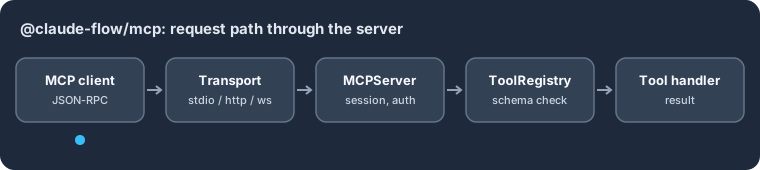
@claude-flow/mcp — A standalone Model Context Protocol server: stdio, HTTP and WebSocket transports, a schema-checked tool registry, resources, prompts and tasks.
Supported environments: Node.js 20+ · ESM · Linux, macOS, Windows (pure JavaScript)
Quickstart
npm install @claude-flow/mcp
import { createToolRegistry, defineTool } from '@claude-flow/mcp';

const logger = { debug() {}, info() {}, warn: console.warn, error: console.error };
const registry = createToolRegistry(logger);
registry.register(defineTool('echo', 'Echo the input text', {
  type: 'object', properties: { text: { type: 'string' } }, required: ['text'],
}, async ({ text }) => ({ echoed: text })));
console.log(registry.getToolNames());
const result = await registry.execute('echo', { text: 'hi' });
console.log(result.isError ?? false, result.content[0].text);
Expected output:
[ 'echo' ]
false {
  "echoed": "hi"
}
Used by @claude-flow/cli, which serves the Ruflo tools over this server.


MCP 2025-11-25 Compliant - Standalone Model Context Protocol server implementation with full Resources, Prompts, and Tasks support
Features
- MCP 2025-11-25 Compliant - Full specification support
- High-Performance Server - <400ms startup time
- Multiple Transports - stdio, HTTP, WebSocket, in-process
- Resources - list, read, subscribe with caching
- Prompts - templates with arguments and embedded resources
- Tasks - Async operations with progress and cancellation
- Pagination - Cursor-based pagination for large datasets
- Connection Pooling - Max 10 connections, configurable
- Fast Tool Registry - O(1) lookup, <10ms registration
- Session Management - Timeout handling, authentication
- Security - CORS, Helmet, auth tokens
- Zero Dependencies - No @claude-flow/* dependencies
Installation
npm install @claude-flow/mcp
Quick Start
import { quickStart, defineTool } from '@claude-flow/mcp';

// Create and start server
const server = await quickStart({
  transport: 'stdio',
  name: 'My MCP Server',
});

// Register custom tools
server.registerTool(defineTool(
  'greet',
  'Greet a user',
  {
    type: 'object',
    properties: {
      name: { type: 'string', description: 'User name' }
    },
    required: ['name']
  },
  async ({ name }) => ({ message: `Hello, ${name}!` })
));

// Start listening
await server.start();
Transports
Stdio (Default)
import { createMCPServer } from '@claude-flow/mcp';

const server = createMCPServer({
  transport: 'stdio',
  name: 'Stdio Server',
}, logger);

await server.start();
HTTP
const server = createMCPServer({
  transport: 'http',
  host: 'localhost',
  port: 3000,
  corsEnabled: true,
  corsOrigins: ['http://localhost:8080'],
  auth: {
    enabled: true,
    method: 'token',
    tokens: ['secret-token'],
  },
}, logger);

await server.start();
// Server at http://localhost:3000
// WebSocket at ws://localhost:3000/ws
WebSocket
const server = createMCPServer({
  transport: 'websocket',
  host: 'localhost',
  port: 3001,
  maxConnections: 100,
  heartbeatInterval: 30000,
}, logger);

await server.start();
// WebSocket at ws://localhost:3001/ws
Tool Registry
import { createToolRegistry, defineTool } from '@claude-flow/mcp';

const registry = createToolRegistry(logger);

// Register tool
registry.register({
  name: 'calculate',
  description: 'Perform calculations',
  inputSchema: {
    type: 'object',
    properties: {
      expression: { type: 'string' }
    }
  },
  handler: async ({ expression }) => {
    return { result: eval(expression) };
  },
  category: 'math',
  tags: ['calculator'],
});

// Execute tool
const result = await registry.execute('calculate', { expression: '2 + 2' });

// Search tools
const mathTools = registry.getByCategory('math');
const stats = registry.getStats();
Session Management
import { createSessionManager } from '@claude-flow/mcp';

const sessions = createSessionManager(logger, {
  maxSessions: 100,
  sessionTimeout: 30 * 60 * 1000, // 30 minutes
});

// Create session
const session = sessions.createSession('http');

// Initialize with client info
sessions.initializeSession(session.id, {
  protocolVersion: '2024-11-05', // MCP spec: YYYY-MM-DD string
  capabilities: { tools: { listChanged: true } },
  clientInfo: { name: 'Claude', version: '1.0' },
});

// Get metrics
const metrics = sessions.getSessionMetrics();
// { total: 1, active: 1, authenticated: 0, expired: 0 }
Connection Pool
import { createConnectionPool } from '@claude-flow/mcp';

const pool = createConnectionPool({
  maxConnections: 10,
  minConnections: 2,
  idleTimeout: 30000,
  acquireTimeout: 5000,
}, logger, 'http');

// Acquire connection
const conn = await pool.acquire();

// Use connection...

// Release back to pool
pool.release(conn);

// Get stats
const stats = pool.getStats();
// { totalConnections: 5, idleConnections: 4, busyConnections: 1, ... }
API Reference
Server
interface IMCPServer {
  start(): Promise<void>;
  stop(): Promise<void>;
  registerTool(tool: MCPTool): boolean;
  registerTools(tools: MCPTool[]): { registered: number; failed: string[] };
  getHealthStatus(): Promise<{ healthy: boolean; error?: string; metrics?: Record<string, number> }>;
  getMetrics(): MCPServerMetrics;
  getSessions(): MCPSession[];
  getSession(sessionId: string): MCPSession | undefined;
  terminateSession(sessionId: string): boolean;
}
Tool
interface MCPTool<TInput = unknown, TOutput = unknown> {
  name: string;
  description: string;
  inputSchema: JSONSchema;
  handler: (input: TInput, context?: ToolContext) => Promise<TOutput>;
  category?: string;
  tags?: string[];
  cacheable?: boolean;
  cacheTTL?: number;
  timeout?: number;
}
Transport
interface ITransport {
  readonly type: TransportType;
  start(): Promise<void>;
  stop(): Promise<void>;
  onRequest(handler: RequestHandler): void;
  onNotification(handler: NotificationHandler): void;
  sendNotification?(notification: MCPNotification): Promise<void>;
  getHealthStatus(): Promise<TransportHealthStatus>;
}
Built-in Tools
The server automatically registers these system tools:
| Tool | Description |
|---|---|
system/info | Get server information |
system/health | Get health status |
system/metrics | Get server metrics |
tools/list-detailed | List all tools with details |
Resources (MCP 2025-11-25)
import { createMCPServer, createTextResource } from '@claude-flow/mcp';

const server = createMCPServer({ transport: 'stdio' }, logger);
const resourceRegistry = server.getResourceRegistry();

// Register a text resource
const { resource, handler } = createTextResource(
  'file://readme.txt',
  'README',
  'Welcome to the application!',
  { mimeType: 'text/plain' }
);
resourceRegistry.registerResource(resource, handler);

// Register with custom handler
resourceRegistry.registerResource(
  {
    uri: 'db://users/{id}',
    name: 'User Data',
    description: 'Get user by ID',
    mimeType: 'application/json',
  },
  async (uri) => {
    const id = uri.split('/').pop();
    const user = await fetchUser(id);
    return [{ uri, mimeType: 'application/json', text: JSON.stringify(user) }];
  }
);

// Subscribe to updates
resourceRegistry.subscribe('file://readme.txt', (uri, content) => {
  console.log('Resource updated:', uri);
});
Prompts (MCP 2025-11-25)
import { createMCPServer, definePrompt, textMessage, interpolate } from '@claude-flow/mcp';

const server = createMCPServer({ transport: 'stdio' }, logger);
const promptRegistry = server.getPromptRegistry();

// Define a prompt with arguments
const codeReviewPrompt = definePrompt(
  'code_review',
  'Review code for quality and best practices',
  async (args) => [
    textMessage('user', `Please review this ${args.language} code:\n\n${args.code}`),
  ],
  {
    title: 'Code Review',
    arguments: [
      { name: 'code', description: 'The code to review', required: true },
      { name: 'language', description: 'Programming language', required: false },
    ],
  }
);

promptRegistry.register(codeReviewPrompt);

// Get prompt with arguments
const result = await promptRegistry.get('code_review', {
  code: 'function hello() { return "world"; }',
  language: 'JavaScript',
});
Tasks (MCP 2025-11-25)
import { createMCPServer } from '@claude-flow/mcp';

const server = createMCPServer({ transport: 'stdio' }, logger);
const taskManager = server.getTaskManager();

// Create a long-running task
const taskId = taskManager.createTask(async (reportProgress, signal) => {
  for (let i = 0; i <= 100; i += 10) {
    if (signal.aborted) throw new Error('Task cancelled');

    reportProgress({
      progress: i,
      total: 100,
      message: `Processing... ${i}%`,
    });

    await new Promise(r => setTimeout(r, 100));
  }

  return { success: true, processedItems: 100 };
});

// Get task status
const status = taskManager.getTask(taskId);

// Wait for completion
const result = await taskManager.waitForTask(taskId);

// Cancel a task
taskManager.cancelTask(taskId, 'User requested cancellation');
MCP Methods Supported
| Method | Description |
|---|---|
initialize | Initialize connection |
tools/list | List available tools |
tools/call | Execute a tool |
resources/list | List resources with pagination |
resources/read | Read resource content |
resources/subscribe | Subscribe to updates |
resources/unsubscribe | Unsubscribe from updates |
prompts/list | List prompts with pagination |
prompts/get | Get prompt with arguments |
tasks/status | Get task status |
tasks/cancel | Cancel a running task |
completion/complete | Auto-complete arguments |
logging/setLevel | Set log level |
ping | Keep-alive |
Performance Targets
| Metric | Target |
|---|---|
| Server startup | <400ms |
| Tool registration | <10ms |
| Tool execution overhead | <50ms |
| Connection acquire | <5ms |
| Connection release | <1ms |
Security
Authentication
const server = createMCPServer({
  auth: {
    enabled: true,
    method: 'token',
    tokens: ['your-secret-token'],
  },
}, logger);
CORS
const server = createMCPServer({
  transport: 'http',
  corsEnabled: true,
  corsOrigins: ['https://your-domain.com'],
}, logger);
Error Codes
const ErrorCodes = {
  PARSE_ERROR: -32700,
  INVALID_REQUEST: -32600,
  METHOD_NOT_FOUND: -32601,
  INVALID_PARAMS: -32602,
  INTERNAL_ERROR: -32603,
  SERVER_NOT_INITIALIZED: -32002,
  AUTHENTICATION_REQUIRED: -32001,
};
License
MIT