导 言
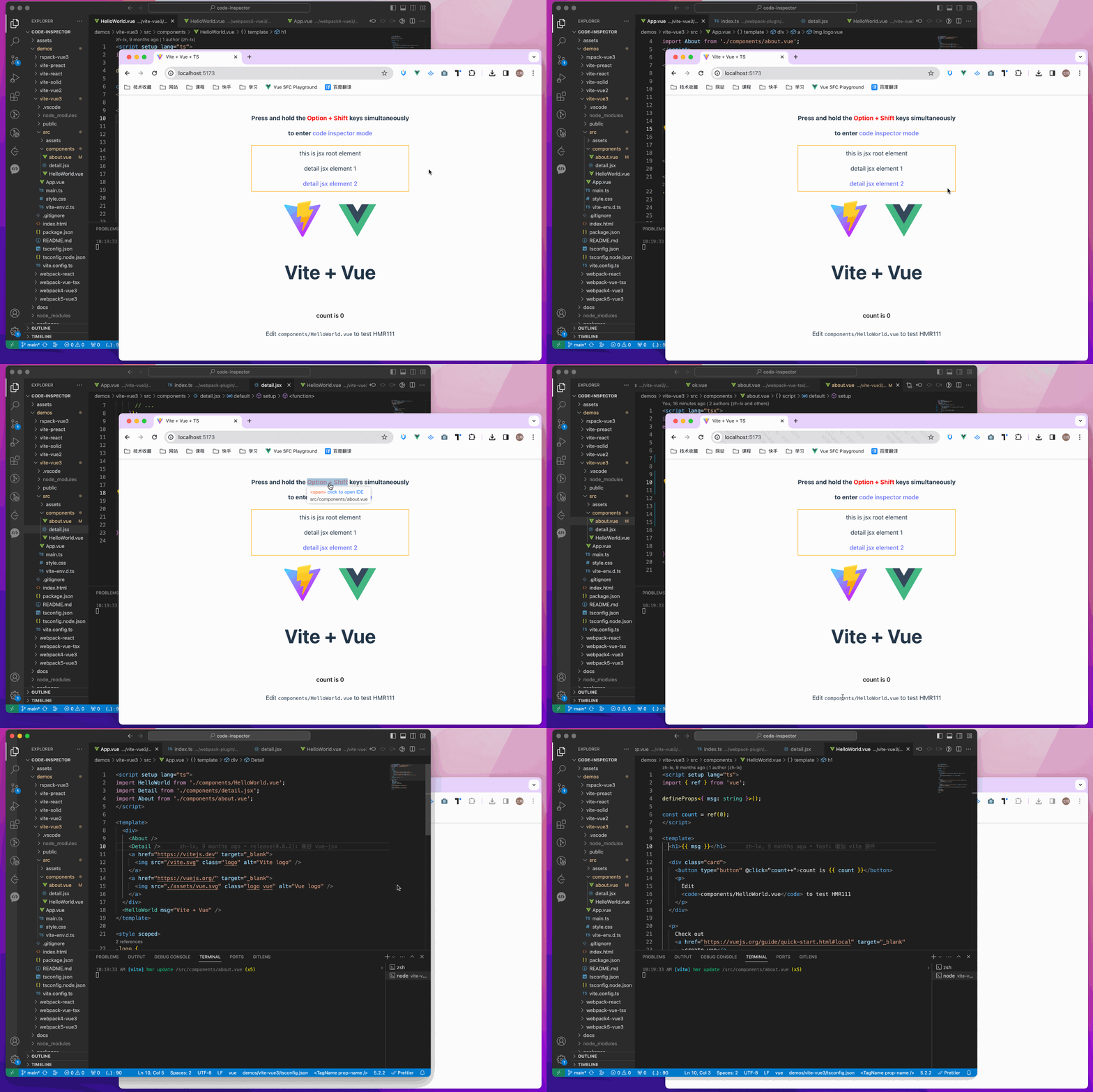
点击页面上的元素,可以自动打开代码编辑器并定位光标到元素的源代码.
试试看网上
++ 辅助
以下是我们现在支持的编译器、网络框架和编辑器:
- 目前支持以下捆绑器:
网络包装
✅:
rspack / 建设
农场
{\fn华文楷体\fs16\1che0e0e0}重建
涡轮包装
马可 - 目前支持以下网络框架:
\\ vue2 / vue3 / nuxt
qq 反应 / nextjs / mijs
预告
固态
qq 齐维克
丝绸
{\fn华文楷体\fs16\1che0e0e0}天体 - 支持的编辑器列表 | 和其他事项
QQ 安装
npm i code-inspector-plugin -D
# or
yarn add code-inspector-plugin -D
# or
pnpm add code-inspector-plugin -D
使用量
请在此查看更多信息 : 代码检查器插件配置
-
1. 构建工具
点击可扩展配置 : 网络软件包
// webpack.config.js
const { codeInspectorPlugin } = require('code-inspector-plugin');

module.exports = () => ({
  plugins: [
    codeInspectorPlugin({
      bundler: 'webpack',
    }),
  ],
});
点击可扩展配置 : 维特
// vite.config.js
import { defineConfig } from 'vite';
import { codeInspectorPlugin } from 'code-inspector-plugin';

export default defineConfig({
  plugins: [
    codeInspectorPlugin({
      bundler: 'vite',
    }),
  ],
});
点击可扩展配置 : 橡胶包
// rspack.config.js
const { codeInspectorPlugin } = require('code-inspector-plugin');

module.exports = {
  // other config...
  plugins: [
    codeInspectorPlugin({
      bundler: 'rspack',
    }),
    // other plugins...
  ],
};
点击可扩展配置 : 建设
// rsbuild.config.js
const { codeInspectorPlugin } = require('code-inspector-plugin');

module.exports = {
  // other config...
  tools: {
    rspack: {
      plugins: [
        codeInspectorPlugin({
          bundler: 'rspack',
        }),
      ],
    },
  },
};
点击可扩展配置 : 兴建
// esbuild.config.js
const esbuild = require('esbuild');
const { codeInspectorPlugin } = require('code-inspector-plugin');

esbuild.build({
  // other configs...
  // [注意] esbuild 中使用时,dev 函数的返回值需自己根据环境判断,本地开发的环境返回 true,线上打包返回 false
  plugins: [codeInspectorPlugin({ bundler: 'esbuild', dev: () => true })],
});
点击可扩展配置 : 农场
// farm.config.js
import { defineConfig } from '@farmfe/core';
import { codeInspectorPlugin } from 'code-inspector-plugin';

export default defineConfig({
  vitePlugins: [
    codeInspectorPlugin({
      bundler: 'vite',
    }),
    // ...other code
  ],
});
点击可扩展配置 : 维克利语name
// vue.config.js
const { codeInspectorPlugin } = require('code-inspector-plugin');

module.exports = {
  // ...other code
  chainWebpack: (config) => {
    config.plugin('code-inspector-plugin').use(
      codeInspectorPlugin({
        bundler: 'webpack',
      })
    );
  },
};
点击可扩展配置 : 纳克特
-
对于 nuxt3.x :
// nuxt.config.js import { codeInspectorPlugin } from 'code-inspector-plugin'; // https://nuxt.com/docs/api/configuration/nuxt-config export default defineNuxtConfig({ vite: { plugins: [codeInspectorPlugin({ bundler: 'vite' })], }, }); -
用于 nuxt2.x :
// nuxt.config.js
import { codeInspectorPlugin } from 'code-inspector-plugin';

export default {
  build: {
    extend(config) {
      config.plugins.push(codeInspectorPlugin({ bundler: 'webpack' }));
      return config;
    },
  },
};
点击可扩展配置 : 下一个.js
-
下一个.js(XX14x):
// next.config.js const { codeInspectorPlugin } = require('code-inspector-plugin'); const nextConfig = { webpack: (config, { dev, isServer }) => { config.plugins.push(codeInspectorPlugin({ bundler: 'webpack' })); return config; }, }; module.exports = nextConfig; -
下一个.js(15.0.x~15.2x):
import type { NextConfig } from 'next'; import { codeInspectorPlugin } from 'code-inspector-plugin'; const nextConfig: NextConfig = { experimental: { turbo: { rules: codeInspectorPlugin({ bundler: 'turbopack', }), }, }, }; export default nextConfig; -
下一个.js(XX15.3.x):
// next.config.js
import type { NextConfig } from 'next';
import { codeInspectorPlugin } from 'code-inspector-plugin';

const nextConfig: NextConfig = {
  turbopack: {
    rules: codeInspectorPlugin({
      bundler: 'turbopack',
    }),
  },
};

export default nextConfig;
点击可扩展配置 : (原始内容存档于2017-09-21). mi.js
-
用网络包装 :
// umi.config.js or umirc.js import { defineConfig } from '@umijs/max'; import { codeInspectorPlugin } from 'code-inspector-plugin'; export default defineConfig({ chainWebpack(memo) { memo.plugin('code-inspector-plugin').use( codeInspectorPlugin({ bundler: 'webpack', }) ); }, // other config }); -
有马可:
// .umirc.ts
import { defineConfig } from 'umi';
import { codeInspectorPlugin } from 'code-inspector-plugin';

export default defineConfig({
  // other config...
  mako: {
    plugins: [
      codeInspectorPlugin({
        bundler: 'mako',
      }),
    ],
  },
});
点击可扩展配置 : 天体
// astro.config.mjs import { defineConfig } from 'astro/config'; import { codeInspectorPlugin } from 'code-inspector-plugin'; export default defineConfig({ vite: { plugins: [codeInspectorPlugin({ bundler: 'vite' })], }, }); -
-
2. 利用函数
现在你可以享受使用它了
在按下页面上的组合密钥时,将鼠标移出页面上会显示带有相关信息的DOM上的一个口罩层. 点击将自动打开 IDE 并定位光标到相应的代码位置 。 (Mac的默认组合密钥是:
Option + Shift; 对于 Windows, 这是Alt + Shift,浏览器控制台将输出相关的组合键提示)
• 贡献者
特别感谢该项目的捐助者:
交流和反馈
对于中文用户,可以加入QQ群 769748484 或者加上作者的微信账户 zhoulx1688888 供磋商和反馈:


提案国
赞助这个项目可以帮助作者创造更好的作品. 如果你愿意,你可以通过Alipay或WeChatPay赞助我: