@ convex- dev/ 争吵- 重播

平原Convex上的实时-ish数据. 发送者批次快速变化的值 (cursors, 笔划, 游戏动作) 成一个变体, 每~250 ms; 监视器 每批按原时重放. 它看起来光滑活泼,运行着 少了一点, 花费了一小撮写第二,而不是60。 蝙蝠侠是 保存,所以整个会话可以稍后重播.
现场演示 : https://helpful-wren-102.ap-东南-2.convex. site (cursers,一个共享的绘图板,一个幽灵赛车手和一个电话平板大理石.
找到窃听器了吗? 特质请求? 放在这。 。 。 .
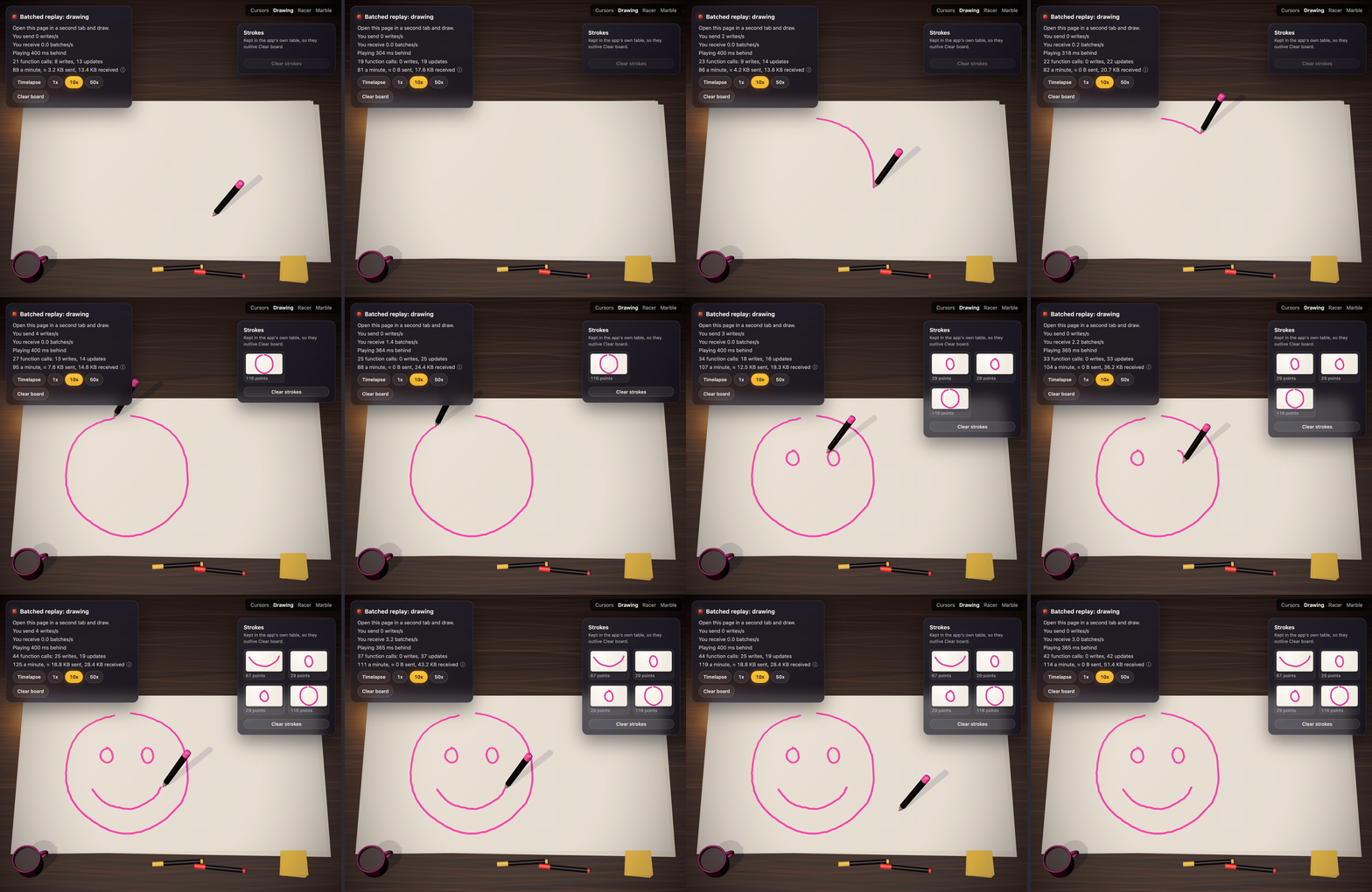
这个例子的画板用两个分页, 从大约4个写一秒.
现场演示 :
https://helpful-wren-102.ap-东南-2.convex. site。 。 。 .
打开它两个标签,或者打开它 #marble 用手提电脑用手机引导它.
安装
npm install @convex-dev/batched-replay
// convex/convex.config.ts
import { defineApp } from "convex/server";
import batchedReplay from "@convex-dev/batched-replay/convex.config.js";

const app = defineApp();
app.use(batchedReplay);
export default app;
显示 API
房间是您选择的字符串(一页,一板,一局). 一个流是发件人的 里面有钥匙.
// convex/cursors.ts
import { v } from "convex/values";
import { components } from "./_generated/api";
import { exposeApi } from "@convex-dev/batched-replay";

export const { append, latest, history, streams } = exposeApi(
  components.batchedReplay,
  {
    // What one sample is. Checked on every append, and it types the hooks.
    // Leave it out and samples are v.any().
    value: v.object({ x: v.number(), y: v.number() }),
    // How long batches are kept after they end. Leave it out to keep them
    // forever (for replays).
    retentionMs: 10 * 60_000,
    // Throw to stop someone watching a room.
    authorizeRead: async (ctx) => {
      const identity = await ctx.auth.getUserIdentity();
      if (!identity) throw new Error("Unauthorized");
    },
    // Return the stream key this caller writes to. `stream` is what the
    // client asked for; here it's only trusted as a per-tab session id.
    authorizeWrite: async (ctx, { stream }) => {
      const identity = await ctx.auth.getUserIdentity();
      if (!identity) throw new Error("Unauthorized");
      return `${identity.tokenIdentifier}:${stream ?? "default"}`;
    },
  },
);
两个回调都得到完整的查询或突变 ctx这样他们就可以检查你自己的
表格(这个用户在这个房间里吗? ). 注释 ctx 用你的应用程序 QueryCtx
或者说 MutationCtx 从 ./_generated/server 用于输入 ctx.db 访问.
每个标签一个流密钥 . 服务器将每条流的批次都放在结束
一个时间表。 如果两个设备(或两个标签)写出相同的密钥,则它们的批次
相接相接相接相接相接相接相接相接相接相接相接相接相接相接相接相接相接相接相接相接相接相接相接相接相接相接相接相接相接相接相接相接相接相接相接相接相接相接相接相接相接相接相接相接相接相接相接相接相接相接相接相接相接相接相接相接相接相接相相接相接相接相接相接相接相接相接相相接相接相接相相接相接相相相接相相接相相接相相接相相接相接相相相接相相接相相相相相相接相相相接相接相接相相相相相相相相相相接相相相相相相相相相相相相相相相相相相相相相相相相相相相相相相相相相相相相相相相相相相相相相相相相相相相相相相相相相相相 做一个
键 用户加一个会话 id 每一个标签选择自己(例如)
crypto.randomUUID() 保留在 sessionStorage另见上文.
usePlayback是因为 self 所以客户需要知道.
把它建在客户端上 传作为 stream (与 authorizeWrite 检查
,或者从您自己的查询返回.
例应用没有登录,所以 authorizeRead 允许每个人及其
authorizeWrite 信任客户的匿名密钥. 别装船.
从自己的功能中也可以使用类:
new BatchedReplay(components.batchedReplay) 已经 append, (中文(简体) ), latest, (中文(简体) ), history, (中文(简体) ),
streams 财务报告和审定财务报表 clear。 。 。 . clear 没有在 exposeApi因为它具有破坏性:
用你自己的支票包住它.
将镜像照入自己的表格( 在附录中)
Batches是组件的数据,为回放而制作. 当你的应用想要自己的
耐用的副本 一些东西, onAppend 是地方: 画完中风,
游戏圈或检查站、传感器滚出和警报、最后看到的存在、,
节制旗,或安排代理 当某事完成.
import { v } from "convex/values";
import { exposeApi } from "@convex-dev/batched-replay";
import { components } from "./_generated/api";
import type { MutationCtx } from "./_generated/server";

export const { append, latest, history, streams } = exposeApi(
  components.batchedReplay,
  {
    value: v.object({
      k: v.union(v.literal("down"), v.literal("move"), v.literal("up")),
      x: v.number(),
      y: v.number(),
    }),
    authorizeRead,
    authorizeWrite,
    // Called by append after the batch is stored, in the same transaction.
    onAppend: async (ctx: MutationCtx, batch) => {
      // It runs on every append: return early unless a stroke finished.
      const ups = batch.samples.filter((s) => s.v.k === "up");
      if (ups.length === 0) return;
      for (const up of ups) {
        await ctx.db.insert("penUps", {
          stream: batch.stream,
          seq: batch.seq,
          at: batch.start + up.t, // the sample's server time
          x: up.v.x,
          y: up.v.y,
        });
      }
    },
  },
);
batch 已经 room, (中文(简体) ), stream, (中文(简体) ), seq, (中文(简体) ), start, (中文(简体) ), end, (中文(简体) ), samples (类型为:
value和 dropped。 。 。 . samples 仅存有: dropped
主要的样本被忽略了 因为它们是在房间之前被捕获的
最后一次清除。 当什么也没有储存的时候,它就不叫。 绘画演示
example/convex/drawing.ts 以这种方式建立整个中风.
规则,最重要的第一:
- 每个流或每个用户写文件,从不写一个共享的房间文件.
每个人的附子(大约每分4秒)都会写出同样的文件,
冲突与重试,使写出冲突复出
为避而建. 房间总数,使用
@convex-dev/sharded-counter或者说@convex-dev/aggregate。 。 。 . - 先过滤后提早返回,如上. (中文(简体) ). 它运行在每个附件.
- 掷出后附子,并拖住这个人的溪流
每个人在发件人重试时都会重复 环绕最佳工作
try编号 :catch,或把它交给ctx.scheduler.runAfter(0, ...)。 。 。 . - 没有重复的防守. 钩子每次存储一次, 在同一笔交易中,Convex最多运行一次突变.
- 顺序为每条流,通过
seq来自不同溪流的蝙蝠 随便什么顺序. - 一个批次不是事件. 中风会跨越很多批次,所以收集它每个
流,并期望部分:中风没有
down(在明确之后,或 当发件人将样品从一分多分年龄时),或down永远得不到 联合国up。 。 。 .
从 BatchedReplay 班级没有钩子: append 返回同样的
{ seq, start, end, dropped } 你们的镜子在下行也是一样
你的变异.
发送
import { useSender } from "@convex-dev/batched-replay/react";

const send = useSender(api.cursors.append, {
  room,
  stream: tabId,
  flushMs: 250, // one write per 250 ms while there's anything to send
  onError: (error) => console.warn(error), // it retries, with backoff
  onSend: (batch) => countWrite(), // as each batch goes out, e.g. for a HUD
});
onPointerMove((e) => send({ x: e.clientX, y: e.clientY }));
// Discrete events are never thinned out by sampleMs:
send(value, { keep: true });
它冲出地上 pagehide。失败的发送保存其样本
之后的重试 flushMs超过一分钟的样本
因为服务器不会花更多时间.
播放回来
import { usePlayback } from "@convex-dev/batched-replay/react";

const { values, stats } = usePlayback(api.cursors, {
  room,
  self: tabId, // your own stream: draw your own input locally, with no delay
  interpolate: true,
});
// values: Map<stream, { x, y }> of everyone active in the last minute.
// stats: { delayMs, bufferedMs, batchesPerSecond, samplesPerSecond }
它看着房间最近的100条流出,通过 maxStreams (至多
1000) 为更广大的人群.
它在服务器后面演奏一点 默认足够覆盖
后一批货已经运抵(大约330米,冲出250米),从不
超过 maxDelayMs (第2条). onSample(stream, value, time) 每起火灾
样本,按顺序排列,即使标签被暂时隐藏. 丢失的批次是
从 history 并按顺序演奏.
画一幅图,每一下都很重要:
usePlayback(api.drawing, {
  room,
  self: tabId,
  // Replay the whole stored history through onSample first, instantly and
  // in order, then carry on live with no gap and nothing twice.
  fromStart: true,
  onSample: (stream, sample) => draw(stream, sample),
  // Someone cleared the room. With fromStart, the (now empty) history is
  // replayed again afterwards.
  onReset: () => clearCanvas(),
});
一旦一个房间历史悠久,每批回放就会变得缓慢. 若为 onAppend
保存您自己所编集的内容( 绘图演示保存完成)
中风,每条溪流的中风都是从这个开始的。 有过
onAppend 也存储每个流的最后一个 seq,并从查询中返回副本
在一次交易中读到,所以中指和下指一致:
const convex = useConvex();
usePlayback(api.drawing, {
  room,
  self: tabId,
  snapshot: {
    // On start, and again after every clear.
    load: () => convex.query(api.drawing.snapshot, {}),
    // Draw it, and say which batch it covers up to, for each stream.
    apply: (snapshot) => {
      drawSnapshot(snapshot);
      return snapshot.pens; // [{ stream, seq }, ...]
    },
  },
  onSample: (stream, sample) => draw(stream, sample),
  onReset: () => clearCanvas(),
});
列出的每个溪流,然后从批次播放 seq无论老到哪里,
正在获取它错过的任何 history,所以没有画两次和什么都没有
在装入的快照丢失时写入。 抓图没有列出流出
从它的第一批. apply 如果房间被清空了就不用打电话了
已装入快照; 它又装入了。 见 example/convex/drawing.ts
财务报告和审定财务报表 example/src/Drawing.tsx。 。 。 .
重播
import { useHistory } from "@convex-dev/batched-replay/react";

const replay = useHistory(api.drawing, { room, speed: 10, onSample: draw });
replay.restart(); // load from the start, picking up new batches, and play
replay.pause(); // also play(), seek(ms), setSpeed(n)
// replay.position, replay.playing, replay.finished, replay.error
时间比 maxGapMs (2 s) 剪短了,所以时间很长
不坐过一个小时一无所有。 1 s 后的页面加载重试失败,
双倍到 10 s, 并显示为 error。 。 。 .
这个 Sender, (中文(简体) ), Player 财务报告和审定财务报表 HistoryPlayer 钩子后面的阶级很平淡
类型脚本,导出自 @convex-dev/batched-replay如果你没有使用
反应.
费用
- 写作: 一个
append每个发送者每冲浪,所以大约每人4秒 在他们移动的时候 冲了250毫秒 他们闲着的时候什么也没有. - 读取: 每个观众订阅
latest用于每个活动流。 每个 附录运行一次查询 康维克斯与每个观众分享结果, 但每个查看器的更新都算作一个函数调用:关于发送者x查看者x 4个秒。 一个房间里有10个人动了400秒左右 50秒 约一万. 溪流列表最多每5 s. - 虐待: 客户端可以打电话
append随所喜快. 打开@convex-dev/rate-limiter内authorizeWrite(说,每个用户每秒10个附件) 对于任何公开. - 保留: 批次保存到
retentionMs在他们结束,然后 cron 每分钟删除一次。 无retentionMs他们被永远保存,所以 存储由发送的每个样本增长: 一人以60分移动光标 一秒钟的样本大约是每小时5 MB。 永远只保留你所要的 重放,像画.
限制
用负载测试测量(一个房间的N人,每人移动60赫兹,250赫兹) 在Convex云层部署时, 2026年10月: 26
| 一个房间里的人 | 写出时间( p50) | 每个观众收到 |
|---|---|---|
| 10个 | 约330毫秒 | 45个KB/s |
| 第25条 | 大约360毫秒 | 120克朗/秒 |
| 第50条 | 约460毫秒 | 240 KB/s (每秒) |
| 100个 | 约1.5 s | 460 KB/s (每秒) |
测试从珀斯到一个美国地区, 所以大约300 ms的每个写作是 腾讯网. 没有错误和任何大小的写冲突:每个人 只写自己的批次。 五十个人搬家很舒服 一次在一个房间。 过去,写慢,发送者自动发送更少, 更大的批量, 和回放更落后, 而不是任何失败. 带宽约为每名观众5KB/s 价值缩小.
测试
用
convex-test,登记
构成部分从 @convex-dev/batched-replay/test数字 :
/// <reference types="vite/client" />
import { convexTest } from "convex-test";
import batchedReplay from "@convex-dev/batched-replay/test";
import schema from "./schema";

const modules = import.meta.glob("./**/*.ts");

export function initConvexTest() {
  const t = convexTest(schema, modules);
  batchedReplay.register(t);
  return t;
}
导出是使用 TypeScript 源 import.meta.glob因此,你的应用需要
convex-test, (中文(简体) ), vitest 财务报告和审定财务报表 vite (关于 vite/client 类型)
依赖性.
示例
example/ 已有 URL 散列切换的演示。 光标( C)#cursors: 打开它
两个标签并移动鼠标; 滑动器集 flushMs 这样你就可以比较
平滑但背后有起伏起伏和代价,高UD开关在3个之间
显示相同批次的方式:跳出( 跳到最新点上),平滑( 有直线)
滑行到最新的点 在一个冲出间隔 和重放批。 绘图
(单位:千美元)#drawing:一个共享的板子,让其他人的中风以速度重放
他们被抽走,时间被拖走。 一个新的窗口从应用程序中取出棋盘
拥有 strokes 财务报告和审定财务报表 pens 桌子,然后继续直播。 赛车#racer一个小
每圈都是自己的小溪的赛跑比赛,所以你最好的一圈回来
幽灵通过 useHistory. 大理石(#marble,与 #tilt 电话:
电话的倾斜像光标一样发出,在笔记本电脑上滚出大理石. 见
example/README.md。 。 。 .
npm run dev
npm run dev:frontend
# 100 bot cursors on the cursors demo, for 60 s or until Ctrl-C
npm run crowd -- --bots 100 --flush 250 --seconds 60
npm run crowd 将每个机器人作为自己的客户端与自己的流密钥连接,
发送通过 Sender 像浏览器标签. --seconds 0 运行到 Ctrl-C,
财务报告和审定财务报表 --url 默认为 VITE_CONVEX_URL 内 .env.local它需要建筑在
dist/,哪个 npm run dev 随时更新.
见 DESIGN.md 对于它是如何工作的.