颜色.js


请检查一下 路线图 为即将到来的特性和发布。 请打开问题以提供反馈,并检查 develop 用于最新的血源更新的分支.
在节点.js控制台中获得颜色和样式
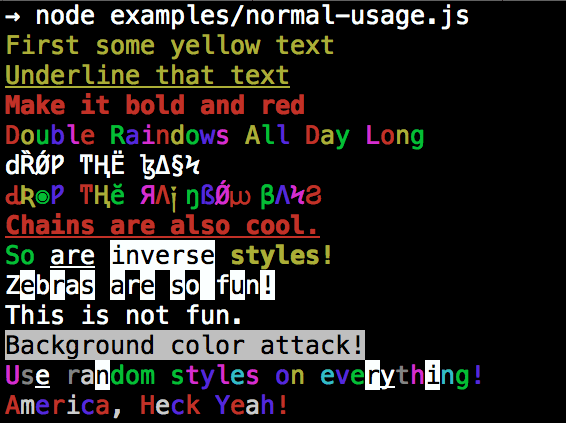
安装
npm install colors
颜色和风格!
文本颜色
- 黑色
- 红色
- 绿色
- 黄色
- 蓝色
- 红色
- 青红
- 白色
- 灰色
- 灰色
亮文本颜色
- 亮红色
- 亮绿色
- 亮黄色
- 亮蓝色
- 亮红色
- 闪亮的青色
- 发光白
背景颜色
- bg 布莱克
- bg红
- bg 绿色
- bg黄色
- bg 蓝色
- bg 红色
- bg 青色线
- bg 白调
- bgGray (英语)
- bg格雷语
亮背景颜色
- bg 亮红色
- bg 淡绿色
- bg 亮黄色
- bg 淡蓝色
- bg Bright 红外线
- bg 闪亮青色
- bg 右白线
样式
- 重设
- 粗体
- 阴暗
- 斜体
- 下划线
- 反转
- 隐藏
- 击穿
额外
- 彩虹
- 斑马
- 美国
- 陷阱
- 随机
使用量
根据大众的要求, colors 现在船有两种用途!
超级美妙的方式
var colors = require('colors');

console.log('hello'.green); // outputs green text
console.log('i like cake and pies'.underline.red); // outputs red underlined text
console.log('inverse the color'.inverse); // inverses the color
console.log('OMG Rainbows!'.rainbow); // rainbow
console.log('Run the trap'.trap); // Drops the bass
或稍微小一点的不延伸的方式 String.prototype
var colors = require('colors/safe');

console.log(colors.green('hello')); // outputs green text
console.log(colors.red.underline('i like cake and pies')); // outputs red underlined text
console.log(colors.inverse('inverse the color')); // inverses the color
console.log(colors.rainbow('OMG Rainbows!')); // rainbow
console.log(colors.trap('Run the trap')); // Drops the bass
我更喜欢第一种方式。 有些人似乎害怕扩展 String.prototype 更喜欢第二种方式.
如果你写好的代码 你永远不会有 与第一个方法的问题。 如果你真的不想碰的话 String.prototype,第二个用法不会触碰 String 原生对象.
启用/ 禁用颜色
软件包将自动检测您的终端是否可以使用颜色并相应启用/失效 。 当颜色被禁用时,颜色函数无所作为. 您可以使用命令行旗来覆盖它 :
node myapp.js --no-color
node myapp.js --color=false

node myapp.js --color
node myapp.js --color=true
node myapp.js --color=always

FORCE_COLOR=1 node myapp.js
或用代码 :
var colors = require('colors');
colors.enable();
colors.disable();
控制台.log 字符串替换
var name = 'Marak';
console.log(colors.green('Hello %s'), name);
// outputs -> 'Hello Marak'
自定义主题
使用标准 API
var colors = require('colors');

colors.setTheme({
  silly: 'rainbow',
  input: 'grey',
  verbose: 'cyan',
  prompt: 'grey',
  info: 'green',
  data: 'grey',
  help: 'cyan',
  warn: 'yellow',
  debug: 'blue',
  error: 'red'
});

// outputs red text
console.log("this is an error".error);

// outputs yellow text
console.log("this is a warning".warn);
使用字符串安全 API
var colors = require('colors/safe');

// set single property
var error = colors.red;
error('this is red');

// set theme
colors.setTheme({
  silly: 'rainbow',
  input: 'grey',
  verbose: 'cyan',
  prompt: 'grey',
  info: 'green',
  data: 'grey',
  help: 'cyan',
  warn: 'yellow',
  debug: 'blue',
  error: 'red'
});

// outputs red text
console.log(colors.error("this is an error"));

// outputs yellow text
console.log(colors.warn("this is a warning"));
组合颜色
var colors = require('colors');

colors.setTheme({
  custom: ['red', 'underline']
});

console.log('test'.custom);
Protip : (英语) 里面有个秘密的无证风格 colors如果你找到那种风格 你可以召唤他.