反应-国内监测
Datadog Real User Monitor(RUM) 使您能够可视化并分析应用程序个人用户的实时性能和用户行程.
设置
要安装国家预防机制,运行:
npm install @datadog/mobile-react-native
要安装 Yarn, 请运行 :
yarn add @datadog/mobile-react-native
最小反应原生版本:SDK支持回放原生版本0.63.4或更高. 与更古老版本的相容性不能保证出框.
版本数 1.0.0-rc5 更需要你拥有 compileSdkVersion = 31 在Android应用程序设置中,这意味着您应该使用Build Tools31版本,Android Gradle插件7版本和Gradle7版本或更高. 要修改版本,请更改 buildscript.ext 您应用程序的顶级块 build.gradle 文档。 Datadog建议使用回放原生版本0.67或更高.
在 UI 中指定应用程序细节
- 在那个 数据狗应用选择 UX 监视 > RUM 应用程序 > 新应用程序。 。 。 .
- 选择
react-native作为您的应用程序类型. - 提供新的应用程序名称以生成一个独特的 Datadog 应用程序 ID 和客户端符 .
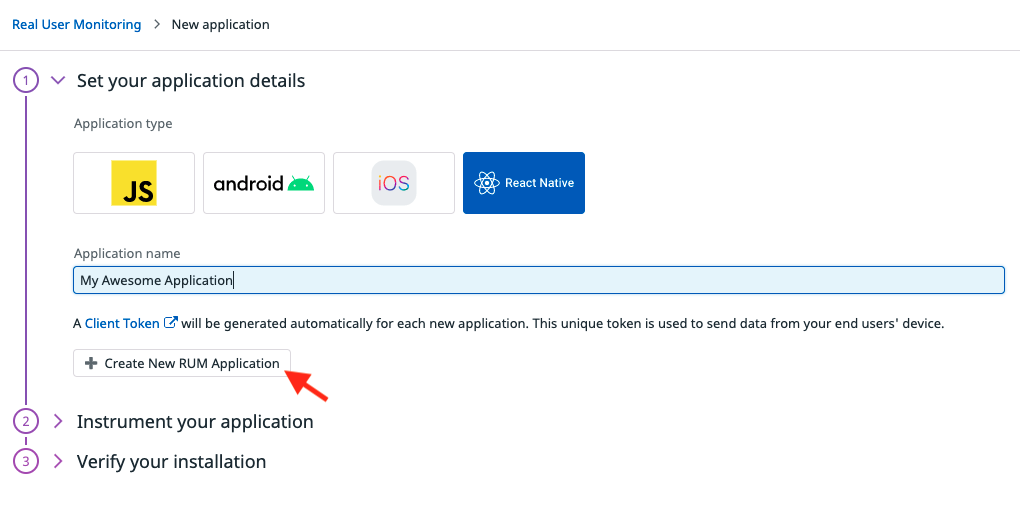
为了保证数据的安全,您必须使用客户代号. 无法只使用 数据犬 API 密钥 来配置 @datadog/mobile-react-native 库,因为他们会暴露客户端。 关于设置客户代号的更多信息,请参见: 客户端调试文档。 。 。 .
初始化包含应用程序上下文的库
import {
    DatadogProvider,
    DatadogProviderConfiguration
} from '@datadog/mobile-react-native';

const datadogConfiguration = new DatadogProviderConfiguration(
    '<CLIENT_TOKEN>',
    '<ENVIRONMENT_NAME>',
    TrackingConsent.GRANTED,
    {
        rumConfiguration: {
            applicationId: '<RUM_APPLICATION_ID>',
            trackInteractions: true, // track User interactions (e.g.: Tap on buttons. You can use 'accessibilityLabel' element property to give tap action the name, otherwise element type will be reported)
            trackResources: true, // track XHR Resources
            trackFetchResources: true, // Optional: also track requests made with the global Expo Fetch implementation
            trackFrustrations: true, // track Frustrations
            trackErrors: true, // track errors
            nativeCrashReportEnabled: true, // Optional: enable or disable native crash reports
            sessionSampleRate: 80, // Optional: sample RUM sessions (here, 80% of session will be sent to Datadog. Default = 100%)
            resourceTraceSampleRate: 80, // Optional: sample tracing integrations for network calls between your app and your backend (here, 80% of calls to your instrumented backend will be linked from the RUM view to the APM view. Default = 20%)
            // You need to specify the hosts of your backends to enable tracing with these backends
            firstPartyHosts: ['example.com'], // matches 'example.com' and subdomains like 'api.example.com'
        },
        logsConfiguration: {
            logEventMapper: logEvent => {
                logEvent.message = `[CUSTOM] ${logEvent.message}`;
                return logEvent;
            }
        },
        traceConfiguration: {}
    }
);
// Optional: Select your Datadog website (one of "US1", "US3", "US5", "EU1", "AP1", "AP2", or "US1_FED"). Default is "US1".
datadogConfiguration.site = 'US1';
// Optional: set the reported service name (by default, it'll use the package name / bundleIdentifier of your Android / iOS app respectively)
datadogConfiguration.service = 'com.example.reactnative';
// Optional: let the SDK print internal logs (above or equal to the provided level. Default = undefined (meaning no logs))
datadogConfiguration.verbosity = SdkVerbosity.WARN;

export default function App() {
    return (
        <DatadogProvider configuration={datadogConfiguration}>
            <Navigation />
        </DatadogProvider>
    );
}
trackFetchResources 通过环球博览会发出的呼吁
fetch直接进口 expo/fetch 没有被拦截。 第 十 条
axios等客户的跟踪保留.
图QL 出错提取( 通过 DatadogLink({ trackErrors: true })用于
b. 通过会议提出的请求 expo/fetch 需要 Expo SDK 56 或 较晚, 如 旧
版本 expo/fetch 不执行 Response.clone()早些时候
版本, GraphQL 元数据仍然被报告,但响应错误没有.
轨道视图导航
因为React Introduct提供了广泛的库来创建屏幕导航,默认只支持手动视图跟踪. 您可以使用下列操作手动启动并停止视图 startView() 财务报告和审定财务报表 stopView 方法。 。 .
import {
    DdSdkReactNative,
    DdSdkReactNativeConfiguration,
    DdLogs,
    DdRum
} from '@datadog/mobile-react-native';

// Start a view with a unique view identifier, a custom view url, and an object to attach additional attributes to the view
DdRum.startView('ViewKey', 'ViewName', Date.now(), {
    'custom.foo': 'something'
});
// Stops a previously started view with the same unique view identifier, and an object to attach additional attributes to the view
DdRum.stopView('ViewKey', Date.now(), { 'custom.bar': 42 });
数据存储
机器人
在数据被上传到 Datadog 之前,它会被保存在应用程序缓存目录中的清晰文本中. 此缓存文件夹由 Android 应用程序沙盒,意味着在大多数设备上 此数据无法被其他应用程序读取. 然而,如果移动设备是根植的,或者某人 与 linux 内核相伴,存储的数据可能会变得可读.
iOS系统
在数据被上传到 Datadog 之前,它被保存在缓存目录中的清晰文本中( )Library/Caches(中文(简体) )
您的电话 应用程序沙盒,它不能被安装在设备上的任何其他应用读取.