英语 · 法语
@ddd-ts-kit /皮诺
内核 Logger 港口 皮诺:标准输出上的JSON行
相关字段的每一行正在进行的工作,凭据编校,刷新为
关闭。中没有 domain/ 或者 application/ 导入此包,或记录任何内容
组合根绑定适配器,基础设施、表示和方面写入
通过港口。
npm i @ddd-ts-kit/pino pino
npm i -D pino-pretty        # only for the pretty format
对着pino 10写的。 pino-pretty 13是可选对等体,只有当
pretty 格式要求。
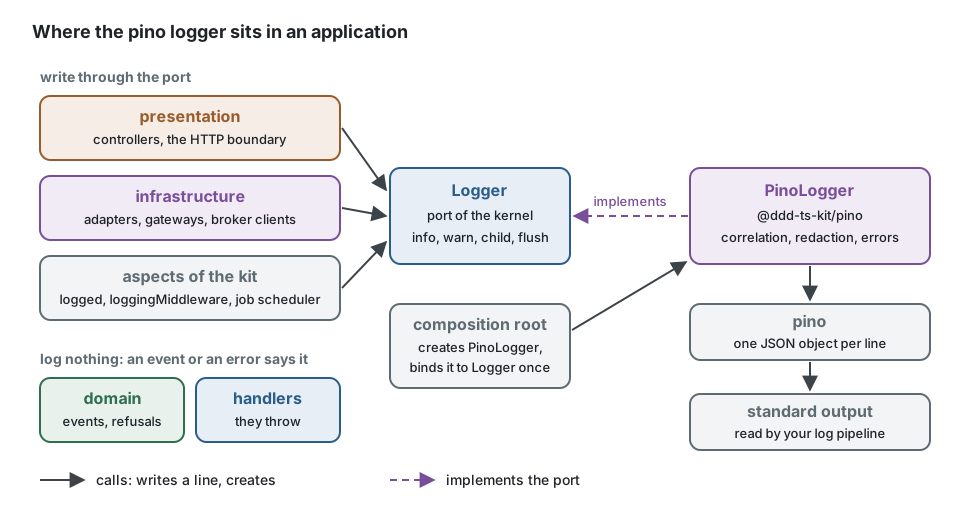
域和处理程序通过事件和错误说明发生了什么,而不是使用日志行。
写在它们周围的是:的适配器 infrastructure/的控制者
presentation/,以及各方面(logged, loggingMiddleware(作业调度器)。他们都
接收内核 Logger;组合根绑定 PinoLogger 一次。更换皮诺
后来更改了该绑定,而不是调用站点。
作文根
// platform/observability/create-logger.ts
import type { ExecutionScope, LogLevel } from '@ddd-ts-kit/kernel';
import { createPinoLogger, type PinoLogger } from '@ddd-ts-kit/pino';
import { traceLogFields } from '@ddd-ts-kit/tracing';

export interface LogSettings {
  readonly level: LogLevel; // LOG_LEVEL
  readonly format: 'json' | 'pretty'; // LOG_FORMAT
  readonly service: string;
  readonly environment: string;
  readonly scrubMessages: boolean; // LOG_SCRUB_MESSAGES
}

export function createLogger(scope: ExecutionScope, settings: LogSettings): PinoLogger {
  return createPinoLogger({ ...settings, fields: () => traceLogFields(scope) });
}
// main.ts
import { tracing } from '@/platform/observability/tracing'; // first
import { createLogger } from '@/platform/observability/create-logger';
import { AsyncLocalStorageExecutionScope } from '@ddd-ts-kit/kernel';
import { kernelModule } from '@ddd-ts-kit/di';
import { createApplication } from '@ddd-ts-kit/di/tsyringe';

const scope = new AsyncLocalStorageExecutionScope();
const logger = createLogger(scope, config.log);

const app = createApplication({
  modules: [kernelModule({ executionScope: scope, logger }), ...contexts],
});

process.once('SIGTERM', () => void shutdown());

async function shutdown(): Promise<void> {
  await app.stop(); // flushes the error reporter, then the logger, last
  await tracing.shutdown();
}
init --logger pino 写这个 create-logger.ts (它回答了。 NoopLogger 当给出no时
设置(这是工具和测试保持沉默的方式); platform/composition/lay-foundations.ts
调用一次,然后 composeApplication 将记录器交给 kernelModule({ logger }).
应用程序的一行,如下所示:
{"level":"info","time":"2026-03-01T10:00:00.000Z","service":"shop-api","environment":"production","correlationId":"9f2c","origin":"http","actorId":"user-1","tenantId":"acme","trace_id":"4bf92f3577b34da6a3ce929d0e0e4736","span_id":"00f067aa0ba902b7","context":"shipping","message":"order shipped"}
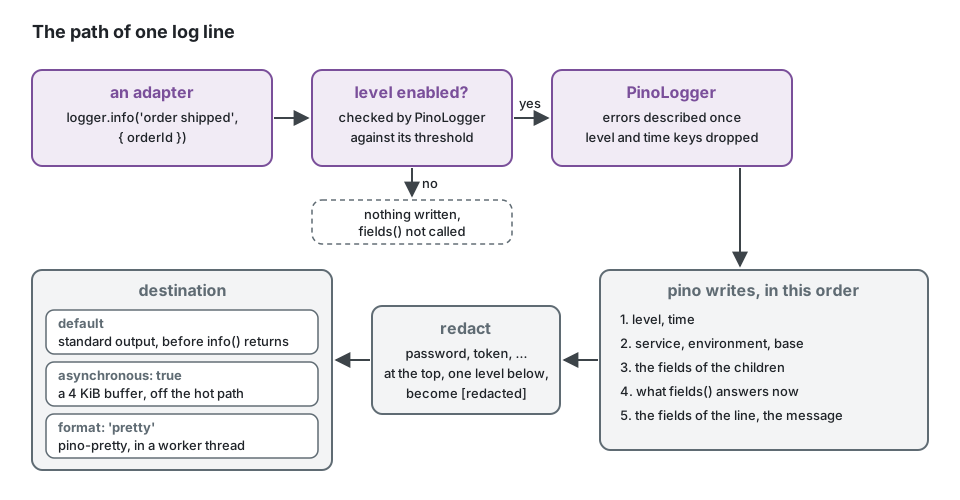
相关性。 fields 在写的每一行读取,通过pino mixin:不
调用站点传递一个id。 traceLogFields(scope) 回答span内的trace和span id,
在执行范围内,关联id,因果id,起源,行动者和
租户。这个包不依赖于跟踪包:any () => LogFields 合适,
() => logFieldsOf(scope.current()) 包括在内。抛出的函数不给出字段,永远不会
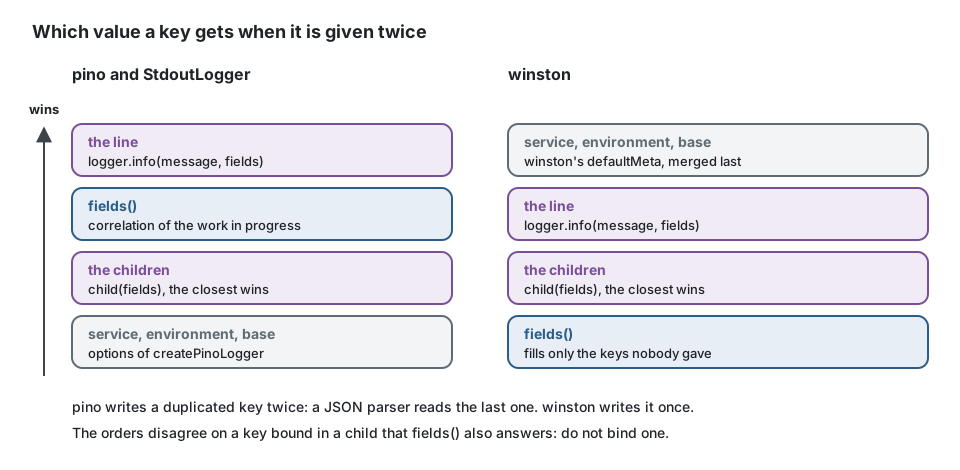
失去了线。这条线的田地越积越多 fields,它胜过了孩子的声音:pino
首先写入子节点的绑定,然后再写入mixin的响应,因此给出一个键
by both写入两次,JSON解析器读取其中一个 fields. StdoutLogger 订单
它们都是一样的; @ddd-ts-kit/winston 难道没有一个孩子赢得别人的好感吗 fields). 不
在子节点中绑定一个键 fields 的答案。
一个你自己的例子。 已经配置了pino的项目会继续这样做 拿走它想要的东西:
import { CREDENTIAL_KEYS, type ExecutionScope } from '@ddd-ts-kit/kernel';
import { pino } from 'pino';
import { PinoLogger, correlationMixin, credentialRedaction } from '@ddd-ts-kit/pino';
import { traceLogFields } from '@ddd-ts-kit/tracing';

declare const scope: ExecutionScope; // the one the composition root creates

const instance = pino({
  mixin: correlationMixin(() => traceLogFields(scope)),
  redact: credentialRedaction([...CREDENTIAL_KEYS, 'iban']),
});

export const logger = new PinoLogger(instance);
createPinoLogger 写 level 通过它的名字和下面的信息 message,比如
StdoutLogger 方面的包和喜欢 @ddd-ts-kit/winston:一个仪表板显示
三。你自己的实例保存着你给它的钥匙(msg 默认情况下为数字级别)。
从适配器进行日志记录
适配器接收 Logger 内核的构造函数,就像任何其他端口一样,和
永远不要导入这个包。在子节点中绑定一次适配器的每行所携带的内容;把
在每一行中,从一个调用到下一个调用的变化。相关字段已经存在:
fields 他们补充道。
// infrastructure/carrier/carrier-gateway.ts
import type { Logger } from '@ddd-ts-kit/kernel';

interface Carrier {
  readonly name: string;
  book(orderId: string, weightGrams: number): Promise<string>; // the tracking number
}

export class CarrierGateway {
  private readonly logger: Logger;

  constructor(
    private readonly preferred: Carrier,
    private readonly fallback: Carrier,
    logger: Logger,
  ) {
    this.logger = logger.child({ context: 'shipping' }); // on every line of this adapter
  }

  async book(orderId: string, weightGrams: number): Promise<string> {
    try {
      return await this.preferred.book(orderId, weightGrams);
    } catch (error) {
      // Handled here, not rethrown: worth a line, with the error described by the logger.
      this.logger.warn('carrier unavailable, booking with the fallback', {
        orderId,
        carrier: this.preferred.name,
        error: error instanceof Error ? error : String(error),
      });

      return this.fallback.book(orderId, weightGrams);
    }
  }
}
消息是常量,标识符是字段:仪表板按行计数 消息时,搜索根据字段查找订单,不会在文本中插入任何个人数据。
import type { Logger } from '@ddd-ts-kit/kernel';

declare const logger: Logger;
declare const order: { readonly id: string; readonly customerEmail: string; readonly lines: readonly unknown[] };

// Instead of: one distinct message per order, an email in clear text, a search that cannot filter.
logger.info(`order ${order.id} shipped to ${order.customerEmail}`);

// Write: the same message every time, identifiers as fields, nothing personal.
logger.info('order shipped', { orderId: order.id });

// Fields that cost something to build are built only when the line is written.
if (logger.isLevelEnabled('debug')) {
  logger.debug('order shipped, detail', { orderId: order.id, lineCount: order.lines.length });
}
代码释放的错误(它抛出或重新抛出)不会在途中记录:总线
路由或工作报告给 ErrorReporter 一次,并且方面记录其类型及其
代码。只在错误被处理和停止的地方记录错误,就像上面的回退一样。
发展模式
createPinoLogger({ level: 'debug', format: 'pretty', fields: () => traceLogFields(scope) });
[10:00:00.000] INFO: order shipped
    service: "shop-api"
    correlationId: "9f2c"
    context: "shipping"
这个 pretty 格式是运输pino文件的要求 pino-pretty:在worker中运行
线程,所以它接受一个文件描述符或路径作为 destination,不是一条小溪,而且 flush()
等待工人。对于您自己的流中的漂亮行,在
pino-pretty 用作溪流, pino(options, pretty({ destination })),然后把它包起来
new PinoLogger(instance). 不要在生产环境中使用:从配置中选择格式
(LOG_FORMAT=pretty 在 .env, json 其他地方)。
隐私
日志线是个人数据泄露的地方:它们被写在任何地方,每个人都可以阅读并保存
太久。在适配器中完成了三件事,因此调用站点不必记住它们。这个
凭据密钥列表、错误描述和两个标记(CREDENTIAL_KEYS,
describeError, REDACTED, SCRUBBED_MESSAGE)是内核的,由每个内核共享
端口记录器。
凭据已编辑。 皮诺自己的 redact,在田野里的一条线,一个孩子和
fields 一样的。这些键的值被替换为 [redacted],在一行的顶端
下一层(headers.authorization, body.password):
password, passwd, authorization, cookie, set-cookie, token, secret, apiKey,
api_key, x-api-key, access_token, refresh_token, id_token, accessToken,
refreshToken, idToken, client_secret, clientSecret, client-secret, private_key,
privateKey
这些名字无论在什么情况下都是匹配的Authorization, X-Api-Key),
isCredentialKey 核的。 redact: ['iban', 'ssn'] 添加到列表中:添加的名称为
匹配,因为它写在一行的顶部,无论它的情况下一层,自pino
在顶部按其路径命名键。没有比一层更深的东西,也没有在一个
列表:记录你想要的部分,而不是整个请求。
作为字段传递的错误 (logger.error('payment failed', { error }): LogValue 的
该港口允许船舶驶入。 Error)写为 describeError 内核的描述,是一样的
从端口的每个记录器中:它的类为 type,它的 code 当
这是一个 DomainError,它的 message,它自己 stack,那么…… cause 同样的方法,直到
八个深。链的每个错误都写入一次:pino的标准序列化器 err 关键
是否将每个原因折叠到消息和第一个原因的堆栈中,以便适配器将其关闭
对于通过港口的线路。在行字段中查找错误,而不是
在嵌套对象内部。
意外错误的消息可以被丢弃。 错误的消息是第一位的
个人数据出现的地方:司机引用了他拒绝的那一行。默认保留它,因为
一条日志线上面写着 [message removed] 花费了所有的调查。只有一个选择
这个项目自己写的信息保存了下来,那些是它的 DomainError年代;类、代码、堆栈和
Cause为其他的保留,堆栈失去它的第一行,这重复了这个消息:
createPinoLogger({ scrubMessages: true }); // or new PinoLogger(instance, { scrubMessages: true })
这是 scrubMessages 端口的每个记录器(StdoutLogger皮诺,温斯顿,
InMemoryLogger)和的一个 @ddd-ts-kit/sentry,用同样的规则,同样的
SCRUBBED_MESSAGE 同样的权衡:当日志离开你的手或没有时打开它
操作符应该读取那里的数据。日志线本身的信息是你的:
写 order shipped 并将标识符放在字段中。
该工具包本身从不向记录器传递错误 logged 方面, loggingMiddleware 和
作业调度器写入 errorType 和 errorCode (identifyError (内核),永远不会
一个信息,随便什么 scrubMessages 说,错误会出现在 ErrorReporter。这个
上面的描述是针对您自己的代码选择记录的错误:
logger.error('payment failed', { error }).
水平
| 港口 | 皮诺 | |
|---|---|---|
debug | debug (20) | |
info | info (30) | 默认阈值 |
warn | warn (40) | |
error | error (50) |
港口没有 trace 也没有 fatal没有任何通过它写的东西使用它们。下一条线
Threshold需要进行一次比较:它的字段不被读取,并且 fields 未被调用。这个
运行时更改实例的阈值(instance.level = 'debug')后面跟着the
适配器和它的孩子。 isLevelEnabled(level) 回答这个门槛:提前问
建造需要花费的田地。
child(fields) 是一个pino子节点:当子节点被创建时,字段被序列化一次,
而且每行不需要任何成本。一个键被绑定两次(被子键和父键绑定,被子键和父键绑定)
fields(或通过它们中的任何一个和通过行)在一行上写两次,就像pino一样;一个
JSON解析器读取最后一个,按以下顺序: service, environment 和 base,
从最大的孩子到最亲的孩子, fields,行。 level 和 time 是
异常:该名称的字段被删除,
因此,没有字段伪造一行的标题。
冲洗
flush(): Promise<void> 一旦将pino缓冲的内容传递到目的地,就进行解析
传输的工作线程,或异步目的地的缓冲区。它从不排斥。虽然它
运行时,它使进程保持活动状态,最多10秒:pino不让工作线程运行
运输是一个过程,所以那个工人的回答可能会来得太晚
进程没有其他事情可做,并且在刷新后关闭所做的操作将永远不会运行。
app.stop() 在模块停止并刷新错误报告器之后,最后调用它:
停止日志。没有应用di包,在那个地方自己调用它。
端口在关闭时调用一次刷新,并且不指定之后记录的内容。
在这里,日志记录器保持可用:在刷新之后记录的一行与其他行一样写入,并且
与 asynchronous: true 它在缓冲区中等待pino的退出钩子。
表演
默认情况下,在调用返回之前将每行写入标准输出。没有什么是 一旦丢失,标准输出的缓慢读取会减慢应用程序的速度。
asynchronous: true 缓存4kib并写入热路径(pino.destination({ sync: false })),这使得pino在负载下速度很快。代价是一个僵死的进程所没有的
但是写的。 flush() 写入缓冲区,pino自己的exit钩子也写入缓冲区 process.exit
以及未捕获的异常。没有处理程序的进程结束的信号(SIGKILL,
内存不足杀手,a SIGTERM 没有人听)最近损失了4千兆字节
诗句,那些可以解释它的诗句;在第一时间退出也是如此,在
目的地是开放的。保持默认值,除非日志记录出现在概要文件中。
每行花费它的字段的一个对象副本(错误描述,标题键被删除),然后pino:
大约3微秒 @ddd-ts-kit/winston 取7(节点24,子节点,4)
相关字段,三个字段,一个接收器,丢弃)。
编校是由pino编译的:在一行的顶部查找每个凭据密钥,并且一个
通配符通过以下级别,其审查器查看每个密钥的名称。通配符路径
每个键将是很明显的书写方式,并且花费十倍:在pino 10上测量,
其中有13个从1微秒到9微秒不等。日志调用永远不会抛出无法读取或序列化的字段
(抛出的getter)给出没有它们的行,标记 logError: "unserializable fields".
哪一个
采取 StdoutLogger 标准输出中的JSON行都是您的
需要:不依赖,线条形状相同。当日志量很重要时使用pino
框架已经说pino (fasttify),或者当您需要它的传输时。采取
@ddd-ts-kit/winston 当团队已经运行温斯顿传输和格式。这三个
实现一个端口并由一个契约套件保持:交换是组合的一行
根。
NestJS
Nest也有自己的 LoggerService,由框架用于其自己的消息,并由
new Logger(context) 在Nest类中。该工具包的应用程序代码从不需要它:处理程序和
适配器接收内核 Logger. 要通过同一个实例发送Nest自身记录的内容,
给它一座几行字的桥;这个工具包没有发货,因为它会将这个包绑定到Nest;
const nest = logger.child({ context: 'nest' });
const bridge: LoggerService = {
  log: (message: unknown) => nest.info(String(message)),
  warn: (message: unknown) => nest.warn(String(message)),
  error: (message: unknown) => nest.error(String(message)),
  debug: (message: unknown) => nest.debug(String(message)),
};

const app = await NestFactory.create(AppModule, { logger: bridge });
nestjs-pino 当Nest类记录大量日志时,另一种选择是:给它一个pino实例
,并将相同的实例封装在 new PinoLogger(instance) 为了工具箱。
在测试中
这个包没有任何内容:测试应用程序绑定 InMemoryLogger 核函数的
entries 是数据。要使端口的另一个适配器具有相同的行为,请运行合约:
import { beforeEach, describe, expect, it } from 'vitest';
import { LOG_LEVELS } from '@ddd-ts-kit/kernel';
import { createPinoLogger } from '@ddd-ts-kit/pino';
import { loggerContract, type LoggedLine } from '@ddd-ts-kit/testing/contracts';

loggerContract({ describe, it, expect, beforeEach }, {
  name: 'PinoLogger',
  createLogger: (setup) => { // { level, fields, scrubMessages }
    const written: string[] = [];
    const logger = createPinoLogger({ ...setup, destination: { write: (line) => written.push(line) } });

    return { logger, lines: () => written.map((line) => lineOf(JSON.parse(line))) };
  },
});

/** A written line as the contract reads it: the level by its name, the message, the other fields. */
function lineOf({ level, message, time: _time, ...fields }: Record<string, unknown>): LoggedLine {
  const known = LOG_LEVELS.find((one) => one === level);

  if (known === undefined) {
    throw new Error(`Not a level of the port: ${String(level)}`);
  }

  return { level: known, message: String(message), fields };
}