望远镜 Vue SDK
德望镜Vue SDK为德望镜上方所写的应用程序提供了方便访问.
你可以读更多关于 望远镜网站。 。 。 .
所需资源
- SDK支持Vue版本3及以上.
- 望远镜
Project ID用于使用SDK。 硂т descope 控制台中的项目页面。 。 。 .
安装 SDK
以 :
npm i --save @descope/vue-sdk
使用量
在应用程序中添加 Descope 插件
import { createApp } from 'vue';
import App from './App.vue';
import descope from '@descope/vue-sdk';

const app = createApp(App);
app.use(descope, {
  projectId: 'my-project-id',
  // If the Descope project manages the token response in cookies, a custom domain
  // must be configured (e.g., https://auth.app.example.com)
  // and should be set as the baseUrl property.
  // baseUrl: https://auth.app.example.com'
});
app.mount('#app');
使用演示镜来渲染特定流
<template>
  <p v-if="isFlowLoading">Loading...</p>
  <Descope flowId="my-flow-id" @success="handleSuccess" @error="handleError" @ready="handleReady" />
  <!-- additional props -->
  <!-- theme="dark" theme can be "light", "dark" or "os", which auto select a theme based on the OS theme. Default is "light" -->
  <!-- v-bind:debug="true" debug can be set to true to enable debug mode -->
  <!-- locale="en" locale can be any supported locale which the flow's screen translated to, if not provided, the locale is taken from the browser's locale. -->
  <!-- tenant="tenantId" tenant ID for SSO (SAML) login. If not provided, Descope will use the domain of available email to choose the tenant -->
  <!-- redirectUrl="redirectUrl" Redirect URL for OAuth and SSO (will be used when redirecting back from the OAuth provider / IdP), or for "Magic Link" and "Enchanted Link" (will be used as a link in the message sent to the the user) -->
  <!-- autoFocus="skipFirstScreen" autoFocus can be true, false or "skipFirstScreen". Default is true. - true: automatically focus on the first input of each screen - false: do not automatically focus on screen's inputs - "skipFirstScreen": automatically focus on the first input of each screen, except first screen -->
  <!-- validateOnBlur can be true in order to show input validation errors on blur, in addition to on submit. Default is false.  -->
  <!-- restartOnError if set to true, in case of flow version mismatch, will restart the flow if the components version was not changed. Default is false.  -->
  <!-- errorTransformer="errorTransformer" errorTransformer is a function that receives an error object and returns a string. The returned string will be displayed to the user. NOTE: errorTransformer is not required. If not provided, the error object will be displayed as is. -->
  <!-- form="{ email: '[email protected]' }" form is an object the initial form context that is used in screens inputs in the flow execution. Used to inject predifined input values on flow start such as custom inputs, custom attrbiutes and other inputs. Keys passed can be accessed in flows actions, conditions and screens prefixed with "form.". NOTE: form is not required. If not provided, 'form' context key will be empty before user input. -->
  <!-- client="{ version: '1.2.3' }" client is an object the initial client context in the flow execution. Keys passed can be accessed in flows actions and conditions prefixed with "client.". NOTE: client is not required. If not provided, context key will be empty. -->
  <!-- styleId="my-awesome-style" Use a custom style name or keep empty to use the default style. -->
  <!-- nonce="rAnd0m" Set a CSP nonce that will be used for style and script tags -->
  <!-- popupOrigin="https://auth.example.com" Sets the expected origin for OAuth popup communication when redirect URL is on different origin than the main application. Required for cross-origin OAuth popup flows -->
  <!-- dismissScreenErrorOnInput=true Clear screen error message on user input -->
</template>

<script setup>
import { Descope } from '@descope/vue-sdk';
import { ref } from 'vue';

const isFlowLoading = ref(true);

const handleSuccess = (e) => {
  console.log('Logged in!', e);
};

const handleError = (e) => {
  console.log('Could not log in', e);
};

const handleReady = () => {
  isFlowLoading.value = false;
};

// let tenantId = '<tenantId>'; // replace with your tenant ID
// let redirectUrl = '<redirectUrl>'; // replace with your redirect URL

// const errorTransformer = (error) => {
//   const translationMap = {
//     SAMLStartFailed: 'Failed to start SAML flow'
//   };
//   return translationMap[error.type] || error.text;
// };
</script>
onScreenUpdate
当出现新屏幕状态时, 并在每次呼叫后, 都会调用此功能 。 它得到以下参数:
screenName: 即将渲染的屏幕名称context: 包含即将到来的屏幕状态的对象。 所有服务器制作的屏幕数据都生活在context.data。 。 。 .next: 当调用时继续流执行的函数ref: 提及去镜-wc节点
该函数可以是同步或async,并且应当返回布尔表示是否应该渲染自定义屏幕:
true: 渲染自定义屏幕false: 渲染默认流程屏幕
断裂变化 (v3. 0.0): 服务器生成的用于直接显示的屏幕数据
context现在生活在context.data- 比如说.context.totp→context.data.totp, (中文(简体) ),context.inboundAppApproveScopes→context.data.inboundAppApproveScopes现状,form,和身份字段(user编号 :project编号 :lastAuth)住顶上. 见 @ descope/ web- 组件 README 完整清单context.data字段.
此功能允许渲染自定义屏幕而不是默认的流程屏幕. 对于高度定制化的 UI 或默认屏幕未覆盖的特定逻辑来说,它可能有用
为了制作自定义屏幕,其内容应作为儿童随附 Descope 组件
用法示例:
function onScreenUpdate(screenName, context, next) {
  if (screenName === 'My Custom Screen') {
    return true;
  }

  return false;
}
使用 useDescope, (中文(简体) ), useSession 财务报告和审定财务报表 useUser 函数,以便获得认证状态、用户细节和公用设备
这可能有助于实施应用程序特定逻辑. 实例:
- 如果当前会话被认证, 将不同组件渲染
- 渲染用户内容
- 注销按钮
<template>
    <div>
        <div v-if="isSessionLoading || isUserLoading">Loading ...</div>
        <div v-else-if="isAuthenticated">
            <div>Hello {{ user?.name }}</div>
            <button @click="logout()">Logout</button>
        </div>
        <div v-else>You are not logged in</div>
    </div>
</template>

<script setup>
import { useDescope, useSession, useUser } from '@descope/vue-sdk';

const { isAuthenticated, isLoading: isSessionLoading, claims } = useSession();
const { user, isLoading: isUserLoading } = useUser();
const { logout } = useDescope();
</script>
说明: useSession 触发对 Descope 后端的单个请求,以尝试刷新会话。 狦 别 useSession 在您的应用程序上,会话不会自动被刷新 。 如果您的应用程序不需要 useSession,您可以手动触发刷新 refresh 从 useDescope 钩.
对于更多的 SDK 使用示例参考 文档
会话令牌服务器验证( 通过会话令牌到服务器 API)
开发全存储应用程序时,通常会拥有需要有效会话符的私人服务器API:
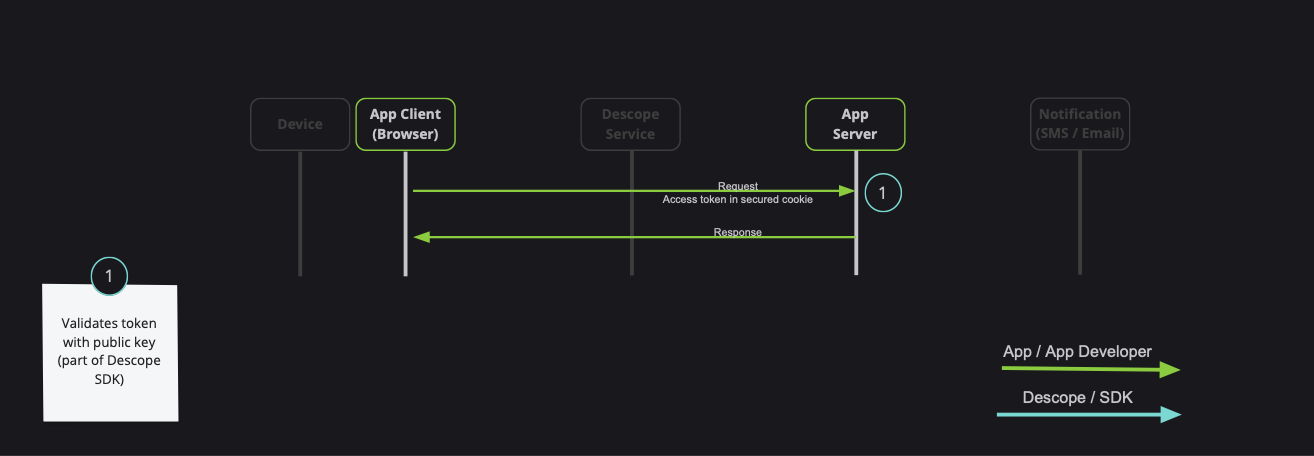
注:Descope还提供各种语言(NodeJS,Go,Python等)的服务器侧SDK. Descope的服务器SDKs有外出会话验证API,支持所描述的bellow选项. 欲了解更多会话验证,请读 本节 用于演示文稿文档.
实现这一点有两种方法:
- 使用
getSessionToken以获得象征, 并传递给Authorization页眉( 建议) - 通过
sessionTokenViaCookie选项初始化插件时(谨慎使用,会话符号可能会增长,特别是在使用授权或添加自定义请求的情况下)
1. 使用 getSessionToken 以获得符号
Api 函数的示例,并在 Authorization 页眉 :
import { getSessionToken } from '@descope/vue-sdk';

// fetch data using back
// Note: Descope backend SDKs support extracting session token from the Authorization header
export const fetchData = async () => {
  const sessionToken = getSessionToken();
  const res = await fetch('/path/to/server/api', {
    headers: {
      Authorization: `Bearer ${sessionToken}`,
    },
  });
  // ... use res
};
2. 通过 sessionTokenViaCookie 选项
在这样做时, Descope SDK 将自动在 DS 饼干.
注意: 如果会话符会保持小( 小于 1k) , 请使用此选项 。 会话符可以增长,特别是在使用授权或增加自定义要求的情况下
示例
import { createApp } from 'vue';
import App from './components/App.vue';
import descope from '@descope/vue-sdk';

const app = createApp(App);

app.use(descope, {
  projectId: 'project-id',
  sessionTokenViaCookie: true,
});
注:会话符号饼干设定为 SameSite=Strict; Secure; 默认.
如果您需要自定义, 您可以设置 sessionTokenViaCookie={sameSite: 'Lax', secure: false, cookieName: 'MY_COOKIE'}。 。 。 .
sameSite(默认 :Strict) – 控制会话饼干的SameSite属性.secure(默认 :true) – 如果真实, 将饼干设定为安全( 仅通过 HTTPS) .cookieName(默认 :DS) – 会话符号饼干的名称. 用于在同一域上运行多个Descope项目时避免冲突.domain(默认:自动检测) - 会话符号饼干的域名 。 如果没有指定,请使用来自Descope项目设置或当前域的域.
现在,每当你打电话 fetch,饼干会随请求自动发送.
扫描后端 SDKs 也支持从 DS 饼干.
获取 Descope SDK 实例
如果您在 Vue 应用程序之外需要 SDK 实例, 您可以使用 getSdk 函数
确保仅在初始化了分镜插件后才能调用它,这就是SDK实例实际创建的地方,否则你将不会出现实例.
例如:
import { createApp } from 'vue';
import App from './components/App.vue';
import descope, { getSdk } from '../src';

const app = createApp(App);

app.use(descope, {
  projectId: 'project-id',
});

const sdk = getSdk();

sdk?.onSessionTokenChange((newSession) => {
  // here you can implement custom logic when the session is changing,
  // note that the session may be not available if it is managed in cookies
});

sdk?.onIsAuthenticatedChange((isAuthenticated) => {
  // here you can implement custom logic when the authentication state is changing
});
帮助函数
您还可以使用以下功能协助您管理 JWT 的各种动作.
getSessionToken() - 获取当前会话符号.
getRefreshToken() - 获取当前刷新标志。 注:只有在刷新令牌存储于本地存储时才相关. 如果刷新符号存储在 httpOnly 饼干,它会返回一个空弦.
refresh(token = getRefreshToken()) - 使用现有的有效刷新符号强制更新当前会话符号.
isSessionTokenExpired(token = getSessionToken()) - 检查当前会话符号是否过期 。 如果不坚持, 则提供会话符号 .
isRefreshTokenExpired(token = getRefreshToken()) - 检查当前刷新符号是否过期 。 如果不坚持,则提供更新信号.
getJwtRoles(token = getSessionToken(), tenant = '') - 从现有的会话符号中获取当前角色。 提供特定租户身份证明.
getJwtPermissions(token = getSessionToken(), tenant = '') - 从现有会话符中选择当前权限。 为特定租户提供租户身份证明.
getCurrentTenant(token = getSessionToken()) - 从现有的会话代号(来自 dct 索赔要求).
刷新符号生命周期
扫描器 SDK 将自动刷新即将到期的会话符号 。 这是在背景中使用刷新符号完成的,没有附加任何配置.
如果配置了Descope项目设置, 以管理 cookie 中的令牌 .
您还必须配置自定义域,并将其设置为 baseUrl 页:1 descope 插件 。 见上文 plugin 使用量 以使用为例.
自动刷新会话符号
扫描器 SDK 会在会话符号即将到期时自动刷新它 。 这是在背景中使用刷新符号完成的,没有附加任何配置.
如果你想禁用这种行为,你可以通过 autoRefresh: false 转到 Descope 插件。 这将阻止 SDK 自动刷新会话符号 .
示例
import { createApp } from 'vue';
import App from './App.vue';
import descope from '@descope/vue-sdk';

const app = createApp(App);
app.use(descope, {
  projectId: 'my-project-id',
  autoRefresh: false,
});
app.mount('#app');
坚韧不拔
Descope存储了两个符号:会话符号和刷新符号.
- 刷新令牌或存储在本地存储中,或
httpOnly饼干 这是可配置的 在Descope控制台. - 会话代号被存储在本地存储或JS饼干中. 这种行为可以通过
sessionTokenViaCookiedescope插件中的道具.
然而,出于安全考虑,您可以选择不在浏览器中存储令牌. 在这种情况下,你可以通过 persistTokens: false 转到 Descope 插件。 这使得SDK无法在浏览器中存储符.
注释:
- 您必须配置要存储在
httpOnly德望台的饼干 否则,刷新令牌将不会被存储,当页面被刷新后,用户会被登录出. - 您仍然可以使用
useSession钩.
最后用户持久性
Descope将最后一个用户信息存储在本地存储中. 如果您想要禁用此特性, 您可以通过 storeLastAuthenticatedUser: false 转到 Descope 插件。 请注意,如果这种行为被禁用,与最后认证用户相关的一些功能可能无法如预期的那样运行.
部件
部件是允许您曝光基于租户执行的管理特性的组件. 在某些情况下,您的客户可能需要独立执行管理行动的能力,从而减轻与您联系的必要性。 部件是一个功能,使您能够以模块化的方式将这些能力委托给客户.
重要说明:
- 要让用户能够使用部件,需要指定
Tenant Admin作用.
所有部件组件接受可选 locale 道具 (英语). 它可以是任何支持的部件屏幕被翻译到的地方;如果不提供,则取自浏览器的地方.
<UserManagement widget-id="user-management-widget" tenant="tenant-id" locale="en" />
用户管理
这个 UserManagement 部件允许您将一个用户表嵌入您的站点以查看并采取行动.
部件让你:
- 创建新用户
- 编辑已有的用户
- 激活/ 禁用已有用户
- 重置现有用户密码
- 删除已有用户的密码
- 删除已有的用户
说明:
- 自定义字段也出现在表格中.
使用量
<template>
  <UserManagement tenant="tenant-id" widget-id="user-management-widget" />
</template>

<script setup>
import { UserManagement } from '@descope/vue-sdk';
</script>
示例 管理用户
角色管理
这个 RoleManagement 部件可以让您在您的网站上嵌入一个角色表以查看并采取行动.
部件让你:
- 创建新角色
- 改变现有角色的字段
- 删除现有角色
说明:
- 这个
Editable字段是由用户对角色的访问决定的 - 意思是项目级角色不能被租户级用户编辑. - 您需要预先定义用户可以使用的权限, 这些权限不能在部件中编辑 .
使用量
<template>
  <RoleManagement tenant="tenant-id" widget-id="role-management-widget" />
</template>

<script setup>
import { RoleManagement } from '@descope/vue-sdk';
</script>
示例 管理角色
访问密钥管理
这个 AccessKeyManagement 部件允许您将访问密钥表嵌入您的站点以查看并采取行动.
部件让你:
- 创建新访问密钥
- 激活/关闭现有访问密钥
- 删除扩展访问密钥
使用量
<template>
  <!-- admin view: manage all tenant users' access keys -->
  <AccessKeyManagement tenant="tenant-id" widget-id="access-key-management-widget" />

  <!-- user view: mange access key for the logged-in tenant's user  -->
  <AccessKeyManagement tenant="tenant-id" widget-id="user-access-key-management-widget" />
</template>

<script setup>
import { AccessKeyManagement } from '@descope/vue-sdk';
</script>
示例 管理访问密钥
审计管理
这个 AuditManagement 部件允许您将审计表嵌入您的站点 .
使用量
<template>
  <AuditManagement tenant="tenant-id" widget-id="audit-management-widget" />
</template>

<script setup>
import { AuditManagement } from '@descope/vue-sdk';
</script>
示例 管理审计
用户配置
这个 UserProfile 部件允许您在您的应用程序中嵌入用户配置文件组件, 并允许登录在用户中更新其配置文件 .
部件让你:
- 更新用户配置图
- 更新用户个人信息
- 更新认证方法
- 注销
使用量
<template>
  <UserProfile widget-id="user-profile-widget" @logout="onLogout" />
</template>

<script setup>
import { UserProfile } from '@descope/vue-sdk';

const onLogout = () => (window.location.href = '/login');
</script>
示例 用户配置
应用程序门户
这个 ApplicationsPortal 允许您在应用程序中嵌入一个应用程序门户组件,并允许登录用户打开分配给他们的应用程序.
使用量
<template>
  <ApplicationsPortal widget-id="applications-portal-widget" />
</template>

<script setup>
import { ApplicationsPortal } from '@descope/vue-sdk';
</script>
示例 用户配置
代码示例
您可以在其中找到一个示例 Vue app 示例文件夹。 。 。 .
设置
运行示例,设置您的 Project ID 通过设置 VUE_APP_DESCOPE_PROJECT_ID 环境 var 或直接
在样本代码.
在 望远镜控制台。 。 。 .
export VUE_APP_DESCOPE_PROJECT_ID=<Project-ID>
或者,将环境变量放入 .env.local 在工程根目录中的文件.
见哀叫 .env.local 带有更多信息的文件模板.
运行示例
在项目根部运行以下命令来构建和运行示例 :
npm i && npm start
打开浏览器并导航到 http://localhost:3:00 (英语)。 。 。 .
示例可选条目变量
应用软件的定制环境变量见下表:
| 信封变量 | 说明 | 默认值 |
|---|---|---|
| VUE APP DESCOPE FLOW ID (英语) | 登录页面中要使用的流程 ID | 注册或注册 |
| VUE APP DESCOPE BASE URL (英语) | 自定义查看镜基址 | 无 |
| VUE APP DESCOPE BASE STATIC URL (英语) | 自定义底盘静态 URL | 无 |
示例 .env.local 文件模板 :
# Your project ID
VUE_APP_DESCOPE_PROJECT_ID="<Project-ID>"
# Login flow ID
VUE_APP_DESCOPE_FLOW_ID=""
# Descope base URL
VUE_APP_DESCOPE_BASE_URL=""
# Descope base static URL
VUE_APP_DESCOPE_BASE_STATIC_URL=""
问答
我在后端更新了用户, 但用户 / 会话符不在前端更新
/ 调整对 vue sdk 的回答
Descope SDK在前端缓存用户和会话符号. 如果您在后端更新用户( 例如使用Descope Management SDK/ API), 您可以调用 me 编号 : refresh 从 useDescope 勾勾以刷新用户和会话符号 。 示例
const sdk = useDescope();

const handleUpdateUser = () => {
  myBackendUpdateUser().then(() => {
    sdk.me();
    // or
    sdk.refresh();
  });
};
学习更多
学习更多 请看 视角文档和 API 参考页面。 。 。 .
联系我们
如果您需要帮助, 您可以发送电子邮件 瞄准镜支持
许可证
用于反应的SDK探测器在下列条件下获得使用许可: 麻省理工学院许可证协议。 。 。 .