abr-geocoder (Digital Agency Address Base Registry Geocoder)
🚨 Upgrade to version 2.3.0 from v2.2.1
- Bug fix:
abrg download -c <prefecture LGCode>no longer skipsmt_town_pos_pref**.csv(town master position-reference extension at the prefecture level). - Important: With the upcoming Version 3 release, Version 2.3.0 is the final release of the Version 2 series. Subsequent fixes and feature additions will be made in Version 3, and no further support is planned for the Version 2 series.
🚨 Upgrade to version 2.2.1 from v2.2
- Updated to use the new DCAT format API for downloading datasets.
- Known Issue: The
abrg update-checkcommand is not yet compatible with the new API format and will not work properly. Since we are planning to upgrade to Version 3, support in Version 2 is undecided.
🚨 Upgrade to version 2.2 from v2.1
- The
abrg servecommand is splitted intoabrg serve startandabrg serve stopcommands.
Description
A geocoder that matches input address strings with the Address Base Registry maintained by the Digital Agency, Government of Japan, outputting normalized address strings, town IDs, latitude and longitude, etc. It analyzes Japanese domestic address notation, absorbs variations, and outputs normalized results according to the hierarchy.
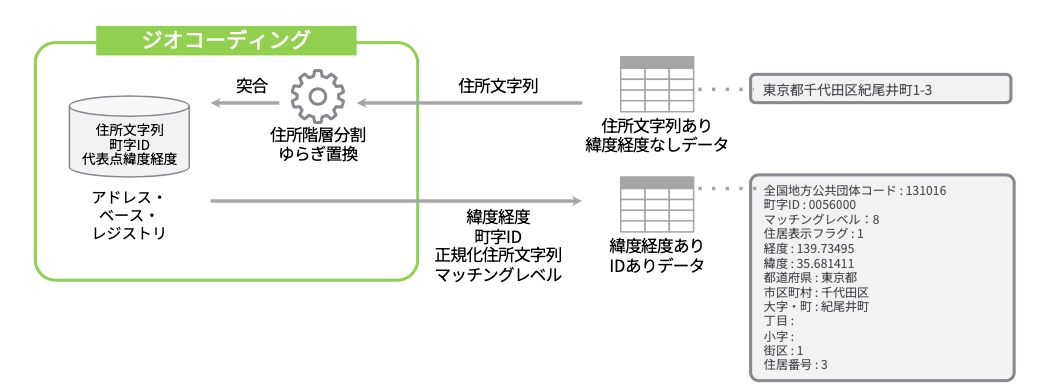
Features
- Geocoder targeting domestic addresses in Japan.
- Normalizes address notation according to the Address Base Registry and hierarchy.
- Supports
residence indicationandpartial number (lot number). - Uses SQLite, enabling geocoding within the server.
- High-speed processing through multithreading.
- Supports six output formats:
csv,json,geojson,ndjson,ndgeojson,simplified.
Use Cases
- Usable as a command:
- Pipeline with standard input/output.
- Input/output via file.
- Usable as a REST server.
- Usable as a Node.js library:
- Supports individual requests and streams.
- Limited support for searches by Kyoto street names.
Limitations
- Cannot search by landmarks (e.g., famous facility names).
- Cannot search by postal codes.
- Cannot search by alphabet (English notation).
Installation
-
Global installation
npm install -g @digital-go-jp/abr-geocoder abrg # Verify it runs -
Local install
npm install @digital-go-jp/abr-geocoder
npm link
abrg  # Verify it runs
abrg download command
Downloads the necessary dataset for geocoding from the Address Base Registry and builds the database using SQLite.
abrg download [options]
-
Specify region(s) for download
You can specify a particular prefecture or municipality to build a localized database, reducing the data size and speeding up database construction.
Use the National Local Government Codes to specify the region(s). Separate multiple regions with spaces.
# Download data for Tokyo
abrg download -c 130001

# Download data for Tokyo and Kanagawa
abrg download -c 130001 140007

# Download data for Chiyoda ward
abrg download -c 131016
-
Change directory
You can change the directory to download the dataset files and save the database. The default is
$HOME/.abr-geocoder.abrg download -d (path to directory to save data)
-
Hide progress bar
If you specify the silent option, the progress bar will not be displayed.abrg download --silent
-
Show debug information
Shows the time taken for the process when it is completed.abrg download --debug
abrg update-check command
Checks for data updates. If there is local data, it checks for updates in the municipalities contained in the database. If new data is available, it can be downloaded.
abrg update-check [options]
-
Pre-specify yes/no
You can pre-specify whether to continue downloading if update data is available.# Continue downloading abrg update-check --yes # Do not continue downloading abrg update-check --no
-
Hide progress bar
If you specify the silent option, the progress bar will not be displayed.abrg update-check --silent
-
Change directory
Specifies the directory to save the database. The default is
$HOME/.abr-geocoder.abrg update-check -d (path to directory to save data)
-
Show debug information
Shows the time taken for the process when it is completed.abrg update-check --debug
abrg command
Geocodes the input address string with the database and outputs normalized address strings, town IDs, latitude, longitude, etc.
$ abrg <inputFile> [<outputFile>] [options]
-
<inputFile>Specifies how to input data into the command.
-
If a file path is specified
The specified text file will be geocoded. Enter one address per line.Example:
abrg ./sample.txtsample.txt:
東京都千代田区紀尾井町1-3 // 1-3 Kioicho, Chiyoda-ku, Tokyo 東京都千代田区永田町1-10-1 // 1-10-1 Nagatacho, Chiyoda-ku, Tokyo ... 東京都千代田区永田町一丁目7番1号 // 1-7-1 Nagatacho, Chiyoda-ku, Tokyo -
If "-" is specified
Receives data from standard input.Example:
echo "東京都千代田区紀尾井町1-3 東京ガーデンテラス紀尾井町 19階、20階" | abrg -
-
-
<outputFile>Specifies where to output the processing results. If omitted, outputs to standard output (stdout).
-
If a file path is specified
Outputs the processing results to the specified file. The output format is based on the `--format` option. Example:abrg ./input.txt ./output.json -
If omitted
If omitted, outputs to standard output (stdout). Example:cat ./sample.txt | abrg - | jq
-
-
Change output format
You can change the output format with the
-f,--formatoption. The default isjson.format Description csv Outputs results in comma-separated csv format simplified Outputs results in comma-separated csv format with limited fields json Outputs results in JSON format ndjson Outputs results in NDJSON format geojson Outputs results in GeoJSON format ndgeojson Outputs results in NDGeoJSON format -
Specify wildcard character
You can specify any character as a wildcard. Useful for cases where certain characters like old kanji that can't be expressed in utf-8 are converted to ● (black circle). The default is `?`.Example:
echo "東京都町●市森野2-2-22" | abrg - --fuzzy "●" -
Hide progress bar
If you specify the silent option, the progress bar will not be displayed.abrg ./input.txt ./output.txt --silent -
Change directory
Specifies the directory to save the database. The default is
$HOME/.abr-geocoder.abrg ./input.txt ./output.txt -d (path to directory to save data) -
Show debug information
Shows the time taken for the process when it is completed. Also outputs the primary key information of each table matched to the input address string.abrg ./input.txt ./output.txt --debug -
Change geocoding target
You can change the geocoding target with the
--targetoption. The default isall.format Description all Searches both residential address and parcel number data. The result for the residential address takes precedence. residential Searches only the residential address data. parcel Searches only the parcel number data.
abrg serve start command
Starts the geocoder as a REST API server.
abrg serve start [options]
Example:
curl http://localhost:3000/geocode?address=東京都千代田区紀尾井町1-3
-
Change port number
Changes the port number for the REST API server. The default is
3000.abrg serve start -p 8080
-
Change directory
Specifies the directory to save the database. The default is
$HOME/.abr-geocoder.abrg serve start -d (path to directory to save data)
-
Request parameters
The request is made via HTTP/GET. The following parameters can be specified:
| Parameter | Required | Description | |-------------|-------------------------------------------------------------------| | address | Y | The address string to be geocoded. Required parameter. | | target | | Search target (all, residential, parcel) | | format | | Output format for the result. | | fuzzy | | A single character used as a wildcard. |
abrg serve stop command
Stop the geocoder as a REST API server.
abrg serve stop