
Documentation for humans and machines.
One Markdown source → website, search, AI context, agents, and knowledge formats.




Website · Documentation · Cloud Relay · Live Editor · Agent Skills · Issues
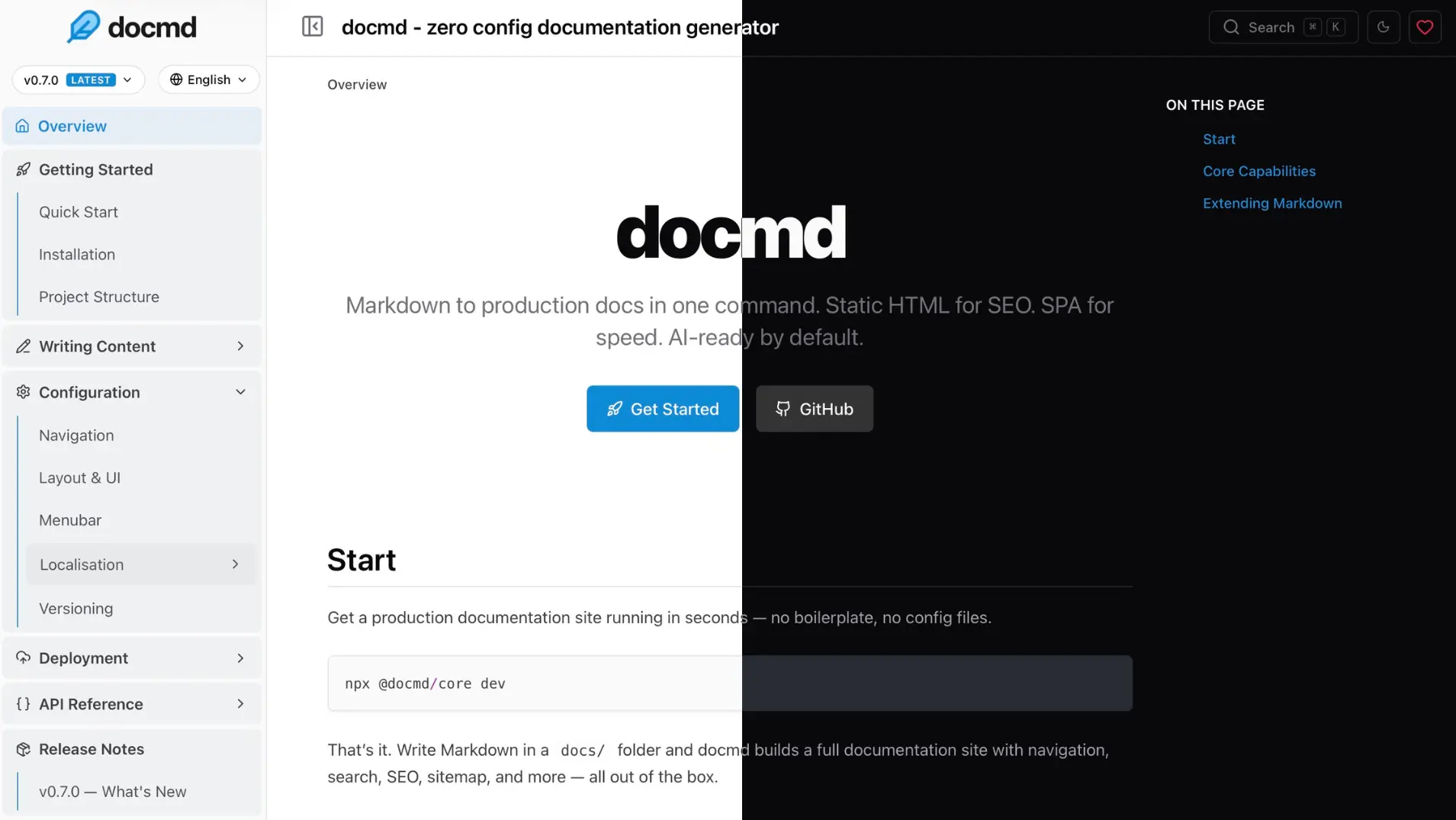
Quick Start
Point docmd at a folder of Markdown files:
npx @docmd/core dev
Open http://localhost:3000.
That's it. Navigation is generated from your file structure. No config file, frontmatter, or framework required.
When you're ready to deploy:
npx @docmd/core build
docmd generates a static site that can be deployed to Vercel, Cloudflare Pages, Netlify, GitHub Pages, S3, NGINX, Caddy, or any other static host.
Requires Node.js 20+.
Global installation and Docker
Install globally:
npm install -g @docmd/core

# or
pnpm add -g @docmd/core
Then:
docmd dev
docmd build
Or run with Docker:
docker run -p 3000:3000 ghcr.io/docmd-io/docmd:latest
Pin the Docker image to a specific release for reproducible production builds.
One Source. Every Output.
docmd is an open source documentation compiler.
Instead of treating your Markdown as input for a website alone, docmd compiles the same source into outputs for readers, search engines, LLMs, coding agents, and knowledge systems.
Markdown
   │
   ▼
 docmd
   │
   ├── → Static documentation site
   ├── → Offline search index
   ├── → llms.txt / llms-full.txt
   ├── → Open Knowledge Format (OKF)
   ├── → Sitemap + SEO metadata
   ├── → robots.txt + Open Graph
   ├── → MCP interface for AI agents
   └── → AI Assistant context
One source tree. One build pipeline. No separate documentation and AI knowledge stacks to maintain.
Why docmd?
Documentation increasingly has more than one reader.
People need a fast, navigable website. Search engines need structured metadata. LLMs need clean context. Coding agents need tools and protocols. RAG systems need structured knowledge.
docmd builds these together while keeping Markdown at the centre.
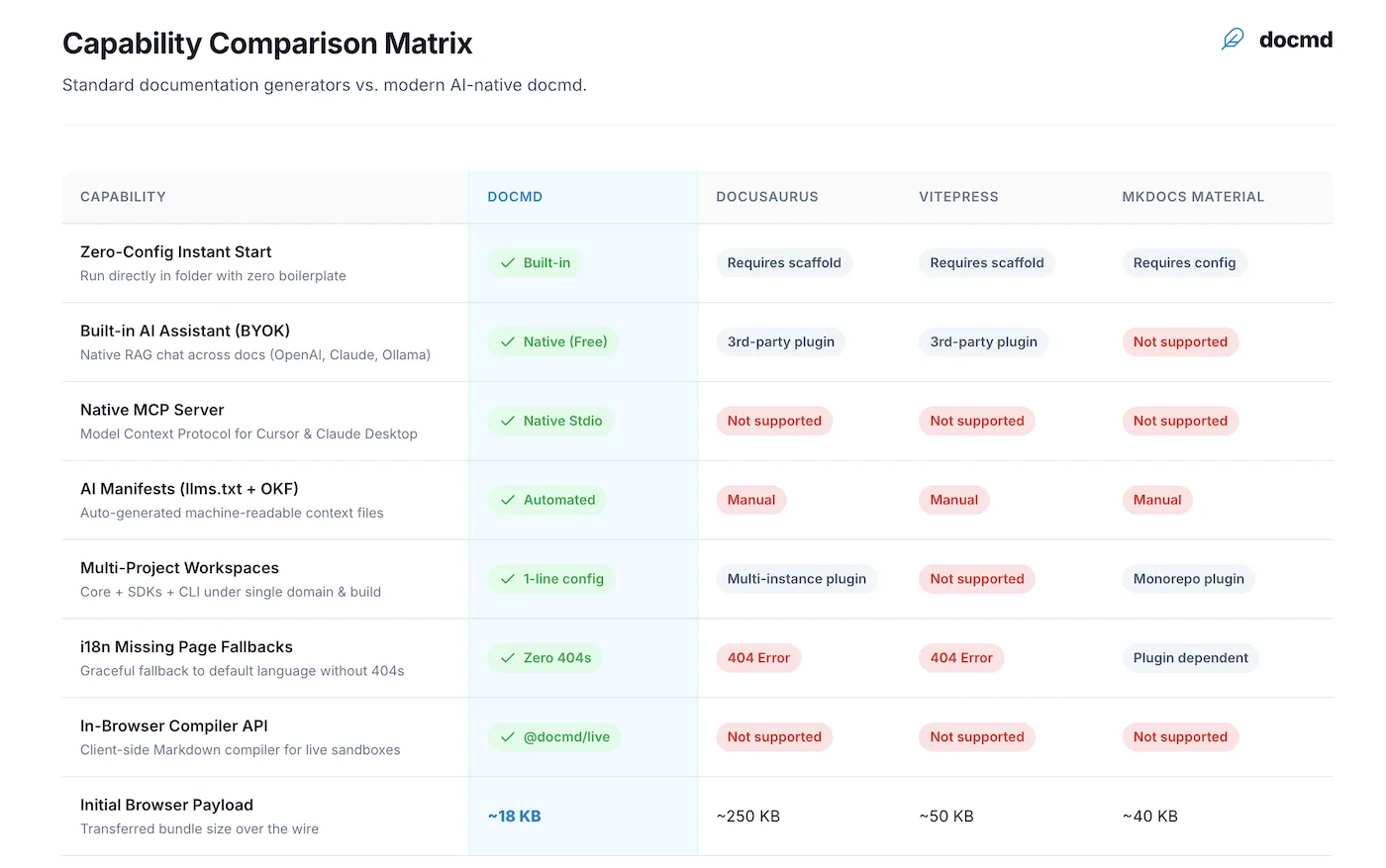
See the complete comparison with Docusaurus, Mintlify and other documentation tools →
Features
Zero config, instant start
Point docmd at any Markdown folder and it runs. Navigation is generated automatically from your file structure — no boilerplate, frontmatter, or build pipeline required to get started.
Lightweight by default, fast everywhere
docmd generates static HTML with minimal vanilla JavaScript and fast SPA-style navigation. Offline full-text search, sitemap, canonical URLs, Open Graph metadata, and other essentials are built into the output.
AI & agent-ready
docmd treats machine-readable documentation as part of the build, not a separate publishing workflow.
- AI Assistant — RAG-powered chat grounded in your documentation
- MCP Server — lets compatible coding agents search, read, and validate your docs
llms.txt/llms-full.txt— complete LLM-readable documentation context- Open Knowledge Format (OKF) — structured knowledge bundles for AI and RAG systems
- Agent Skills — reusable instructions for LLMs and coding agents
- Copy as Markdown / Copy Context — clean context extraction directly from the browser
- Semantic search — optional vector retrieval alongside built-in keyword search
Built to scale
- Internationalisation with locale-aware search and generated outputs
- Versioning for multiple documentation releases
- Workspaces for monorepos and multi-project setups
- OpenAPI 3.x rendering for API documentation
- Built-in templates, custom CSS/JavaScript, and light/dark mode
AI Assistant & Cloud Relay
docmd includes a RAG-powered AI Assistant grounded in your documentation.
You can connect it to your own backend or local AI provider. If your documentation is deployed as a static site, docmd Cloud Relay provides the hosted bridge instead.
Your documentation
        │
        ▼
 @docmd/plugin-ai
        │
        ▼
 docmd Cloud Relay
        │
        ▼
 Your AI provider
Cloud Relay securely sends AI requests to the provider you choose, so provider credentials do not need to be shipped to the browser and you do not need to operate an AI backend.
Cloud Relay is free to use with your own AI provider key.
- Bring your own provider and model
- Keep provider credentials off the client
- Works with static hosting
- No AI backend to deploy or maintain
- Usage visibility and reader-question insights
- Connect multiple documentation projects from one account
Set up Cloud Relay → • AI Assistant documentation →
The Cloud Relay is free. Model usage may be charged separately by your chosen AI provider.
CLI
docmd dev            # Start the local development server
docmd build          # Build for production
docmd live           # Start the browser-based Live Editor
docmd init           # Create a configuration file
docmd doctor         # Check configuration and plugin status
docmd validate       # Check internal documentation links
docmd migrate        # Migrate from Docusaurus, VitePress, MkDocs, or Starlight
docmd deploy         # Generate deployment configuration
docmd mcp            # Run the MCP server over stdio
docmd add <name>     # Install a plugin or template
docmd stop           # Stop running docmd development servers
See complete CLI Commands →
Plugins
docmd is built around a plugin system. Common documentation capabilities ship with core, while optional plugins can be installed when needed.
| Plugin | Status | Description |
|---|---|---|
ai | Core | RAG-powered AI Assistant with BYOK, local providers, and Cloud Relay |
search | Core | Offline keyword search with optional semantic search |
seo | Core | SEO and Open Graph metadata |
sitemap | Core | Generates sitemap.xml |
git | Core | Git history and last-updated metadata |
analytics | Core | Lightweight analytics integration |
llms | Core | Generates llms.txt and llms-full.txt |
okf | Core | Open Knowledge Format bundles |
mermaid | Core | Mermaid diagram rendering |
openapi | Core | OpenAPI 3.x documentation renderer |
pwa | Optional | Progressive Web App and offline navigation |
threads | Optional | Inline documentation discussions (by @svallory) |
math | Optional | KaTeX / LaTeX rendering |
Install an optional plugin:
docmd add <plugin-name>
Build your own: Plugin Development Guide →
Configuration
Configuration is optional.
Add docmd.config.json, docmd.config.ts, or docmd.config.js in your project root when you need more control:
{
  "title": "My Project",
  "url": "https://docs.myproject.com",
  "src": "./docs",
  "out": "./dist"
}
TypeScript and JavaScript configurations can be used when dynamic values are required.
Programmatic API
Use docmd from Node.js scripts, CI pipelines, or custom build systems.
import { build } from '@docmd/core';

// Build documentation programmatically.
await build('./docmd.config.json', { isDev: false });
CommonJS and ESM are supported.
Migration
Existing documentation does not need to start from scratch.
docmd migrate
Migration tooling is available for supported documentation frameworks including Docusaurus, VitePress, MkDocs, and Starlight.
Open Source
Your documentation is the intellectual heart of your project. It belongs in plain Markdown files in your Git repository — portable, version-controlled and auditable.
The docmd compiler and official core plugins are MIT-licensed and will remain free to use, with no paywalled compiler features.
Generated documentation can be hosted anywhere and does not require docmd-hosted infrastructure.
Community
- Documentation → docs.docmd.io
- Questions & ideas → GitHub Discussions
- Bugs & feature requests → GitHub Issues
- Contributing → CONTRIBUTING.md
- Roadmap → GitHub Discussions
Support docmd
If docmd is useful to you:
- Give the repository a ⭐
- Share it with someone building documentation
- Open issues, contribute fixes, or build a plugin
- Sponsor development on GitHub
License
MIT License. See LICENSE for details.