Docutain SDK for Capacitor
Preview
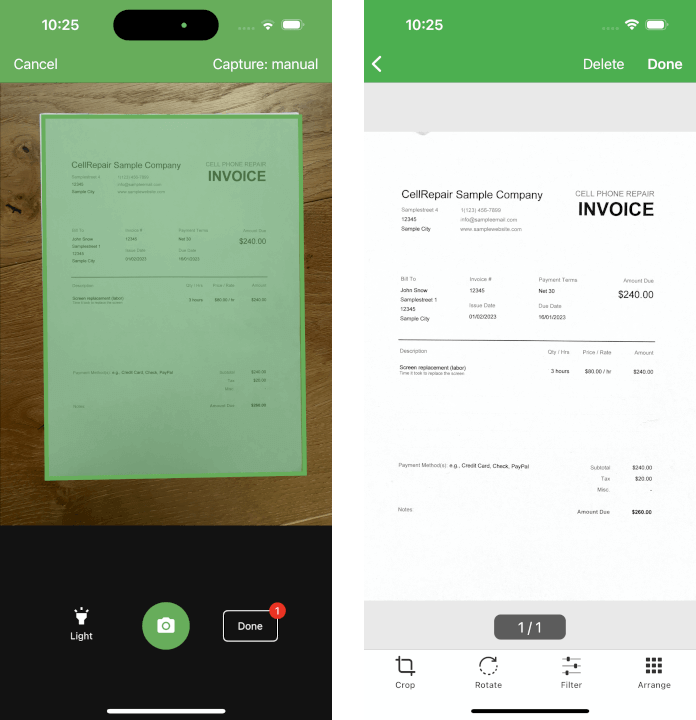
What is Docutain SDK?
The Docutain SDK brings functionalities for automatic document scanning, data capture, image processing, OCR text recognition, intelligent data extraction, PDF creation and photo payment to your apps.
It works 100% offline, which ensures maximum data safety.
It contains individually licensable modules:
For more details visit our website https://sdk.Docutain.com
If you like to test the functionality without writing any lines of code, check out our Showcase Apps.
Plugin Versions
| Capacitor version | Plugin version |
|---|---|
| 7.x | 7.x |
| 6.x | 6.x |
| 5.x | 1.x |
Usage
The following shows a minimum example to use the document scanner. For all available features and theming possibilities, please check out our documentation.
Initialize
In order to use any functionality of the SDK, you must initialize it first.
try{
    await DocutainSDK.initSDK({licenseKey: "<YOUR-LICENSE-KEY>"})
} catch (error) {
    //init of Docutain SDK failed, get the last error message
    console.error(error);
    //your logic to deactivate access to SDK functionality
}
For testing purposes, you can leave the license key empty. However, the SDK will stop working after 1 minute. You can get a free extended trial license on our website.
Start the scanner to scan documents
On iOS, make sure to add a camera usage description in the Info.plist. If you don't, the app will crash.
NSCameraUsageDescription - "In order to scan documents, you need to grant permission to access the camera."
To start the document scanner, you only have to call DocutainSDK.startDocumentScanner and wait for it to return.
Check out the documentation for possible scan configurations.
try{
    await DocutainSDK.startDocumentScanner({
        //customize the scanner config according to your needs
    });
} catch (error) {
    if ((error as { code?: string })?.code === 'CANCELED') {
        //user canceled scan process
        console.log(`user canceled`);
    } else {
        console.error(error);
    }
}
Generate a PDF document
Once the user finished the scan, you can generate a PDF document out of the scanned pages. The PDF document will include the recognized text, making it searchable and selectable.
Check out the documentation for more details.
try{
    const pdfUri = (await DocutainSDK.writePDF({
        fileUri: destinationUri,
        overWrite: true,
    })).fileUri
} catch (error) {
    console.error(error);
}
Image Export
It is also possible to get the scanned pages as single image files.
Check out the documentation for more details.
try{
    const pageCount = (await DocutainSDK.pageCount()).count;
    for(let i = 1; i <= pageCount; i++){
        const imageUri = (await DocutainSDK.writeImage({
            pageNumber: i,
            fileUri: destinationUri
        })).fileUri
    }
}catch (error) {
    console.error(error);
}
Text Recognition
With a single line of code, you can get the recognized text of the scanned document or single pages.
Check out the documentation for more details.
try{
    const text = (await DocutainSDK.getText()).text
}catch (error) {
    console.error(error);
}
Data Extraction
It is also possible to run data extraction on the scans to extract certain values, like Address, Amount, IBAN, Date and more.
Check out the documentation for more details.
try{
    const analyzeData = (await DocutainSDK.analyze()).data;
}catch (error) {
    console.error(error);
}
Photo Payment
Integrate Photo Payment into your banking app within minutes with just a few lines of code. It works 100% offline on device. No data at all is transfered to any external server or cloud service, ensuring 100% data protection.
Check out the documentation for more details.
try{
    const result = await DocutainSDK.startPhotoPayment({
        //customize the photo payment process according to your needs
    });
    if(result.data !== ""){
        //payment information has been extracted
        //result.data is a JSON string containing the information
        //extract the fields you need and pass it on to your payment sheet
    } else{
        //no data was extracted at all
        //Note: this case is only reachable, if you disabled the Empty Result Screen
    }
} catch (error) {
    if ((error as { code?: string })?.code === 'CANCELED') {
        //user canceled scan process
        console.log(`user canceled`);
    } else {
        console.error(error);
    }
}
Documentation of the Docutain SDK
The documentation includes everything you need to know to integrate the Docutain SDK into your Capacitor application. If you prefer sample projects over documentation, check out our Docutain SDK Capacitor sample app on Github.
Changelog
All changes included in each version can be found here: Changelog
License and Support
The Docutain SDK is a commercial product and requires a paid license for production use. In order to get a trial license, please visit our website via https://sdk.docutain.com/TrialLicense to generate a trial license key.
If you need technical support of any kind, please contact us via [email protected].