@domainkit/react
Headless React hooks for custom-domain setup, over a transport your server owns. The package supplies state, copy, and accessibility; your application supplies the markup. Provider credentials never reach the browser.
Documentation: domain-kit.dev
Install
npm install @domainkit/react domainkit effect react react-dom
React 19 is required. Install domainkit and @domainkit/react at the same release version.
For the styled composition, add the flow from the DomainKit registry into your own shadcn kit:
npx shadcn@latest add https://domain-kit.dev/r/domain-flow.json
One hook
"use client";

import { DnsRecord } from "domainkit";
import { Transport } from "domainkit/client";
import { Domain, DomainKit } from "@domainkit/react";

const transport = Transport.fromFetch("/api/domainkit");

const requirements = [
  DnsRecord.cname({ name: "app.example.com", target: "edge.acme.dev", purpose: "Serve your site" }),
  DnsRecord.txt({
    name: "_acme.app.example.com",
    value: "acme-verify=7f3a",
    purpose: "Prove ownership",
  }),
];

function DomainSetup() {
  const flow = Domain.useFlow({ domain: "app.example.com", requirements });
  return <DomainFlowCard flow={flow} />;
}

export function DomainSettings() {
  return (
    <DomainKit.Root transport={transport}>
      <DomainSetup />
    </DomainKit.Root>
  );
}
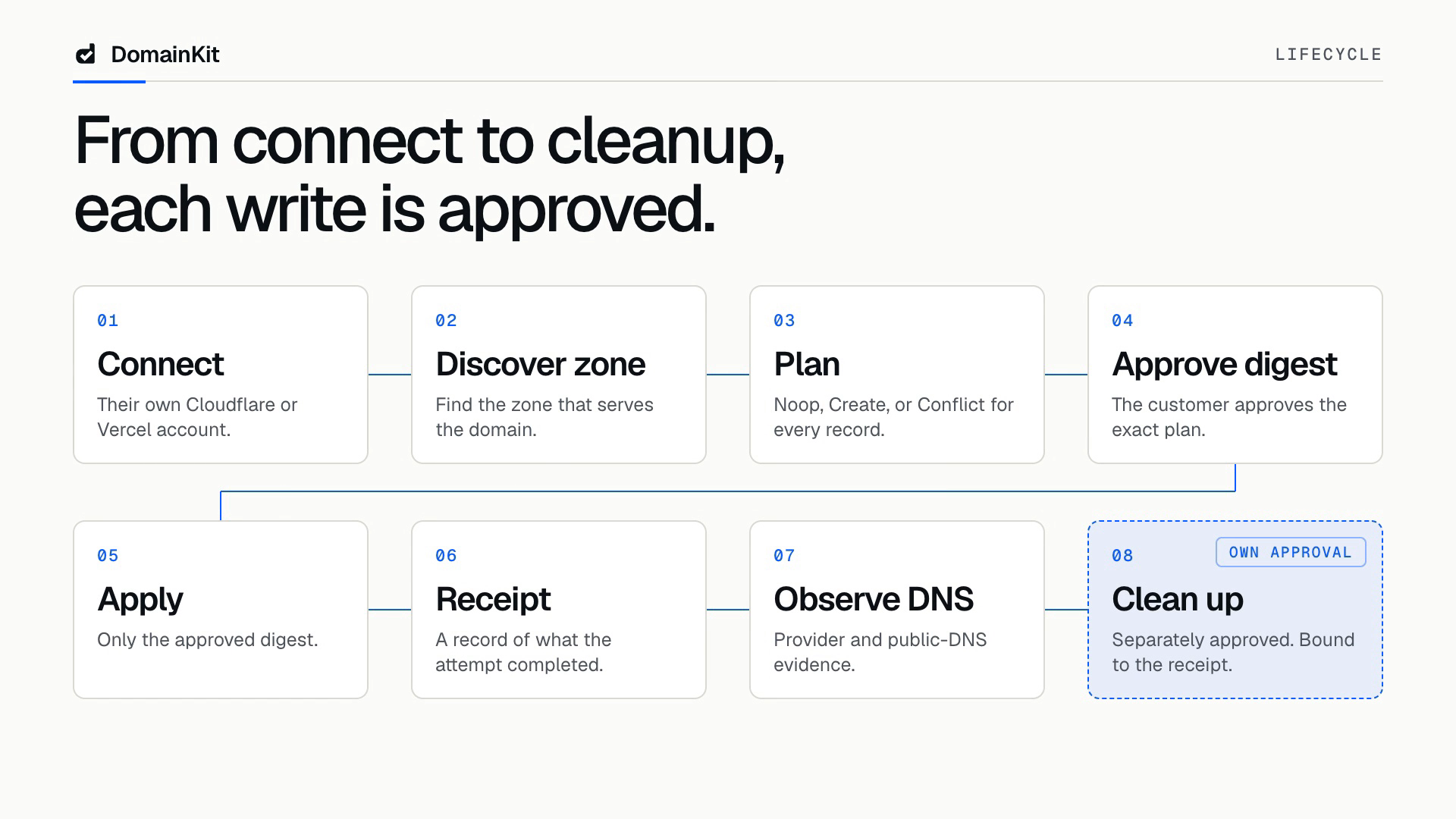
Domain.useFlow connects a provider, plans the DNS changes, takes the customer's approval or
refusal, applies the plan, observes the records, and cleans them up against the apply receipt. It
returns the four controllers, the plan the rows report, the latest readiness, the capability groups
the transport declares, and a FlowState your own surface reads.
Transport.fromFetch points at the routes you mounted from domainkit/server. Writing it inline in
JSX is fine: DomainKit.Root keeps the transport's identity for the whole mount, so the controllers
do not restart on every render. Pass revision to re-inspect every mounted domain after a change
the UI did not make.
An interactive provider returns the customer to the page they started from. Pass returnTo to name
a different destination, or null to leave the server's defaultReturnTo in charge.
Callback recovery
Connect.useRecovery() returns a named Connect.Recovery with outcome and dismiss().
The outcome is a CallbackRecovery.Model from domainkit/client: kind is cancelled,
restart, or inspect, provider identifies the provider to offer again, and optional
connectionId identifies an existing connection to re-credit. A callback hint is
not evidence of a successful connection. For inspect, inspect connected accounts before retrying.
Render the hint with recoveryCancelled(provider), recoveryRestart(provider), or
recoveryInspect(provider) from Messages.Catalog, passing the provider's display name. Each
returns a title and description. Use the catalog's retry and dismissRecovery action labels.
A retry calls the existing connection controller's connect({ provider, method }) with the
customer's chosen method. When the hint includes connectionId, call
reconnect({ connectionId, provider, method }) instead. Both the domain controller and account
controller expose it; the domain input is Connect.ReconnectInput. Dismiss clears the visible alert. Controllers strip recovery parameters from the default current
return URL even when another control starts the attempt, leaving the current page unchanged.
dismiss() removes the recovery parameters through history.replaceState, preserving host history
state, unrelated query parameters, and the hash without navigating. The hook returns null during
server rendering and the first hydration render, then reads the browser URL. It follows browser
history and hash events and checks the URL on host rerenders; a client router that changes history
without a browser event must rerender the consumer. The hook requires no DomainKit.Root.
What the flow says about a domain
flow.state is what DomainKit has to say, so your own offers can be ordered beside it rather than
competing with it.
| Field | Says |
|---|---|
connected | DomainKit holds a connection for this domain |
offering | The connect surface has something to offer |
provider, label | Who holds the connection, and which account the records go to |
receiptId, applied | The apply this domain's records came from |
connection, provisioning | The tag each controller's state carries |
readOnly | The customer may read this domain but not write to it |
Discovery names the provider whose nameservers serve the domain, and Connect.hostProvider returns
its descriptor. When no registered provider serves the zone there is nothing DomainKit can connect,
so offering is false. Pass connect: "always" to offer every provider anyway, or
connect: "never" for a domain your application has already settled another way.
Connecting is the customer saying yes to the records, so the plan builds itself the moment a
connection lands, after a token connect and after the customer returns from a provider. One
approve adds them, and the flow observes the domain again to read them back. A domain that already
holds an apply receipt plans again when a later observation reads one of its records back missing or
wrong, so records deleted at the provider are offered again from the same button. Records the flow's
own cleanup took away are not that.
Controllers
Compose the flow yourself from the same hooks. Each takes one options object and returns a named
Controller whose State is a tagged union.
const connection = Connect.useController({ domain });
const provisioning = Provision.useController({ domain, requirements, onApplied });
const cleanup = Cleanup.useController({ domain, receiptId, onCleaned });
const verification = Verify.useController({ domain, polling: true });
approve authorizes the plan digest and applies it. reject records the customer's refusal; the
attempt is terminal and a new plan is needed. retry builds a new plan when the reason says the old
one is gone, and re-runs the failed step otherwise.
Connect.describeMethods arranges one provider's auth methods into the interactive ones a customer
clicks through and the ones that ask for credentials, so a connect surface asks for one decision at
a time. Connect.rejectedField names the one field a rejection was about.
Adding a domain
Connect.useZones lists every zone the workspace's accounts reach, Connect.useAccounts adds
another account without naming a domain and lists the ones already connected, each with the
label the provider gave it (null when the provider named none), and Connect.useDomainField turns a text input into a
combobox over those zones: it returns inputProps, listboxProps, and optionProps, moves the
highlight with the arrow keys, and completes on Tab or Enter while keeping whatever subdomain was
typed in front of the zone. Zones that already hold the typed name are offered on their own, deepest
first. A finished name that no connected zone holds offers nothing.
const { zones } = Connect.useZones();
const field = Connect.useDomainField({ zones, value, onChange: setValue, onResolve });

<input {...field.inputProps} />
<ul {...field.listboxProps}>
  {field.suggestions.map((zone) => (
    <li key={`${zone.connectionId}:${zone.zone}`} {...field.optionProps(zone)}>
      {zone.zone}
    </li>
  ))}
</ul>;
The member view
A customer who may read a domain but not change it gets readOnly. State still reports; every
command that would change the domain refuses to run, at the controller rather than in your markup,
so a control you render anyway cannot reach the transport.
<DomainKit.Root transport={transport} readOnly>
  <DomainSetup />
</DomainKit.Root>
Domain.useFlow takes the same flag when only one domain on the page is read-only, and it rides on
flow.state.readOnly, so your surface can say who may connect instead of rendering nothing.
Capability gating is the other half: a group the transport does not declare is absent from
flow.capabilities, so a transport built with
Transport.fromFetch(url, { capabilities: ["connection", "verification"] }) already rules out
provisioning and cleanup. readOnly covers the authorization a transport cannot express, such as a
member of an organisation who reaches the same routes.
Verification does not wait for a connection: the flow observes the requirements it was given, so a domain with no provider attached still reports which records are in place.
A host that observes on its own clock passes the readiness it holds as
Domain.useFlow({ verification: { readiness, observe } }), or as supplied on
Verify.useController. The hook then observes nothing on mount, sets no timer, and routes observe
and retry to the host's own, while drift replanning runs off the supplied value.
Observation and verification retries stay available in read-only, because checking DNS reads the world rather than changing the domain. Provisioning and cleanup retries are refused. Connection retries re-inspect instead of resending a failed write.
Words
Messages.Catalog holds every user-visible string, including a title and a description per
DomainKit.Error reason; nothing renders a tag, a status literal, or a reason name. Pass
messages to DomainKit.Root to override any key.
const describe = Outcome.useDescribe();
const words = describe(error, { provider: "Cloudflare" });
Records
Records.standingOf answers both facts one row carries: planned, the operation a pending plan
holds for that record, and observed, the requirement the last observation stored for it, evidence
included. Either can be null. Records.useCopy is the clipboard control a value needs, and
Records.toZoneFile and Records.downloadZoneFile spell the whole requirement set for a customer
who edits DNS by hand.
Next.js
The package entry carries "use client". A transport is an object of functions, so build it inside
a client module rather than passing one from a server component.
Learn more
License
MIT