Spectral Linter Plugin
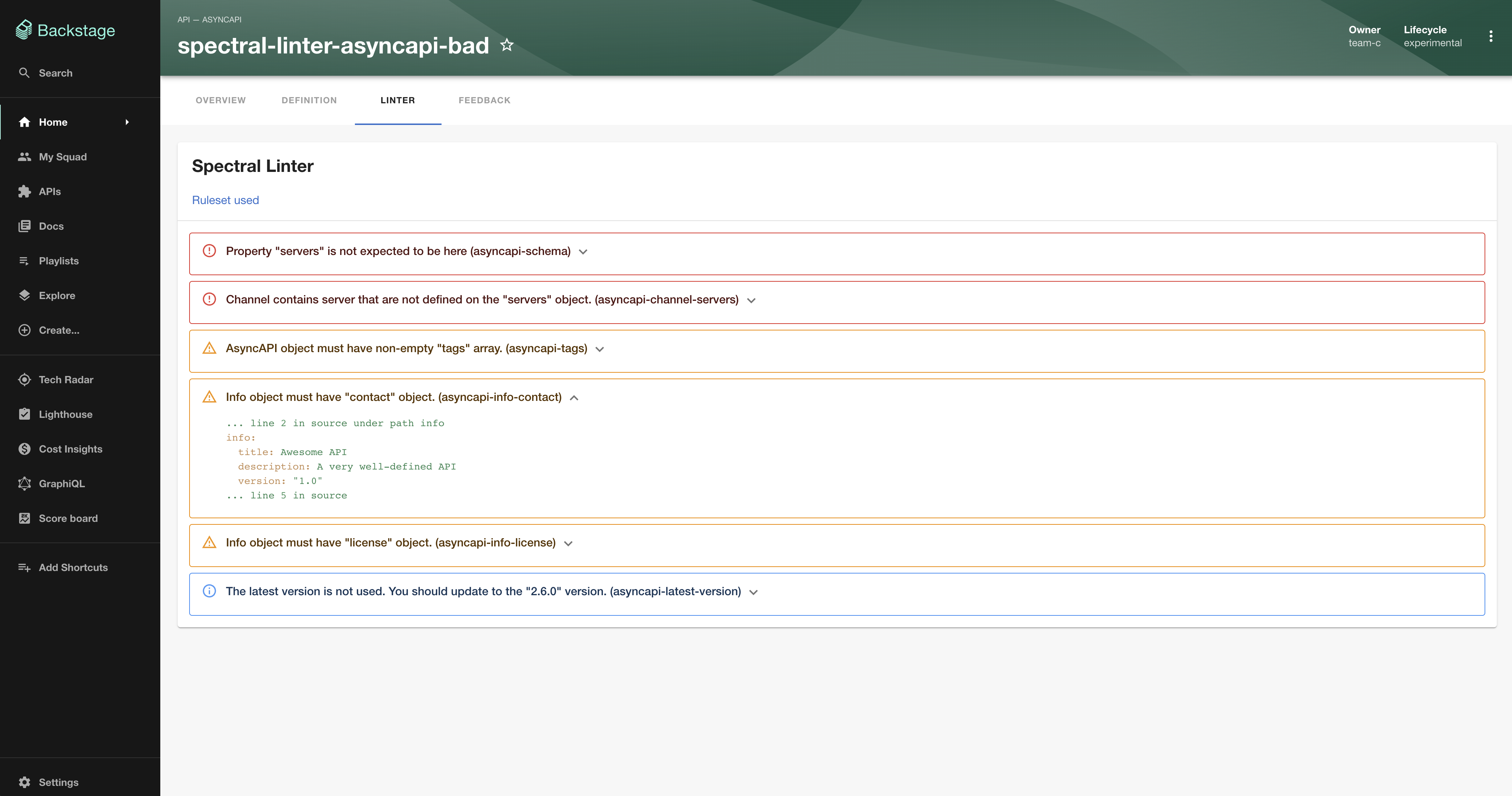
Welcome to the Spectral Linter plugin!
This plugin allows you to lint (validate) API's with rule sets.
Setup
Install this plugin:
# From your Backstage root directory
yarn --cwd packages/app add @dweber019/backstage-plugin-api-docs-spectral-linter
Entity Pages
Add the plugin as a tab to your Entity pages:
// In packages/app/src/components/catalog/EntityPage.tsx
import { EntityApiDocsSpectralLinterContent, isApiDocsSpectralLinterAvailable } from '@dweber019/backstage-plugin-api-docs-spectral-linter';

...

const apiPage = (
  <EntityLayout>
    {/* other tabs... */}
    <EntityLayout.Route if={isApiDocsSpectralLinterAvailable} path="/linter" title="Linter">
      <EntityApiDocsSpectralLinterContent />
    </EntityLayout.Route>
  </EntityLayout>
Add backstage.io/spectral-ruleset-url annotation to your catalog-info.yaml:
metadata:
  annotations:
    backstage.io/spectral-ruleset-url: <url-to-your-yaml-or-json-file>
Default rule sets
You can provide default rule sets in you app-config.yaml like this
spectralLinter:
  openApiRulesetUrl: <url-to-your-yaml-or-json-file>
  asyncApiRulesetUrl: <url-to-your-yaml-or-json-file>
Local development
There is a local setup at plugins/api-docs-spectral-linter/dev which can be started with yarn --cwd plugins/api-docs-spectral-linter start from the root.
@dweber019/backstage-plugin-api-docs-spectral-linter 是什么? Welcome to the Spectral Linter plugin!
如何安装 @dweber019/backstage-plugin-api-docs-spectral-linter? 在项目目录运行 npm install @dweber019/backstage-plugin-api-docs-spectral-linter,或使用 pnpm add / yarn add / bun add。它还需要宿主项目提供 peer 依赖:react(^16.13.1 || ^17.0.0 || ^18.0.0)、react-dom(^16.13.1 || ^17.0.0 || ^18.0.0)、react-router-dom(6.0.0-beta.0 || ^6.3.0)。npm 7 及以上与 pnpm 8 及以上默认会自动安装必需的 peer 依赖,Yarn 需要手动安装。
@dweber019/backstage-plugin-api-docs-spectral-linter 支持 TypeScript 吗? 支持。包内自带 TypeScript 类型声明(package.json 声明了 types 入口),安装后即可获得类型提示,无需再安装 @types 包。
@dweber019/backstage-plugin-api-docs-spectral-linter 支持 ESM 还是 CommonJS? 以 CommonJS 形式发布,可以直接 require();在 ES Module 项目中也可以用 import 引入(Node.js 会把 module.exports 作为默认导出)。
@dweber019/backstage-plugin-api-docs-spectral-linter 可以商用吗? @dweber019/backstage-plugin-api-docs-spectral-linter 使用 MIT 许可。宽松许可:允许商业使用、修改和再分发,通常只需在分发时保留原版权与许可声明。以上为概括,不构成法律意见,请以许可原文为准。
@dweber019/backstage-plugin-api-docs-spectral-linter 的下载量有多少? 根据 npm 官方下载统计,@dweber019/backstage-plugin-api-docs-spectral-linter 在 2026/10/13 – 2026/11/11 这 30 天内被下载 2,208 次,日均约 74 次。下载量会把 CI 构建、镜像同步和作为其他包依赖的安装一并计入,适合横向比较热度,不能直接等同于使用人数。
@dweber019/backstage-plugin-api-docs-spectral-linter 还在维护吗? 最新版本 0.5.2 发布于 2025/12/19(10 个月前);至今共发布 33 个版本,其中过去 12 个月发布了 1 个;首次发布于 2023/03/26。发布频率只是参考信号:功能稳定的工具可能很少需要更新,建议结合源码仓库的 issue 和提交记录判断。