Ngx 对象diff
角 2+ 库来比较和显示对象差异.
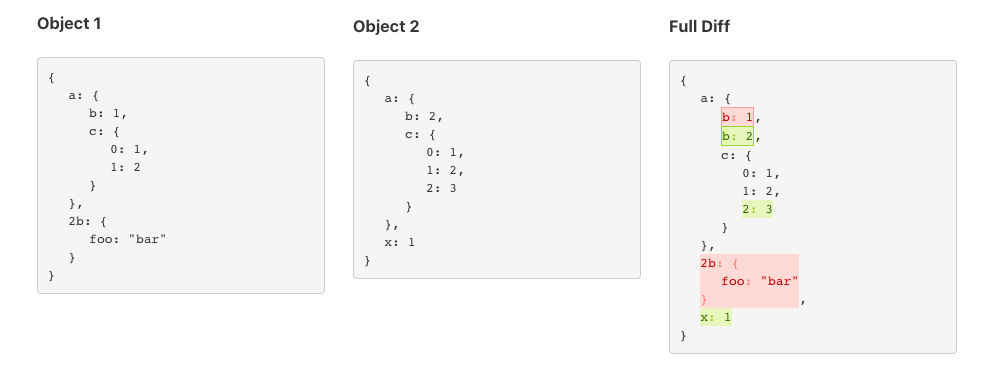
安装
npm i ngx-object-diff
现有方法 NgxObjectDiff 服务
setOpenChar: 设置视图的开口字符,默认为 {
setCloseChar: 设置视图的关闭字符,默认为 }
diff: 比较和构建包括原型属性在内的两个对象的所有差异
diffOwnProperties: 比较和构建两个对象的相差,只考虑其属性
toJsonView: 向完整的 JSON 格式化对象视图格式化 diff 对象
toJsonDiffView: 将 diff 对象格式化为 JSON 格式化视图,但仅作修改
objToJsonView: 将任何javascript对象格式化为 JSON 格式化视图
使用量
导入 Ngx 对象Diff 模块
import { NgxObjectDiffModule } from 'ngx-object-diff';

@NgModule({
  declarations: [
    AppComponent
  ],
  imports: [
    BrowserModule,
    NgxObjectDiffModule
  ],
  providers: [],
  bootstrap: [AppComponent]
})
export class AppModule { }
输入服务
  constructor(private objectDiff: NgxObjectDiffService) { }

  ngOnInit(): void {
    // This is required only if you want to show a JSON formatted view of your object
    this.object1View = this.objectDiff.objToJsonView(this.object1);
    this.object2View = this.objectDiff.objToJsonView(this.object2);

    // you can directly diff your objects js now or parse a Json to object and diff
    let diff = this.objectDiff.diff(this.object1, this.object2);
    // you can directly diff your objects including prototype properties and inherited properties using `diff` method
    let diffAll = ObjectDiff.diff($scope.yourObjectOne, $scope.yourObjectTwo);

    // gives a full object view with Diff highlighted
    this.diffView = this.objectDiff.toJsonView(diff)
    // gives object view with only Diff highlighted
    this.diffValueChanges = ObjectDiff.toJsonDiffView(diff);
  }
构成部分
将变量绑入 ngx-object-diff 构成部分。 它会照顾造型.
   <ngx-object-diff [obj]="object1View"></ngx-object-diff>
   <ngx-object-diff [obj]="object1View"></ngx-object-diff>
   <ngx-object-diff [obj]="diffView"></ngx-object-diff>
   <ngx-object-diff [obj]="diffValueChanges"></ngx-object-diff>
备选办法
使用 html 直接绑定变量 innerHTML 角绑定属性
使用一个 <pre> 三. 取得更好成果的要素
      <pre [innerHTML]="object1View" ></pre>
      <pre [innerHTML]="object2View" ></pre>
      <pre [innerHTML]="diffView" ></pre>
      <pre [innerHTML]="diffValueChanges"></pre>
依据 https://github.com/hipster-labs/angular-objects-diff 互联网档案馆的存檔,存档日期2013-12-21