agent-lens


Read back everything a Claude Code session did — prompts, reasoning, tool calls, sub-agents, inputs and outputs — in a local UI, long after the session ended.
Claude Code expires its own transcripts. agent-lens keeps a verbatim copy of every session you have ever run, on your machine, searchable after the source is gone. It reads the files the harness already writes to disk: no account, no API key, and nothing added to your agent or your application.
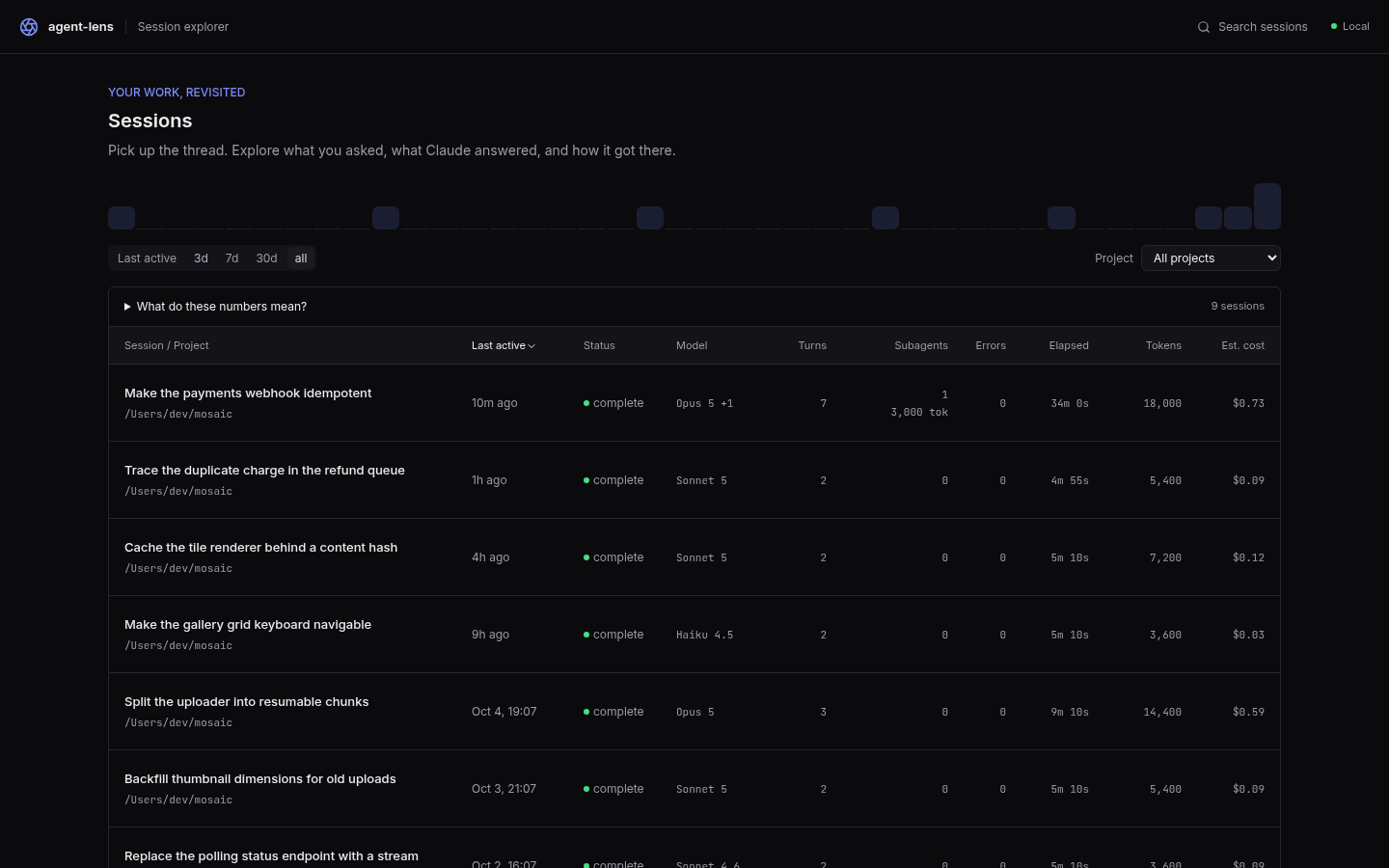
Questions it answers
- What did I actually ask for three weeks ago? The archive still holds the session even once Claude Code has expired its copy.
- Where did that session go wrong? Read the session back in order: every tool call, its real input, its real output, where it happened.
- What did the sub-agent do? Open the
Agentcall and read the sub-agent's own transcript — its reasoning, its tools, and what it reported back. - Which session touched this file? Full-text search across prompts, tool payloads and output too large to sit inline.
- What is it costing? Tokens and estimated cost, rolled up per session, per turn and per call.
Quickstart
npx @faithfulalabi/agent-lens
That starts the local server and the UI and prints the URL. Open it. Sessions you have already run are there; new ones show up as they happen.
Requires Node.js >=24.
A short tour
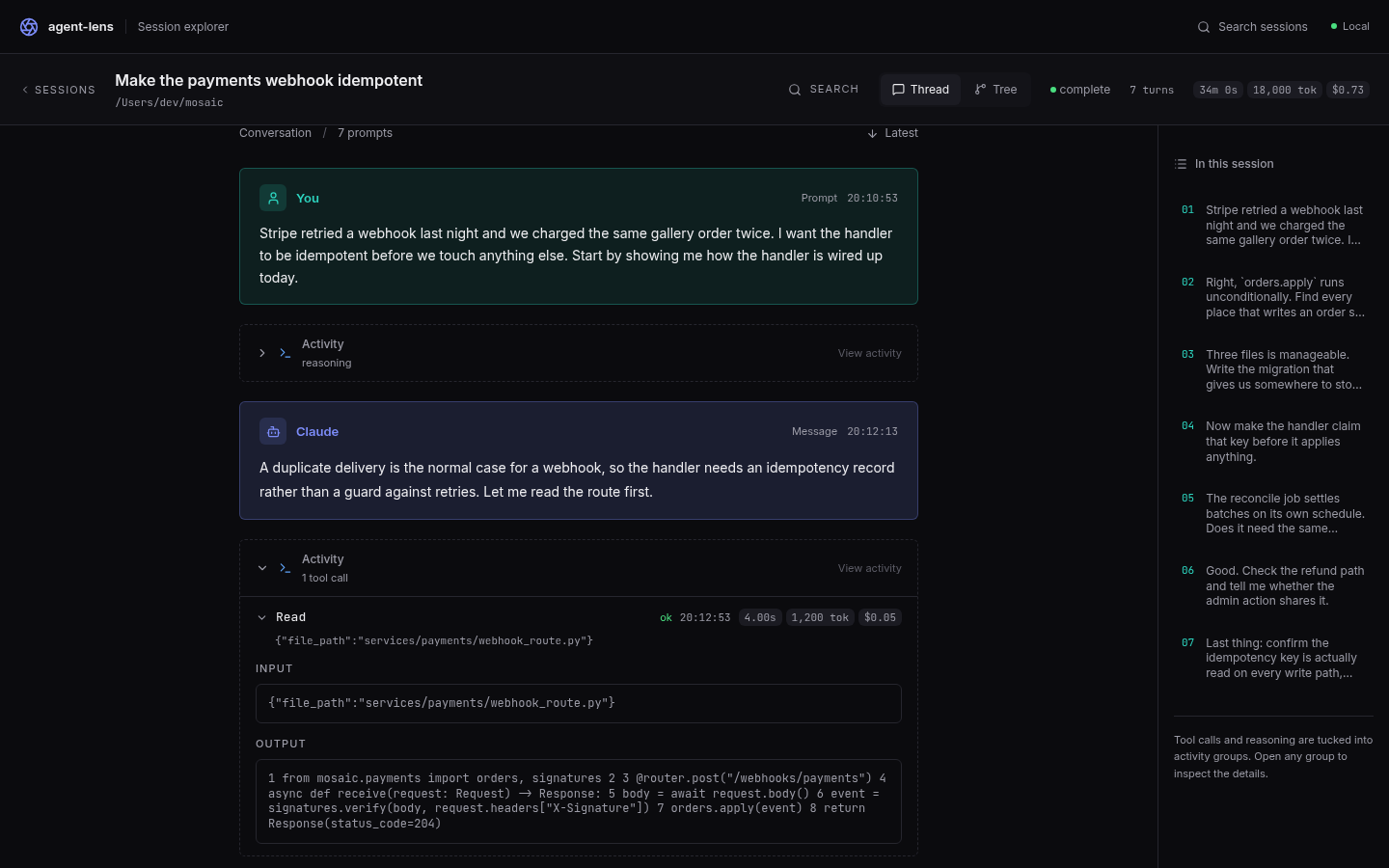
Every call, with its real payload. The session reads back as a conversation, with the tool calls tucked into activity groups between the messages. Open one and it shows what actually went in and what actually came back.
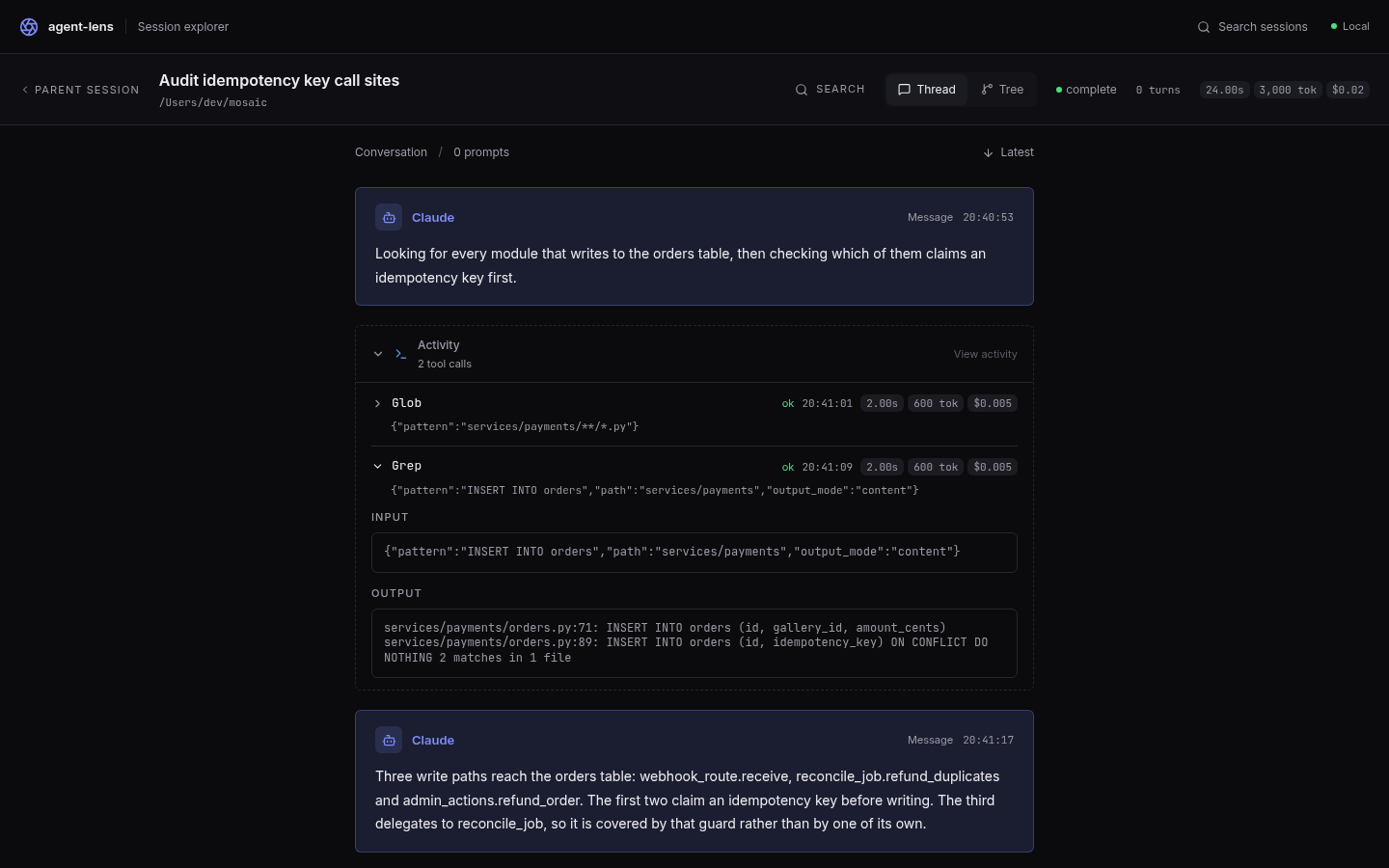
Sub-agents keep their own transcript. An Agent call links straight to the session the
sub-agent ran, with its own messages, its own tool calls and its own cost — and a way back to the
parent.
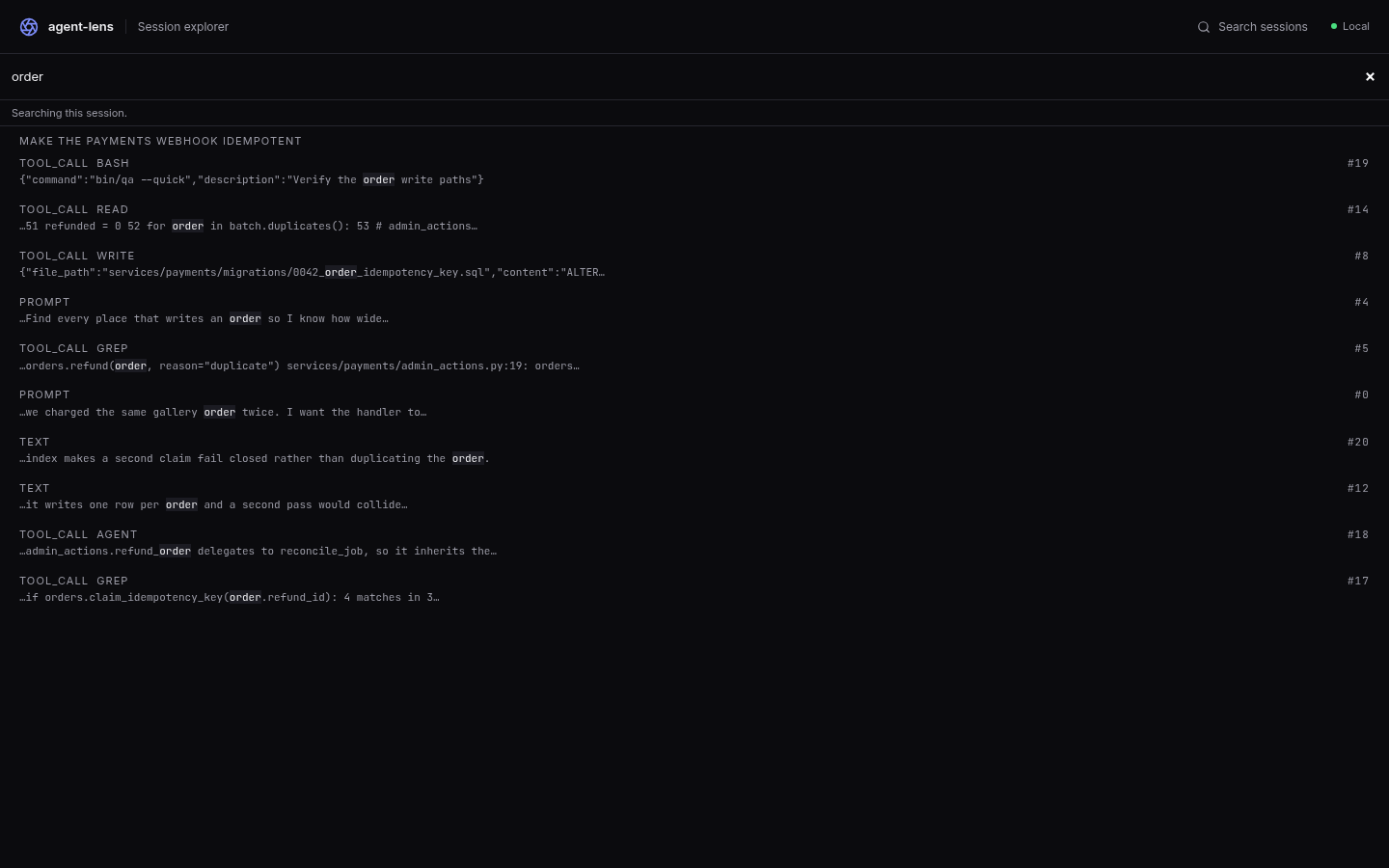
Search reaches the payloads, not just the prompts. Hits land on the event that carried them, and the match is highlighted in place. The screen below is search scoped to one open session; search across the whole archive is reached from the session list.
How it compares
LangSmith, Langfuse and Arize Phoenix are tracing platforms for applications you are building, and all three now also ship a Claude Code plugin. Each posture below was read from that tool's own current documentation.
| Tool | What it needs from you | Where the data lives | What it reads |
|---|---|---|---|
| LangSmith | An account and an API key. Tracing comes from its SDK in your application, from OpenTelemetry, or from its Claude Code plugin. | LangChain's cloud by default. Self-hosted and BYOC are Enterprise-plan options. | Spans your application emits, or the turns its Claude Code plugin reports while a session runs. |
| Langfuse | An account — cloud or self-hosted — and a key pair. Tracing comes from its SDK, from OpenTelemetry, or from its Claude Code plugin. | Langfuse Cloud by default. Self-hosting is documented and open source. | Spans your application emits. Its Claude Code plugin reads each turn's transcript as that turn completes. |
| Arize Phoenix | A Phoenix instance to send to — the documented default is a local one, which needs no account. Tracing comes from OpenInference / OpenTelemetry, or from its Claude Code plugin. | Your own machine or infrastructure by default. | OpenTelemetry spans your application emits, or the turns its Claude Code plugin reports while a session runs. |
| agent-lens | One command. No account, no key, nothing added to your application or your agent. | Your machine only, under ~/.agent-lens. | The transcript files Claude Code has already written to disk — including sessions that ran before agent-lens was ever on the machine. |
The last column is the difference. The other three observe a session as it happens, so the record starts when you set them up. agent-lens reads what the harness already wrote, so the first run shows you work you did before you had it — and keeps that work after Claude Code expires its own copy.
What you keep — the durability contract
The reason to run this is the archive. Claude Code expires ~/.claude/projects on its own
schedule; the archive is the copy that outlives it, and past that cliff it is the only copy there
is. Which makes the next part worth reading before you delete anything.
Three directories, three completely different promises.
| Path | What it is | What deleting it costs |
|---|---|---|
~/.claude/projects | The source. Claude Code owns it, writes it, and expires files from it on its own schedule. agent-lens only reads. | Not your call — Claude Code is already doing it. That is the whole reason this tool exists. |
~/.agent-lens/archive | The system of record. A verbatim mirror: the same bytes at a different path, append-only, never written back. | Everything past the source's cliff. There is no other copy. |
~/.agent-lens/cache.db | A disposable cache — search indexes and projections, all derived. | Nothing. It rebuilds from the archive. |
rm cache.db loses nothing. rm -rf ~/.agent-lens/archive loses data permanently.
The inversion is the point. The directory that looks canonical is the one being erased, and the unremarkable one in your home directory is the one holding the only surviving copy.
The limitation, stated plainly
agent-lens can only archive what exists while it runs — a gap in uptime is a gap in the record.
A coverage figure of 100% is 100% of the survivors. Anything Claude Code expired before the archive existed, or during a long gap in it, is gone and no tool can bring it back.
What the archive does hold, it holds forever. The shape is consistent even though the numbers are not: the source thins out with age and then stops — past a cliff a few weeks back there is nothing left in it at all — while the archive keeps going. Every session older than that cliff exists only in the archive.
Do not take a number from this page. Your corpus is not the author's, and both move day to day.
agent-lens doctor prints yours, including how many files have no live source left and are held
only by the archive.
Keeping the archive current
agent-lens schedule install
That sets up a recurring job that runs agent-lens archive every 15 minutes and logs each pass
where agent-lens doctor reads it. Both supported platforms are handled for you: macOS gets a
launchd agent, Linux gets a systemd user timer under ~/.config/systemd/user. Run it again any
time — it replaces its own job rather than duplicating it. agent-lens schedule status reports the
job and its last successful pass; agent-lens schedule disable turns it off cleanly, leaving the
archive and its logs untouched. On any other platform, run agent-lens archive every ~15 minutes
yourself from whatever scheduler you have, such as a cron entry.
One caveat worth knowing before you rely on an interval: a wall-clock schedule does not fire while the machine is asleep. Treat the interval as a bound on wake time, not on elapsed time.
One more on Linux, and it is the difference between a green report and a real archive:
a systemd user timer does not run while you are logged out unless lingering is on for your user
agent-lens schedule status reports which state your user is in, and schedule install prints the
one command that changes it — loginctl enable-linger <uid>. The command is printed and never run:
it writes outside everything this tool owns. The two platforms also differ deliberately on catch-up.
launchd runs a pass at load; the systemd timer uses OnCalendar with Persistent=true, so a slot
missed while the machine was off runs once on resume.
The pass is safe to run often: an advisory lock means a second concurrent pass copies nothing and
exits 0, and an unchanged corpus copies zero bytes. When a source has been rewritten, the archived
bytes are kept and the file is marked diverged rather than overwritten. agent-lens archive --verify is the full-file integrity audit — not for the scheduled pass; run it by hand or on a
weekly schedule.
agent-lens doctor — what is protected, and what is not
doctor reads both trees and reports archive coverage, integrity, total archive bytes split hot vs
sealed, every diverged file, and Claude Code's own retention setting. It writes nothing — not
the archive, not the log, not the lock, and never anything belonging to your harness. It reports
retention; it does not repair it.
agent-lens doctor --verify
| Flag | Meaning |
|---|---|
--json | emit the full report as one JSON line |
--dataDir <dir> | override ~/.agent-lens |
--transcriptRoot <dir> | override ~/.claude/projects |
--settingsPath <file> | override where the harness retention setting is read from (also AGENT_LENS_CLAUDE_SETTINGS) |
--verify | recompute the full prefix hash — the real audit, not the sampled one |
Read the integrity line carefully. It prints three counts that sum to the number of archived files: verified, diverged and unverifiable. A file is unverifiable when nothing exists to check it against — its source has already expired, or it is sealed — and there is no stored per-file hash yet. Those files are never counted as verified. On a machine that has been off for a month, expect unverifiable to be the large one. That is the truthful answer, not a failure.
doctor also reports the time since the archive job's last successful pass, read from the job's
own log (~/.agent-lens/logs/cron.log) and never from a file mtime — a job that has not run is a
different, more urgent fact than one that ran and found nothing new to copy.
Starting the server
agent-lens start
| Flag | Meaning |
|---|---|
--port <n> | bind port (auto-increments on collision) |
--host <host> | bind host. Defaults to loopback; anything else prints a network-exposure warning and is your decision to make |
The server binds 127.0.0.1 by default and every /api/* request carries a token. See
SECURITY.md for the trust boundary, including the one property that surprises
people: on a shared machine, the agent being traced can read the trace API too.
Contributing
See CONTRIBUTING.md for dev setup, the render loop against a real corpus, the command that regenerates the screenshots on this page, and the one-door rule every change to transcript reading has to satisfy.
License
MIT.