Claude Code Statusline
English | 简体中文

A configurable Claude Code status line for Linux, WSL, Windows and macOS. See model and reasoning effort, project, Git, context, usage and task timing at a glance. Configure the main line and individual subagent rows in the current Claude session, a terminal editor or the CLI.
Demonstrations · Quick installation · Common configuration · User guide · Troubleshooting
Features
- Choose what to see: 65 main metrics and 15 subagent metrics, plus text and flexible spacers. Search names, IDs and descriptions across twelve languages. Metric definitions.
- Compose a readable display: independent component copies, linked groups, explicit rows, left/right layout, conditional visibility, colors, gradients and adaptive percentage indicators. Composition · Appearance.
- Start from a scheme: eight complete display schemes and six original presets remain editable. Save named schemes, bind projects and reuse selected styles or whole groups. Schemes · Project bindings.
- Review before saving: sample scenarios, width previews, import differences, shared undo/redo and current-file comparison help inspect a draft. Draft history and reuse.
- Follow tasks and agents: separate session and per-agent metrics, task timing through agent work and main wrap-up, and a searchable task-evidence viewer. Task details.
- Add explicit data sources: local JSON, GitHub checks and command values, with separately reviewed activation, refresh and optional links. Extensions.
- Choose interface and output languages independently: English, 简体中文, 繁體中文(台灣), 繁體中文(香港), 日本語, 한국어, Español, Français, Deutsch, Português (Brasil), Русский and Bahasa Indonesia.
- Diagnose and recover: inspect supplied input, review package changes and restore compatible configuration backups explicitly. Input diagnosis · Package management.
Rendering reads Claude Code input and local state without network requests or model tokens. Optional source refresh is separate; the question-and-answer wizard uses Claude model turns. Missing observations remain distinguishable from zero.
Screenshots
The complete demonstrations pair scene configurations with reproducible steps for setup, editing, tasks, sources and version review. The visual baseline uses classic separators and soft, bright foreground gradients without Powerline. A component keeps its colors across main and subagent rows; the light scene uses darker shades of the same hues. Each asset's package, input and capture type is recorded in the showcase image index; fixed samples are identified separately from recorded task observations.

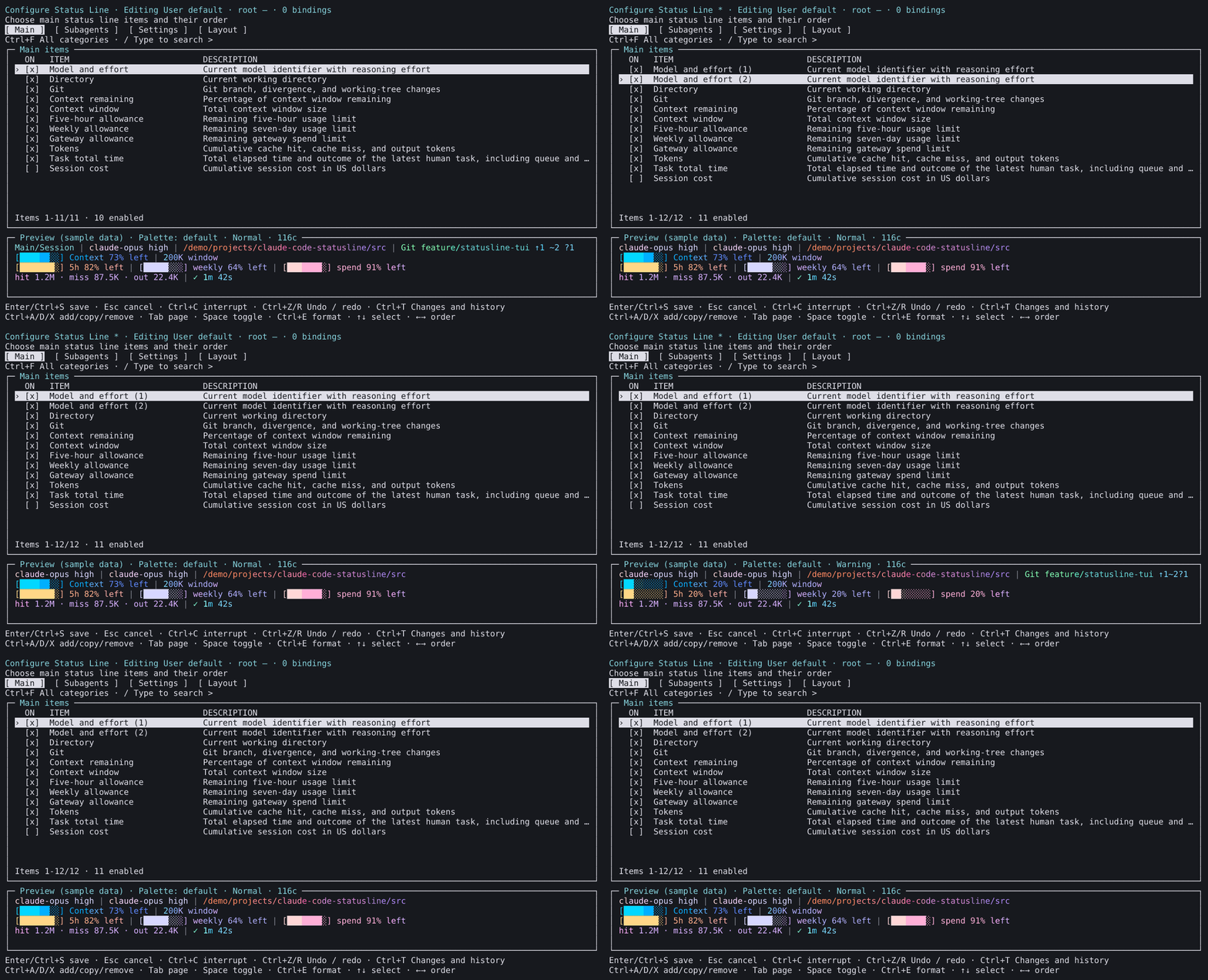
The clip copies one metric, then demonstrates Undo, Redo, Save and reopening. The duplicate belongs only to this exercise; the original daily scene is restored afterward.
In-session TUI
Run /statusline-configure-native inside Claude Code and click the Client region once before using the keyboard. Editor workflow.
External TUI
Run claude-statusline configure in a terminal, or /statusline-configure from Claude Code to open a supported external terminal. Terminal workflow.
All current and historical images retain their original provenance. Historical cross-platform screenshots do not establish acceptance of a newer package; the six existing issue #96 gaps remain unverified.
Supported platforms
| Platform | Supported environment |
|---|---|
| Linux / WSL | Node 22.x or 24.x, x64 |
| Windows 10/11 | Node 22.x or 24.x, x64 |
| macOS 14+ | Node 22.x or 24.x, Intel / Apple Silicon |
Windows ARM devices use x64 Node under emulation; native Windows ARM64 and 32-bit runtimes are outside the support contract. Git fields require Git. Claude Code requirements vary by feature: subagent rows 2.1.205+, local slash arguments/external entry 2.1.258+, in-session editor 2.1.287+, native timing/live metrics 2.1.289+. Requirements and limitations.
Quick installation
Install Node 22.x or 24.x with npm and Claude Code CLI. The package bundles its supported native dependencies and needs no Python or compiler.
Install the package
In an interactive terminal, npx @fbincon/claude-code-statusline reviews a persistent installation before opening setup. Alternatively, install the package explicitly:
npm install --global --ignore-scripts @fbincon/claude-code-statusline
Integrate with Claude Code
Ensure the npm command directory is on PATH, then run:
claude-statusline --version
claude-statusline setup --dry-run
claude-statusline setup
claude-statusline doctor
On Windows, use claude-statusline.cmd, or invoke the installed JavaScript entry with Node. Restart Claude Code in a trusted terminal after integration. Package installation, display Save and Claude integration are separate stages; setup reports partial completion if a later stage fails.
Both editors default on for compatible hosts and preserve saved choices. Native timing and advanced live metrics require explicit opt-in. See first-use setup, offline/fixed-version installation, conflict handling and Python migration.
Common configuration
| Entry point | Use |
|---|---|
/statusline-configure-native | Edit in the current Claude session |
/statusline-configure | Launch an editor in a supported external terminal |
claude-statusline configure | Edit in the current terminal, including SSH |
/statusline-config | Claude question-and-answer wizard; supported argument commands run locally |
claude-statusline config ... | Inspect settings or set exact values from scripts |
In either editor, Ctrl+P opens Quick setup to select a scheme, inspect requirements and preview the draft. Save applies it to the displayed user/profile/project target; cancel discards pending display changes. Walkthroughs and reusable scenes · All schemes.
Interface language
Set the shared interface preference, or override it for one invocation:
claude-statusline config language set zh-CN
claude-statusline --language en configure
An interface-language change saves immediately and survives cancellation of display edits. Language choices.
Statusline language
Set output language independently:
claude-statusline config set statusline-language zh-CN
In an editor, this choice changes the preview and takes effect in the actual main/subagent output only after display Save. Technical IDs, paths and custom text retain their values. Output language.
Native configuration editor
Click the Client region once. Tab changes pages, Space toggles, Ctrl+E opens item details, / searches and Ctrl+F filters categories. S saves and stays, F saves and closes, and Q discards the draft. Ctrl+G cancels field input. Controls and recovery.
External and standalone terminal TUI
Tab changes pages, Space toggles, and Ctrl+S saves after field input is finished. Esc cancels a field first, then the editor; Ctrl+C interrupts without saving. The minimum size is 64×18. Controls and terminal launchers.
To start from a built-in scheme with classic separators:
claude-statusline config preset daily-development --dry-run
claude-statusline config preset daily-development
claude-statusline config set separator-style classic
Review before applying: a preset replaces display selections and layout. Recipes · CLI reference.
Upgrading and uninstalling
Review and apply a package change, then restart Claude Code:
claude-statusline update --check
claude-statusline update
claude-statusline doctor
Package management explains exact versions, prefixes, rollback and separate configuration restoration. Remove Claude integration before uninstalling the package:
claude-statusline uninstall --dry-run
claude-statusline uninstall
npm uninstall --global @fbincon/claude-code-statusline
Display settings and backups remain. Uninstalling.
Project structure
The TypeScript workspace separates pure rules (packages/core), platform effects (packages/platform), application services (packages/cli) and the terminal editor (packages/tui). mods contains the official-host integrations; tools contains generation, packaging and acceptance tooling. archive/python preserves the frozen historical implementation. Architecture · Development setup.
Documentation and help
| Goal | Start here |
|---|---|
| Try a complete workflow | Demonstrations · First-use setup |
| Configure a display | User guide · Schemes · Appearance · Composition |
| Reuse settings | Profiles and projects · Draft history and reuse |
| Understand data | Metric definitions · Task details · Extensions |
| Diagnose or automate | Troubleshooting · Input diagnosis · CLI reference |
| Develop or review evidence | Development guide · Image provenance |
| Follow plans or releases | Roadmap · Development plan · Changelog |
GitHub Issues accepts reproducible bugs, questions and feature ideas. Include versions, steps and relevant diagnostics; remove private paths and session content.
Contributing and security
See Contributing for development, translations and feedback. Report vulnerabilities privately through the security policy.
License
MIT License. Copyright (c) 2026 fbincon.
Bundled Unicode data retains the Unicode License v3 and the wcwidth MIT notice.