react-native-phone-input


react-native-phone-input is a simplified and optimized Phone Number Input Component for React Native that provides an intuitive interface for entering and validating international phone numbers. This fork eliminates redundant API complexity and provides a cleaner, more maintainable solution.
🚀 What's New in This Fork
- 🎯 Simplified API: No more redundant
callingCode- it's automatically derived fromcountryCode - ⚡ Performance Optimized: O(1) country code lookups using pre-calculated maps
- 🔧 Better Developer Experience: Cleaner props with
defaultCountryCodeandshowPrefixCode - 🛡️ Enhanced Error Handling: Better validation and fallback mechanisms
- 📱 Flexible Display: Control whether to show the calling code prefix or not
Autopick Feature
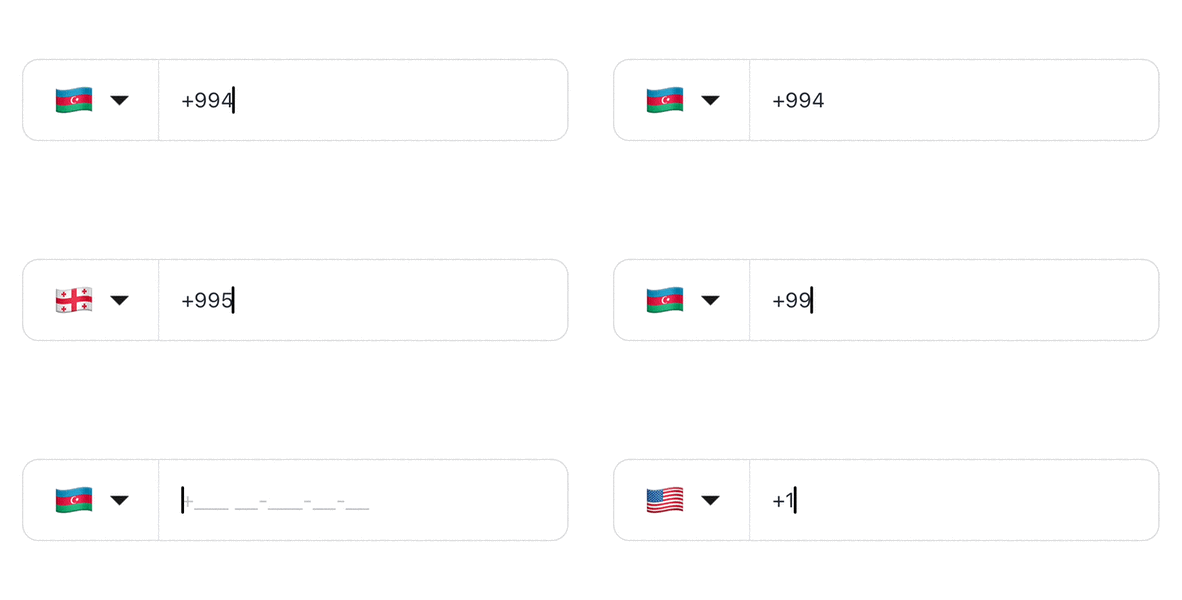
A feature that automatically picks the right country while typing the phone number.
Masking Feature
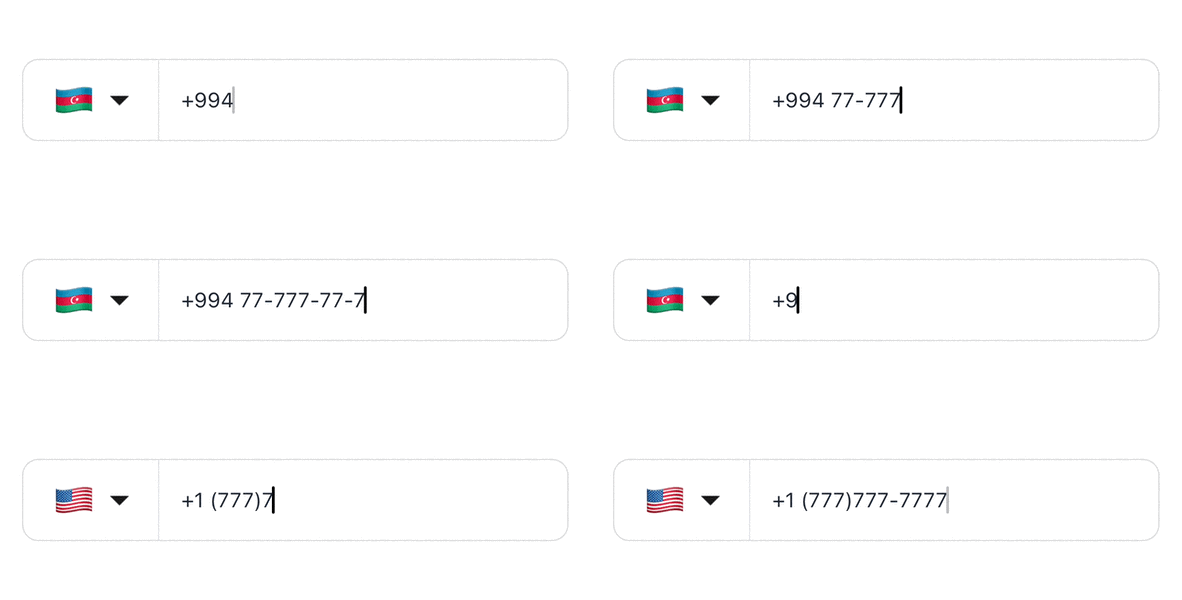
A feature that picks a right mask based on the country code.
Features
- 🌍 International phone number input with country picker
- 📱 Automatic phone number formatting based on country
- 🔍 Dynamic country and mask adaptation based on typed country code
- ✨ Highly customizable appearance and styling
- 🎯 Phone number validation using Google's libphonenumber
- 🎨 Dark theme support with automatic adaptation
- ✅ Visual validation feedback with check/X icons
- 🎨 SVG icons that adapt to theme automatically
- ♿ Accessibility support
- 💪 Written in TypeScript
- 🚀 Simplified API with automatic calling code derivation
- ⚡ Performance optimized with O(1) lookups and memoization
- 🎛️ Flexible prefix display control
Installation
npm install @fenadev/react-native-phone-input

# or

yarn add @fenadev/react-native-phone-input
Peer Dependencies
This library requires react-native-svg as a peer dependency. If you don't have it installed:
npm install react-native-svg

# or

yarn add react-native-svg
Additional Setup
For react-native-svg, follow the installation guide for your platform.
For iOS, you may need to run:
cd ios && pod install
Usage
- Import the PhoneInput component:
import { PhoneInput, isValidNumber } from '@fenadev/react-native-phone-input';
- NEW Simplified API (Recommended):
export default function App() {
  const [countryCode, setCountryCode] = useState<CountryCode>('US');
  return (
    <PhoneInput
      defaultCountryCode="CL"        // 🎯 Just specify the country
      showPrefixCode={true}          // 🎯 Control prefix display
      onChangeText={(text) =>
        console.log(
          'Phone number:',
          text,
          'isValidNumber:',
          isValidNumber(text, countryCode)
        )
      }
      onChangeCountry={(country) => {
        console.log('Country:', country);
        setCountryCode(country.cca2);
      }}
    />
  );
}
- Different Countries:
export default function App() {
  const [countryCode, setCountryCode] = useState<CountryCode>('US');
  return (
    <PhoneInput
      defaultCountryCode="MX"        // 🇲🇽 Mexico
      showPrefixCode={true}
      onChangeText={(text) =>
        console.log(
          'Phone number:',
          text,
          'isValidNumber:',
          isValidNumber(text, countryCode)
        )
      }
      onChangeCountry={(country) => {
        console.log('Country:', country);
        setCountryCode(country.cca2);
      }}
    />
  );
}
- Advanced usage with customization:
<PhoneInput
  defaultCountryCode="CL"           // 🎯 Simplified country selection
  showPrefixCode={true}              // 🎯 Show/hide calling code prefix
  value="+56 9 1234 5678"
  onChangeText={(text) => console.log('Phone number:', text)}
  onChangeCountry={(country) => console.log('Country:', country)}
  autoFocus={true}
  disabled={false}
  countryPickerProps={{
    withFilter: true,
    withFlag: true,
    withCountryNameButton: true,
  }}
  theme={{
    containerStyle: styles.phoneContainer,
    textInputStyle: styles.input,
    flagButtonStyle: styles.flagButton,
    codeTextStyle: styles.codeText,
    dropDownImageStyle: styles.dropDownImage,
    validationIconStyle: styles.validationIcon,
    enableDarkTheme: false,
  }}
  hideDropdownIcon={false}
  isCallingCodeEditable={false}
  showValidationIcon={true}
  onValidationChange={(isValid) => console.log('Phone number is valid:', isValid)}
/>
🎯 New API Examples
With Prefix Visible (Default)
<PhoneInput defaultCountryCode="CL" showPrefixCode={true} />
// Result: Input shows "+56"
Without Prefix
<PhoneInput defaultCountryCode="CL" showPrefixCode={false} />
// Result: Input shows only the local number
Multiple Countries
<PhoneInput defaultCountryCode="MX" />  // Automatically uses +52
<PhoneInput defaultCountryCode="ES" />  // Automatically uses +34
<PhoneInput defaultCountryCode="US" />  // Automatically uses +1
Props
🚀 New Simplified Props
| Prop | Type | Description | Default |
|---|---|---|---|
defaultCountryCode | CountryCode | NEW: Default country code (e.g., 'CL', 'US', 'MX') | 'US' |
showPrefixCode | boolean | NEW: Whether to show the calling code prefix in input | true |
📱 Core Props
| Prop | Type | Description | Default |
|---|---|---|---|
value | string | Controlled value for the phone number input | undefined |
onChangeText | (text: string) => void | Callback when phone number changes | undefined |
onChangeCountry | (country: Country) => void | Callback when selected country changes | undefined |
autoFocus | boolean | Automatically focuses the input when mounted | false |
disabled | boolean | Disables the input | false |
🎨 Styling & Customization Props
| Prop | Type | Description | Default |
|---|---|---|---|
countryPickerProps | CountryPickerProps | Props for the country picker modal | {} |
maskInputProps | MaskInputProps | Props for the masked input component | {} |
theme | Theme | Theme configuration for styling the component | {} |
hideDropdownIcon | boolean | Hides the dropdown arrow icon when set to true | false |
renderCustomDropdown | ReactNode | Custom component to replace the default dropdown arrow | undefined |
flagProps | object | Props for customizing the country flag | {} |
dropDownImageProps | ImageProps | Props for customizing the dropdown arrow image | {} |
isCallingCodeEditable | boolean | Controls whether the calling code can be edited | true |
showValidationIcon | boolean | Shows validation icon (check/X) next to the input | false |
isValid | boolean | External validation state (overrides internal validation) | undefined |
onValidationChange | (isValid: boolean) => void | Callback when validation state changes | undefined |
Theme Properties
| Property | Type | Description | Default |
|---|---|---|---|
containerStyle | StyleProp<ViewStyle> | Style for the main container | undefined |
textInputStyle | StyleProp<TextStyle> | Style for the text input | undefined |
codeTextStyle | StyleProp<TextStyle> | Style for the calling code text | undefined |
flagButtonStyle | StyleProp<ViewStyle> | Style for the flag button | undefined |
dropDownImageStyle | StyleProp<ImageStyle> | Style for the dropdown arrow image | undefined |
validationIconStyle | StyleProp<ViewStyle> | Style for the validation icon | undefined |
enableDarkTheme | boolean | Enables dark theme for the component | false |
Utility Functions
isValidNumber(phoneNumber: string, countryCode: string): boolean
Validates a phone number for a specific country using Google's libphonenumber.
import { isValidNumber } from '@fenadev/react-native-phone-input';

const isValid = isValidNumber('+1234567890', 'US');
Dependencies
This library depends on the following packages:
Contributing
See the contributing guide to learn how to contribute to the repository and the development workflow.
TODO
- Expose ref of the input
- Add custom country picker modal
🚀 Performance Improvements
This fork includes several performance optimizations:
- O(1) Country Code Lookups: Pre-calculated maps for instant country code resolution
- Eliminated Redundant API: No more manual
callingCodespecification - Optimized State Management: Reduced unnecessary re-renders
- Better Error Handling: Graceful fallbacks and validation
📊 Migration Guide
From Original react-native-phone-entry to This Fork
// ❌ Original library (redundant)
<PhoneInput
  defaultValues={{
    countryCode: 'CL',
    callingCode: '+56',    // Redundant!
    phoneNumber: '+56',    // Redundant!
  }}
/>

// ✅ This fork (simplified)
<PhoneInput
  defaultCountryCode="CL"  // Calling code derived automatically
  showPrefixCode={true}     // Control prefix display
/>
Key Changes
- Eliminated:
defaultValues.callingCode- now automatically derived - Eliminated:
defaultValues.phoneNumber- usevalueprop instead - Added:
defaultCountryCode- cleaner country selection - Added:
showPrefixCode- control prefix visibility
License
This project is licensed under the MIT License.
Fork of: react-native-phone-entry by anday013
Made with create-react-native-library
Inspired by react-native-phone-number-input