
Logistics-first headless commerce and marketplace infrastructure for Fleetbase.
Documentation | GitHub | Platform Overview | Fleetbase | Launch with AppHelm



Overview
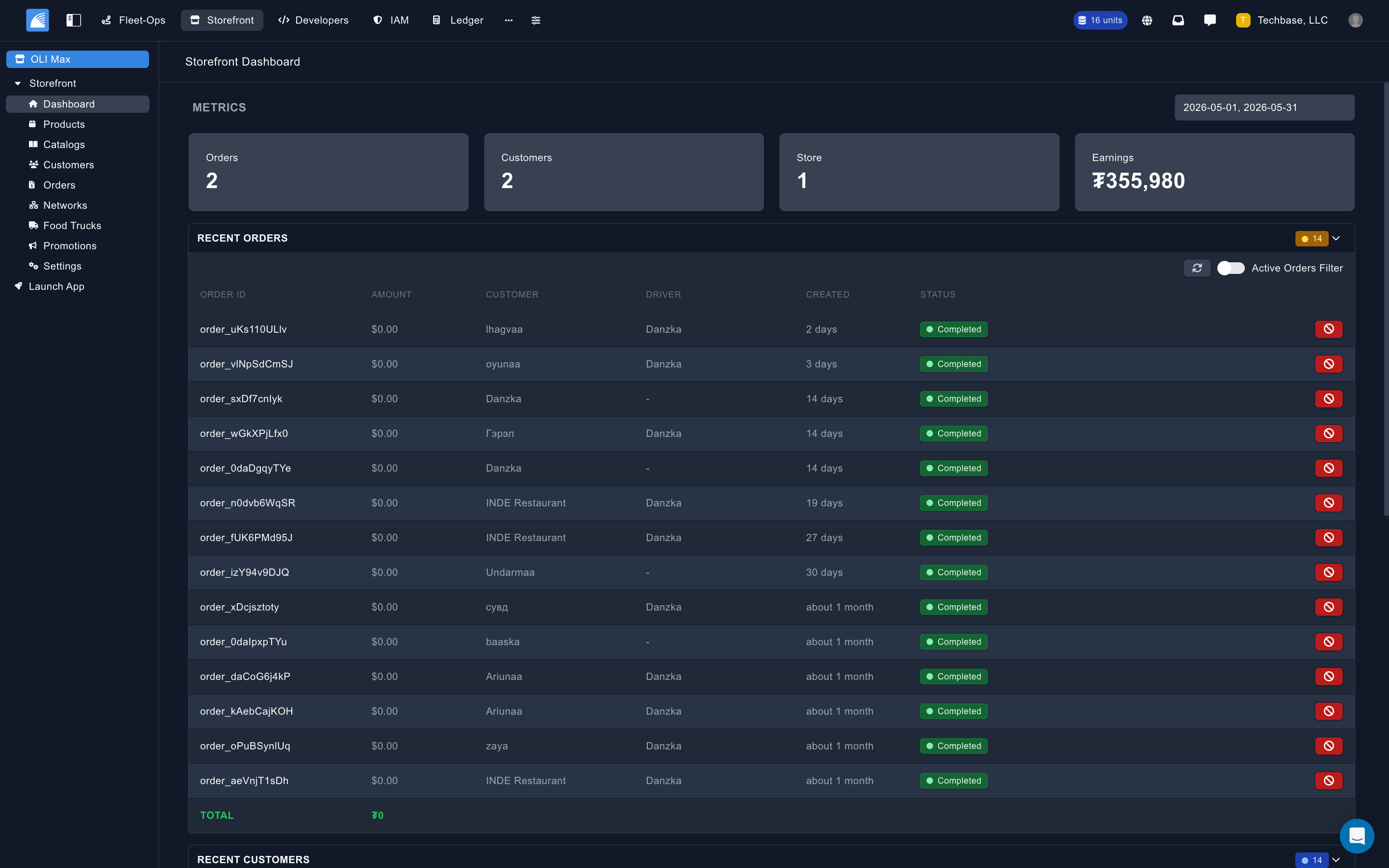
Storefront is the commerce extension for Fleetbase. It combines a Laravel API package with an Ember engine for the Fleetbase Console, giving operators the tools to manage stores, products, carts, checkout, customers, marketplace networks, and fulfillment workflows from one logistics-native system.
Unlike a generic e-commerce plugin, Storefront is built around the handoff from purchase to delivery. A checkout can create Fleet-Ops orders, attach storefront order metadata, expose customer and commerce details in the Fleetbase Console, and keep operators close to the real delivery lifecycle.
Read the official guide at fleetbase.io/docs/storefront.
Features
- Store and marketplace management: run a single store or organize many stores into Storefront networks.
- Product catalog: manage products, categories, variants, variant options, addons, addon categories, images, pricing, tags, and availability hours.
- Locations and mobile commerce: configure store locations, service areas, food trucks, Fleet-Ops vehicle links, and catalogs assigned to mobile stores.
- Carts and checkout: support persistent carts, line items, variants, addons, scheduled items, service quotes, checkout initialization, and order capture.
- Payments: configure Stripe, QPay, and cash-on-delivery flows through Storefront gateways.
- Customers: support customer registration, login, SMS verification, social login hooks, saved customer metadata, device registration, order history, and account closure flows.
- Orders and fulfillment: manage Storefront orders in the console, advance order activity, assign/unassign drivers, mark preparation states, complete pickups, and inspect commerce details alongside route and tracking data.
- Reviews and votes: expose API resources for customer reviews and voting.
- Promotions and notifications: manage notification channels and send broadcast or transactional push notifications through APNs, FCM, and related Storefront notification classes.
- Dashboard analytics: ship Storefront widgets for revenue, order volume, average order value, active orders, completed orders, customers, cart conversion, cancellation rate, revenue trends, top products, customer insights, order status mix, recent orders, and recent customers.
- Fleet-Ops integration: register Storefront summaries inside Fleet-Ops order details and add product-as-entity tooling to Fleet-Ops order creation.
- Internationalization: include translations for multiple locales through the extension translation files.
Customer App
|
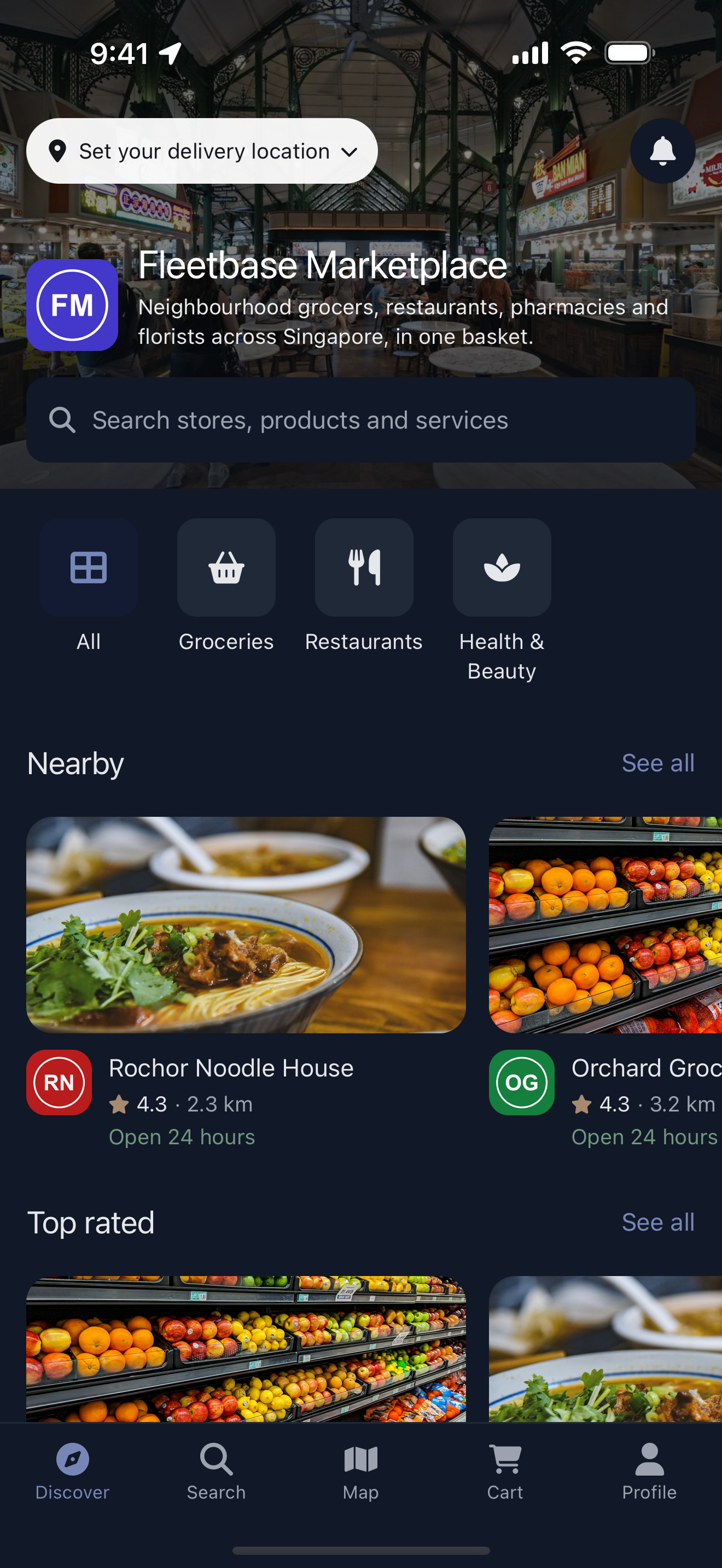
The Storefront App is the open-source customer app for this extension, for iOS, Android, and the web. Customers browse, order, pay, and track deliveries in it, through the public Storefront API. The easiest way to launch it is Fleetbase AppHelm, which takes a Fleetbase store and publishes it as your own branded app, with no code to write. Connect your store, set your brand, and preview the app with your real products. Publish it free on the web at
|


Architecture
This repository contains both sides of the Storefront extension:
| Area | Path | Purpose |
|---|---|---|
| Ember engine | addon/, app/, config/, translations/ | Fleetbase Console UI, routes, models, components, services, widgets, and translations. |
| Laravel API | server/src/, server/config/, server/migrations/ | Storefront API controllers, models, resources, middleware, providers, observers, notifications, jobs, and database migrations. |
| Tests | tests/, server/tests/ | Ember integration tests and backend test scaffolding. |
The Ember package is published as @fleetbase/storefront-engine. The Laravel package is published as fleetbase/storefront-api.
Console Modules
Storefront registers a Console entry under the storefront route and exposes these primary work areas:
- Dashboard: Storefront-specific operational and analytics widgets.
- Products: product catalog, categories, variants, addons, import processing, and product entity creation.
- Orders: incoming Storefront orders, activity actions, customer details, commerce summary, documents, route/tracking context, and comments.
- Customers: customer records and order history.
- Networks: multi-store marketplace networks, store assignment, categories, invitations, and network-level views for stores, customers, and orders.
- Catalogs: product bundles and catalog categories, including food truck catalog assignment.
- Food Trucks: Fleet-Ops vehicle-linked mobile stores with service area and zone support.
- Promotions: push notification campaigns and notification channel workflows.
- Settings: store profile, API keys, locations, gateways, and notifications.
API Surface
Storefront exposes two API families.
Public Storefront API
The public customer-facing API is mounted under storefront/v1 and protected by Storefront API middleware. It includes:
- Store lookup, store/network information, locations, gateways, search, tags, and network stores.
- Categories, products, food trucks, reviews, and customer-facing catalog browsing.
- Persistent carts with add, update, remove, empty, and delete operations.
- Service quotes from carts.
- Checkout initialization, status, capture, Stripe setup intents, Stripe payment intent updates, and QPay capture callbacks.
- Customer registration, login, SMS code verification, social login endpoints, device registration, saved places, customer orders, phone verification, Stripe customer helpers, and account closure flows.
- Order pickup completion and receipt generation.
Marketplace network contract
A public network_... key uses accepted network_stores membership as its marketplace authorization boundary, including member stores owned by another company. Marketplace responses expose only public Storefront resources; they do not expose member customers, internal API keys, or gateway credentials.
GET storefront/v1/storessupports search, online/tag/category/ID filters, rating/age/popularity/trending/nearest sorts, distance filtering in meters, and limit/offset pagination.- Categories and published products can be scoped to a member store. Product responses include public merchant context for marketplace search and cards.
- Cart line items preserve both merchant and store-location identity. Product and location substitution across stores is rejected.
- Checkout revalidates active membership, store availability, published products, location ownership, the network multi-cart policy, and one-cart currency before payment begins.
- Network delivery quotes resolve one origin per represented store and reject missing, foreign, or mismatched locations with
422. - When
Customer-Tokenis present, it is authoritative; a conflicting checkout customer ID returns403.
Internal Console API
The protected internal API is mounted under storefront/int/v1. It powers the Fleetbase Console and includes:
- CRUD resources for orders, customers, stores, store hours, store locations, products, product hours, variants, variant options, addons, addon categories, gateways, notification channels, reviews, votes, food trucks, catalogs, catalog categories, and catalog hours.
- Order actions for accept, preparing, ready, completed, cancel, and unassign driver.
- Network actions for adding stores, removing stores, categories, invitations, and network lookup.
- Analytics endpoints for overview, revenue trends, order status mix, top products, and customer insights.
- Metrics and operational action endpoints.
Getting Started
Storefront is designed to run inside a Fleetbase installation with fleetbase/core-api and fleetbase/fleetops-api available.
Requirements
- PHP
^8.0 - Node.js
>=18 - pnpm
- Composer
- Fleetbase Core API
- Fleetbase FleetOps API
Install Dependencies
pnpm install
composer install
Backend Package
composer require fleetbase/core-api
composer require fleetbase/fleetops-api
composer require fleetbase/storefront-api
Frontend Package
pnpm install @fleetbase/storefront-engine
Development
For the full local Fleetbase workflow, see the Fleetbase Development Setup guide. That guide covers cloning the main repository with submodules, mounting live package source, linking extensions, running the Console dev server, and reloading the API after backend changes.
Use Local Storefront Source in Fleetbase
When developing Storefront inside the Fleetbase monorepo, run the package linker from the repository root so the local packages/storefront source replaces the published Storefront packages used by Console and API:
flb-package-linker enable storefront
flb-package-linker install storefront
The linker updates the local Console and API manifests for development. To inspect the current link state:
flb-package-linker status
flb-package-linker doctor
If the linker is not installed yet, install it once from the Fleetbase repository root:
npm link
After linking backend package changes, reload the running API worker so Laravel Octane picks up PHP changes:
docker compose exec application php artisan octane:reload
For frontend changes, run the Fleetbase Console dev server as described in the development setup guide; linked Ember packages are watched and live-reloaded by the dev server.
Package Commands
Run the Ember engine locally:
pnpm start
Build the Ember engine:
pnpm build
Run frontend lint and tests:
pnpm lint
pnpm test
pnpm test:ember
Run backend checks:
composer test:lint
composer test:types
composer test:unit
composer test
Generate and summarize the full backend Clover baseline with Xdebug or PCOV:
XDEBUG_MODE=coverage composer test:coverage:clover
composer coverage:summary
Marketplace changes on dev-v0.4.19 must retain 100% backend statement coverage. Focused success and failure-path contracts should be added before regenerating the baseline.
Configuration
Storefront configuration is provided through the Laravel package config files and environment variables:
server/config/storefront.php: API routing, Storefront app verification settings, database connection, and request throttling.server/config/api.php: Storefront API configuration.server/config/database.connections.php: Storefront database connection defaults.
Important environment variables include:
| Variable | Purpose |
|---|---|
STOREFRONT_DB_CONNECTION | Database connection name for Storefront models. |
STOREFRONT_BYPASS_VERIFICATION_CODE | Instance-wide sign-in code for the review accounts in STOREFRONT_REVIEW_ACCOUNTS (self-hosted). Stores can instead turn on App Review access in their settings. |
STOREFRONT_REVIEW_ACCOUNTS | Comma-separated phone numbers and emails that sign in with STOREFRONT_BYPASS_VERIFICATION_CODE and are never sent a code. |
STOREFRONT_THROTTLE_REQUESTS_PER_MINUTE | Public Storefront API requests allowed per device (store key + client IP) per window. Default 120. |
STOREFRONT_THROTTLE_DECAY_MINUTES | Public Storefront API throttle window in minutes. Default 1. |
For customer app configuration, see the Storefront App configuration docs.
Documentation
- Storefront documentation
- Products and catalog
- Orders and checkout
- App Review access: letting Apple and Google reviewers sign in to a store's app
- Checkout flow
- Store locations
- Storefront App configuration
Contributing
Storefront follows the same review expectations as the rest of Fleetbase:
- Keep changes small and reviewable.
- Preserve existing architecture and naming conventions.
- Add or update tests when practical.
- Run the relevant frontend or backend validation commands before opening a pull request.
- For API behavior changes, check whether the API specification and public documentation also need updates.
See CONTRIBUTING.md for general contribution guidance.
License
Fleetbase Storefront is open-source software licensed under the AGPL-3.0-or-later.