佛罗伦萨.ai API - 与您的 MongoDB & MySQL 数据交谈
Florentine.ai API 允许您整合 对您的 MongoDB & MySQL 数据进行自然语言查询 直接进入您的项目.
问题已转变为 也可以直接执行和回答的数据库查询 自然语言.
还有一对夫妇 额外特性 例如:
- 安全的数据分离 用于多种租户用途
- 自动计划探索
- 语义矢量搜索/RAG支持 自动嵌入创建
- 高级搜索支持
- 钥匙的排除
[注] 如果你正在寻找我们的MCP服务器,你可以 找到这里。 。 。 .
目录
先决条件
- 节点.js >= v 18.0.0
- Florentine.ai账户(创建 这里的自由账户(中文(简体) )
- 一个连接的数据库和至少一个分析并激活了您的花旗上的收藏/表格 。 ai 账户
- 一个Florentine.ai API 密钥(您可以在您的 账户仪表板(中文(简体) )
安装
API的详细文档可找到 在这里,我们的文件。 。 。 .
npm install @florentine-ai/api
认证
import { Florentine } from '@florentine-ai/api';

const FlorentineAI = new Florentine({
  florentineToken: '<FLORENTINE_API_KEY>'
});
连接您的 LLM 账户
佛罗伦萨。 。 带上自己的钥匙模型,因此您需要在您的 API 请求中提供 LLM API 密钥( OpenAI, Google, Anthropic, Deepseek) .
您有两个选项可以添加您的 LLM API 密钥 :
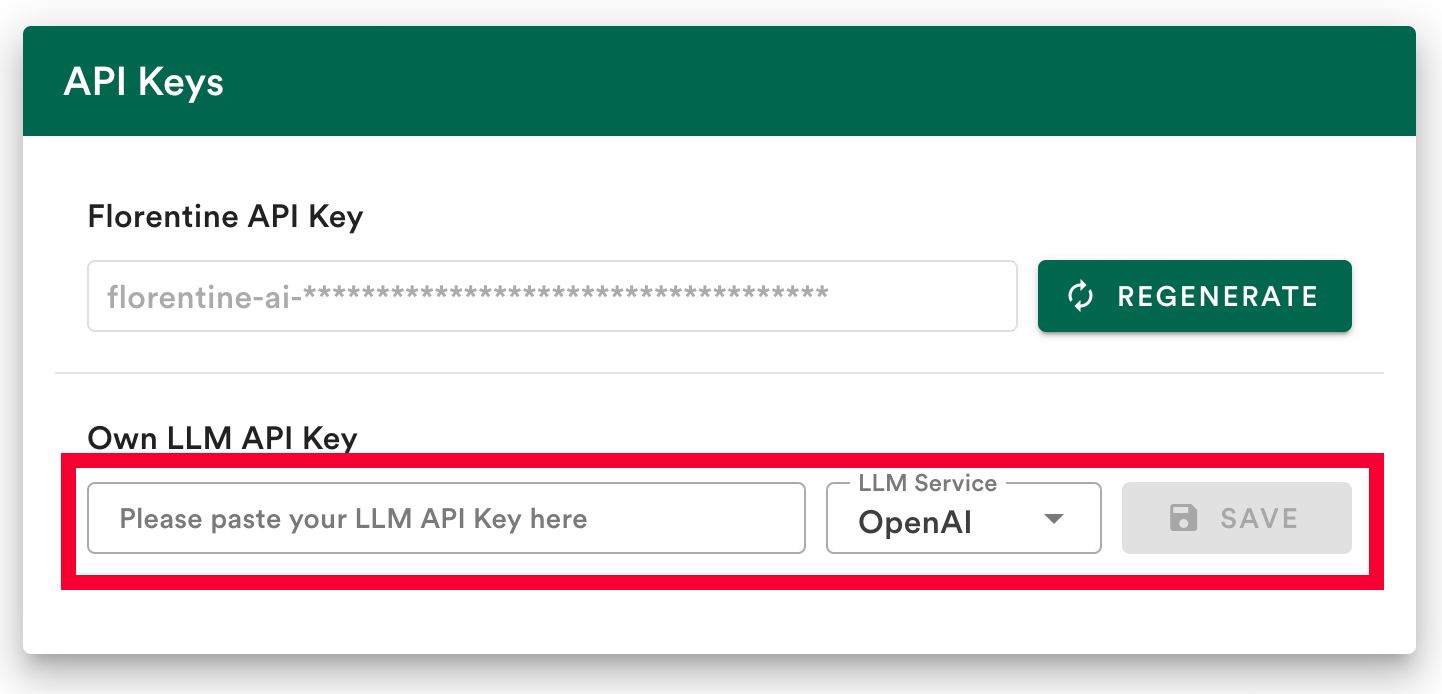
选项1: 在账户中保存您的 LLM 密钥( 建议)
连接您的 LLM 提供者的最简单方式是将您的 LLM API 密钥保存在您的 佛罗伦萨.ai仪表板。 。 。 .
- 添加您的 API 密钥
- 选择您的 LLM 提供者( OpenAI, Deepseek, Google 或 Anthropic)
- 单击保存
选项2:在 API 请求中提供您的 LLM 密钥
如果你不想在佛罗伦萨储存钥匙的话 ai 账户或想要使用多个 LLM 密钥, 您可以通过您的 API 请求中的密钥 .
添加值为 llmService 财务报告和审定财务报表 llmKey 至类构造对象:
const FlorentineAI = new Florentine({
  florentineToken: '<FLORENTINE_API_KEY>',
  llmService: '<YOUR_LLM_SERVICE>', // one of: "openai", "google", "anthropic", "deepseek"
  llmKey: '<YOUR_LLM_API_KEY>'
});
[注] 如果你提供
llmKey在请求中,它将覆盖存储在您的账户中的任何密钥.
第一次请求
你现在应该准备好 发送你的第一个API请求!
提出一个可以通过您激活的收集/表格中的数据解答的问题,并将其传递给 .ask() 方法 :
const FlorentineAI = new Florentine({
  florentineToken: '<FLORENTINE_API_KEY>'
});

const res = await FlorentineAI.ask({
  question: '<YOUR_QUESTION>',
  sessionId: 'FIRST_REQUEST'
});
默认情况下 API 返回原始查询结果返回类型可以通过 returnTypes。 。 。 .
想象一个 tabletennis 用于记录两个玩家匹配结果的收藏.
如果我问问题 Who won the last match? 答案可能与此类似:
{
  "answer": "Frank won the last match. According to our records, he emerged as the winner, highlighting his strong performance in that game."
}
返回类型
在背景中,每个请求都有三个步骤:
- 查询生成:这个问题被转换为数据库查询(MongoDB聚合管或MySQL查询).
- 查询执行: 使用您提供的连接字符串查询数据库.
- 答案生成:结构化的结果被转化为自然语言的答案.
在您的 Florentine.ai 账户中配置了默认返回类型 。 您可以通过指定一个 returnTypes 组合 :
returnTypes 数值 | 说明 | 预期反应关键 |
|---|---|---|
"query" | 返回生成的数据库查询、所使用的数据库和收集/表格、0至10级的置信分和数据库类型("mongodb" 或者说 "mysql") (中文(简体) ). | confidence, (中文(简体) ), database, (中文(简体) ), collection, (中文(简体) ), query, (中文(简体) ), databaseType |
"result" | 返回已执行查询的原始查询结果 . | result |
"answer" | 返回基于已执行查询结果的自然语言响应. | answer |
返回全部三个步骤的示例
让我们想象一下 tabletennis 实例 第一次请求 再一次.
三个步骤都这样
const res = await FlorentineAI.ask({
  question: 'Who won the last match?',
  returnTypes: ['query', 'result', 'answer']
});
反应是这样的:
{
  "database": "samples",
  "collection": "tabletennis",
  "databaseType": "mongodb",
  "query": [
    { "$sort": { "year": -1, "matchInYear": -1 } },
    { "$limit": 1 },
    {
      "$project": {
        "winner": {
          "$cond": {
            "if": { "$eq": ["$matchwinner", "home"] },
            "then": "$players.home",
            "else": "$players.away"
          }
        }
      }
    }
  ],
  "result": [{ "_id": "67d352056d3ef0f2281524cf", "winner": "Frank" }],
  "answer": "Frank won the last match. According to our records, he emerged as the winner, highlighting his strong performance in that game."
}
多租户使用的安全数据分离
您可以启用 安全数据分离 通过确保查询 基于提供值的过滤数据 我们称之为 Required Inputs。 。 。 .
这些价值是: 添加到查询中 由 Florentine.ai 转换层 在 LLM 生成查询后因此 Florentine.ai 可以保证每个用户只获取他有资格获取的数据。 。 。 .
键被定义为 Required Input 请参看 官方文件中的章节 如何做到这一点.
提供所需投入
在 a 内提供所需的输入 requiredInputs 以 keyPath 财务报告和审定财务报表 value 对于您设定为必需输入的每个密钥, 并添加到 .ask() 方法 :
const res = await FlorentineAI.ask({
  question: 'What is the revenue of my products this year?',
  requiredInputs: [
    {
      keyPath: 'accountId',
      value: '507f1f77bcf86cd799439011'
    }
  ]
});
您也可提供 database (单位:千美元) collections 阵列,如果您有相同的输入要求 keyPath 在多个收藏/表格中,但不同 value 用于收集/表格:
const res = await FlorentineAI.ask({
  question: 'Whats the current monthly rent of my tenants?',
  requiredInputs: [
    {
      keyPath: 'name',
      value: 'Sesame Street',
      database: 'rentals',
      collections: ['houses']
    },
    {
      keyPath: 'name',
      value: { $in: ['Ernie', 'Bert'] },
      database: 'rentals',
      collections: ['tenants']
    }
  ]
});
所需输入配置
| 外地 | 需求 | 类型 | 说明 | 制约因素 |
|---|---|---|---|---|
keyPath | 对 | 字符串 | 应过滤的去字段路径 . | 必须是有效的密钥路径 . |
value | 对 | 任意 | 要过滤的值( 类型, 见 支持的值类型) (中文(简体) ). | 必须匹配字段的类型( String, ObjectId, Boolean, 数字, 或 Date) . |
database | 没有 | 字符串 | 包含要过滤的收藏的数据库 . | 如果 collections 提供. |
collections | 没有 | Array<String> | 数据库中用于应用过滤器的具体收藏/表格. | 必须包含至少一个收藏/表 . |
支持的值类型
基于按键的值类型,您对您可以提供什么有不同的选项 Required Input 值 :
| 类型 | 格式示例 | 支持的运算符 | 页:1 |
|---|---|---|---|
String 或者说 Array<String> | "text"{ $in: ["text1", "text2"] } | $in | 案件敏感. |
ObjectId 或者说 Array<ObjectId> | "507f191e810c19729de860ea"{ $in: ["507f191e810c19729de860ea", "507f191e810c19729de860eb"] } | $in | 作为绳索提供. |
Boolean | true编号 :false | —— 说 | 只有准确的数值. |
Number 或者说 Array<Number> | 42{ $gt: 10, $lte: 100 }{ $in: [1, 2, 3] }{ $in: [{$gte:1}, {$lt:10}] } | $gt, (中文(简体) ), $gte, (中文(简体) ), $lt, (中文(简体) ), $lte, (中文(简体) ), $in | 支持小数. |
Date 或者说 Array<Date> | "2024-01-01T00:00:00Z" (UTC) (中文(简体) )"2024-01-01T00:00:00-05:00"(时区平分) | $gt, (中文(简体) ), $gte, (中文(简体) ), $lt, (中文(简体) ), $lte, (中文(简体) ), $in | ISO 8601格式. |
用法实例
示例类型 : String
使用大小写 : 用户只能查看他经常玩的玩家的统计数据.
解决方案 : 将玩家名限制在由4名玩家组成的组内访问.
const res = await FlorentineAI.ask({
  question: 'Which player had the most wins?',
  requiredInputs: [
    {
      keyPath: 'name',
      value: { $in: ['Megan', 'Frank', 'Jen', 'Bob'] }
    }
  ]
});
示例类型 : ObjectId
使用大小写 : 用户只能看到自己产品的收入.
解决方案 : 限制账户访问一个特定账户.
const res = await FlorentineAI.ask({
  question: 'Whats the revenue of my products?',
  requiredInputs: [
    {
      keyPath: 'accountId',
      value: '507f1f77bcf86cd799439011'
    }
  ]
});
示例类型 : Boolean
使用大小写 : 对客户的每一次分析只能对付费客户进行.
解决方案 : 限制Paid Account只向付费客户开放.
const res = await FlorentineAI.ask({
  question: 'How many customers registered in the last year?',
  requiredInputs: [
    {
      keyPath: 'isPaidAccount',
      value: true
    }
  ]
});
示例类型 : Number
使用大小写 : 只应允许雇员看到低于某一数额的付款信息.
解决方案 : 限制获得金额低于10 000美元的付款.
const res = await FlorentineAI.ask({
  question: 'List all payments we received.',
  requiredInputs: [
    {
      keyPath: 'amount',
      value: { $lt: 10000 }
    }
  ]
});
示例类型 : Date
使用大小写 : 对财务数据的分析只应包括一年.
解决方案 : 2024年通过交易限制所有交易Date访问.
const res = await FlorentineAI.ask({
  question: 'What was our revenue, profit and margin per month?',
  requiredInputs: [
    {
      keyPath: 'transactionDate',
      value: {
        $gte: '2023-01-01T00:00:00Z',
        $lt: '2024-01-01T00:00:00Z'
      }
    }
  ]
});
会议
会议 允许 Florentine.ai 使用 启用服务器侧聊天历史。仅仅提供 sessionId 像这样的字符串 :
const res = await FlorentineAI.ask({
  question: 'What is the revenue of my products this year?',
  sessionId: '<YOUR_SESSION_ID>'
});
强制会话,除非您 禁用服务器侧聊天历史 设置 withHistory 改为 false 构造器内 :
const FlorentineAI = new Florentine({
  florentineToken: '<FLORENTINE_API_KEY>',
  withHistory: false
});
[注] 强烈建议采用
sessionId进行有意义的多回合对话.
错误
Florentine.ai API的所有出错都遵循这个一致的JSON结构:
{
  "error": {
    "name": "FlorentineApiError",
    "statusCode": 401,
    "message": "Please provide your Florentine API key. You can find it in your account settings: https://florentine.ai/settings",
    "errorCode": "NO_TOKEN",
    "requestId": "abc123"
  }
}
| 外地 | 类型 | 说明 |
|---|---|---|
name | 字符串 | 错误类名称( 如 ). FlorentineApiError, (中文(简体) ), FlorentineConnectionError(中文(简体) ) |
statusCode | 编号 | HTTP状态代码(例如. 400, (中文(简体) ), 500(中文(简体) ) |
message | 字符串 | 对出错的解释 |
errorCode | 字符串 | 错误标识符(例如). NO_TOKEN, (中文(简体) ), INVALID_LLM_KEY(中文(简体) ) |
requestId | 字符串 | 此请求的唯一 ID (帮助支持和调试) |
处理客户端错误
API 错误会作为 JavaScript 错误类自动抛出 :
import { Florentine, FlorentineApiError } from '@florentine-ai/api';

try {
  const FlorentineAI = new Florentine({});
  const res: TFlorentineReturnOutput = await FlorentineAI.ask({
    question: 'Who is Florentine?'
  });
} catch (err) {
  if (err instanceof FlorentineApiError) {
    console.error(err.message); // "Please provide your Florentine API key."
    console.error(err.statusCode); // 401
    console.error(err.errorCode); // "NO_TOKEN"
    console.error(err.requestId); // "abc123"
  }
}
所有客户端错误扩展 FlorentineError 类,这样您就可以捕捉到所有与客户端相关的错误 :
if (err instanceof FlorentineError) {
  // Catches all florentine npm package errors
}
常见错误
| 错误类型 | 错误代码 | 含义 |
|---|---|---|
FlorentineApiError | NO_TOKEN | 缺少 Florentine API 密钥 |
FlorentineApiError | INVALID_TOKEN | Florentine API 密钥无效 |
FlorentineApiError | LLM_KEY_WITHOUT_SERVICE | 你必须提供 llmService 若为 llmKey 定义 |
FlorentineApiError | LLM_SERVICE_WITHOUT_KEY | 你必须提供 llmKey 若为 llmService 定义 |
FlorentineApiError | INVALID_LLM_SERVICE | 无效 llmService 提供 |
FlorentineApiError | NO_OWN_LLM_KEY | 您需要提供自己的 llm 密钥 |
FlorentineApiError | NO_ACTIVE_COLLECTIONS | 没有激活账户的收款/表格 |
FlorentineApiError | MISSING_REQUIRED_INPUT | 缺少必要的输入 |
FlorentineApiError | INVALID_REQUIRED_INPUT | 需要的输入无效 |
FlorentineApiError | INVALID_REQUIRED_INPUT_FORMAT | 需要的输入格式无效 |
FlorentineApiError | NO_QUESTION | 问题不见了 |
FlorentineApiError | EXECUTION_FAILURE | 创建查询执行失败 |
FlorentineApiError | NO_CHAT_ID | 需要历史聊天代号, 但缺少 |
FlorentineLLMError | API_KEY_ISSUE | LLM API 密钥无效 |
FlorentineLLMError | NO_RETURN | Florentine.ai 没有收到有效的 LLM 返回 |
FlorentineLLMError | RATE_LIMIT_EXCEEDED | LLM 语言 请求大小太大 |
FlorentineApiError | TOO_MANY_TOKENS | 查询提示超过了 LLM 模型的最大符号 |
FlorentineConnectionError | CONNECTION_REFUSED | 无法连接数据库查询执行 |
FlorentineCollectionError | NO_EXECUTION | 无法执行已创建的查询 |
FlorentinePipelineError | MODIFICATION_FAILED | 修改查询管道失败 |
FlorentineUsageError | LIMIT_REACHED | 你计划中所有的API请求都耗尽了 |
FlorentineUnknownError | UNKNOWN_ERROR | 所有发生未知错误 |