@git-diff-view/cli (英语)
基于终端的 diff 查看器, 用于 CLI 环境的 GitHub 风格 UI


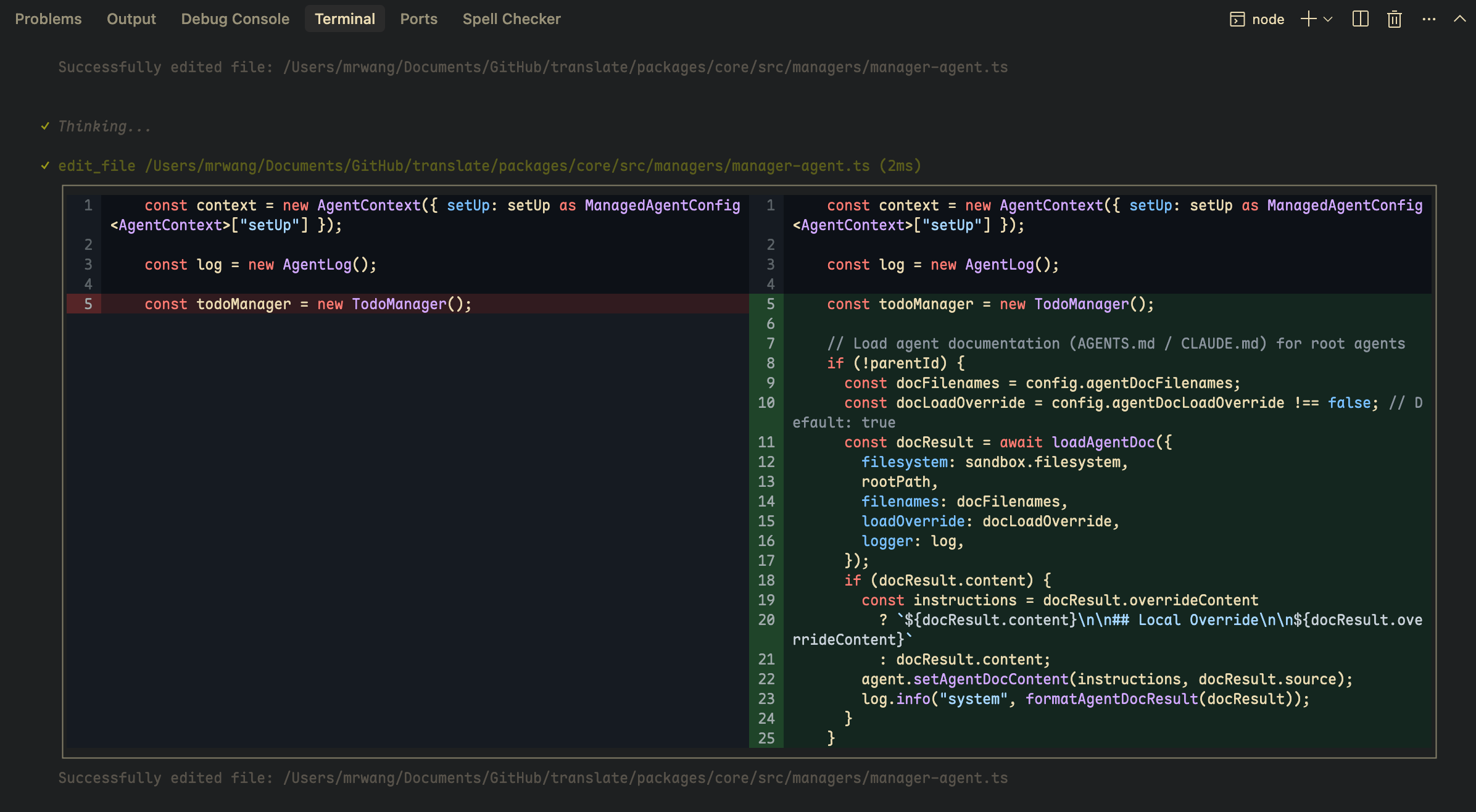
特征
- * 终端方便的 diff 渲染
- 在终端中分割和统一视图
- CLI 语法突出显示
- & 黑暗主题
- QQ 可配置宽度并显示选项
- * 固定高度取景口滚动(
CodeView打开DiffView(中文(简体) ) - 工作与 @git-diff-view/core 和 @git-diff-view/ file 相关
安装
npm install @git-diff-view/cli
# or
pnpm add @git-diff-view/cli
# or
yarn add @git-diff-view/cli
快速启动
基本用途
import { DiffView, DiffModeEnum } from "@git-diff-view/cli";

DiffView({
  data: {
    oldFile: { fileName: "old.ts", content: "...", fileLang: "typescript" },
    newFile: { fileName: "new.ts", content: "...", fileLang: "typescript" },
    hunks: ["..."]
  },
  diffViewMode: DiffModeEnum.Split,
  diffViewTheme: "dark",
  diffViewHighlight: true,
  width: 120  // Terminal width
});
用 DiffFile 键
文件比较模式
import { DiffView } from "@git-diff-view/cli";
import { generateDiffFile } from "@git-diff-view/file";

const file = generateDiffFile(
  "old.ts", oldContent,
  "new.ts", newContent,
  "typescript", "typescript"
);
file.init();
file.buildSplitDiffLines();

DiffView({ diffFile: file, width: 120 });
Git Diff 模式
import { DiffView } from "@git-diff-view/cli";
import { DiffFile } from "@git-diff-view/core";

const file = new DiffFile(
  oldFileName, oldContent,
  newFileName, newContent,
  hunks,
  oldFileLang, newFileLang
);
file.init();
file.buildSplitDiffLines();

DiffView({ diffFile: file });
API 参考
DiffView 道具
| Prop | 类型 | 说明 |
|---|---|---|
data | DiffData | 向导数据 oldFile, (中文(简体) ), newFile,以及 hunks |
diffFile | DiffFile | 预处理的 diff 文件实例 |
diffViewMode | DiffModeEnum | 查看模式( 默认 ): SplitGitHub(中文(简体) ) |
diffViewTheme | "light" | "dark" | 主题( 默认 ): "light"(中文(简体) ) |
diffViewHighlight | boolean | 启用语法加亮 |
diffViewTabSpace | boolean | 显示标签/ 空格字符 |
diffViewTabWidth | "small" | "medium" | "large" | 标签显示宽度( 默认值 : "medium"(中文(简体) ) |
diffViewHideOperator | boolean | 隐藏 +编号 :-编号 : 操作栏 |
diffViewNoBG | boolean | 禁用透明终端的中性背景颜色 |
diffViewThemeColors | DiffViewColorTheme | 自定义色彩覆盖( 见 主题自定义(中文(简体) ) |
width | number | 用于渲染的固定终端宽度 |
height | number | 在可视行查看端口高度; 启用滚动模式( 见 滚动 API(中文(简体) ) |
onScrollChange | (state: ScrollState) => void | 滚动状态改变时调用 |
diffViewExtendLineHeight | number | 滚动布局中延伸行的可视行高( 默认 ): 1(中文(简体) ) |
extendData | ExtendData | 每行增加数据 |
renderExtendLine | Function | 自定义延伸线渲染器 |
代码视频道具
| Prop | 类型 | 说明 |
|---|---|---|
data | { content: string; fileName?: string; fileLang?: string } | 源文件数据 |
file | File | 预处理的文件实例 |
codeViewTheme | "light" | "dark" | 主题( 默认 ): "light"(中文(简体) ) |
codeViewHighlight | boolean | 启用语法加亮 |
codeViewTabSpace | boolean | 显示标签/ 空格字符 |
codeViewTabWidth | "small" | "medium" | "large" | 标签显示宽度( 默认值 : "medium"(中文(简体) ) |
codeViewNoBG | boolean | 禁用透明终端的中性背景颜色 |
codeViewThemeColors | DiffViewColorTheme | 自定义色彩覆盖( 见 主题自定义(中文(简体) ) |
width | number | 用于渲染的固定终端宽度 |
height | number | 在可视行查看端口高度; 启用滚动模式( 见 滚动 API(中文(简体) ) |
onScrollChange | (state: ScrollState) => void | 滚动状态改变时调用 |
数据类型
type DiffData = {
  oldFile?: {
    fileName?: string | null;
    fileLang?: string | null;
    content?: string | null;
  };
  newFile?: {
    fileName?: string | null;
    fileLang?: string | null;
    content?: string | null;
  };
  hunks: string[];
};
主题自定义
您可以通过 diffViewThemeColors 编号 : codeViewThemeColors。所有字段都是可选的——未设置的密钥会倒回内置的 GitHub 风格默认.
import type { DiffViewColorTheme } from "@git-diff-view/cli";

const myTheme: DiffViewColorTheme = {
  addContent: { light: "#d4edda", dark: "#1b4332" },
  delContent: { light: "#f8d7da", dark: "#3d0f0f" },
  addContentHighlight: { light: "#a3d9a5", dark: "#2d6a4f" },
  delContentHighlight: { light: "#f1aeb5", dark: "#6c1e1e" },
};
<DiffView
  diffFile={file}
  diffViewMode={DiffModeEnum.Unified}
  diffViewTheme="dark"
  diffViewThemeColors={myTheme}
/>
可用的颜色托盘
| 脚本 | 说明 |
|---|---|
addContent | 添加行的背景 |
delContent | 删除行的背景 |
plainContent | 不变行的背景 |
expandContent | 扩展/文本行的背景 |
emptyContent | 空占位符区域的背景 |
addLineNumber | 添加行的行号背景 |
delLineNumber | 删除行的行号背景 |
plainLineNumber | 不变行的行号背景 |
expandLineNumber | 扩展行的行号背景 |
hunkLineNumber | Hunk 页眉编号背景 |
plainLineNumberColor | 不变行的行号文字颜色 |
expandLineNumberColor | 扩展行的行号文字颜色 |
hunkContentColor | Hunk 页眉文本颜色 |
addContentHighlight | 添加文本的内嵌更改亮点 |
delContentHighlight | 对已删除的文本进行线性修改 |
hunkContent | Hunk 页眉背景 |
border | 边框颜色 |
noBGAddContent | 增强背景 noBG 已启用 |
noBGDelContent | 强烈删除背景当 noBG 已启用 |
noBGAddLineNumber | 强加行号背景 noBG 已启用 |
noBGDelLineNumber | 更强烈的删除行号背景 noBG 已启用 |
noBGAddContentHighlight | 强加亮度 noBG 已启用 |
noBGDelContentHighlight | 更强烈的删除亮度 noBG 已启用 |
每个符号是 { light: string; dark: string } ——每个主题变体的十六进制颜色字符串.
滚动 API
两者 CodeView 财务报告和审定财务报表 DiffView 支持带有程序滚动的有固定高度的视图。 过 height (单位:千美元) 视觉行,以启用滚动模式.
无 height,则全部内容变为(后向兼容). DiffView 在此情况下跳过滚动布局计算.
何时 height 大于内容, 视图 缩小到内容高度 (没有后面的空白行). ScrollState.viewportHeight 报告有效高度.
共享类型
import type { ScrollState, ScrollViewRef } from "@git-diff-view/cli";

type ScrollState = {
  totalLines: number;      // logical line count
  totalRows: number;       // visual row count after wrap
  viewportHeight: number;  // min(height, totalRows) when height is set; else totalRows
  scrollOffset: number;    // top visual row (0-based)
  startLine: number;       // first visible logical line (includes partial clips)
  endLine: number;         // last visible logical line (includes partial clips)
  canScrollUp: boolean;
  canScrollDown: boolean;
};
反证方法(ScrollViewRef(中文(简体) )
| 方法 | 说明 |
|---|---|
getScrollState() | 当前滚动快照 |
scrollToTop(line) | 将目标逻辑行的第一个可视行与视图端口对齐 |
scrollToBottom(line) | 将目标逻辑行的最后一个可视行与视图端对齐 |
scrollUp({ unit?, step? }) | 向上滚动( N)unit数字 : "visual" | "logical"默认值 "visual"(中文(简体) ) |
scrollDown({ unit?, step? }) | 向下滚动 |
CodeViewRef 添加 getFileInstance()。 。 。 . DiffViewRef 添加 getDiffFileInstance()。 。 。 .
行语义
| 构成部分 | line 含义 |
|---|---|
| 代码查看 | 源文件行号 (基于 1 ,), File.rawFile(中文(简体) ) |
| DiffView (英语) | 平面显示序列中基于 1 的索引: hunk → 内容 → 每个内容块扩展. 第一个内容块有 没有 领先洪克线. |
示例
import { useRef } from "react";
import { CodeView, DiffView, type CodeViewRef } from "@git-diff-view/cli";

const ref = useRef<CodeViewRef>(null);

<CodeView
  ref={ref}
  file={file}
  height={20}
  width={80}
  onScrollChange={(state) => console.log(state.startLine, state.endLine)}
/>;

ref.current?.scrollToTop(100);
ref.current?.scrollDown({ unit: "logical" });
宽度/ 模式变化
何时 width 更改、滚动回移到 0 (包装计数变化). DiffView 当切换分拆 qq 统一时, 也会重排 .
扩展行 (DiffView)
自定义 renderExtendLine 内容高度通过 diffViewExtendLineHeight (默认) 1)用于卷轴布局. 使用时设定它以匹配您的扩展 UI height。 。 。 .
执行详情
见 缩略语.md 用于建筑笔记。 滚动测试 :
pnpm --filter @git-diff-view/cli test:scroll
pnpm --filter @git-diff-view/cli test:scroll:interactive        # CodeView
pnpm --filter @git-diff-view/cli test:scroll:interactive:diffview
使用大小写
- CLI diff 工具
- 基于终端的代码审查
- 带有视觉 diff 的 Git 钩
- CI/CD 管道 diff 显示
- SSH 远程 diff 查看
- 基于终端的编辑器
实例
// Simple diff with custom width
<DiffView data={diffData} width={160} diffViewHighlight={true} />

// Unified view in dark theme
<DiffView
  diffFile={file}
  diffViewMode={DiffModeEnum.Unified}
  diffViewTheme="dark"
/>

// Transparent terminal with no background colors
<DiffView
  data={diffData}
  diffViewNoBG={true}
  diffViewTheme="dark"
/>

// With custom theme colors
<DiffView
  data={diffData}
  diffViewThemeColors={{
    addContent: { light: "#d4edda", dark: "#1b4332" },
    delContent: { light: "#f8d7da", dark: "#3d0f0f" },
  }}
/>

// CodeView for single file rendering
<CodeView
  data={{ content: sourceCode, fileLang: "typescript" }}
  codeViewTheme="dark"
  codeViewHighlight={true}
/>

// Fixed-height scroll viewport
<DiffView
  diffFile={file}
  height={18}
  width={100}
  onScrollChange={console.log}
/>
相关软件包
- @ git- diff- 视图/ 核心 - 核心diff发动机
- @ git- diff- view/ file (英语) - 文件比较
- @ git- diff- 视图/ 反应 - 反应UI组件
- @git-diff-view/vue (英语) - Vue UI 组件
许可证
麻省理工学院 万正东先生