@gitgraph/js


和香草JS一起画漂亮的图.
这是梵地拉JS的图书馆 GitGraph.js (英语)。 。 。 .
试试看 在线操场
开始吧
您有两个选项:
浏览器捆绑, 准备使用
从以下来源中获取捆绑:
- jsDelivr CDN (英语): https://cdn.jsdelivr.net/npm/@gitgraph/js (中文(简体) )
- 未读 pkg CDN : https://unpkg.com/@gitgraph/js (中文(简体) )
创建一个 index.html 文件并开始编码 :
<!DOCTYPE html>
<html>
<head>
  <!-- Load the JS file -->
  <script src="https://cdn.jsdelivr.net/npm/@gitgraph/js"></script>
</head>
<body>
  <!-- DOM element in which we'll mount our graph -->
  <div id="graph-container"></div>

  <!-- Use the `GitgraphJS` global variable to create your graph -->
  <script>
    // Get the graph container HTML element.
    const graphContainer = document.getElementById("graph-container");

    // Instantiate the graph.
    const gitgraph = GitgraphJS.createGitgraph(graphContainer);

    // Simulate git commands with Gitgraph API.
    const master = gitgraph.branch("master");
    master.commit("Initial commit");

    const develop = master.branch("develop");
    develop.commit("Add TypeScript");

    const aFeature = develop.branch("a-feature");
    aFeature
      .commit("Make it work")
      .commit("Make it right")
      .commit("Make it fast");

    develop.merge(aFeature);
    develop.commit("Prepare v1");

    master.merge(develop).tag("v1.0.0");
  </script>
</body>
</html>
服务您的文件 - 使用 npm, 您可以运行 npx serve .
请参看下图:
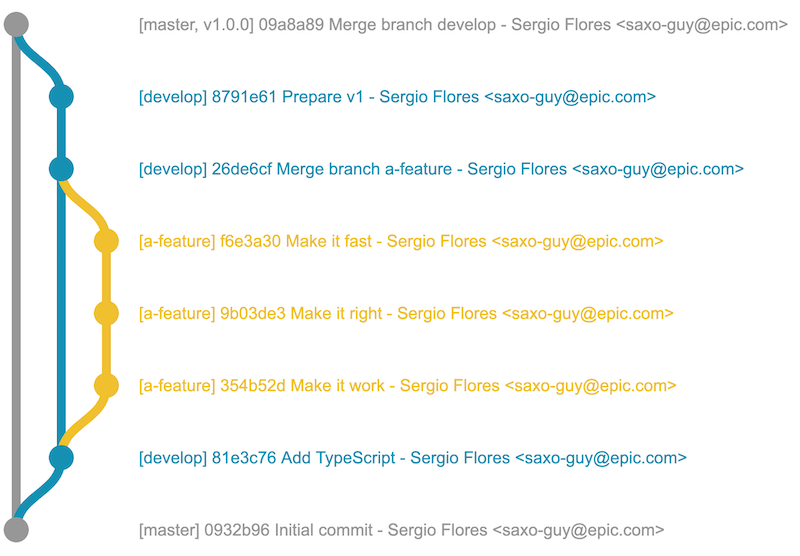
使用捆绑器(例如使用ParcelJS)
你必须要有 无 已安装.
为您的工程创建新文件夹, 并去那里 : mkdir your-project && cd your-project
初始化您的 npm 工程 : npm init -y
用 npm 安装软件包 : npm i --save @gitgraph/js
安装 Parcel 捆绑器 : npm i --save-dev parcel-bundler
现在你可以用 createGitgraph 以 DOM 元素渲染您的图 :
创建一个 index.html 文件 :
<!DOCTYPE html>
<html>
<head>
  <!-- … -->
</head>
<body>
  <!-- DOM element in which we'll mount our graph -->
  <div id="graph-container"></div>

  <!-- This is for ParcelJS bundler -->
  <script src="./index.js"></script>
</body>
</html>
创建一个 index.js 文件 :
import { createGitgraph } from "@gitgraph/js";

// Get the graph container HTML element.
const graphContainer = document.getElementById("graph-container");

// Instantiate the graph.
const gitgraph = createGitgraph(graphContainer);

// Simulate git commands with Gitgraph API.
const master = gitgraph.branch("master");
master.commit("Initial commit");

const develop = gitgraph.branch("develop");
develop.commit("Add TypeScript");

const aFeature = gitgraph.branch("a-feature");
aFeature
  .commit("Make it work")
  .commit("Make it right")
  .commit("Make it fast");

develop.merge(aFeature);
develop.commit("Prepare v1");

master.merge(develop).tag("v1.0.0");
在您的开始命令中添加 package.json数字 :
{
  "name": "your-project",
  "version": "1.0.0",
  "scripts": {
+   "start": "parcel index.html"
  }
运行 npm start。请参见下图:
更多实例
一堆场景 我们的故事书里已经模拟过了 看看他们
如果你来自 gitgraph.js 软件包
这是帮助你迁徙的指南 改为 @gitgraph/js。 。 。 .