
Integration Module for Medusa
Documentation
A Medusa module that lets any plugin or provider declare its options and store admins manage them in the Admin, with no medusa-config edits and no redeploys.
Читать README на русском ↗




What Is the Integration Module
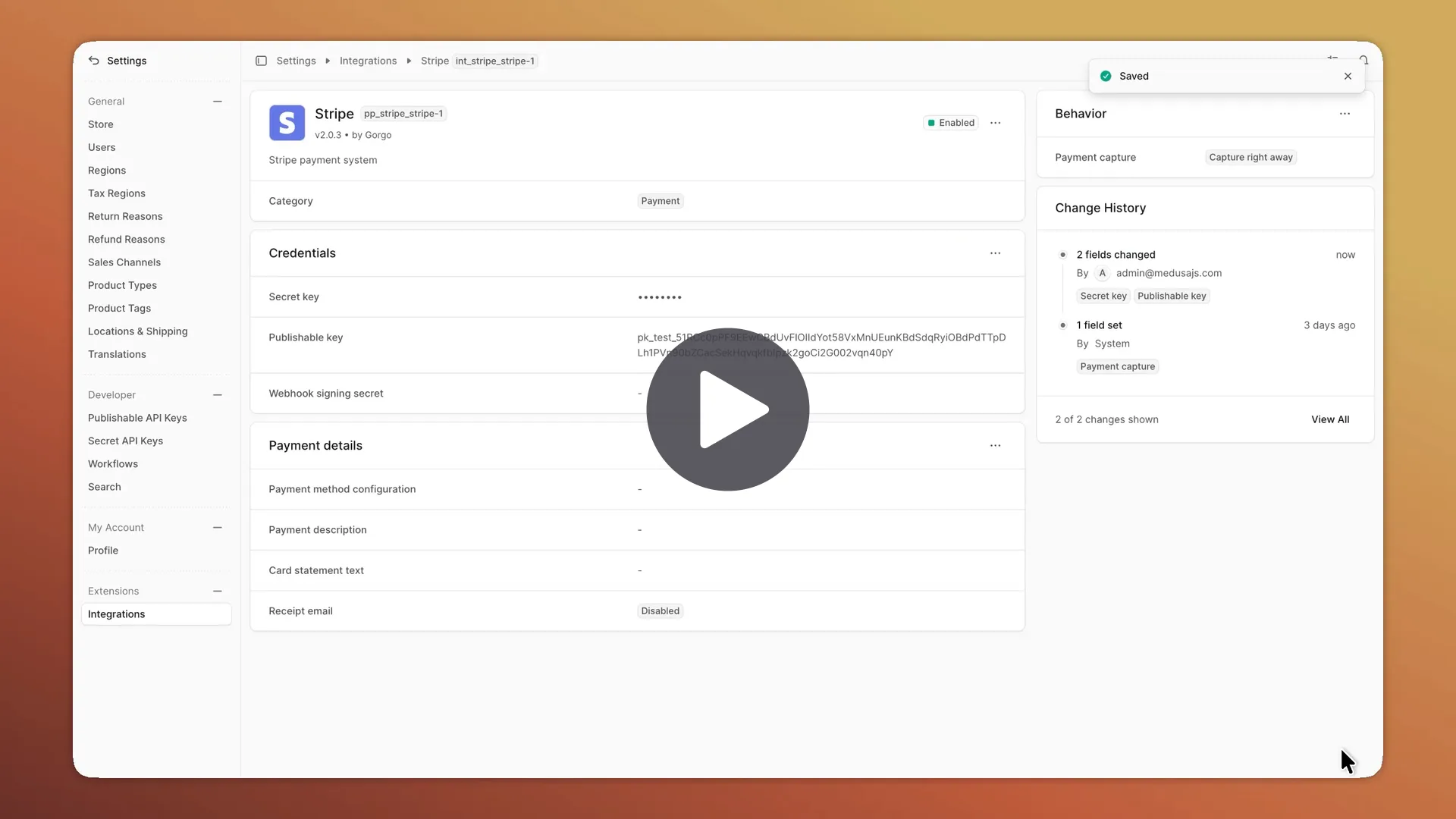
The Integration Module lets any plugin declare its options, and store admins configure them as integrations right in the Admin, with no medusa-config edits and no redeploys. The module takes care of the UI, storage, encryption, and validation.
The Integration Module is useful for any Medusa developer building plugins, providers, or custom modules that need configurable settings, such as API keys, credentials, modes, or webhooks, but who'd rather not hand-build settings UI pages, a data layer, and validation for each one.
Features
- Settings management in Admin: Set in the Settings → Integrations section, no
medusa-config/env edits and no redeploys. - Any plugin, provider, or module: Works across payment, fulfillment, ERP, notification, content, and other extensions.
- Declarative descriptor (
defineIntegration): A single description of the options, settings sections, validation, and connection test. - Flexible typing and validation: Typed fields (
string,url,email,uuid,number,boolean,enum,json) with per-option and cross-section rules, conditional visibility, and read-only fields. At runtime, the plugin gets a typed, decrypted object. Incomplete or disabled settings never resolve, so the plugin never gets an unfilled draft. - Encrypted secrets: Fields marked
secretare encrypted (AES-256-GCM) and never reach the browser. - Multiple instances: The same provider can be configured more than once. For example, for several accounts in the same third-party service.
- Connection test: Verify credentials against the third-party service right from the Admin.
- Change history: The module records who changed which fields of an integration's settings and when. You can search and filter the history in the Admin, and secret values never reach it.
- Extensible UI: Sections can be reordered (LayoutComposer). If the generated sections aren't enough, you can implement any UI for your options using custom widgets.
- Integration catalog: The Admin shows the integrations from the Gorgo catalog. To add yours to it, make a Pull Request.
Available Integrations
 ApiShip
Fulfillment · @gorgo/medusa-fulfillment-apiship
 T-Kassa by T-Bank
Payment · @gorgo/medusa-payment-tkassa
 YooKassa
Payment · @gorgo/medusa-payment-yookassa
 Robokassa
Payment · @gorgo/medusa-payment-robokassa
 Stripe
Payment · @gorgo/medusa-payment-stripe
 PayPal
Payment · @gorgo/medusa-payment-paypal
 Authorize.net
Payment · @gorgo/medusa-payment-authorizenet
 Mollie
Payment · @gorgo/medusa-payment-mollie
 1C:Enterprise
ERP · @gorgo-store/medusa-erp-1c
1C:Enterprise Catalog
ERP · @gorgo/medusa-1c
Any plugin can use the Integration Module, see the documentation.
💬 Support & Community
Got questions or ideas? Join the Telegram support chat @gorgojs_chat
Connect with other Medusa developers on Telegram @medusajs_chat
The Maintenance page explains how we test, update and fix the module.
Requirements
- Medusa v2.21.0 or later
- Node.js v22.23.4 or later (22.x), v24.22.1 or later (24.x), or v26.12.1 or later
Installation
yarn add @gorgo/medusa-integration
# or
npm install @gorgo/medusa-integration
Configuration
Register the module in medusa-config.ts together with the providers of the plugins you install, for example T-Kassa:
module.exports = defineConfig({
  plugins: [
    {
      resolve: "@gorgo/medusa-integration",
      options: {
        encryptionKey: process.env.INTEGRATION_ENCRYPTION_KEY,
        providers: [
          {
            resolve: "@gorgo/medusa-payment-tkassa/providers/integration-tkassa",
            id: "tkassa-1",
            options: {},
          },
        ],
      },
    },
  ],
})
The module keeps integrations and their change history in its own tables. Run the migrations after you install or update it:
yarn medusa db:migrate
# or
npx medusa db:migrate
Once the migrations run, restart the server. Each registered integration appears in Medusa Admin under Settings → Integrations.
Environment Variables
INTEGRATION_ENCRYPTION_KEY– the passphrase you pass as theencryptionKeyoption. The module derives the key that encrypts options markedsecret: truefrom it. Set it to a long random string, for example the output ofopenssl rand -hex 32. A provider with a secret option doesn't work without it.GORGO_LICENSE– the project key from the Gorgo dashboard. Only paid Gorgo plugins need it. The module checks their licenses in the background and never blocks server startup. See Install a Paid Plugin.
Documentation
The complete installation, configuration, and usage guide is available on the Gorgo documentation website.
License
Licensed under the MIT License.